
1. Introduction
Welcome to the TIMEURE 2308 Pedometer Watch user manual. This watch is designed for simplicity and functionality, offering essential fitness tracking without the need for smartphone applications or frequent charging. It is an ideal choice for individuals seeking a straightforward way to monitor their daily activity and time.
2. Product Overview
The TIMEURE 2308 Pedometer Watch provides a range of features to support your active lifestyle:
- Standalone Operation: No app, no phone, no Bluetooth, and no charging required.
- Water Resistance: Rated for 50 meters, suitable for hand washing, cold showers, and swimming.
- EL Backlight: Provides 5-second illumination for clear visibility in low-light conditions.
- Large Display: Ensures a clear view of time, date, and fitness data.
- Multiple Functions: Includes Time (12/24H format), Date, Day of Week, Alarm, Hourly Chime, Pedometer (steps, calories, distance), Stopwatch, and Countdown Timer.
- Durable Design: Features a stainless steel ring and a comfortable polyurethane (PU) strap.

Figure 2.1: Key Features of the TIMEURE 2308 Watch

Figure 2.2: Standalone Operation
3. Setup
3.1 Initial Battery Activation
The TIMEURE 2308 watch comes with a pre-installed, non-rechargeable lithium metal battery. No initial charging is required. The watch is ready for use upon receipt.
3.2 Setting Time and Date
- In Time Mode, press and hold the LIGHT button for approximately 3 seconds to enter setting mode. The seconds display will begin to flash.
- Press the MODE button repeatedly to cycle through the settings in the following order: Seconds → Hours → Minutes → Year → Month → Day → 12/24H format.
- While a value is flashing, use the START button to adjust the value.
- Once all settings are adjusted, press the LIGHT button again to exit setting mode and save your changes.
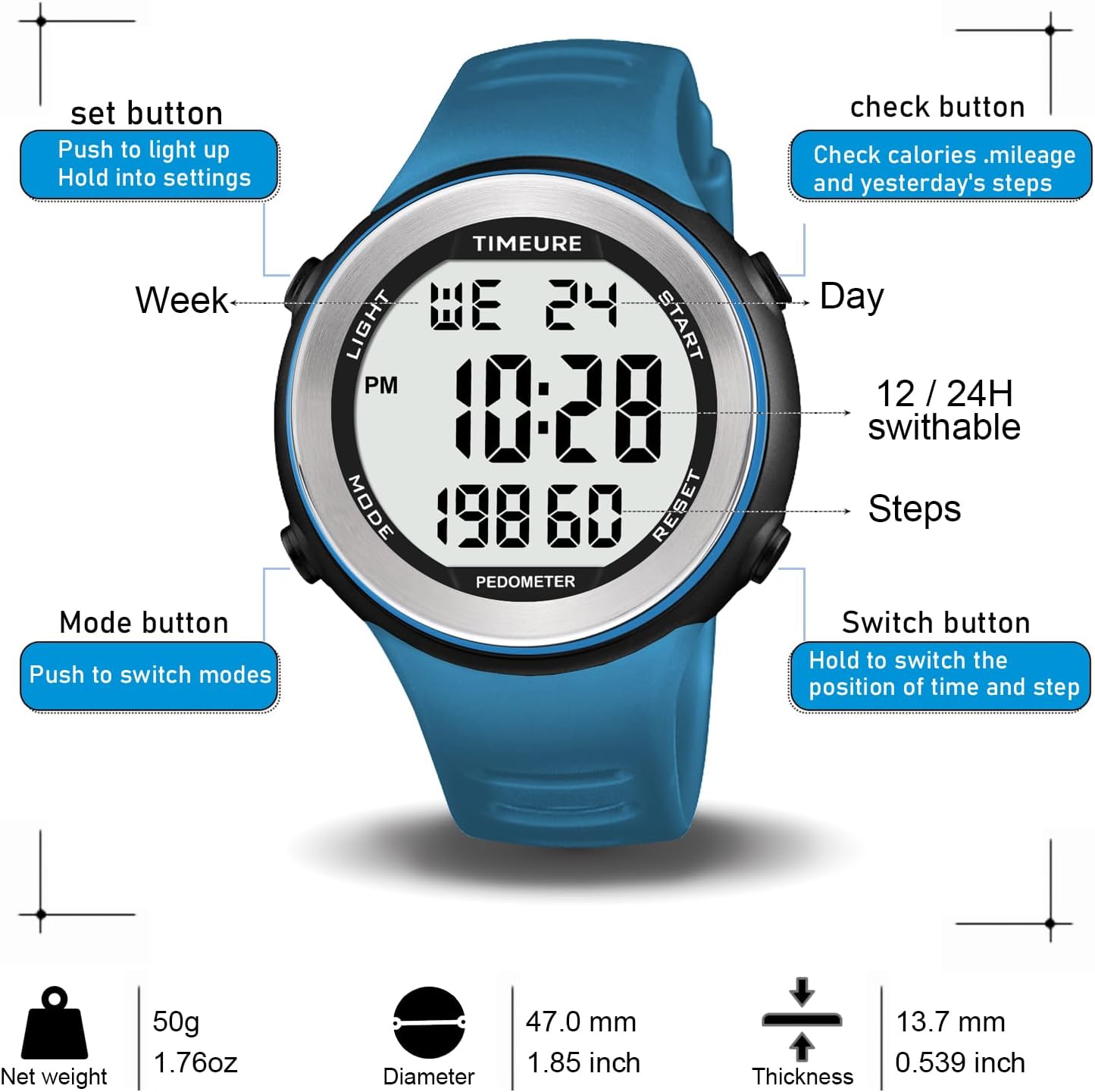
Figure 3.1: Watch Buttons and Display Elements
4. Operating Instructions
4.1 Button Functions
- LIGHT Button: Press to activate the EL backlight for 5 seconds. Hold to enter or exit setting modes.
- MODE Button: Press to cycle through different operational modes: Time → Pedometer → Stopwatch → Countdown → Alarm.
- START Button: In Time mode, press to check calories burned, mileage, and yesterday's steps. In setting modes, press to adjust values. In Stopwatch/Countdown mode, press to start or stop the timer.
- RESET Button: In Pedometer mode, press and hold for 2 seconds to switch the display format (Time in middle / Steps in middle). In Stopwatch/Countdown mode, press to reset the timer.
4.2 Pedometer Mode
- Press the MODE button until "PEDOMETER" is displayed on the screen.
- The watch will automatically begin counting your steps as you walk.
- To view additional fitness data such as calories burned, distance walked, or yesterday's total steps, press the START button.
- To switch the main display between showing Time in the middle and Steps in the middle, press and hold the RESET button for approximately 2 seconds.
- The maximum step count is 39,999 steps. The maximum calories burned display is 3,999.9 Kcal.

Figure 4.1: Display Format Switching
4.3 Stopwatch Mode
- Press the MODE button until "STOPWATCH" is displayed.
- Press the START button to begin timing.
- Press the START button again to pause or resume the stopwatch.
- Press the RESET button to clear the stopwatch to zero.
4.4 Countdown Mode
- Press the MODE button until "COUNTDOWN" is displayed.
- To set the countdown time, press and hold the LIGHT button. Use the MODE button to select hours, minutes, or seconds, and the START button to adjust the values. Press LIGHT to confirm and exit setting.
- Press the START button to begin the countdown.
- Press the START button again to pause or resume the countdown.
- Press the RESET button to reset the countdown to the previously set time.
- The maximum countdown duration is 99 hours, 59 minutes, and 59 seconds.
4.5 Alarm Mode
- Press the MODE button until "ALARM" is displayed.
- To set the alarm time, press and hold the LIGHT button. Use the MODE button to select hours or minutes, and the START button to adjust the values. Press LIGHT to confirm and exit setting.
- To turn the alarm ON or OFF, press the START button in Alarm mode. An alarm icon will appear or disappear on the display to indicate its status.
4.6 Hourly Chime
- In Time mode, press the MODE button until the hourly chime icon (often represented by a bell symbol) is visible or not visible.
- Press the START button to toggle the hourly chime ON or OFF. When ON, the watch will emit a short beep every hour on the hour.
4.7 EL Backlight
Press the LIGHT button to activate the EL backlight. The display will illuminate for approximately 5 seconds, providing visibility in dark environments.

Figure 4.2: EL Backlight in Use
5. Maintenance
5.1 Water Resistance
The TIMEURE 2308 watch is water-resistant up to 50 meters (5 ATM). This rating means it is suitable for:
- Hand washing
- Cold showers
- Swimming in shallow water
Important: Do not press any buttons while the watch is submerged in water. Avoid exposure to hot water, steam, or extreme temperature changes, as this can compromise the watch's water-resistant seals.

Figure 5.1: 50M Water Resistance
5.2 Cleaning
Clean the watch casing and strap with a soft, slightly damp cloth. Avoid using harsh chemicals, solvents, or abrasive materials, as these can damage the watch's finish or components.
5.3 Battery Replacement
The watch uses a non-rechargeable lithium metal battery. When the display dims significantly, becomes erratic, or the watch stops functioning, the battery may need replacement. It is recommended to have the battery replaced by a qualified watch technician to ensure the watch's water resistance is properly maintained after the battery compartment is opened.
6. Troubleshooting
- Display is dim or blank: This typically indicates a low or depleted battery. Replace the battery as described in Section 5.3.
- Watch resets unexpectedly or time is incorrect: This issue can also be caused by a low battery. Replace the battery. If the problem persists after battery replacement, contact customer support.
- Pedometer not counting steps accurately:
- Ensure the watch is worn securely on your wrist. Loose watches may not register movements consistently.
- The pedometer counts arm movements; very subtle or stationary movements may not be registered as steps.
- Accuracy can vary based on individual stride length and movement patterns.
- Buttons are unresponsive: Ensure the watch is not wet or submerged when attempting to press buttons. If the issue persists, the watch may require servicing.
7. Specifications
| Brand | TIMEURE |
| Model Number | TU2308 |
| Screen Size | 40 mm |
| Operating System | Proprietary |
| Connectivity | None |
| Special Features | Pedometer, EL Backlight, Stopwatch, Countdown, Alarm, Hourly Chime |
| Compatible Devices | No application required |
| Battery Type | 1 x Lithium Metal (non-rechargeable) |
| Water Resistance | 50 meters (5 ATM) |
| Wrist Size Compatibility | 160 mm to 240 mm |
| Net Weight | 50g (1.76 oz) |
| Diameter | 47.0 mm (1.85 inch) |
| Thickness | 13.7 mm (0.539 inch) |
8. Warranty and Support
For specific warranty information or technical support regarding your TIMEURE 2308 Pedometer Watch, please refer to the product packaging or contact TIMEURE customer service directly through the retailer where the product was purchased. Keep your purchase receipt as proof of purchase.