
1. Introduction
This manual provides detailed instructions for the installation, operation, and maintenance of your MOUDOAUER Wireless Bluetooth AUX Adapter Cable. This adapter allows you to stream audio wirelessly from Bluetooth-enabled devices to compatible Alpine car radios. Please read this manual thoroughly before installation and use to ensure proper functionality and to prevent damage.
2. Product Overview
The MOUDOAUER Wireless Bluetooth AUX Adapter Cable is designed to integrate seamlessly with specific Alpine car radio models, providing a modern audio streaming solution. It features a compact Bluetooth module, a multi-pin connector for the Alpine head unit, and bare wires for power connection.

Figure 2.1: Overview of the MOUDOAUER Wireless Bluetooth AUX Adapter Cable, showing the Bluetooth module and the Alpine connector.
Key Features:
- Wireless audio streaming via Bluetooth 5.0.
- Direct connection to compatible Alpine car radios.
- Enables external audio source input without functional limitations of the car radio.
- Easy installation process.
3. Specifications
| Specification | Value |
|---|---|
| Bluetooth Version | 5.0 |
| Product Voltage | 5-12V |
| Length | 15 cm (approx. 5.9 inches) |
| Weight | 50g (approx. 1.76 ounces) |
| Color | Black |
| Connector Type | Auxiliary (Alpine specific multi-pin) |
4. Compatibility
This Bluetooth AUX Adapter Cable is compatible with a wide range of Alpine car radio models. Please ensure your specific model is listed below before installation:
- CDA Series: CDA-7893, CDA-7894, CDA-7998, CDA-7998R, CDA-9535R, CDA-9805, CDA-9807, CDA-9811, CDA-9812, CDA-9813, CDA-9815, CDA-9827, CDA-9830, CDA-9830R, CDA-9831, CDA-9831R, CDA-9833, CDA-9833R, CDA-9835, CDA-9847R, CDA-9851R, CDA-9853R, CDA-9855R, CDA-9812RB, CDA-9852RR / RB, CDA-9854R, CDA-9856R, CDA-9857R, CDA-9883R, CDA-9885R, CDA-9887R, CDA-9884R, CDA-9886R, CDA-105Ri, CDA-117Ri
- CVA Series: CVA-1004
- IVA Series: IVA-D300, IVA-D900
- INA Series: INA N333, INA N333RS / RRS
- DVA Series: DVA-7996R, DVA-9860R, DVA 9861Ri, DVA-9965R
- IDA Series: IDA-X100, IDA-X200, IDA-X300, iDA-X301, iDA-X303, IDA-X311, IDA-X313
5. Setup and Installation
Installation of the Bluetooth AUX Adapter Cable requires access to the rear of your Alpine car radio. If you are not comfortable with car audio wiring, it is recommended to seek professional assistance.
Required Tools:
- Car radio removal tools (specific to your vehicle and Alpine model)
- Wire strippers/crimpers
- Electrical tape or heat shrink tubing
- Multimeter (optional, for verifying power connections)
Installation Steps:
- Disconnect Power: Before beginning, ensure your vehicle's battery is disconnected to prevent electrical shorts or damage.
- Remove Car Radio: Carefully remove your Alpine car radio from the dashboard using appropriate removal tools. Refer to your vehicle's or radio's specific instructions for this step.
- Locate AUX Input: Identify the multi-pin AUX input port on the rear of your Alpine car radio. This is typically an AI-NET or M-Bus port.
- Connect Adapter: Plug the multi-pin connector of the Bluetooth AUX Adapter Cable into the corresponding AUX input port on your Alpine radio. Ensure it is securely seated.
- Connect Power Wires: The adapter has two bare wires: one red and one black.
- Red Wire (Positive): Connect the red wire to a switched 12V accessory power source in your vehicle. This source should only be active when the ignition is on.
- Black Wire (Ground): Connect the black wire to a reliable ground point in your vehicle's wiring harness or chassis.
Ensure all connections are secure and insulated with electrical tape or heat shrink tubing to prevent short circuits.
- Test Connections: Reconnect the vehicle battery. Turn on your car radio and verify that the adapter receives power (the pilot lamp on the Bluetooth module may illuminate).
- Reinstall Radio: Carefully reinstall the Alpine car radio into the dashboard.

Figure 5.1: Detail of the adapter's multi-pin connector and bare power wires (red and black).
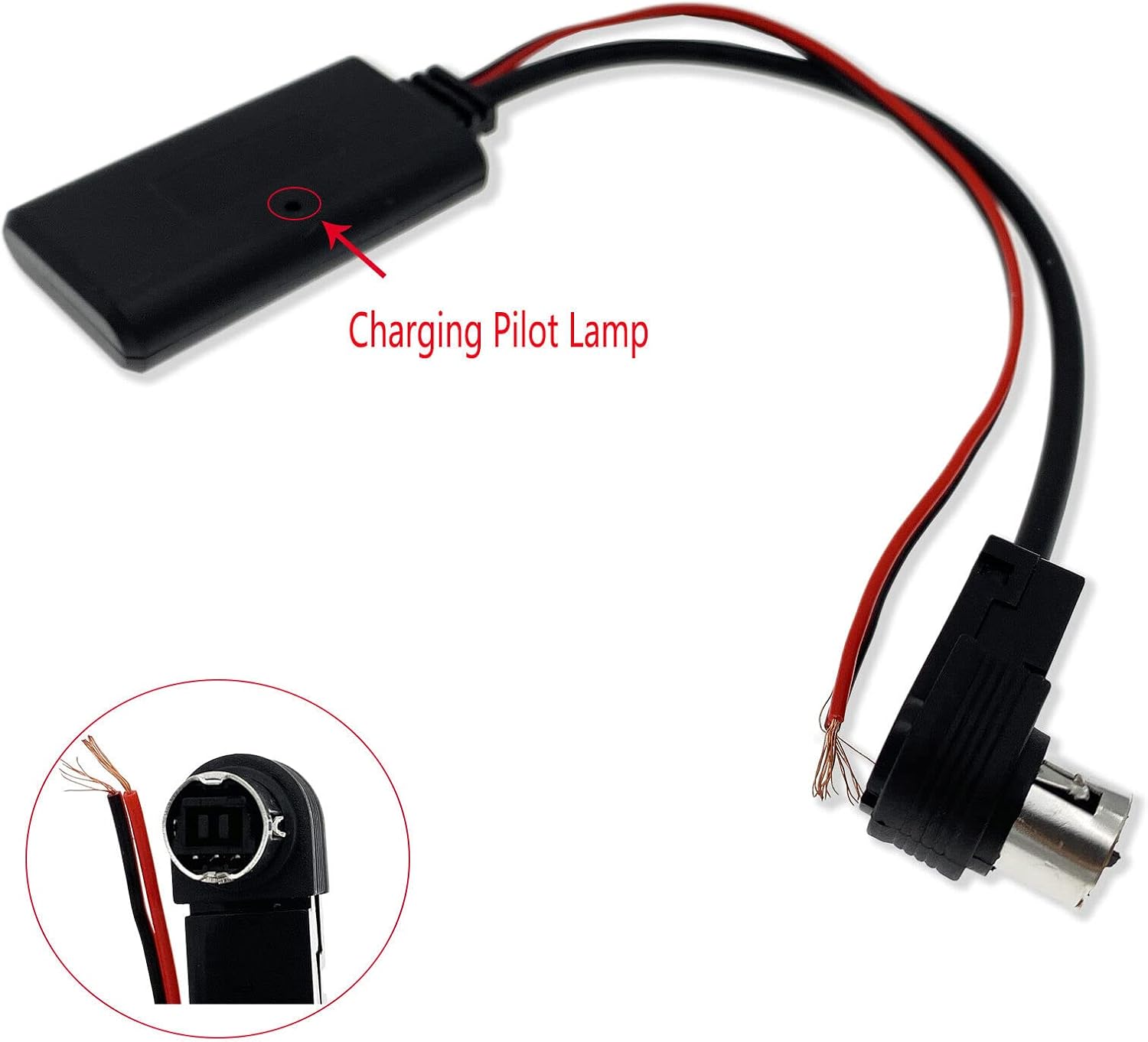
Figure 5.2: The Bluetooth module features a charging pilot lamp, which indicates power status.
6. Operating Instructions
Once the adapter is installed and powered, follow these steps to use the Bluetooth audio streaming function:
- Turn on Car Radio: Power on your Alpine car radio.
- Select AUX Input: On your Alpine car radio, select the AUX input source. This may be labeled as 'AUX', 'CD Changer', 'External Source', or similar, depending on your specific radio model. Refer to your Alpine radio's user manual for instructions on selecting external audio inputs.
- Enable Bluetooth on Device: On your smartphone or other Bluetooth-enabled audio device, enable Bluetooth and search for available devices.
- Pair with Adapter: The adapter should appear in your device's Bluetooth list, typically named something like "BT-MUSIC" or similar. Select it to pair. No PIN is usually required.
- Start Audio Playback: Once paired, play audio from your device. The sound should now be routed through your Alpine car radio's speakers. Adjust volume from both your device and the car radio.
7. Troubleshooting
If you encounter issues with your Bluetooth AUX Adapter Cable, refer to the following troubleshooting guide:
| Problem | Possible Cause | Solution |
|---|---|---|
| No power to adapter / Pilot lamp off | Incorrect or loose power connections (red/black wires). | Check red wire for 12V accessory power and black wire for ground. Ensure connections are secure. |
| Adapter not appearing in Bluetooth list | Adapter not powered on. Bluetooth on device is off or already connected to another device. | Verify adapter has power. Ensure Bluetooth is enabled on your device and disconnect from other devices. Restart your device and car radio. |
| No audio output after pairing | Incorrect AUX input selected on car radio. Volume too low on device or radio. Loose connection to Alpine radio. | Ensure the correct AUX input is selected on your Alpine radio. Increase volume on both your device and the car radio. Check the multi-pin connector for a secure fit. Confirm your Alpine radio model is compatible. |
| Poor audio quality or intermittent connection | Interference from other electronic devices. Device too far from adapter. | Move your Bluetooth device closer to the adapter. Minimize other active Bluetooth devices or sources of electromagnetic interference. |
8. Maintenance
The MOUDOAUER Wireless Bluetooth AUX Adapter Cable requires minimal maintenance. Follow these guidelines to ensure its longevity:
- Keep the adapter dry and away from moisture.
- Avoid exposing the adapter to extreme temperatures.
- Do not attempt to open or modify the adapter, as this will void any potential warranty and may cause damage.
- Ensure all wiring connections remain secure over time.
9. Warranty and Support
Specific warranty information for the MOUDOAUER Wireless Bluetooth AUX Adapter Cable is not provided in the product data. For any issues or support inquiries, please contact the seller or manufacturer directly through your purchase platform. Keep your proof of purchase for any warranty claims.