
1. Product Overview
The ALEEIK Tempered Glass Computer Desk is designed for versatility in home office, gaming, or study environments. Its open-concept design and clean aesthetic integrate well with various interior styles. Constructed with a robust metal frame and a tempered glass tabletop, this desk offers both stability and ease of maintenance.
Key features include a waterproof, anti-scratch, and impact-resistant tempered glass surface, a sturdy metal frame for stability, and user-friendly design elements such as rounded corners and a cable management hole.
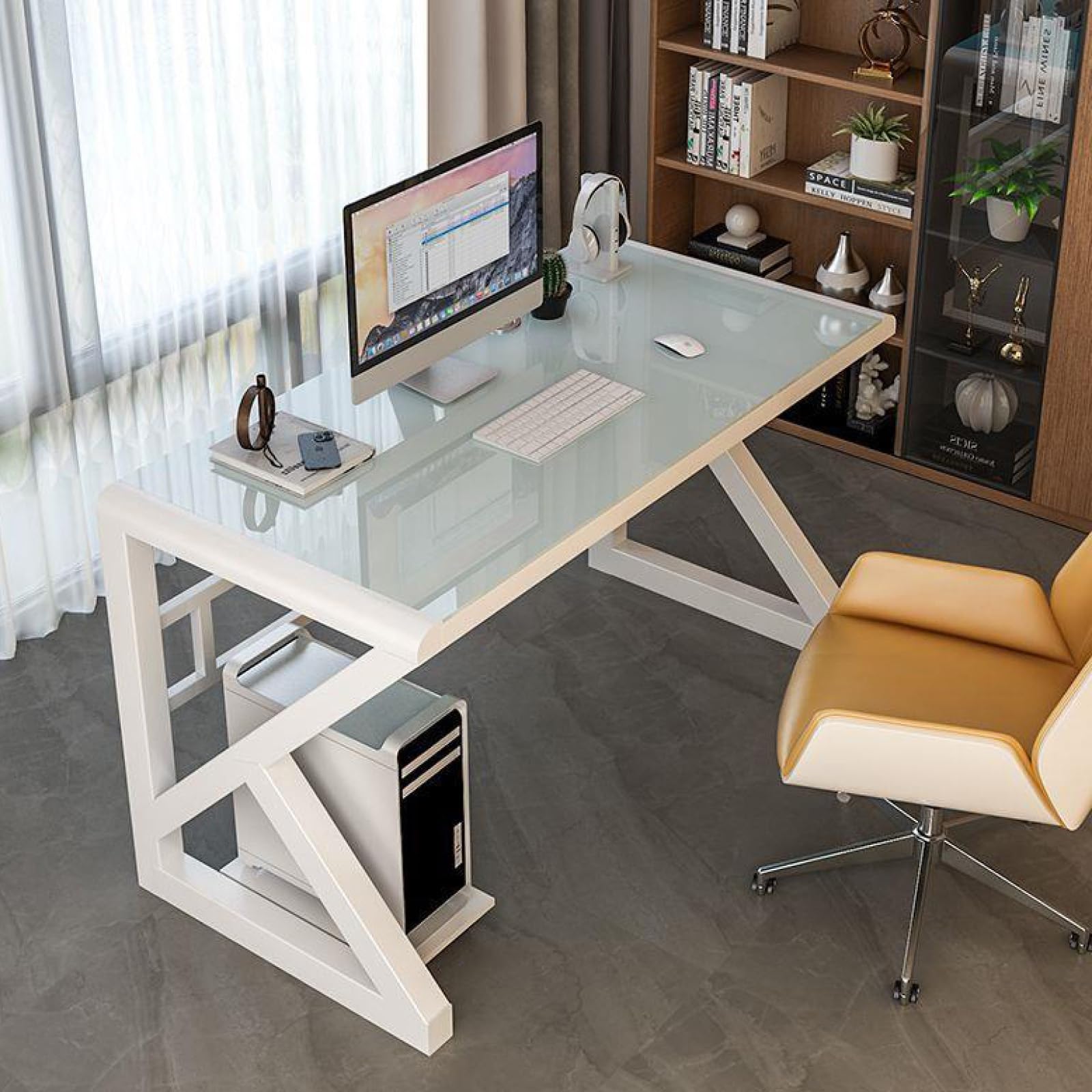
Figure 1: ALEEIK Tempered Glass Computer Desk (120CM, White)
2. Safety Information
- Glass Care: Avoid placing extremely hot or cold items directly on the glass surface without protection. Do not strike the glass with hard or sharp objects.
- Weight Distribution: Distribute weight evenly across the desktop. Do not overload the desk beyond its structural capacity.
- Stability: Ensure all screws are securely tightened after assembly to prevent wobbling. Periodically check and re-tighten fasteners.
- Rounded Corners: The desk features rounded corners for safety, reducing the risk of injury from sharp edges.
- Children and Pets: Keep children and pets away from the desk during assembly.

Figure 2: Anti-collision design with rounded corners for enhanced safety.
3. Package Contents
Before beginning assembly, please verify that all components are present and undamaged. If any parts are missing or damaged, please contact customer service.
- Tempered Glass Desktop
- Desk Legs/Frame Components
- Assembly Hardware (screws, bolts, Allen wrench)
- Instruction Manual (this document)
4. Setup and Assembly Instructions
Assembly of the ALEEIK Tempered Glass Computer Desk is designed to be straightforward, typically completed within 5 minutes. Follow these steps for a smooth setup:
- Unpack Components: Carefully remove all parts from the packaging and lay them out on a clean, soft surface (e.g., a blanket or carpet) to prevent scratches.
- Attach Legs to Frame: Connect the desk legs to the main frame components using the provided hardware. During this initial stage, tighten screws lightly, leaving some play.
- Secure Glass Top: Carefully place the tempered glass desktop onto the assembled frame. Ensure it aligns correctly with the mounting points.
- Final Tightening: Once the entire desk is assembled and all components are aligned, firmly tighten all screws and bolts. This ensures maximum stability.

Figure 3: Desk dimensions for reference during assembly (Length: 120cm/47in, Width: 60cm/24in, Height: 75cm/30in).
5. Operating Instructions
This desk is designed for various uses, including as a computer desk, gaming desk, writing table, or study workstation.
- Placement: Position the desk on a flat, stable surface to prevent wobbling.
- Cable Management: Utilize the integrated hole on the desktop to route cables for monitors, keyboards, and other peripherals, helping to maintain a tidy workspace.
- Ergonomics: The desk height of 29.5 inches (75cm) is designed to be compatible with most standard office chairs, promoting comfortable use.
6. Maintenance
Proper care will ensure the longevity and appearance of your desk.
- Cleaning the Glass Top: The tempered glass surface is waterproof and easy to clean. Use a soft cloth with a mild glass cleaner or a damp cloth to wipe away dust and spills. Avoid abrasive cleaners or scouring pads that could scratch the glass.
- Cleaning the Metal Frame: Wipe the metal frame with a soft, damp cloth. Avoid harsh chemicals that may damage the finish.
- Regular Checks: Periodically inspect all fasteners and re-tighten if necessary to maintain structural integrity.

Figure 4: Tempered glass properties ensuring durability and ease of maintenance.
7. Troubleshooting
- Desk is Wobbly: Ensure all assembly screws are fully tightened. Check that the desk is placed on a level surface. If not, adjust with shims if necessary.
- Scratches on Glass: While the glass is scratch-resistant, deep scratches can occur from sharp objects. Use coasters and mouse pads to protect the surface. Minor scratches may be reduced with specialized glass polish (consult a professional).
- Difficulty Cleaning Stains: For stubborn stains on the glass, use a non-abrasive glass cleaner and a microfiber cloth. Avoid using harsh chemicals or abrasive materials.
8. Specifications
| Brand | ALEEIK |
| Model Number | 11726870 |
| Desk Design | Computer Desk, Writing Desk |
| Color | White |
| Top Material Type | Tempered Glass |
| Base Material | Metal |
| Dimensions (L x W x H) | 120CM x 60CM x 75CM (approx. 47in x 24in x 29.5in) |
| Special Feature | Waterproof, Anti-scratch, Impact-resistant |
| Recommended Uses | Gaming, Office, Working, Writing |
9. Warranty and Support
ALEEIK is committed to providing quality products and customer satisfaction. This product comes with a quality assurance commitment.
For any issues, questions, or concerns regarding your ALEEIK Tempered Glass Computer Desk, please contact our customer service team. Provide your model number (11726870) and details of your inquiry for prompt assistance.
Contact information can typically be found on the retailer's website or your purchase documentation.