1. Introduction
This manual provides instructions for the safe and efficient operation of the PULME EPS3205 Adjustable DC Power Supply. This device features a 4-digit LED display for precise voltage, current, and power readings, along with USB-A and Type-C fast charging ports. It includes a 3-group memory function for storing frequently used settings and offers constant voltage (CV) and constant current (CC) modes. The power supply is designed for various applications including laboratory testing, electronic maintenance, and scientific research.
Key features include:
- High-precision 4-digit LED display for voltage, current, and power.
- Adjustable output voltage (0-30V) and current (0-5A).
- Integrated USB-A and Type-C fast charging ports (5V/3.6A).
- Three programmable memory groups (M1, M2, M3) for quick recall of settings.
- Constant Voltage (CV) and Constant Current (CC) modes.
- Multiple safety protections: Over Voltage Protection (OVP), Over Current Protection (OCP), Over Temperature Protection (OTP), short circuit protection, leakage protection, and grounding.
- Temperature-controlled cooling fan for efficient heat dissipation.
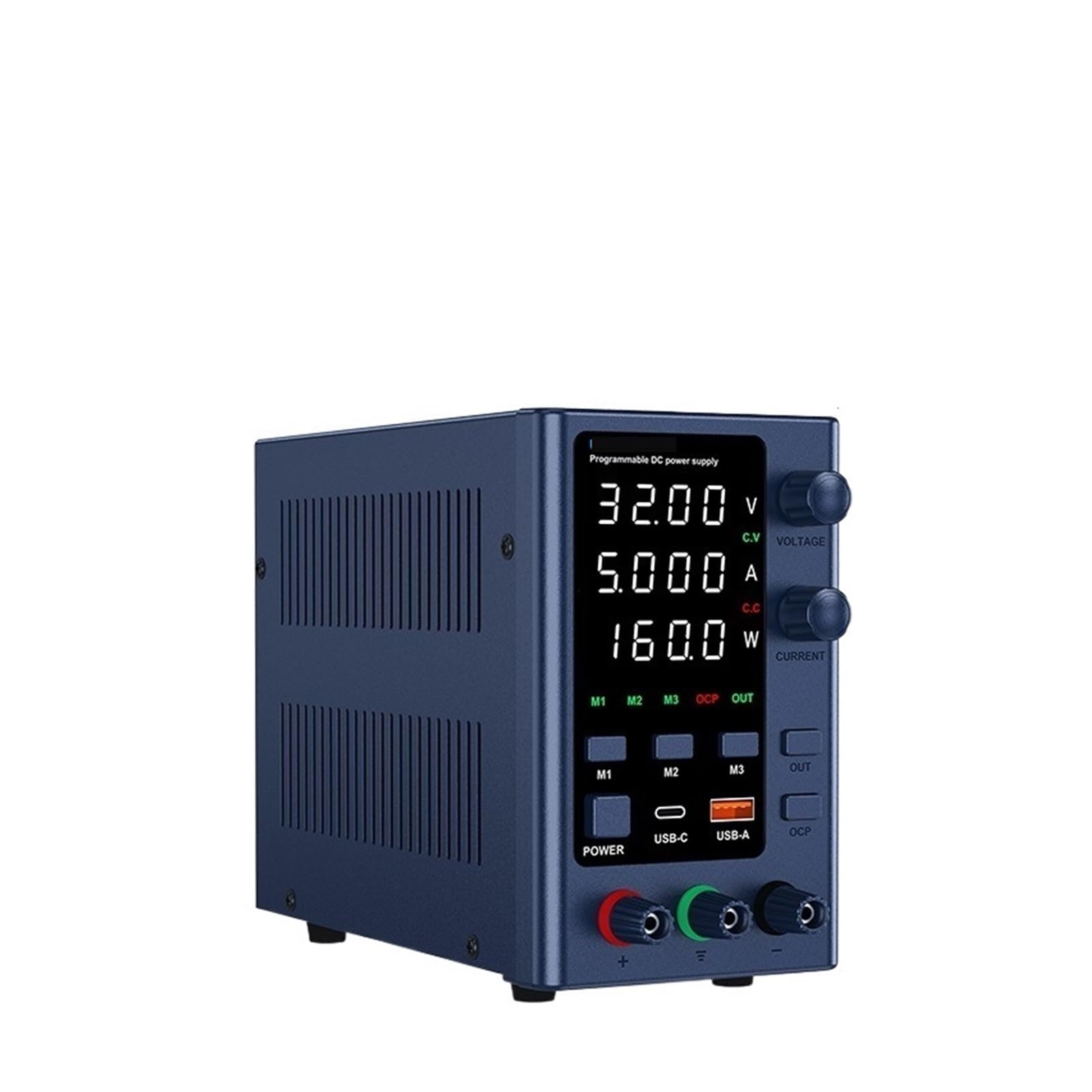
Figure 1: Front and rear view of the PULME EPS3205 DC Power Supply, showing the display, controls, output terminals, and rear power input with cooling fan. Included power cord and test leads are also visible.
2. Setup
2.1 Unpacking
Carefully remove the power supply and all accessories from the packaging. Verify that all components are present: the DC power supply unit, power cord, and test leads. Inspect the unit for any signs of damage incurred during shipping. If any damage is found, contact customer support immediately.
2.2 Power Connection
- Voltage Selection: Locate the AC input voltage selector switch on the rear panel of the unit. Ensure it is set to the correct voltage for your region (115V or 230V). Incorrect voltage selection can damage the unit.
- Power Cord: Connect the provided power cord to the AC power input socket on the rear panel.
- Grounding: Ensure the power supply is connected to a properly grounded electrical outlet to prevent electrical shock.
- Fuse Box: The fuse box is located near the AC power input. In case of a blown fuse, replace it with a fuse of the same type and rating.

Figure 2: Rear panel details, highlighting the cooling fan, AC input voltage selector switch (115V/230V), AC power input, and fuse box.
2.3 Output Terminal Connection
Connect your load to the output terminals on the front panel. The red terminal is for positive (+) output, and the black terminal is for negative (-) output. The green terminal is for ground. Ensure connections are secure before powering on the unit or applying voltage.
3. Operating Instructions
3.1 Power On/Off
Press the POWER button on the front panel to turn the unit on or off. The LED display will illuminate upon power-on.
3.2 Understanding the Display
The 4-digit LED display shows the output voltage (V), current (A), and power (W) in real-time. The display resolution is 0.01V and 0.001A, providing accurate readings.

Figure 3: The high-precision 4-digit LED display showing real-time voltage, current, and power output.
3.3 Adjusting Voltage and Current
Use the VOLTAGE and CURRENT encoder knobs to adjust the output voltage and current. These knobs allow for continuous adjustment between 0 and the nominal value. The encoder design provides both fine and coarse adjustment capabilities for precise control.

Figure 4: Labeled diagram of the front panel controls and indicators.
3.4 Memory Functions (M1, M2, M3)
The power supply features three memory groups (M1, M2, M3) to store and recall frequently used voltage and current settings.
- To Save: Set the desired voltage and current. Press and hold the desired memory button (M1, M2, or M3) for a few seconds until the display indicates the setting has been saved.
- To Recall: Briefly press the desired memory button (M1, M2, or M3) to load the stored settings.

Figure 5: Example of using the three data storage functions (M1-M3) for quick recall of settings.
3.5 USB-A and Type-C Fast Charging
The unit is equipped with USB-A and Type-C ports for fast charging external devices at 5V/3.6A. Simply connect your device to the appropriate port. These ports provide a stable output for charging compatible devices.

Figure 6: USB-A and Type-C ports providing stable fast charging for external devices.
3.6 Output ON/OFF
Use the OUT button to enable or disable the DC output to the terminals. This allows you to set voltage and current parameters before applying power to your circuit.
3.7 Over Current Protection (OCP)
The OCP button activates or deactivates the Over Current Protection feature. When OCP is active, the power supply will automatically cut off output if the current exceeds the set limit, protecting your connected device. Refer to the display for OCP status.
4. Maintenance
4.1 Cleaning
To clean the unit, disconnect it from the power source. Use a soft, dry cloth to wipe the exterior. Do not use abrasive cleaners or solvents, as these may damage the casing or display. Ensure no liquids enter the unit.
4.2 Cooling Fan Operation
The power supply is equipped with a temperature-controlled cooling fan. This fan will automatically activate when the internal temperature reaches approximately 50°C (122°F) to ensure optimal operating temperature and extend product life. Ensure the rear ventilation grilles are not obstructed to allow for proper airflow.
Figure 7: The cooling fan on the rear panel, which activates automatically to dissipate heat.
4.3 Fuse Replacement
If the unit fails to power on, the fuse may need replacement. Disconnect the power cord. Open the fuse box located on the rear panel (refer to Figure 2). Replace the blown fuse with a new fuse of the exact same type and rating. Using an incorrect fuse can lead to damage or fire hazard. Close the fuse box securely before reconnecting power.
5. Troubleshooting
This section addresses common issues you might encounter with the PULME EPS3205 DC Power Supply.
5.1 No Power
- Check if the power cord is securely connected to both the unit and the electrical outlet.
- Verify that the AC input voltage selector switch on the rear panel is set correctly for your region (115V or 230V).
- Inspect the fuse in the fuse box on the rear panel. Replace if blown (refer to Section 4.3).
- Ensure the wall outlet is functional by testing it with another device.
5.2 No Output Voltage/Current
- Ensure the OUT button is pressed to enable the output.
- Check if the output terminals are correctly connected to your load.
- Verify that the voltage and current settings are not set to zero.
- If the OCP indicator is lit, the Over Current Protection may have activated. Reduce the load or increase the current limit.
- Check for short circuits in your connected load.
5.3 Inaccurate Readings
- Ensure proper connection of test leads to the load.
- Verify that the load is within the specified operating range of the power supply.
- If discrepancies persist, contact customer support.
5.4 Safety Protections
The unit incorporates several safety features:
- Over Voltage Protection (OVP): Prevents output voltage from exceeding a safe limit.
- Over Current Protection (OCP): Shuts off output if current exceeds the set limit.
- Over Temperature Protection (OTP): Activates if the internal temperature becomes too high, potentially shutting down the unit.
- Short Circuit Protection: Protects the unit and load from damage due to short circuits.
- Leakage Protection & Grounding: Ensures electrical safety by preventing current leakage.
If any protection mechanism activates, identify and resolve the underlying issue before resuming operation.
6. Specifications
| Parameter | Value |
|---|---|
| Model | EPS3205 |
| Output Voltage Range | 0-30V (continuously adjustable) |
| Output Current Range | 0-5A (continuously adjustable) |
| Calculated Max Output Power | 150W (30V x 5A) |
| Display | 4-digit LED (Voltage, Current, Power) |
| Display Resolution | 0.01V / 0.001A |
| USB-A / Type-C Output | 5V / 3.6A Fast Charging |
| Memory Groups | 3 (M1, M2, M3) |
| Input Voltage | AC 230V/115V ±10%; 50Hz/60Hz (Switchable) |
| Working Environment Humidity | <80% RH |
| Constant Voltage (CV) Stability | Voltage stability: 0.1% + 3mV; Load stability: 0.2% + 3mV |
| CV Ripple Voltage | 0.5% Vp-p |
| Constant Current (CC) Stability | Current stability: 0.1% + 3mA; Load stability: 0.2% + 3mA |
| CC Ripple Current | 0.5% Vp-p |
| Recovery Time | 500µS |
| Temperature Coefficient | 100ppm/°C |
| Safety Protections | OVP, OCP, OTP, Short Circuit, Leakage, Grounding |
| Cooling | Temperature-controlled fan |
| Item Weight | 11.02 pounds (approx. 5000 grams) |
Note: Specifications are subject to change without prior notice.
7. Support
For technical assistance, questions regarding operation, or if you encounter any issues not covered in this manual, please contact PULME customer support. Our team is available to help you with product inquiries, setup guidance, and troubleshooting.
We ensure that all DC power supplies and accessories are inspected before shipment to guarantee product quality. If you are unsure how to set the current and voltage, or have any other operational questions, please reach out to us.
Please refer to your purchase documentation or the retailer's website for specific contact information.