
1. Introduction
This manual provides essential information for the safe and efficient assembly, operation, and maintenance of your Generic Lift Desk with 2 Drawer Storage. Please read this manual thoroughly before assembly and retain it for future reference.
The Generic Lift Desk is designed for home office and living room environments, offering a versatile workspace with an adjustable height tabletop and integrated storage drawers. Its robust construction ensures stability and durability for daily use.
2. Safety Information
- Always follow assembly instructions carefully.
- Ensure all screws and fasteners are securely tightened before use. Periodically check and re-tighten as necessary.
- Do not overload the desk or drawers beyond their intended capacity.
- Keep small parts away from children during assembly to prevent choking hazards.
- Use the desk on a flat, stable surface to prevent tipping.
- When adjusting the lift tabletop, ensure hands and fingers are clear of moving parts to avoid pinching.
3. Package Contents
Before beginning assembly, verify that all components listed below are present and undamaged. If any parts are missing or damaged, please contact customer support.
- Desk Top (with integrated lift mechanism)
- Desk Frame Components (legs, crossbars)
- 2 x Drawer Units
- Hardware Pack (screws, bolts, Allen wrench, etc.)
- Instruction Manual

Image: The Generic Lift Desk in a blue finish, shown with its lift-top extended, supporting a computer monitor and other office items. Two drawers are visible below the main desk surface.
4. Assembly Instructions
Assembly is required for this product. It is recommended to have two people for assembly. Please follow the steps below carefully.
- Unpack Components: Carefully remove all parts from the packaging and lay them out on a clean, soft surface to prevent scratches.
- Assemble Desk Frame: Attach the leg components to the crossbars using the provided hardware. Ensure all connections are firm but do not fully tighten screws until the frame is complete.
- Install Drawers: Slide the two drawer units into their designated slots within the desk frame. Ensure they operate smoothly.
- Attach Desk Top: Carefully place the desk top onto the assembled frame. Secure it using the remaining hardware. Ensure the lift mechanism is correctly aligned.
- Final Tightening: Once all components are in place and aligned, fully tighten all screws and fasteners.
- Check Stability: Gently shake the assembled desk to ensure it is stable. If any wobbling occurs, re-check all connections.

Image: A technical drawing of the blue lift desk, illustrating its overall dimensions and the measurements of various components such as the lift-top, drawers, and leg structure in centimeters.
5. Operating Instructions
5.1. Lift Tabletop Operation
The desk features a spring-assisted lift mechanism for the tabletop, allowing you to adjust its height for various tasks.
- To Lift: Gently pull the front edge of the tabletop upwards. The spring mechanism will assist in raising it to the desired height.
- To Lower: Apply gentle downward pressure on the tabletop. The mechanism will smoothly lower it back into the closed position. Ensure no objects are obstructing the lowering path.
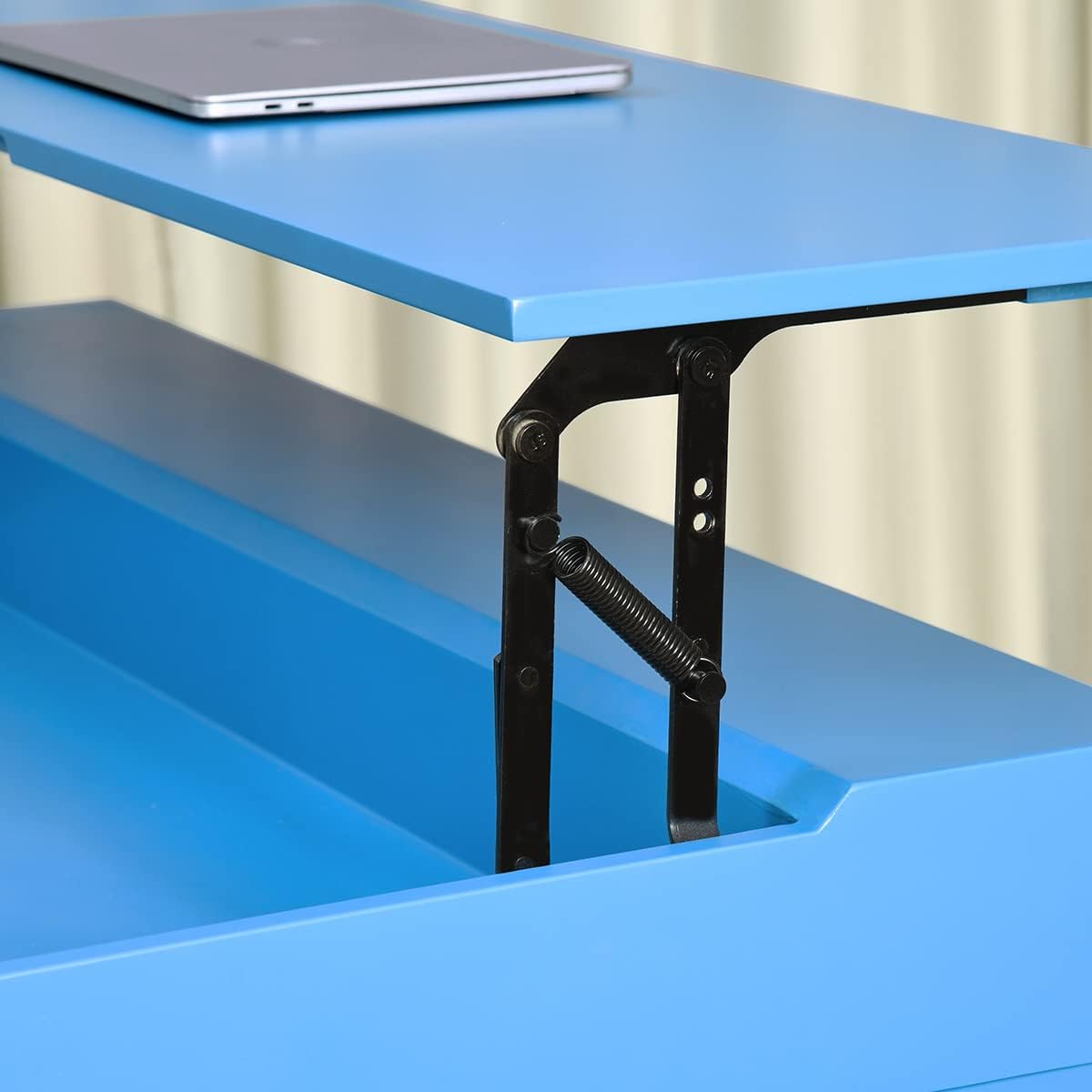
Image: A detailed close-up of the black metal lift mechanism, showing the springs and hinges that enable the tabletop to be raised and lowered smoothly.
5.2. Drawer Usage
The two integrated drawers provide convenient storage for office supplies and personal items.
- To Open: Gently pull the drawer handle outwards.
- To Close: Push the drawer inwards until it is fully seated in the desk frame.

Image: A direct front view of the blue lift desk, showcasing both of its storage drawers fully extended, providing a clear view of their interior space.
6. Maintenance
- Cleaning: Wipe the desk surfaces with a soft, damp cloth. Avoid harsh chemicals or abrasive cleaners, which can damage the finish.
- Hardware Check: Periodically inspect all screws and fasteners to ensure they remain tight. Re-tighten as needed to maintain stability.
- Lift Mechanism: The lift mechanism is designed for durability. If it becomes stiff, a small amount of silicone-based lubricant can be applied to the moving joints, avoiding contact with the wood finish.
- Avoid Extreme Conditions: Do not expose the desk to excessive moisture, direct sunlight for prolonged periods, or extreme temperature changes, as this may affect the engineered wood material.
7. Troubleshooting
| Problem | Possible Cause | Solution |
|---|---|---|
| Desk is wobbly. | Loose fasteners; uneven floor. | Ensure all screws are fully tightened. Move desk to a level surface or use shims under legs. |
| Lift tabletop is stiff or difficult to move. | Mechanism needs lubrication; obstruction. | Apply silicone-based lubricant to moving joints. Check for any objects blocking the mechanism. |
| Drawers do not slide smoothly. | Misalignment; debris in tracks. | Ensure drawers are correctly installed. Clean tracks of any dust or debris. |
8. Specifications
- Brand: Generic
- Model Name: home-office-desks
- Product Dimensions (D x W x H): 44.1" x 20.1" x 29.9" (112cm x 51cm x 76cm)
- Color: Blue
- Style: Victorian
- Base Material: Engineered Wood
- Top Material Type: Engineered Wood
- Finish Type: MDF
- Number of Drawers: 2
- Assembly Required: Yes
- Special Feature: Durable, Lift Table Top

Image: A straightforward front view of the blue lift desk, with its tabletop in the closed position. The two drawers are visible, along with the distinctive X-shaped leg design.
9. Warranty and Support
This product is covered by a standard manufacturer's warranty against defects in materials and workmanship. For specific warranty details, please refer to the documentation included with your purchase or contact the seller.
For customer support, assistance with assembly, or to report missing/damaged parts, please contact your retailer or the manufacturer directly. Please have your purchase information and model number (home-office-desks) ready when contacting support.
Returns are typically accepted within 30 days of purchase, subject to the retailer's return policy.