
1. Introduction
The IPUDIS IN4007 is a standard general-purpose rectifier diode, widely used in various electronic circuits. Its primary function is to convert alternating current (AC) into pulsating direct current (DC) by allowing current to flow in one direction only. This manual provides essential information for the proper understanding, installation, and use of the IN4007 diode.
2. Product Overview
This package contains 100 pieces of IN4007 1N4007 DIP Rectifier Diodes. These components are designed for through-hole mounting in printed circuit boards (PCBs) and are suitable for a wide range of applications, including power supplies, battery chargers, and general rectification circuits.

Figure 2.1: A bundle of 100 IN4007 diodes, showcasing the quantity and packaging.
3. Technical Specifications
The following table outlines the key physical specifications of the IPUDIS IN4007 diodes:
| Specification | Value |
|---|---|
| Package Dimensions | 1.18 x 0.79 x 0.39 inches |
| Item Weight | 1.76 ounces (for 100 pieces) |
| Manufacturer | IPUDIS |
| ASIN | B0CPX9K2ST |
| Item Model Number | IN4007 |
| Number of Pieces | 100 |
4. Understanding the IN4007 Diode
A diode is a two-terminal electronic component that conducts current primarily in one direction. The IN4007 is a rectifier diode, meaning it is designed to handle higher currents and voltages for power rectification. It has two terminals: the anode (positive) and the cathode (negative).
Identifying Polarity: The cathode terminal of the IN4007 diode is typically marked with a silver or gray band on the diode's body. The unmarked end is the anode.
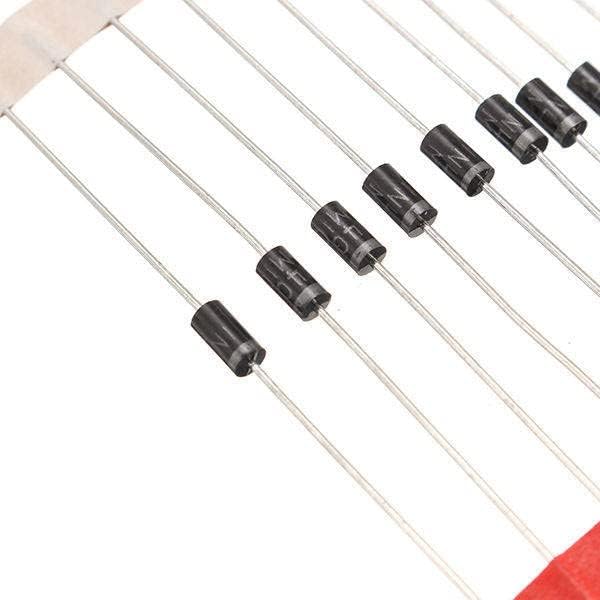
Figure 4.1: Close-up of IN4007 diodes, highlighting the cathode band.
5. Setup and Installation
Proper installation is crucial for the reliable operation of the IN4007 diode. Follow these guidelines:
- Identify Polarity: Before soldering, always confirm the anode and cathode terminals. Incorrect polarity will prevent current flow or damage the diode and other components.
- Circuit Placement: Integrate the diode into your circuit board, ensuring its orientation matches the circuit design.
- Soldering: Use appropriate soldering techniques. Avoid excessive heat, which can damage the diode. Apply heat for a short duration (typically 2-3 seconds) and allow the joint to cool.
- Lead Bending: When bending the leads, ensure the bend is not too close to the diode body to prevent stress on the internal structure.
- Current and Voltage Ratings: Ensure that the operating current and reverse voltage in your circuit do not exceed the diode's maximum ratings. The IN4007 typically has a maximum average rectified forward current of 1A and a maximum repetitive peak reverse voltage of 1000V.
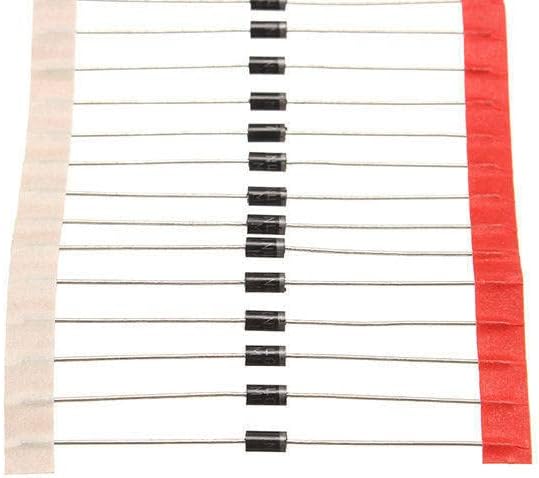
Figure 5.1: IN4007 diodes in a strip, illustrating their typical packaging for ease of handling during installation.
6. Operating Principles
The IN4007 diode operates based on its semiconductor junction properties:
- Forward Bias: When a positive voltage is applied to the anode and a negative voltage to the cathode (forward bias), the diode conducts current with a small voltage drop (typically around 0.7V for silicon diodes like the IN4007).
- Reverse Bias: When a negative voltage is applied to the anode and a positive voltage to the cathode (reverse bias), the diode blocks current flow. Only a very small leakage current flows, provided the reverse voltage does not exceed its breakdown voltage (1000V for IN4007).
This unidirectional current flow characteristic makes the IN4007 ideal for rectification, voltage clamping, and protection circuits.
7. Maintenance
IN4007 diodes are passive electronic components and generally require no active maintenance once installed correctly. To ensure their longevity and performance:
- Storage: Store unused diodes in a dry, cool environment, away from direct sunlight and extreme temperatures. Keep them in their original packaging or anti-static bags to prevent physical damage and electrostatic discharge (ESD).
- Handling: Handle diodes by their leads to avoid touching the body, especially if static electricity is a concern.
- Environmental Conditions: Ensure the operating environment of the circuit is within the diode's specified temperature range to prevent premature failure.
8. Troubleshooting Common Issues
If your circuit involving the IN4007 diode is not functioning as expected, consider the following:
- No Current Flow:
- Incorrect Polarity: Double-check that the diode is installed with the correct anode-cathode orientation.
- Open Circuit: Verify all connections and solder joints for continuity.
- Diode Failure: The diode may be open-circuited internally. Test with a multimeter in diode mode.
- Excessive Heat / Diode Failure:
- Overcurrent: The current flowing through the diode might exceed its 1A rating. Redesign the circuit or use a higher-rated diode.
- Overvoltage: The reverse voltage applied might have exceeded the 1000V rating, causing breakdown.
- Short Circuit: The diode may have failed short, allowing current to flow in both directions or causing excessive current draw.
- Poor Rectification:
- Incorrect Diode Type: Ensure an IN4007 (or equivalent rectifier diode) is used for rectification purposes.
- Circuit Design Issue: Review the overall circuit design for proper filtering and load matching.
9. Safety Information
Working with electronic components and circuits requires adherence to safety precautions:
- Disconnect Power: Always ensure that power is disconnected from the circuit before installing, removing, or troubleshooting components.
- Eye Protection: Wear safety glasses to protect your eyes from solder splashes or flying debris.
- Ventilation: Work in a well-ventilated area when soldering to avoid inhaling fumes.
- Electrical Hazards: Be aware of potential electrical shocks, especially when working with high voltages.
- Component Heat: Diodes can become hot during operation. Allow them to cool before handling.
10. Warranty and Support
For product support, technical assistance, or warranty inquiries regarding your IPUDIS IN4007 1N4007 DIP Rectifier Diodes, please contact IPUDIS customer service directly through the platform where your purchase was made. Please have your order details and product information available when contacting support.