
Introduction
Thank you for choosing the Lrecat i21 Wireless Earbuds. This manual provides essential information for setting up, operating, and maintaining your new earbuds. Please read it carefully to ensure optimal performance and longevity of your device.

Image: Lrecat i21 Sports Headphones with key features highlighted.
What's in the Box
Verify that all items are present in your package:
- 2x Lrecat i21 Wireless Earbuds (Left and Right)
- 1x Charging Case
- 1x USB-C Charging Cable
- 3x Pairs of Eartips (S/M/L)
- 1x User Manual
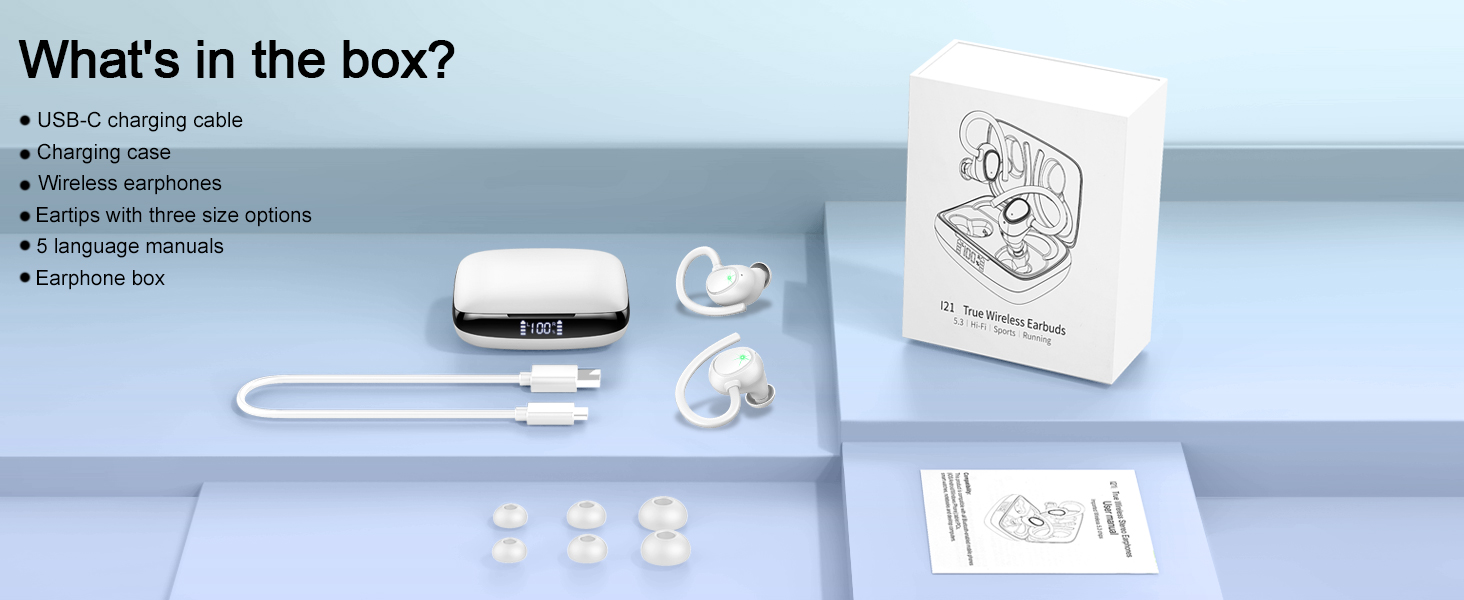
Image: Illustration of all components included in the product packaging.
Product Overview
The Lrecat i21 Wireless Earbuds feature an ergonomic design with earhooks for a secure fit, making them suitable for various activities. The charging case includes a dual LED display to show battery status.

Image: The Lrecat i21 Wireless Earbuds shown inside their charging case, displaying the LED battery indicator.
Setup
1. Charging the Earbuds and Case
Before first use, fully charge the earbuds and charging case. Connect the provided USB-C cable to the charging port on the case and a compatible USB power source. The LED display on the case will indicate the charging status. The earbuds will charge automatically when placed inside the case.

Image: Diagram illustrating the charging process and battery life of the earbuds and charging case.
2. Pairing with Your Device
- Remove Earbuds: Take both earbuds out of the charging case. They will automatically power on and enter pairing mode.
- Activate Bluetooth: On your device (smartphone, tablet, etc.), go to the Bluetooth settings and enable Bluetooth.
- Select Device: Search for available devices and select "i21" from the list to connect.
- Confirmation: Once connected, you will hear an audio prompt, and the earbuds' indicator lights will change.
After the initial pairing, the earbuds will automatically connect to the last paired device when removed from the case.

Image: Visual guide demonstrating the one-step auto-matching process for connecting the earbuds to a smartphone.
Operating Instructions
1. Wearing the Earbuds
Select the appropriate eartip size (S/M/L) for a comfortable and secure fit. Place the earbud in your ear and adjust the earhook over your ear until it feels stable. A proper fit enhances sound quality and prevents the earbuds from falling out during activity.

Image: Visual representation of the ergonomic design, flexible earhooks, and different eartip sizes for a secure fit.
2. Touch Controls
The Lrecat i21 earbuds feature touch-sensitive controls on each earbud. Refer to the table below for common functions:

Image: Diagram detailing the various touch control functions for music playback, calls, and voice assistant activation.
| Action | Function |
|---|---|
| Single Tap (L/R) | Play/Pause Music, Answer Call |
| Double Tap (L/R) | Volume Adjustment |
| Long Press 1s (L/R) | Previous/Next Song |
| Long Press 3s (L/R) | Activate Voice Assistant |
| Long Press (L/R) during call | Hang Up Call |
Key Features
Bluetooth 5.3 Connectivity
Equipped with advanced Bluetooth 5.3 technology, the i21 earbuds provide a stable, fast, and efficient wireless connection with minimal interference. This ensures a reliable audio experience up to 48 feet from your device.

Image: Illustration of Bluetooth 5.3 technology, highlighting faster connection, stronger signal, and lower power consumption.
Hi-Fi Stereo Sound
The earbuds feature 14.2mm double-layer diaphragm drivers, engineered to deliver rich bass, clear mid-tones, and crisp treble for an immersive audio experience.

Image: Graphic depicting the internal structure of the 14.2mm dynamic drivers responsible for Hi-Fi stereo sound.
IP7 Waterproof Rating
With an IP7 waterproof rating, these earbuds are designed to withstand sweat, rain, and minor water splashes, making them suitable for workouts and outdoor activities.

Image: Visual representation of the earbuds' IP7 waterproof capability, showing resistance to rain, sweat, and splashes.
Extended Playtime & Dual Power Display
Enjoy up to 8 hours of listening time on a single charge, with the charging case providing multiple additional charges for a total of up to 48 hours of playtime. The dual LED display on the charging case shows the remaining power for both the case and each earbud.
Maintenance
Cleaning
Regularly clean your earbuds and charging case to ensure optimal performance and hygiene. Use a soft, dry, lint-free cloth to wipe the surfaces. For eartips, remove them and clean with a mild soap solution, then rinse and dry thoroughly before reattaching.
Storage
When not in use, store the earbuds in their charging case to protect them from dust and damage. Store the case in a cool, dry place away from extreme temperatures and direct sunlight.
Troubleshooting
No Sound from Earbuds
- Ensure earbuds are charged.
- Check if earbuds are properly paired with your device.
- Verify the volume level on both your device and the earbuds.
- Try re-pairing the earbuds.
Earbuds Not Charging
- Ensure the charging cable is securely connected to both the case and the power source.
- Check if the charging case has sufficient power.
- Clean the charging contacts on both the earbuds and the case.
Connection Issues
- Ensure Bluetooth is enabled on your device.
- Move closer to your device to reduce interference.
- Forget the device in your Bluetooth settings and re-pair.
- Restart your device and the earbuds.
Specifications
| Feature | Detail |
|---|---|
| Model Name | i21 |
| Connectivity Technology | Wireless (Bluetooth 5.3) |
| Bluetooth Range | Up to 48 feet (15 meters) |
| Battery Life (Earbuds) | Up to 8 hours per charge |
| Total Playtime with Case | Up to 48 hours |
| Water Resistance Level | IP7 Waterproof |
| Audio Driver Type | 14.2mm Dynamic Driver |
| Frequency Range | 20 Hz - 20,000 Hz |
| Control Method | Touch, Voice |
| Charging Port | USB Type-C |
| Ear Placement | Over Ear (with earhooks) |
| Item Weight | 5.3 ounces (total package) |
Warranty Information
Lrecat products are covered by a limited warranty against manufacturing defects from the date of purchase. Please retain your proof of purchase for warranty claims. This warranty does not cover damage caused by misuse, accidents, unauthorized modifications, or normal wear and tear. For specific warranty terms and conditions, please refer to the documentation included with your product or contact customer support.
Customer Support
If you have any questions, concerns, or require technical assistance, please contact Lrecat customer support through the following channels:
- Email: Refer to your product packaging or the official Lrecat website for contact email.
- Website: Visit the official Lrecat website for FAQs and support resources.
Please have your product model (i21) and purchase details ready when contacting support.


