
Introduction
Thank you for choosing the K31 LED Rechargeable USB Flashlight. This compact and versatile flashlight is designed for various applications, including emergencies, outdoor activities like camping and trekking, and general daily use. It features a powerful LED, multiple lighting modes, and a convenient USB rechargeable design. Please read this manual carefully to ensure proper use and maintenance of your device.
Safety Information
- Do not look directly into the LED light. The intense beam can cause temporary vision impairment.
- Keep the flashlight out of reach of children.
- Do not disassemble or modify the flashlight. This may cause damage and void the warranty.
- Use only the provided or a compatible USB cable for charging.
- Avoid exposing the flashlight to extreme temperatures, direct sunlight for prolonged periods, or corrosive liquids.
- If the flashlight is not used for an extended period, charge it every 3 months to maintain battery health.
Package Contents
Verify that all items are present in your package:
- 1 x K31 LED Rechargeable USB Flashlight
- 1 x USB Charging Cable

Image: The K31 LED Rechargeable USB Flashlight packaged in its retail box.
Product Overview
Familiarize yourself with the main components of your K31 flashlight:
- LED Lens: Emits the light beam.
- Zoom Head: Adjustable head for focusing the beam.
- Power Button: Controls power and lighting modes.
- USB Charging Port: For recharging the internal battery.
- Body: Durable casing of the flashlight.

Image: A detailed view of the K31 flashlight, highlighting its key features like the LED lens, adjustable head, and power button.
Setup
Charging the Flashlight
Before first use, fully charge the flashlight. The K31 features an internal rechargeable Lithium-ion battery.
- Locate the USB charging port on the flashlight body.
- Connect the small end of the provided USB cable to the flashlight's charging port.
- Connect the larger end of the USB cable to a standard USB power source (e.g., computer USB port, USB wall adapter, power bank).
- An indicator light (if present) will show the charging status. Charging typically takes a few hours.
- Once fully charged, disconnect the USB cable.
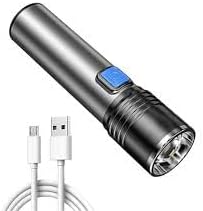
Image: The K31 flashlight shown with its USB charging cable, illustrating the charging connection.
Operating Instructions
Power On/Off and Mode Selection
The K31 flashlight offers three lighting modes: High, Low, and Strobe.
- To Turn On: Press the power button once. The flashlight will turn on in High mode.
- To Change Modes: While the flashlight is on, press the power button repeatedly to cycle through the modes: High → Low → Strobe.
- To Turn Off: Press the power button after cycling through all modes, or hold the power button for approximately 2 seconds in any mode.
Zoom Function
The K31 flashlight features an adjustable zoom head to change the beam focus from a wide floodlight to a narrow spotlight.
- To Adjust Zoom: Gently push or pull the head of the flashlight forward or backward.
- Pushing the head forward will narrow the beam for a focused spotlight.
- Pulling the head backward will widen the beam for a broad floodlight.

Image: A collage demonstrating the K31 flashlight's utility in different situations, including night riding, hunting, studying, trekking, night fishing, and outdoor adventures.
Maintenance
Cleaning
- Wipe the flashlight body with a soft, damp cloth.
- Do not use abrasive cleaners or solvents.
- Keep the LED lens clean for optimal light output. Use a soft, lint-free cloth.
Storage
- Store the flashlight in a cool, dry place away from direct sunlight.
- Avoid storing it in environments with high humidity or extreme temperatures.
- For long-term storage, ensure the battery is partially charged (around 50%) and recharge it every 3 months.
Troubleshooting
| Problem | Possible Cause | Solution |
|---|---|---|
| Flashlight does not turn on. | Battery is depleted. | Charge the flashlight using the USB cable. |
| Light is dim or flickers. | Low battery. | Recharge the flashlight. |
| Flashlight is not charging. | Faulty USB cable or power source. | Try a different USB cable or power adapter. Ensure connections are secure. |
| Zoom function is stiff. | Dirt or debris in the mechanism. | Gently clean the adjustable head area. Do not force movement. |
Specifications
| Feature | Detail |
|---|---|
| Model Number | K31 |
| Brand | Generic |
| Special Features | Tactical, Rechargeable |
| Color | Silver |
| Power Source | Rechargeable |
| Light Source | LED |
| Product Dimensions (DxWxH) | 5 cm x 5 cm x 20 cm |
| Item Weight | 100 grams |
| Battery Type | Internal Lithium-ion battery |
| Batteries Included | Yes |
| Style | Modern |
Warranty Information
This product is typically covered by a limited warranty provided by the retailer or manufacturer. Please refer to your purchase receipt or contact the point of sale for specific warranty terms and conditions. Keep your proof of purchase for any warranty claims.
Support
If you encounter any issues not covered in this manual or require further assistance, please contact the retailer where you purchased the K31 LED Rechargeable USB Flashlight. You may also visit the manufacturer's website for additional support resources, if available.


