
vidaXL 339808
User Manual for vidaXL Steel Locker Cabinet
Model: 339808 | Brand: vidaXL
1. Introduction
This manual provides essential information for the safe and efficient use of your vidaXL Steel Locker Cabinet. Please read these instructions carefully before assembly and operation, and retain them for future reference.
The vidaXL Steel Locker Cabinet, model 339808, is designed for secure storage in various environments such as offices, schools, and homes. It features nine lockable compartments, a durable steel construction, and an anthracite and white finish.

Image 1.1: Front view of the vidaXL Steel Locker Cabinet. This image displays the full cabinet with its nine individual white doors, each equipped with a black lock and keyhole, set against an anthracite frame. The cabinet stands on four sturdy legs.
2. Safety Information
Always adhere to the following safety guidelines to prevent injury or damage to the product.
- Ensure all components are present and undamaged before beginning assembly.
- Assemble the cabinet on a soft, clean surface to prevent scratches.
- Always use appropriate tools as specified in the assembly instructions.
- For stability, it is highly recommended to secure the cabinet to a wall using the provided wall attachment device, especially in areas with children or high traffic.
- Do not overload the cabinet. The total weight capacity is 396.8 lbs (180 kg). Distribute weight evenly across compartments.
- Keep small parts and packaging materials away from children to prevent choking hazards.
- Do not climb on or hang from the cabinet doors or frame.
3. Package Contents
Verify that all parts are included in your package before proceeding with assembly. If any parts are missing or damaged, contact customer support.
- Locker Cabinet components (panels, doors, shelves)
- 9 Cam Locks with corresponding keys
- Assembly hardware (screws, bolts, connectors)
- Wall attachment device
- Assembly instructions manual
4. Setup and Assembly
Assembly of the vidaXL Steel Locker Cabinet requires basic tools, typically a screwdriver. Follow these steps carefully.
4.1 Tools Required
- Screwdriver (Phillips head recommended)
- Hammer (optional, for plastic caps)
- Level (for wall mounting)
- Drill (for wall mounting)
4.2 Assembly Steps
- Unpack and Identify Parts: Carefully remove all components from the packaging. Lay them out on a protected surface and compare them against the parts list in your included assembly instructions to ensure all pieces are present.
- Assemble the Frame: Begin by connecting the base and top panels to the side panels using the provided screws and connectors. Ensure all connections are secure and the frame is stable.
- Install Internal Shelves: Insert the internal shelves into their designated slots within the frame. These shelves create the individual compartments for the lockers.
- Attach Doors: Secure each of the nine doors to the frame using the hinges. Ensure the doors swing freely and align correctly.
- Install Locks: Insert the cam locks into the pre-drilled holes on each door. Secure them according to the instructions, ensuring they function correctly with their respective keys.
- Attach Legs: Secure the four legs to the bottom of the cabinet.
- Wall Attachment (Recommended): For enhanced stability and safety, especially in environments with children or high traffic, attach the cabinet to a wall using the provided wall attachment device. Mark the desired location on the wall, drill pilot holes, and secure the cabinet firmly.
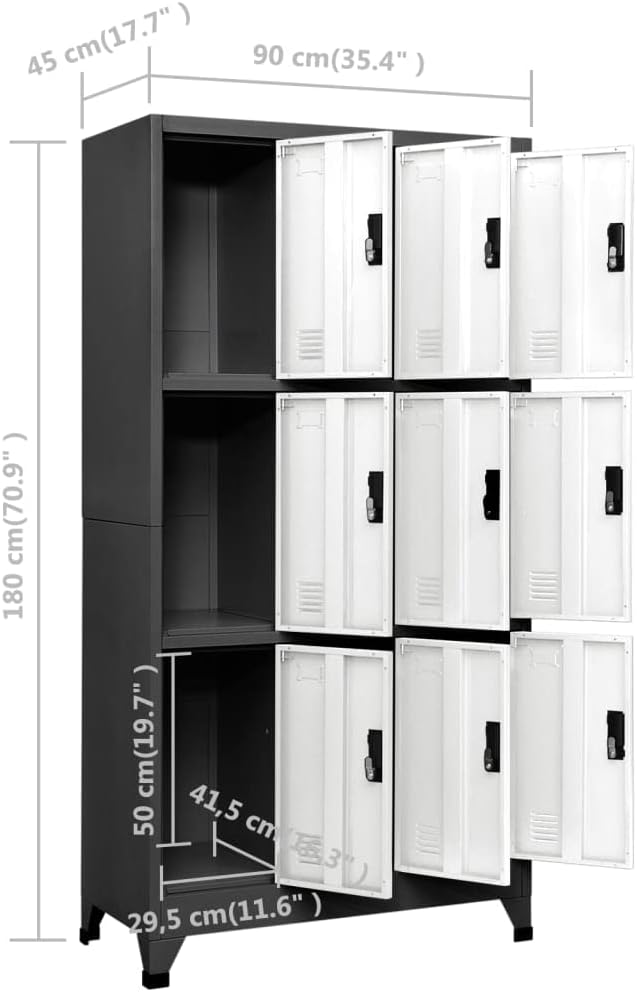
Image 4.1: Dimensional diagram of the locker cabinet. This image provides key measurements including height (70.9 inches), width (35.4 inches), and depth (17.7 inches), along with internal compartment dimensions, crucial for planning placement and assembly.

Image 4.2: Detail of the cabinet's leg. This close-up shows the sturdy black leg and its connection point to the anthracite base of the cabinet, illustrating the support structure.
5. Operating Instructions
The vidaXL Steel Locker Cabinet is designed for straightforward operation.
5.1 Locking and Unlocking Doors
- Each of the nine doors is equipped with a cam lock and comes with its own set of keys.
- To lock a door, ensure it is fully closed. Insert the key into the lock and turn it clockwise until the lock mechanism engages. Remove the key.
- To unlock a door, insert the correct key into the lock and turn it counter-clockwise until the lock mechanism disengages. The door can then be opened.
- It is recommended to keep spare keys in a secure location.

Image 5.1: Detail of a locker door and its cam lock. This image highlights the black handle and keyhole mechanism on one of the white locker doors, demonstrating the secure locking feature.
5.2 Organizing Contents
- Each compartment is designed to hold various items such as clothes, documents, books, or personal belongings.
- Utilize the name tag holders on each door (if applicable) for easy identification of compartment contents or assigned users.
- Ensure items are placed neatly to allow doors to close completely without obstruction.
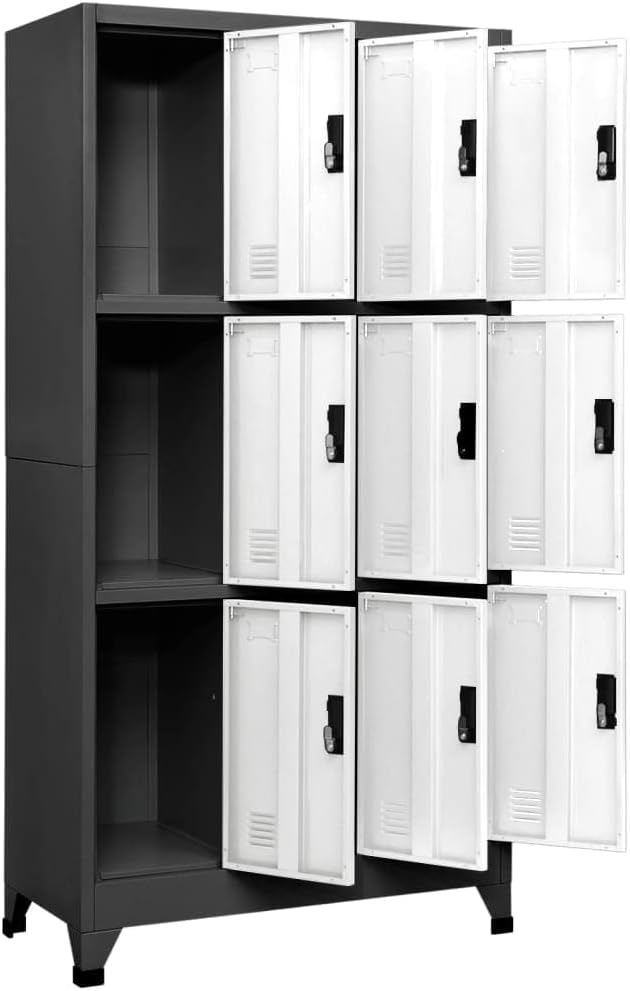
Image 5.2: Interior view of the locker cabinet with doors open. This image shows the spacious internal compartments of the locker, illustrating how items can be stored within each of the nine sections.
6. Maintenance
Proper maintenance will ensure the longevity and appearance of your locker cabinet.
6.1 Cleaning
- Wipe surfaces regularly with a soft, damp cloth.
- For stubborn marks, use a mild, non-abrasive cleaner. Avoid harsh chemicals or abrasive materials that could damage the powder-coated finish.
- Dry thoroughly after cleaning to prevent water spots.
6.2 General Care
- Periodically check all screws and connections to ensure they remain tight. Tighten if necessary.
- Ensure the cabinet is not exposed to excessive moisture or direct sunlight for prolonged periods, which could affect the finish.
- Do not drag the cabinet when moving it; always lift it to prevent damage to the legs or floor.
7. Troubleshooting
This section addresses common issues you might encounter with your locker cabinet.
| Problem | Possible Cause | Solution |
|---|---|---|
| Door does not close properly. | Obstruction inside compartment; misaligned hinges; loose screws. | Remove any obstructions. Check and tighten hinge screws. Adjust hinge alignment if possible. |
| Key does not turn in lock. | Incorrect key; lock mechanism jammed; debris in keyhole. | Ensure you are using the correct key for that specific lock. Gently try to jiggle the key. Do not force it. Clean keyhole if necessary. |
| Cabinet feels wobbly. | Uneven floor; loose assembly screws; not wall-mounted. | Ensure the cabinet is on a level surface. Tighten all assembly screws. Secure the cabinet to a wall using the provided wall attachment device. |
8. Specifications
| Feature | Detail |
|---|---|
| Brand | vidaXL |
| Model Number | 339808 |
| Color | Anthracite and White |
| Material | Metal Steel, Powder-Coated Finish |
| Dimensions (W x D x H) | 35.4" x 17.7" x 70.9" (90 cm x 45 cm x 180 cm) |
| Number of Doors | 9 |
| Lock Type | Cam Lock with Key |
| Total Weight Capacity | 396.8 lbs (180 kg) |
| Item Weight | 92.59 lbs (42 kg) |
| Assembly Required | Yes |
| Indoor/Outdoor Use | Indoor Only |
9. Warranty and Support
vidaXL is committed to providing high-quality products. For any questions, concerns, or issues regarding your Steel Locker Cabinet, please contact our customer support.
9.1 Returns and Exchanges
This product is eligible for 30-day easy returns. Please refer to your purchase documentation or the retailer's website for detailed return policy information.
9.2 Customer Support
For technical assistance, missing parts, or warranty inquiries, please visit the official vidaXL website or contact their customer service department. Contact information can typically be found on the product packaging or the retailer's order details page.
You can also visit the vidaXL Store on Amazon for more information and support resources.
Ask a question about this manual
Ask about setup, troubleshooting, compatibility, parts, safety, or missing instructions. Manuals+ will review the question and use this page’s manual context to help answer it.