
TF-T12
Transformers TF-T12 Earphones User Manual
Model: TF-T12
Brand: Generic
1. Introduction
Thank you for choosing the Transformers TF-T12 Earphones. These wireless earbuds are designed to provide a high-quality audio experience with features such as low latency, sound isolation, and long battery endurance. This manual will guide you through the setup, operation, and maintenance of your new earphones.
2. Package Contents
Please verify that all items listed below are present in your package:
- Transformers TF-T12 Wireless Earphones (Left and Right)
- Charging Case
- USB Type-C Charging Cable
- User Manual
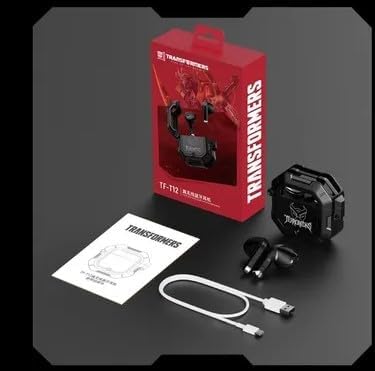
Image: Contents of the TF-T12 Earphones package, showing the earphones, charging case, USB Type-C charging cable, and the user manual.
3. Setup
3.1 Initial Charging
Before first use, fully charge the earphones and the charging case. Connect the provided USB Type-C cable to the charging port on the case and the other end to a USB power adapter (not included).
- Place both earphones into the charging case.
- Connect the Type-C charging cable to the charging case.
- The indicator light on the charging case will show charging status. A full charge typically takes approximately 1.5 to 2 hours.
3.2 Pairing with a Device
The TF-T12 earphones use Bluetooth 5.3 for a stable and efficient connection.
- Ensure the earphones are charged and inside the charging case.
- Open the charging case. The earphones will automatically enter pairing mode, indicated by a flashing light on the earphones.
- On your device (smartphone, tablet, etc.), go to Bluetooth settings and turn Bluetooth on.
- Search for available devices. Select "TF-T12" from the list.
- Once connected, the indicator light on the earphones will stop flashing, and your device will confirm the connection.
Note: The earphones will automatically reconnect to the last paired device when taken out of the case, if Bluetooth is enabled on the device.
4. Operating Instructions
4.1 Basic Controls
The TF-T12 earphones feature touch controls for various functions:
| Function | Action |
|---|---|
| Play/Pause | Single tap on either earphone. |
| Next Track | Double tap on the right earphone. |
| Previous Track | Double tap on the left earphone. |
| Answer/End Call | Single tap on either earphone during an incoming call. |
| Reject Call | Press and hold either earphone for 2 seconds during an incoming call. |
| Activate Voice Assistant | Triple tap on either earphone. |
| Volume Up | Press and hold the right earphone. |
| Volume Down | Press and hold the left earphone. |
4.2 Wearing the Earphones
For optimal sound quality and comfort, ensure the earphones are properly seated in your ears. The TF-T12 earphones are designed for a secure fit, providing effective sound isolation.

Image: The TF-T12 earphones, showcasing their design and how they sit within the charging case.

Image: Promotional image highlighting the HIFI Surround Sound HD Decoding feature of the TF-T12 earphones.
5. Maintenance and Care
To ensure the longevity and optimal performance of your TF-T12 earphones, follow these care guidelines:
- Cleaning: Regularly clean the earphones and charging case with a soft, dry, lint-free cloth. Do not use abrasive cleaners or solvents.
- Storage: When not in use, store the earphones in their charging case to protect them from dust and damage.
- Temperature: Avoid exposing the earphones to extreme temperatures (hot or cold) or high humidity.
- Water Resistance: These earphones are not waterproof. Avoid contact with water or other liquids.
- Charging: Use only the provided Type-C cable for charging.
6. Troubleshooting
If you encounter issues with your TF-T12 earphones, please refer to the following common solutions:
- Earphones not pairing:
- Ensure both earphones are charged.
- Turn off Bluetooth on your device and turn it back on.
- Forget "TF-T12" from your device's Bluetooth list and attempt to pair again.
- Place earphones back in the case, close the lid, wait a few seconds, then open to re-enter pairing mode.
- No sound from one earphone:
- Ensure both earphones are charged.
- Try placing both earphones back into the charging case, closing the lid, and then taking them out again.
- Perform a factory reset (refer to manufacturer's specific instructions if available, or try holding the touch area for an extended period while in the case).
- Charging case not charging:
- Check the USB Type-C cable for damage and ensure it is securely connected.
- Try a different USB power adapter or USB port.
- Low volume or poor sound quality:
- Adjust the volume on both your device and the earphones.
- Ensure the earphones are properly seated in your ears.
- Clean any debris from the earphone grilles.
7. Specifications
| Feature | Detail |
|---|---|
| Model Name | TRANSFORMERS TF-T12 |
| Connectivity | Wireless (Bluetooth 5.3) |
| Noise Control | Noise cancellation for voice call, Sound Isolation |
| Form Factor | In Ear |
| Control Method | Application (implied by product description), Touch Control |
| Microphone Type | Condenser Microphone |
| Headphone Jack | Type-C Jack (for charging case) |
| Battery Properties | Rechargeable Battery |
| Recommended Use | Game, General Audio |
8. Warranty and Support
For warranty information and customer support, please refer to the warranty card included in your package or contact the retailer where you purchased the product. Keep your proof of purchase for any warranty claims.
For further assistance, you may also visit the official website of the manufacturer or contact their customer service department.