
1. Introduction
Thank you for choosing the ZealSound D19 Portable Karaoke System. This device is designed to provide a high-quality audio experience for karaoke, music playback, and entertainment. It features a powerful speaker, two wireless microphones, dynamic RGB lighting, and multiple connectivity options. Please read this manual carefully to ensure proper use and maintenance of your device.

Image 1.1: The ZealSound D19 Portable Karaoke System, featuring the main speaker unit with a central illuminated driver and two wireless microphones.
2. Package Contents
Please check the package carefully to ensure all items are present:
- 1x ZealSound D19 Bluetooth Speaker with 6 LED lights
- 2x 2.4Ghz Wireless Dynamic Microphones with LED and voice changer function
- 1x Type-C Charging Cable (approximately 31.5 inches / 80 cm)
- 1x User Manual

Image 2.1: An illustration showing the D19 speaker, two wireless microphones, a Type-C charging cable, and the user manual, along with their approximate dimensions.
3. Product Overview and Features
3.1 Speaker Unit
- High-Fidelity Sound: Features a 3-inch full-range loudspeaker with 10W output, DSP audio processor, and AR Quad-Core noise reduction chip for superior sound quality.
- Dynamic RGB Lighting: Aurora Rhythm technology synchronizes vibrant multi-colored lights with music, offering 6 LED light modes (Static Solid Color, Dynamic & Breathing mix color gradient, Spectral Rhythm, Spectral Breathing, Out of body, 7 Spectral Gradient).
- Integrated Display: An LED display shows time, audio source, and volume.
- Design: Industrial aesthetic with a container-like appearance, light-cooled mirror surface relief, and electroplated embossed water pipe shape. Includes an intelligent clock and ergonomic control knob.

Image 3.1: A cutaway view of the D19 speaker, illustrating the 10W 3-inch full-range loudspeaker and the DSP audio processor for Hi-Fi sound quality.

Image 3.2: The D19 speaker showcasing its Auroral Light Rhythm feature, with examples of different LED light modes such as Static Solid Color, Dynamic & Breathing, Spectral Rhythm, and 7 Spectral Gradient.
3.2 Wireless Microphones
- Dual 2.4Ghz Wireless: Two rechargeable microphones for duets and enhanced mobility.
- LED Lighting: Microphones feature integrated LED lights.
- Voice Changer: Includes three magical voice effects (Baby, Monster, Karaoke) in addition to the original voice.
- Accompaniment Mode: A dedicated button to easily mute the original vocal track of a song.

Image 3.3: A close-up of the wireless microphone, illustrating the 'Magic Voice Changer' function with options for Baby, Monster, Original Voice, and Karaoke effects, and a button to mute the original sound.
4. Setup
4.1 Charging the Device
Before first use, fully charge the D19 speaker and both wireless microphones using the provided Type-C charging cable. Connect the cable to a standard USB power adapter (not included).
- Speaker: The LED display will indicate charging status.
- Microphones: An indicator light on the microphone will show charging status.
4.2 Powering On/Off
- Speaker: Press and hold the power button on the speaker unit until the display lights up.
- Microphones: Press and hold the power button on each microphone. The microphones will automatically pair with the speaker upon boot.
4.3 Connecting to Devices
The D19 system offers multiple connectivity options:
- Bluetooth: Turn on the speaker and enable Bluetooth on your smartphone, tablet, or Bluetooth-enabled TV. Search for "ZealSound D19" in your device's Bluetooth settings and pair.
- USB-A (for PC): Connect the speaker to your computer using a USB-A cable (not included, but compatible with the Type-C port via an adapter if needed).
- AUX: Use a 3.5mm audio cable (not included) to connect external audio sources to the AUX port on the speaker.

Image 4.1: An illustration demonstrating the various ways to connect the D19 system, including 2.4Ghz wireless for microphones, Bluetooth for mobile devices, and USB-A cable for PC connection.
5. Operating Instructions
5.1 Speaker Controls
The speaker unit features an ergonomic knob and several buttons for control:
- Volume Control: Rotate the main knob to adjust the overall volume.
- Light Effects: Press the light button to cycle through the 6 LED light modes.
- Power/Mode: Press and hold for power on/off. Short press to switch between input modes (Bluetooth, AUX, etc.).
5.2 Microphone Controls
Each wireless microphone has the following controls:
- Power On/Off: Press and hold the power button.
- Volume Control: Use the '+' and '-' buttons to adjust microphone volume.
- Voice Changer: Short press the effect mode button to cycle through voice effects (Baby, Monster, Karaoke, Original Voice).
- Accompaniment Mode: Press the dedicated button to mute the original vocal track of the playing music.
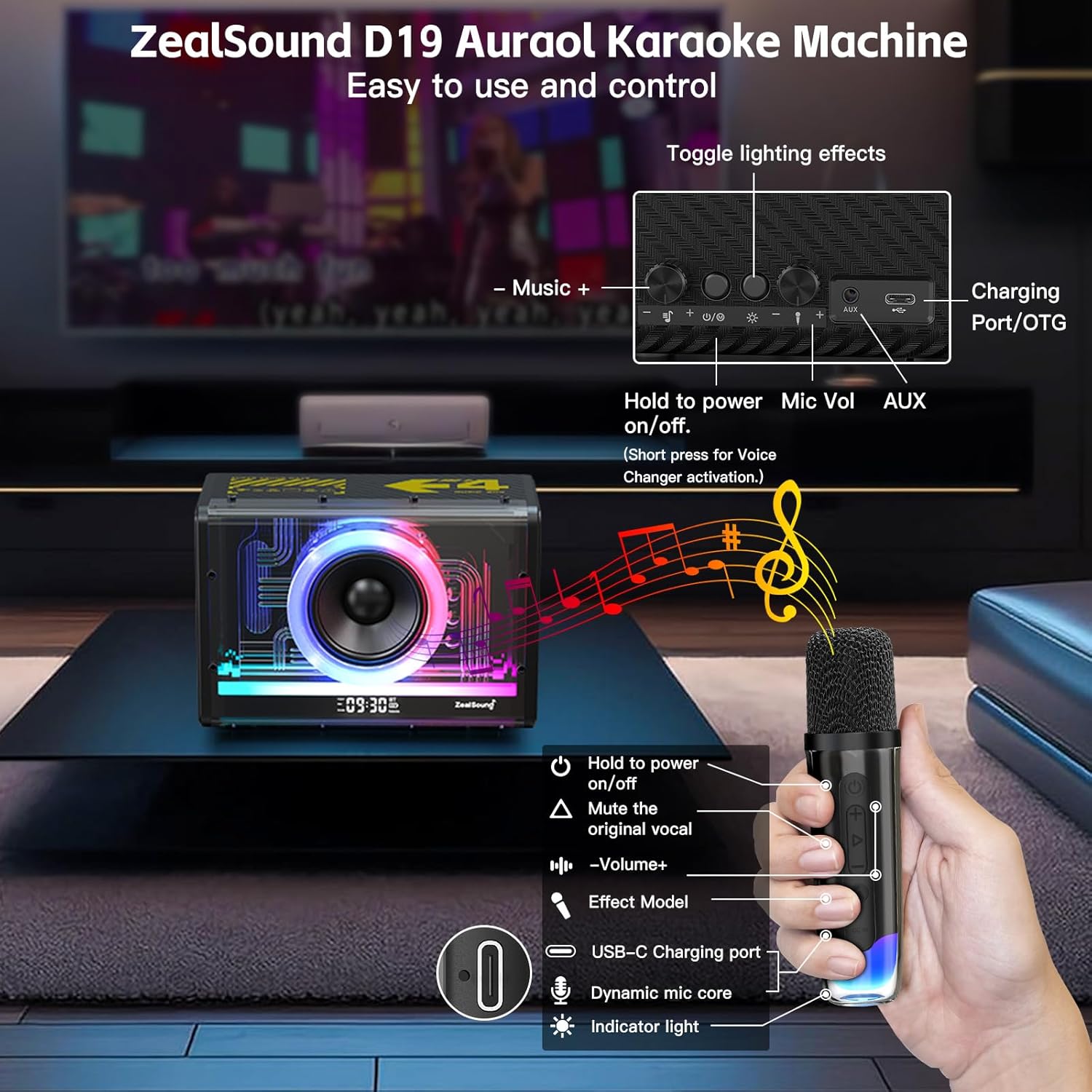
Image 5.1: A diagram illustrating the controls on both the D19 speaker (including music volume, light effects, power, microphone volume, and AUX/charging ports) and the wireless microphone (power, volume, mute original vocal, effect mode, USB-C charging, dynamic mic core, and indicator light).
5.3 TWS (True Wireless Stereo) Function
The two wireless microphones are designed to work simultaneously with the D19 speaker, allowing for duets. Simply power on both microphones, and they will automatically connect to the speaker.
5.4 Smart LED Alarm Clock
When connected via Bluetooth, the D19 speaker's LED display will synchronize with your device's time, functioning as an intelligent alarm clock. The display provides a clear view of the time, current audio source, and volume.
6. Maintenance
- Cleaning: Use a soft, dry cloth to clean the speaker and microphones. Avoid using abrasive cleaners, solvents, or liquids that could damage the device.
- Storage: Store the system in a cool, dry place away from direct sunlight and extreme temperatures.
- Battery Care: To prolong battery life, charge the devices regularly, even if not in frequent use. Avoid fully discharging the batteries for extended periods.
- Handling: Handle the speaker and microphones with care. Avoid dropping or subjecting them to strong impacts.
7. Troubleshooting
If you encounter any issues with your ZealSound D19 system, please refer to the following common problems and solutions:
| Problem | Possible Cause | Solution |
|---|---|---|
| Device does not power on | Low battery; Power button not pressed correctly | Charge the device fully. Press and hold the power button for a few seconds. |
| No sound from speaker | Volume too low; Incorrect input mode; Device not connected | Increase volume. Ensure correct input mode (Bluetooth, AUX). Reconnect the device. |
| Microphone not working | Microphone off; Low battery; Not paired with speaker | Power on the microphone. Charge the microphone. Ensure microphone is within range and automatically paired. |
| Bluetooth connection unstable or failing | Device too far from speaker; Interference; Pairing issue | Move device closer to speaker. Avoid sources of interference. Forget device in Bluetooth settings and re-pair. |
| RGB lights not working | Light mode off or set to static | Press the light button on the speaker to cycle through modes. |
If the problem persists after trying these solutions, please contact customer support.
8. Specifications
| Feature | Specification |
|---|---|
| Brand | ZealSound |
| Model Number | D19 |
| Connectivity Technology | Bluetooth, 2.4 GHz Wireless, OTG, AUX |
| Speaker Output Power | 10W |
| Speaker Size | 3-inch full-range loudspeaker |
| Microphone Type | Dynamic, 2.4 GHz Wireless |
| Battery Composition | Lithium-ion |
| Rechargeable Battery | Yes |
| Power Source | Battery Powered |
| Total USB Ports | 1 (Type-C for charging/OTG) |
| Item Weight | 1.22 Kilograms |
| Voltage | 3.7 Volts |
9. Safety Information
- Do not expose the device to water or excessive moisture.
- Avoid extreme temperatures, direct sunlight, and heat sources.
- Do not attempt to disassemble or repair the device yourself. Refer to qualified service personnel.
- Keep out of reach of children and pets.
- Use only the provided charging cable or a certified equivalent.
- Dispose of batteries and electronic components responsibly according to local regulations.
10. Warranty and Support
Warranty information for the ZealSound D19 Portable Karaoke System is typically provided with the product packaging or available on the manufacturer's official website. Please refer to these resources for details regarding warranty coverage and terms.
For technical support, troubleshooting assistance beyond this manual, or inquiries about replacement parts, please contact ZealSound customer service through their official channels. Contact information can usually be found in the product packaging or on the ZealSound website.