
Introduction
Thank you for choosing the DiHines 20W USB C Fast Charger with 6FT Lightning Cable. This product is designed to provide efficient and safe charging for your compatible Apple devices. Please read this manual carefully to ensure proper use and to maximize the lifespan of your charger and cable.
Product Features
- 6FT Long Lightning Cable: Equipped with a smart chip and high-quality copper core, designed for durability with 12000+ bending resistance.
- MFi Certified: The USB C to Lightning cable features automatic chip recognition for perfect compatibility and safe charging with Apple devices.
- 20W USB C Fast Charger: Utilizes PD 3.0 technology to deliver up to 3 times faster charging speed compared to standard 5W chargers, capable of charging compatible devices up to 50% in approximately 30 minutes.
- Safety and Efficiency: Built-in multi-protection system guards against over-voltage, over-charge, and over-heat, ensuring safe and efficient charging.

Figure 1: Fast Charging Capability

Figure 2: MFi Certification and Smart Chip

Figure 3: 20W Charger with Comprehensive Protection
Package Contents
The DiHines 20W USB C Fast Charger package includes:
- 2 x 20W USB C Charger Blocks
- 2 x 6FT USB C to Lightning Cables
Setup Instructions
- Unpack the charger block and the 6FT USB C to Lightning cable from the packaging.
- Insert the USB C end of the cable into the USB C port on the charger block.
- Plug the charger block into a standard wall outlet.
- Connect the Lightning end of the cable to your compatible iPhone or iPad.
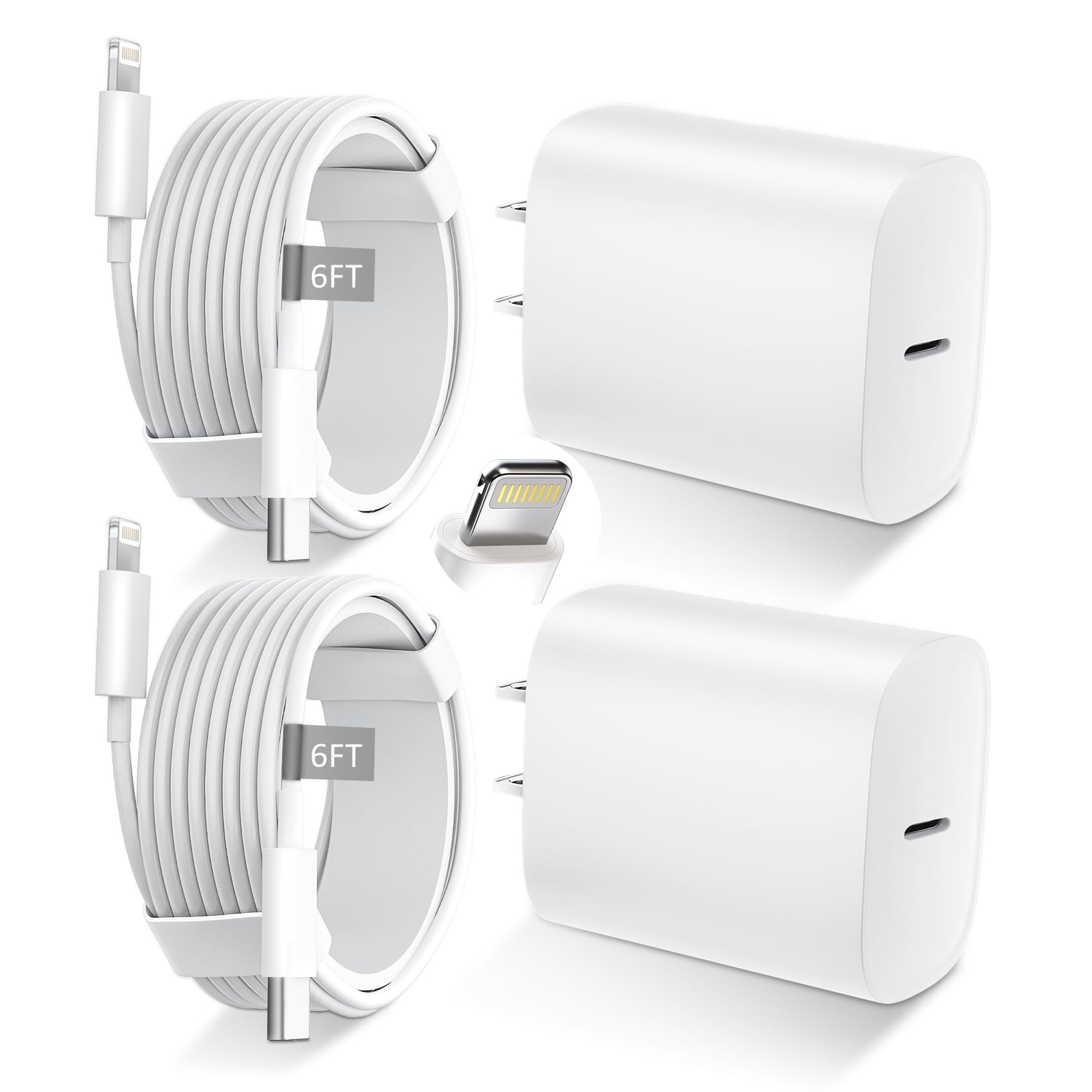
Figure 4: Charger and Cable Overview
Operating Instructions
Once connected, your device will begin charging automatically. The 20W USB C charger supports Power Delivery (PD) 3.0 for fast charging compatible devices. Ensure your device supports fast charging to utilize the full speed capabilities of this charger.
- For optimal fast charging, use with iPhone 8 or later models.
- The cable is designed to prevent error messages and ensure stable power delivery.
Video 1: Demonstration of the DiHines 20W USB C Fast Charger and Lightning Cable in use, highlighting its fast charging capabilities for iPhone devices.
Safety Information
- Do not expose the charger or cable to liquids or extreme temperatures.
- Avoid dropping or subjecting the product to strong impacts.
- Do not attempt to disassemble or modify the charger or cable.
- Keep out of reach of children.
- Unplug the charger from the wall outlet when not in use.
- If the product appears damaged, discontinue use immediately.
Maintenance
- Clean the charger and cable with a soft, dry cloth.
- Store the product in a cool, dry place away from direct sunlight.
- Avoid tightly coiling the cable to prevent damage to the internal wires.
Troubleshooting
| Problem | Possible Cause | Solution |
|---|---|---|
| Device not charging. | Loose connection, faulty outlet, damaged cable/charger, incompatible device. | Ensure all connections are secure. Try a different wall outlet. Inspect cable and charger for damage. Verify device compatibility. |
| Slow charging speed. | Device not supporting fast charging, background apps, high device usage during charging. | Confirm your device supports 20W PD fast charging. Close unnecessary background applications. Avoid heavy device usage while charging. |
| "Accessory not supported" message. | Cable not properly connected, dirty Lightning port, rare software glitch. | Reconnect the cable firmly. Clean your device's Lightning port carefully. Restart your device. |
Specifications
| Brand | DiHines |
| Model Number | XD18W2 |
| Connector Type | Lightning, USB-C |
| Cable Type | USB |
| Compatible Devices | Cellular Phones (iPhone 14, 14 Pro, 14 Pro Max, 13, 13 Pro, 13 Pro Max, 12, 12 Pro, 12 Pro Max, 12 mini, 11, 11 Pro, 11 Pro Max, SE (2nd gen), X, XR, XS, XS Max, 8, 8 Plus) |
| Special Feature | Fast Charging |
| Color | White |
| Wattage | 20 watts |
| Maximum Voltage | 5 Volts |
| Cable Length | 6 feet |
| Certification | MFi |

Figure 5: Universal Compatibility Chart
Warranty and Support
DiHines products are manufactured with high-quality standards. For any issues or questions regarding your product, please contact DiHines customer support through the retailer's platform or the official DiHines website. Please retain your proof of purchase for warranty claims.


