
Pro-Trade PT-TR2-100PC
Pro-Trade PT-TR2-100PC 100W Polycarbonate Transformer User Manual
Model: PT-TR2-100PC
1. Introduction
This manual provides comprehensive instructions for the safe and efficient operation, installation, and maintenance of your Pro-Trade PT-TR2-100PC 100W Polycarbonate Transformer. Please read this manual thoroughly before installation and use, and retain it for future reference.
The Pro-Trade PT-TR2-100PC is an economy transformer designed for low-voltage lighting applications. It features an integrated and replaceable photocell and timer for automated control.
2. Safety Information
WARNING: Risk of Electric Shock. Read all instructions before installation.
- Ensure power is disconnected before installing or servicing the transformer.
- Installation should be performed by a qualified electrician or in accordance with local electrical codes.
- Do not immerse the transformer in water.
- Do not connect two or more transformers in parallel.
- Use only low-voltage landscape lighting fixtures with this transformer.
- The total wattage of connected fixtures must not exceed 100W.
3. Package Contents
Verify that all components are present:
- Pro-Trade PT-TR2-100PC Transformer
- User Manual (this document)
4. Product Features
- Original OEM Pro-Trade Parts
- Field Replaceable Integrated Photocell and Timer
- Timer Functions: Constant On, Dusk to Dawn, and Up-to 8 Hour On from Dusk
- Durable Polycarbonate Case
5. Setup and Installation
Follow these steps for proper installation:
- Mounting the Transformer: Choose a suitable location for mounting the transformer. It should be mounted vertically on a flat, stable surface, at least 1 foot (30 cm) above the ground, and away from direct water spray. Ensure adequate ventilation.
- Connecting Low-Voltage Cables:
Route your low-voltage landscape lighting cables to the transformer. Strip approximately 1/2 inch (1.25 cm) of insulation from the ends of the low-voltage cables.
Loosen the terminal screws on the transformer's low-voltage output terminals. Insert the stripped ends of the cables into the terminals and tighten the screws securely. Ensure a firm connection to prevent arcing.
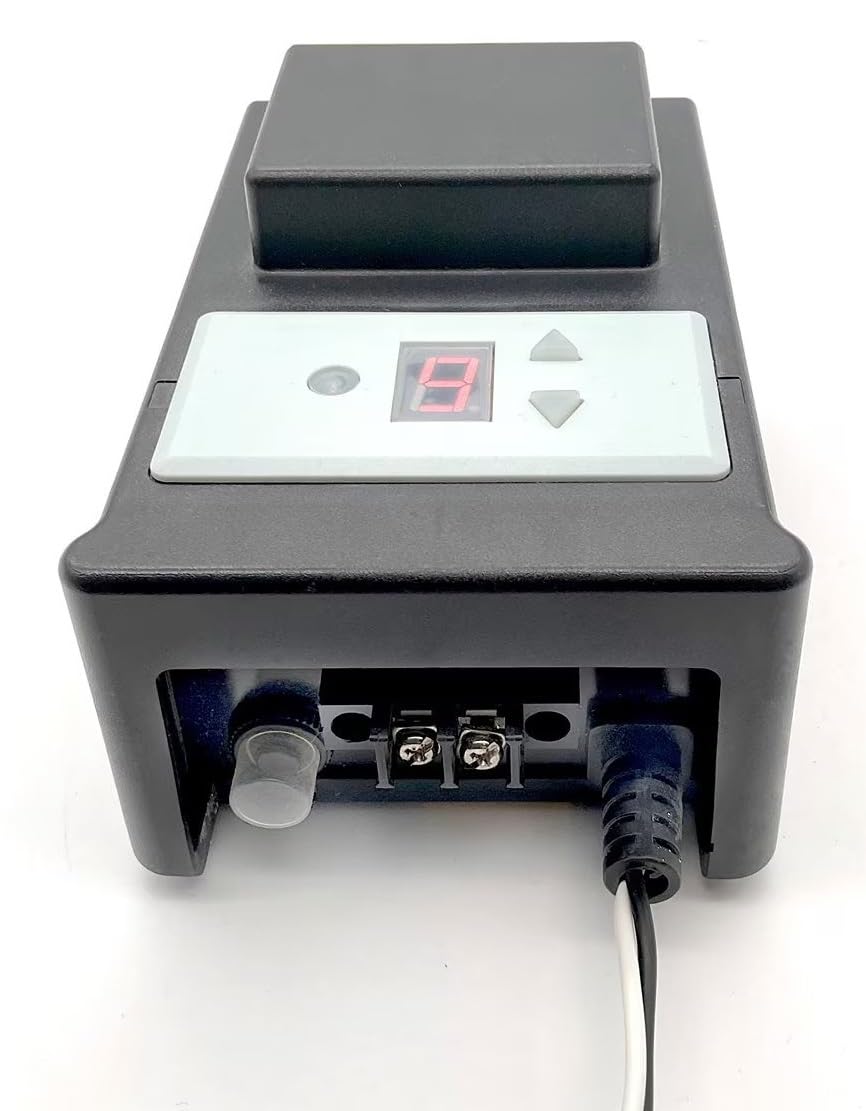
Image: Front view of the Pro-Trade PT-TR2-100PC transformer, showing the digital display, control buttons, low-voltage terminal block, and the integrated photocell on the left. The power cord exits to the right.
- Connecting to Power: Plug the transformer's power cord into a grounded 120V AC outdoor-rated receptacle. Ensure the receptacle is protected by a Ground Fault Circuit Interrupter (GFCI).
6. Operating Instructions
The PT-TR2-100PC transformer features an integrated photocell and timer for automatic operation. The control panel includes a digital display and adjustment buttons.

Image: Close-up of the control panel on the Pro-Trade PT-TR2-100PC transformer, showing a red digital display and three gray buttons: a mode button (left) and up/down arrow buttons (right).
6.1. Setting the Timer Function
Press the mode button (usually indicated by a light bulb or similar icon) to cycle through the available timer settings. The digital display will show the current mode.
- "ON" (Constant On): The lights will remain on continuously.
- "DD" (Dusk to Dawn): The lights will turn on automatically at dusk and turn off at dawn, controlled by the integrated photocell.
- "H" (Hours from Dusk): The lights will turn on at dusk and remain on for a set number of hours (e.g., 4H, 6H, 8H). Use the up/down arrow buttons to adjust the duration.
Once the desired mode is displayed, the setting will be saved automatically after a few seconds of inactivity.
6.2. Photocell Operation
The integrated photocell detects ambient light levels. For optimal performance, ensure the photocell is not obstructed by foliage, structures, or artificial light sources that could interfere with its light sensing capabilities.
7. Maintenance
- Cleaning: Periodically clean the exterior of the transformer with a soft, damp cloth. Do not use abrasive cleaners or solvents.
- Photocell: Keep the photocell lens clean and free from dirt, dust, or debris to ensure accurate light sensing.
- Connections: Periodically check all low-voltage cable connections to ensure they are secure and free from corrosion.
- Photocell Replacement: The photocell is field replaceable. If the photocell malfunctions, consult a qualified technician or contact Pro-Trade support for replacement instructions.
8. Troubleshooting
| Problem | Possible Cause | Solution |
|---|---|---|
| Lights do not turn on. |
|
|
| Lights stay on during the day. |
|
|
| Lights flicker or are dim. |
|
|
9. Specifications
| Model | PT-TR2-100PC |
| Brand | Pro-Trade (SPW) |
| Input Voltage | 120V AC |
| Output Voltage | Low Voltage (typically 12V AC) |
| Max Wattage | 100W |
| Housing Material | Polycarbonate |
| Features | Integrated Photocell & Timer (Field Replaceable) |
| Item Weight | 6 Pounds |
| UPC | 795850799500 |
10. Support and Contact Information
For technical assistance, warranty inquiries, or replacement parts, please contact your authorized Pro-Trade dealer or visit the official Pro-Trade website.
Manufacturer: Pro-Trade
Brand: SPW
Ask a question about this manual
Ask about setup, troubleshooting, compatibility, parts, safety, or missing instructions. Manuals+ will review the question and use this page’s manual context to help answer it.