
1. Introduction
Thank you for choosing the MAGICON BX20S 88-Key Foldable Electronic Piano. This portable digital piano is designed for musicians of all levels, offering a full 88-key experience in a compact, foldable design. It combines advanced features with ease of use, making it suitable for practice, performance, and music creation on the go.
2. What's in the Box
Please verify that all items listed below are included in your package:
- MAGICON BX20S 88-Key Foldable Electronic Piano
- User Manual
- AC Adapter
- Foot-pedal (Sustain Pedal)
- Handbag (Carrying Bag)
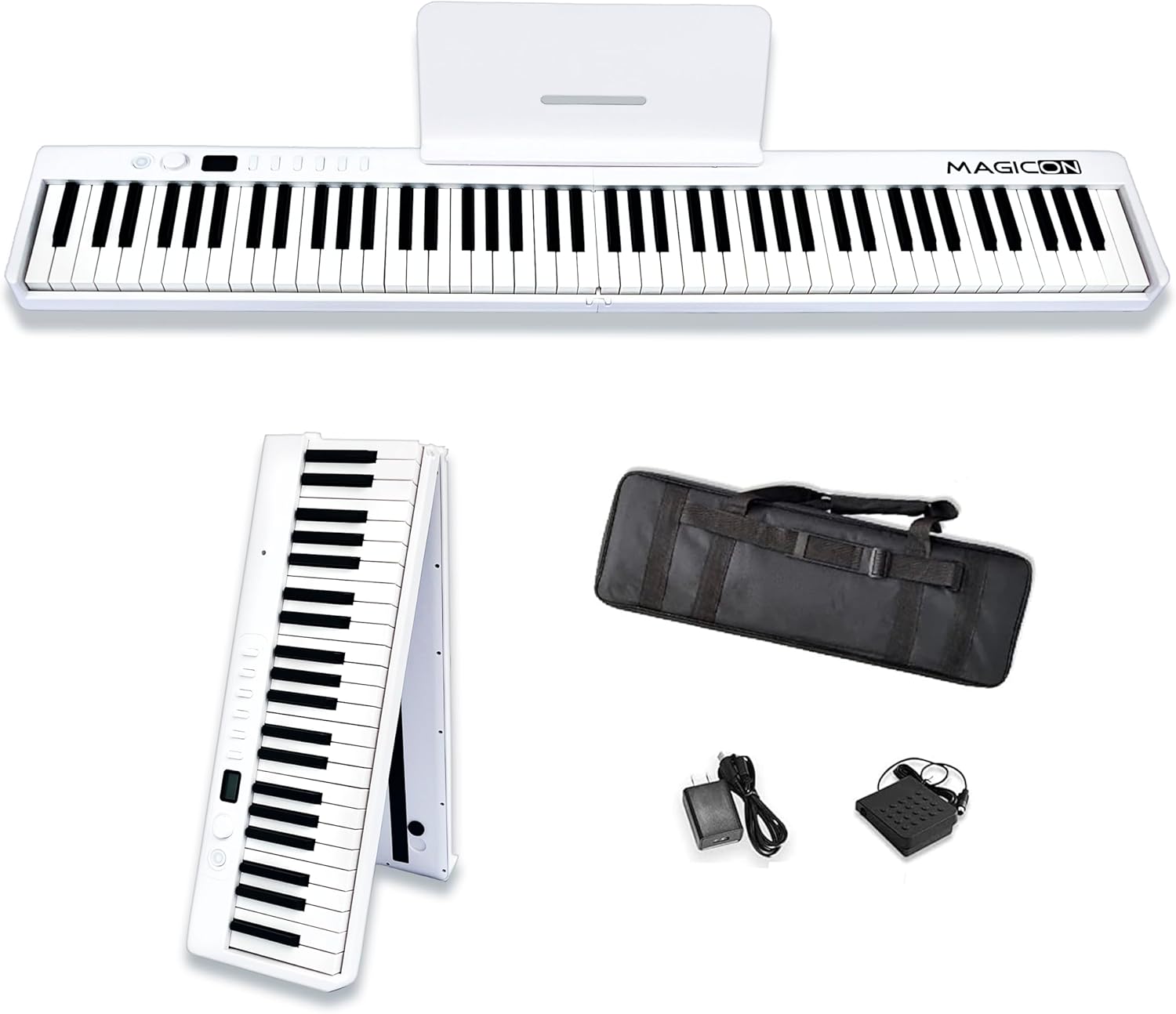
Figure 1: MAGICON BX20S 88-Key Foldable Electronic Piano with included accessories. The image displays the MAGICON BX20S 88-Key Foldable Electronic Piano in its full extended form, alongside its folded configuration. Also shown are the included accessories: a carrying handbag, power adapter, and sustain pedal.
3. Setup
3.1 Unfolding the Piano
- Carefully remove the piano from its carrying bag.
- Place the folded piano on a flat, stable surface.
- Gently unfold the two halves of the piano until they lock securely into place, forming a full 88-key keyboard.

Figure 2: MAGICON BX20S Foldable Electronic Piano in folded position on grass. The foldable electronic piano is shown in its compact, folded state, standing upright on a grassy surface, highlighting its portability.
3.2 Connecting Power and Accessories
- Power: The piano has a built-in Lithium Polymer battery. To charge, connect the AC adapter to the Type-C USB port on the piano.
- Sustain Pedal: Plug the sustain pedal into the 'SUS' jack located on the back panel of the piano.
- Headphones: For private practice, connect 3.5mm headphones to the dedicated headphone jack.
- External Audio/Microphone: Use the MP3 input or MIC jack for connecting external audio sources or a microphone, respectively.

Figure 3: Close-up of connectivity ports on the MAGICON BX20S piano. This image highlights the various input/output ports on the piano, including connections for sustain pedal (SUS), MP3 input, microphone (MIC), headphones, and USB (Type-C) for charging and MIDI.
3.3 Music Stand
Attach the included music stand to the designated slots on the piano's top panel to hold sheet music or a tablet.
4. Operating Instructions
4.1 Power On/Off
Press and hold the power button (usually located on the left side of the control panel) to turn the piano ON or OFF. The digital display will illuminate upon power-on.
4.2 Volume Adjustment
Use the rotary dial or dedicated volume buttons (+/-) on the control panel to adjust the master volume.
4.3 Tone Selection
The piano offers 127 different tones. Press the 'Tone' button and use the rotary dial or +/- buttons to cycle through the available tones. The digital display will show the current tone number.
4.4 Rhythm Selection
Select from 127 rhythms. Press the 'Rhythm' button and use the rotary dial or +/- buttons to choose a rhythm. The digital display will show the current rhythm number.
4.5 Demo Songs
The piano includes 20 demo songs. Press the 'Demo' button to start playback. Use the +/- buttons to navigate through the demo songs.
4.6 Recording and Playback
To record your performance, press the 'Record' button. Play your desired piece. To stop recording, press 'Record' again. To play back your recorded piece, press the 'Play' button.
4.7 Metronome
Activate the metronome function by pressing the 'Metronome' button. Use the rotary dial or +/- buttons to adjust the tempo and time signature.
4.8 Bluetooth and MIDI Connectivity
The piano supports Bluetooth 5.0 for both audio and MIDI signal transmission. This allows connection to mobile devices and compatibility with various music applications like Cubase, POPMusic, and Nuendo. Use the USB Type-C port for wired MIDI connections to computers or other intelligent devices.
Video 1: MAGICON BX20S 88-Key Foldable Electronic Piano. This video demonstrates the features and functionality of the MAGICON BX20S piano, including its foldable design, sound quality, and connectivity options.
5. Maintenance
- Cleaning: Use a soft, dry cloth to clean the piano's surface. For stubborn dirt, a slightly damp cloth can be used, followed by a dry cloth. Avoid abrasive cleaners or solvents.
- Storage: When not in use, fold the piano and store it in its carrying bag to protect it from dust and damage. Store in a cool, dry place away from direct sunlight and extreme temperatures.
- Battery Care: To prolong battery life, avoid fully discharging the battery frequently. Charge the piano regularly, even if not in constant use.
6. Troubleshooting
| Problem | Possible Cause | Solution |
|---|---|---|
| No sound | Volume too low; headphones connected; piano not powered on. | Increase volume; disconnect headphones; power on the piano. |
| Keys not responding | Piano not powered on; low battery. | Power on the piano; charge the battery. |
| Bluetooth connection issues | Bluetooth not enabled on device; piano not in pairing mode. | Ensure Bluetooth is on; refer to manual for pairing instructions. |
| Piano not folding/unfolding smoothly | Obstruction in hinge; mechanism not aligned. | Check for obstructions; ensure proper alignment before folding/unfolding. |
7. Specifications
| Feature | Detail |
|---|---|
| Model Name | BX20S |
| Number of Keys | 88 |
| Special Feature | Foldable (180°) |
| Folded Size | 24.8 x 8 x 4.7 inches (approx. 63 x 20 x 12 cm) |
| Item Weight | 8.8 pounds (4 kg) |
| Connectivity | Bluetooth 5.0, USB Type-C, 3.5mm Headphone Jack, MP3 In, MIC In |
| Power Source | Battery Powered (1 Lithium Polymer battery included) |
| Tones/Rhythms/Demos | 127 Tones, 127 Rhythms, 20 Demo Songs |
| Supported Software | Cubase, POPMusic, Nuendo |
| Material Type | Silicone (for function buttons) |
| Manufacturer | INNO Electronics Technology CO.,LTD. |
8. Warranty and Support
For warranty information, technical support, or any inquiries regarding your MAGICON BX20S Electronic Piano, please refer to the contact details provided in your product packaging or visit the official MAGICON website. Keep your purchase receipt as proof of purchase for warranty claims.