1. Product Overview
The Carel Mastercella is an advanced refrigeration controller designed for integrated cold room solutions. It combines innovative design with a comprehensive set of functions to provide precise temperature management and operational efficiency.
Key features include:
- Increased space for wiring, simplifying installation.
- Provision for installing a main switch for enhanced safety and control.
- Flexible cable entry options (from below or above).
- Integrated clock for real-time defrost scheduling.
- HACCP functions for compliance and food safety management.
- Customization options via a removable plastic front panel.
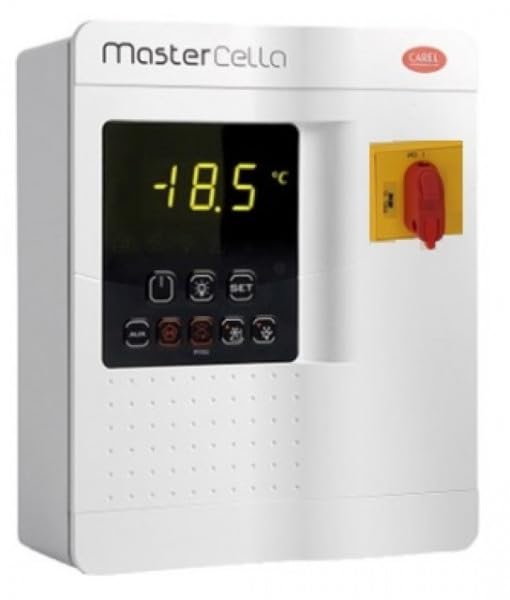
Figure 1: Front view of the Carel Mastercella unit, showing the digital display, control buttons, and main switch.
2. Setup and Installation
The Mastercella unit is designed for wall mounting. Ensure proper electrical safety procedures are followed during installation. It is recommended that installation be performed by a qualified technician.
2.1 Mounting
The unit features a wall mount design. Select a suitable location that is dry, well-ventilated, and away from direct heat sources or excessive moisture. Secure the unit firmly to the wall using appropriate fasteners.
2.2 Wiring
The Mastercella provides ample space for wiring connections. Cables can be routed from either the bottom or the top of the unit for installation flexibility. Connect power supply, sensors, and controlled devices (e.g., compressor, fans, defrost heaters) according to the wiring diagram provided with your specific model. Ensure all connections are secure and correctly insulated.
2.3 Main Switch Installation
The unit allows for the installation of a main switch. This switch provides a convenient and safe method to disconnect power to the entire system. Refer to the specific wiring instructions for integrating the main switch.
2.4 Initial Power-Up
Once all wiring is complete and verified, apply power to the unit. The display will illuminate, and the unit will begin its initialisation sequence. Verify that the displayed temperature is accurate and corresponds to the sensor readings.
3. Operating Instructions
The Mastercella is operated via its intuitive button control interface and digital display.
3.1 Basic Operation
- Display: The digital display shows the current temperature and various operational parameters.
- Set Button: Used to access and modify setpoints and parameters.
- Up/Down Buttons: Used to navigate menus and adjust values.
- Function Buttons: Dedicated buttons for specific functions such as manual defrost, light control, or fan control (refer to icon labels on the unit).
3.2 Temperature Control
The Mastercella is designed for refrigeration temperature control. To adjust the desired temperature setpoint:
- Press the SET button.
- Use the Up or Down buttons to adjust the temperature value.
- Press SET again to confirm and save the new setpoint.
3.3 Defrost Management
The unit features a clock for real-time defrost scheduling. This allows for precise control over defrost cycles, optimizing energy consumption and maintaining refrigeration efficiency. Consult the detailed programming manual for setting up scheduled defrosts.
3.4 HACCP Functions
The Mastercella includes functions to assist with HACCP (Hazard Analysis and Critical Control Points) compliance. These functions may include temperature logging, alarm management for critical deviations, and event recording. Refer to the advanced programming guide for configuring and utilizing these features.
3.5 Customization
The removable plastic front panel allows for various customization options, including branding or specific interface layouts. Consult with your supplier for available customization services.
3.6 Wi-Fi Connectivity
The Mastercella supports Wi-Fi connectivity, enabling remote monitoring and control capabilities. Refer to the separate Wi-Fi setup guide for instructions on connecting the unit to your network and integrating it with compatible applications or systems.
4. Maintenance
Regular maintenance ensures the longevity and optimal performance of your Mastercella unit.
- Cleaning: Periodically clean the exterior of the unit with a soft, damp cloth. Do not use abrasive cleaners or solvents. Ensure the unit is powered off before cleaning.
- Ventilation: Ensure that the ventilation openings on the unit are not obstructed to prevent overheating.
- Connections: Periodically check all electrical connections for tightness and signs of wear.
- Sensor Check: Verify that temperature sensors are clean and properly positioned.
For any internal maintenance or repairs, contact a qualified service technician.
5. Troubleshooting
This section provides guidance for common issues. For complex problems, contact technical support.
| Problem | Possible Cause | Solution |
|---|---|---|
| Unit does not power on | No power supply; main switch off; faulty wiring. | Check power connection; ensure main switch is on; verify wiring connections. |
| Incorrect temperature display | Faulty sensor; sensor not properly connected; incorrect calibration. | Check sensor connection; replace sensor if faulty; refer to calibration instructions. |
| System not cooling/heating | Setpoint issue; compressor/fan fault; defrost cycle active. | Verify setpoint; check compressor/fan operation; wait for defrost cycle to complete. |
| Alarms triggered | Temperature deviation; sensor error; system malfunction. | Identify alarm code on display; consult manual for specific alarm meaning and resolution. |
6. Specifications
The following are the technical specifications for the Carel Mastercella (Model: MD33D5FB00):
- Brand: Generic (Carel Mastercella)
- Model Number: MD33D5FB00
- Colour: White
- Material: Plastic
- Temperature Control Type: Refrigeration
- Included Components: Controller
- Control Type: Button Control
- Connectivity Protocol: Wi-Fi
- Mounting Type: Wall Mount
- Style: Modern
7. Warranty and Support
Warranty information for the Carel Mastercella is typically provided at the point of purchase or included with the product packaging. Please retain your proof of purchase for warranty claims.
For technical support, service, or further inquiries regarding your Mastercella unit, please contact your authorized dealer or the manufacturer's customer service department. Ensure you have your model number (MD33D5FB00) and serial number (if applicable) ready when contacting support.
For general information, you may visit the official Carel website or consult the comprehensive technical documentation available for the Mastercella series.
