
Introduction
This manual provides instructions for the use and maintenance of your new Generic replacement remote control for various Tefal Robotic Robot Vacuum Cleaner models. Please read this manual thoroughly before operating the remote control to ensure proper function and longevity.
Important Note: This remote control is designed as a direct replacement and requires no programming. Ensure your original remote control matches the appearance and button layout of this replacement for guaranteed compatibility. Refer to your vacuum cleaner's original manual for specific operational details of the vacuum itself.
1. Setup
1.1 Battery Installation
- Locate the battery compartment on the back of the remote control.
- Slide the battery compartment cover downwards or outwards to open it.
- Insert two (2) AAA batteries, ensuring the positive (+) and negative (-) terminals align correctly with the markings inside the compartment.
- Close the battery compartment cover by sliding it back into place until it clicks securely.

Figure 1: Rear view of the remote control with the battery cover removed, illustrating the two AAA battery slots.
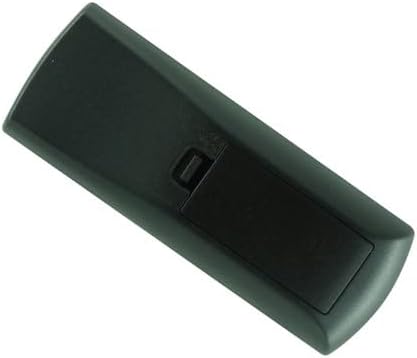
Figure 2: Rear view of the remote control with the battery cover securely in place.
The remote control is now ready for use. No additional programming or pairing is required.
2. Operating Instructions
This remote control provides direct access to various functions of your compatible Tefal Robotic Robot Vacuum Cleaner. Point the remote control directly at the vacuum cleaner for optimal signal transmission.
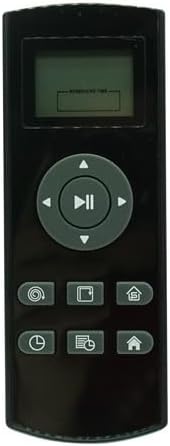
Figure 3: Front view of the remote control, displaying the LCD screen and control buttons.
2.1 Button Functions
The remote features an LCD screen and several buttons for controlling your robot vacuum. While specific icons may vary slightly, their general functions are as follows:
- LCD Screen: Displays current status, cleaning mode, time, or error messages.
- Directional Pad (Up, Down, Left, Right): Used for manual navigation of the robot vacuum.
- Play/Pause Button (Center of Directional Pad): Initiates or pauses the cleaning cycle.
- Spiral/Spot Clean Button: Activates spot cleaning mode, where the robot cleans a concentrated area in a spiral pattern.
- Edge Clean Button: Commands the robot to clean along walls and edges.
- Home/Recharge Button: Sends the robot back to its charging dock.
- Schedule/Time Setting Button: Used to set or adjust cleaning schedules or the current time.
- Cleaning Mode Button: Cycles through different cleaning modes (e.g., auto, silent, max).
- Return to Dock Button (Alternative Home Button): Another button to send the robot back to its charging station.
For detailed information on each cleaning mode and advanced features, please consult the original user manual of your Tefal Robotic Robot Vacuum Cleaner.
3. Maintenance
3.1 Cleaning the Remote Control
- Wipe the surface of the remote control with a soft, dry cloth.
- For stubborn dirt, slightly dampen the cloth with water and then wipe dry immediately.
- Do not use abrasive cleaners, solvents, or alcohol, as these can damage the surface and markings.
3.2 Battery Replacement
If the remote control's range decreases or it becomes unresponsive, the batteries may need replacement. Follow the steps in Section 1.1 Battery Installation to replace the two (2) AAA batteries.
- Always replace both batteries at the same time.
- Do not mix old and new batteries, or different types of batteries.
- Remove batteries if the remote control will not be used for an extended period to prevent leakage.
- Dispose of used batteries according to local regulations.
4. Troubleshooting
| Problem | Possible Cause | Solution |
|---|---|---|
| Remote control is unresponsive. |
|
|
| Reduced operating range. |
|
|
| Specific button not working. |
|
|
If the problem persists after attempting these solutions, please contact the seller for further assistance.
5. Specifications
- Product Dimensions: 3 x 2 x 4 inches
- Item Weight: 1.41 ounces
- Power Source: 2 x AAA Batteries (not included)
- Compatible Devices: Tefal Robotic Robot Vacuum Cleaner models RG6825WH, RG6871WH, RG6971KO, RG6871, RG6875, GRG6875WH
- Material: High-quality ABS plastic
6. Warranty and Support
As a generic replacement product, specific warranty terms may vary. Please refer to the seller or your purchase documentation for details regarding warranty coverage and return policies.
For technical support or inquiries regarding this remote control, please contact the seller directly through the platform where the purchase was made.