
1. Product Overview
The OELFFOW Smart Pump Controller is an electronic device designed to automatically monitor and control the operation of water pumps. It integrates advanced pressure sensor technology and a digital display for real-time pressure monitoring and parameter adjustment. This controller is suitable for various water supply systems, offering efficient and reliable automated control.
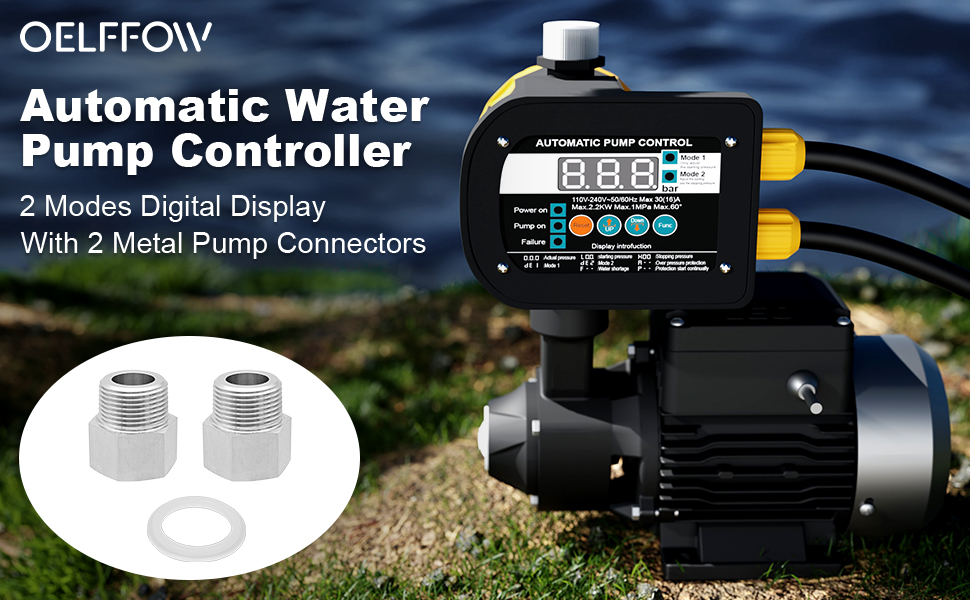
Image: OELFFOW Automatic Water Pump Controller with digital display and metal connectors. This image shows the main unit of the pump controller along with the metal connectors.
Key Features:
- Digital Display: Shows real-time pressure and allows for convenient parameter setting.
- Two Operating Modes: Mode 1 for adjusting starting pressure, Mode 2 for adjusting both start and stop pressures.
- Pressure Protection: Includes features like pressure protection, frequent start prompts, and forced start to prevent pump blockage.
- Automatic Start: Can auto-start during water shortages.
- Durable Connectors: Equipped with 304 stainless steel pump connectors (BSPP G1 internal thread, NPT 1-inch external thread) for heat and corrosion resistance.
- Versatile Installation: Can be installed vertically or horizontally.
2. Specifications
| Parameter | Value |
|---|---|
| Rated Voltage | 110V |
| Frequency | 50/60Hz |
| Max. Current | 30(16)A |
| Max. Power | 2.2KW |
| Max. Pressure | 1MPa |
| Starting Pressure | 0.5-6.7bar |
| Stopping Pressure | 0.8-7.0bar |
| Max Working Pressure | 8.0bar |
| Min Differential Pressure | 0.3bar |
| Max Differential Pressure | 6.5bar |
| Max. Working Temperature | 60°C |
| International Protection Rating | IP65 |
| Screw Thread | 2XG1" male |
| Material | Metal |
| Model Number | LBT-EPC12-068-4 |
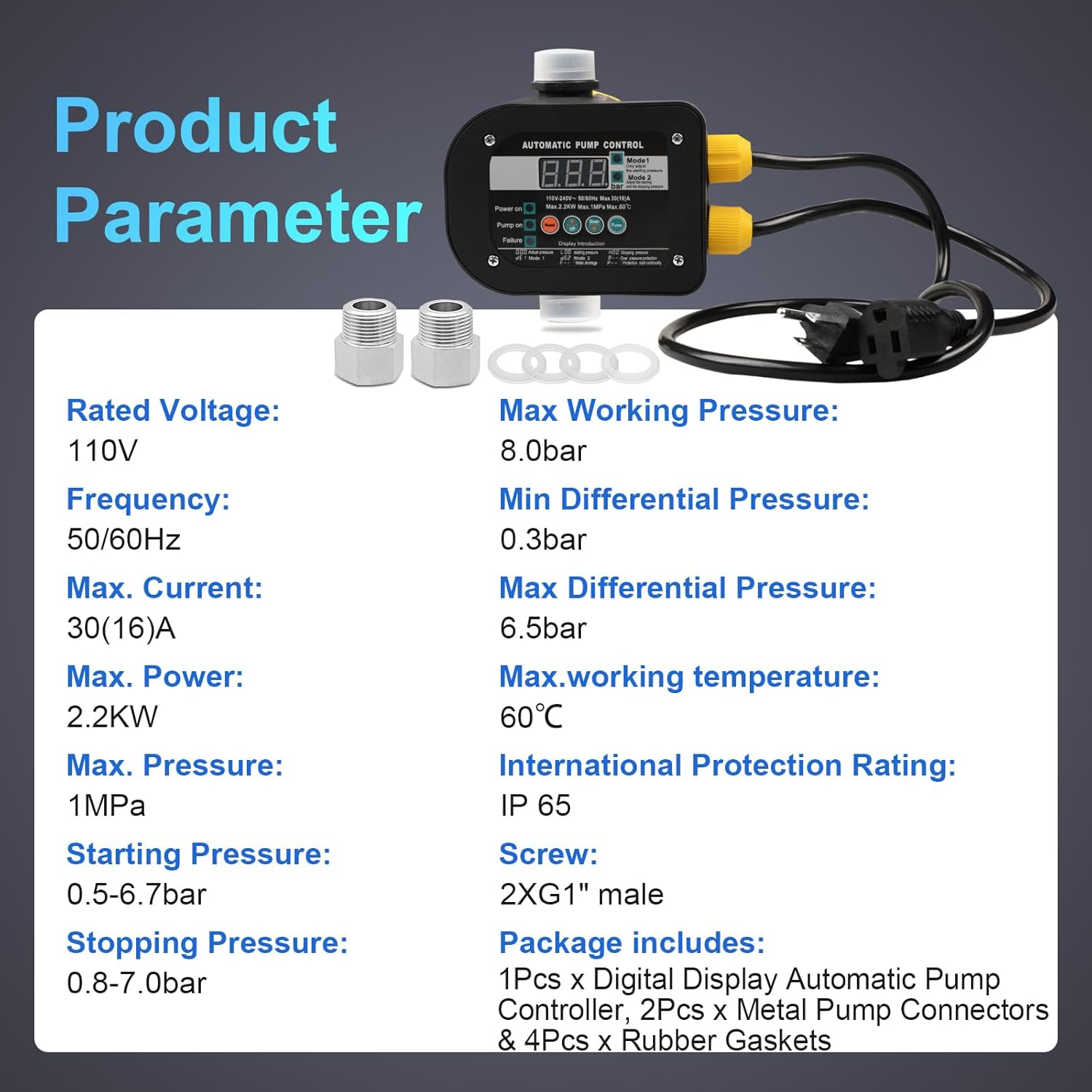
Image: Product Parameter Table. This image visually summarizes the technical specifications of the pump controller, including voltage, frequency, power, pressure ranges, and protection rating.
3. Package Contents
Verify that all items are present and undamaged upon opening the package.
- 1 x Digital Display Automatic Pump Controller
- 2 x Metal Pump Connectors (BSPP G1 internal thread, NPT 1-inch external thread)
- 4 x Rubber Gaskets

Image: Package Contents. This image displays the pump controller unit, two metal pump connectors, and rubber gaskets included in the package.
4. Installation and Setup
Proper installation is crucial for the optimal performance and longevity of the pump controller. Ensure all connections are secure and watertight.
4.1 Safety Precautions
- Always disconnect power before installation or maintenance.
- Ensure the electrical supply matches the controller's rated voltage (110V).
- Installation should be performed by a qualified professional if you are unsure.
- The product is only suitable for 110V plugs and is not compatible with 220V plugs.
4.2 Mounting the Controller
The controller can be installed either vertically or horizontally on the pump or piping system. Choose a location that is easily accessible for viewing the digital display and making adjustments.

Image: Dimension Reference. This diagram provides the physical dimensions of the controller and highlights the G1 inch threaded interface for connection.
4.3 Connecting the Pump and Water Lines
- Attach the provided metal pump connectors to the inlet and outlet ports of the controller. These connectors feature a 1-inch internal BSPP thread and a 1-inch external NPT thread for compatibility.
- Ensure the rubber gaskets are properly seated to create a watertight seal.
- Connect the water inlet pipe to the controller's inlet and the water outlet pipe to the controller's outlet.
- Verify all connections are tightened securely to prevent leaks.

Image: Sealing Design for the Inlet. This image highlights the waterproof and moisture-proof sealing design of the controller's inlet, ensuring high sealing performance.

Image: Metal Pump Connector. This image provides a detailed view of the 304 stainless steel pump connector, showing its internal BSPP G1 thread and external NPT 1-inch thread, along with dimensions.
4.4 Electrical Connection
Connect the pump's power cable to the controller's output and the controller's input cable to a suitable 110V power source.
5. Operating Instructions
The OELFFOW Smart Pump Controller features a digital display and intuitive controls for easy operation.
5.1 Digital Display Panel
The digital display shows real-time pressure readings and allows for parameter adjustments. Familiarize yourself with the buttons: Reset, Up, Down, and Func (Function).

Image: Digital Display Panel. This image shows a close-up of the controller's digital screen, displaying pressure readings and control buttons for setting parameters.
5.2 Operating Modes
The controller offers two primary operating modes:
- Mode 1: Adjust Starting Pressure
In this mode, you can set the pressure at which the pump will automatically start. The stopping pressure is typically determined by the system's flow rate and the pump's characteristics.
- Mode 2: Adjust Start and Stop Pressures
This mode allows for independent adjustment of both the pump's starting and stopping pressures, providing more precise control over the water system.
5.3 Adjusting Pressure Settings
- Press the Func button to cycle through the available modes and settings.
- Use the Up and Down buttons to increase or decrease the desired pressure values.
- Refer to the display introduction on the panel for specific indicators (e.g., "SET" for Mode 1, "L.00" for starting pressure, "H.00" for stopping pressure).
- The controller saves settings automatically after a short period of inactivity or by pressing Func again to exit the setting menu.
5.4 Special Functions
- Pressure Protection: The controller monitors system pressure to prevent damage from overpressure or underpressure conditions.
- Frequent Start Prompt: Alerts the user if the pump is starting too frequently, which may indicate a leak or other system issue.
- Forced Start: Allows for manual override to start the pump, useful for clearing blockages or priming.
- Water Shortage Auto-Start: If the system detects a water shortage, the pump can be configured to automatically start to replenish the supply.
6. Maintenance
Regular maintenance ensures the reliable operation and extends the lifespan of your OELFFOW Smart Pump Controller.
- Inspect Connections: Periodically check all water and electrical connections for leaks or corrosion. Tighten as necessary.
- Clean Display: Keep the digital display panel clean and free of dust or debris for clear readability. Use a soft, damp cloth.
- Environmental Conditions: Ensure the controller is not exposed to extreme temperatures or direct sunlight for prolonged periods, although it is rated IP65 for water and dust resistance.
- Winterization: In freezing climates, ensure the pump and controller are protected from frost damage. Drain water from the system if it will be inactive for extended periods in cold weather.
7. Troubleshooting
This section provides solutions to common issues you might encounter with your pump controller.
| Problem | Possible Cause | Solution |
|---|---|---|
| Pump does not start | No power; Pressure below start setting; Water shortage; Pump blockage. | Check power supply; Adjust start pressure; Check water supply; Use forced start function to clear blockage or prime pump. |
| Pump runs continuously | Leak in system; Pressure sensor malfunction; Stop pressure not reached. | Inspect for leaks and repair; Contact support if sensor is faulty; Adjust stop pressure (Mode 2). |
| Frequent pump starts/stops | Small leak; Incorrect pressure differential setting; Air in system. | Check for minor leaks; Adjust differential pressure (Mode 2); Bleed air from the system. |
| Digital display not working | No power; Internal fault. | Verify power connection; Contact customer support. |
8. Warranty and Support
OELFFOW products are manufactured to high-quality standards. For warranty information or technical support, please contact your retailer or visit the official OELFFOW website.
Manufacturer: Minyu Store
For further assistance, please refer to the contact information provided with your purchase or on the OELFFOW brand store page on Amazon: OELFFOW Store