
NewtiPower 36V 100Ah
NewtiPower 36V 100Ah LiFePO4 Lithium Battery User Manual
Brand: NewtiPower | Model: 36V 100Ah
1. Introduction
This manual provides essential information for the safe and efficient use of your NewtiPower 36V 100Ah LiFePO4 Lithium Battery. This deep cycle battery is designed for various applications including golf carts, RVs, marine vessels, and off-grid power systems. It features a built-in 200A Battery Management System (BMS) for enhanced protection and a long cycle life.

Image 1.1: The NewtiPower 36V 100Ah LiFePO4 Lithium Battery, showcasing its robust design and clear labeling.
2. Important Safety Information
Please read and understand all safety instructions before installing or operating the battery. Failure to follow these instructions may result in electric shock, fire, or serious injury.
- Risk of Fire, Explosion, or Burns: Do not short circuit the battery terminals.
- Reverse Polarity: Do not reverse connections from the charger to the battery. Ensure correct polarity during installation.
- Temperature Exposure: Do not throw the battery into fire or incinerate. Do not heat the battery above 60°C (140°F).
- Disassembly: Do not attempt to disassemble the battery. Internal components may be hazardous.
- Ventilation: Ensure adequate ventilation around the battery during operation and charging.
- Protective Gear: Always wear appropriate personal protective equipment (PPE), including gloves and eye protection, when handling batteries.
3. Package Contents
Verify that all items listed below are included in your package:
- 1 x NewtiPower 36V 100Ah LiFePO4 Battery
- 1 x Battery Charger (as indicated in product features)
- 1 x LCD Display Monitor (as indicated in product features)
- User Manual and Documentation
Note: Additional accessories such as cables or mounting hardware may be included depending on the specific product variant or bundle.
Video 3.1: An overview of the NewtiPower LiFePO4 Battery package contents, including the battery, charger, and LCD display.
4. Specifications
| Feature | Specification |
|---|---|
| Brand | NewtiPower |
| Model | 36V 100Ah |
| Battery Type | LiFePO4 (Lithium Iron Phosphate) |
| Nominal Voltage | 36V |
| Capacity | 100Ah |
| Built-in BMS | 200A (500A instantaneous current) |
| Cycle Life | 10000+ cycles |
| Weight | 58 pounds |
| Product Dimensions (L x W x H) | 18.98 x 10.51 x 8.66 inches |
| Terminal Type | Marine Terminal |
| Charging Temperature | 0°C to 50°C (32°F to 122°F) |
| Discharge Temperature | -20°C to 60°C (-4°F to 140°F) |
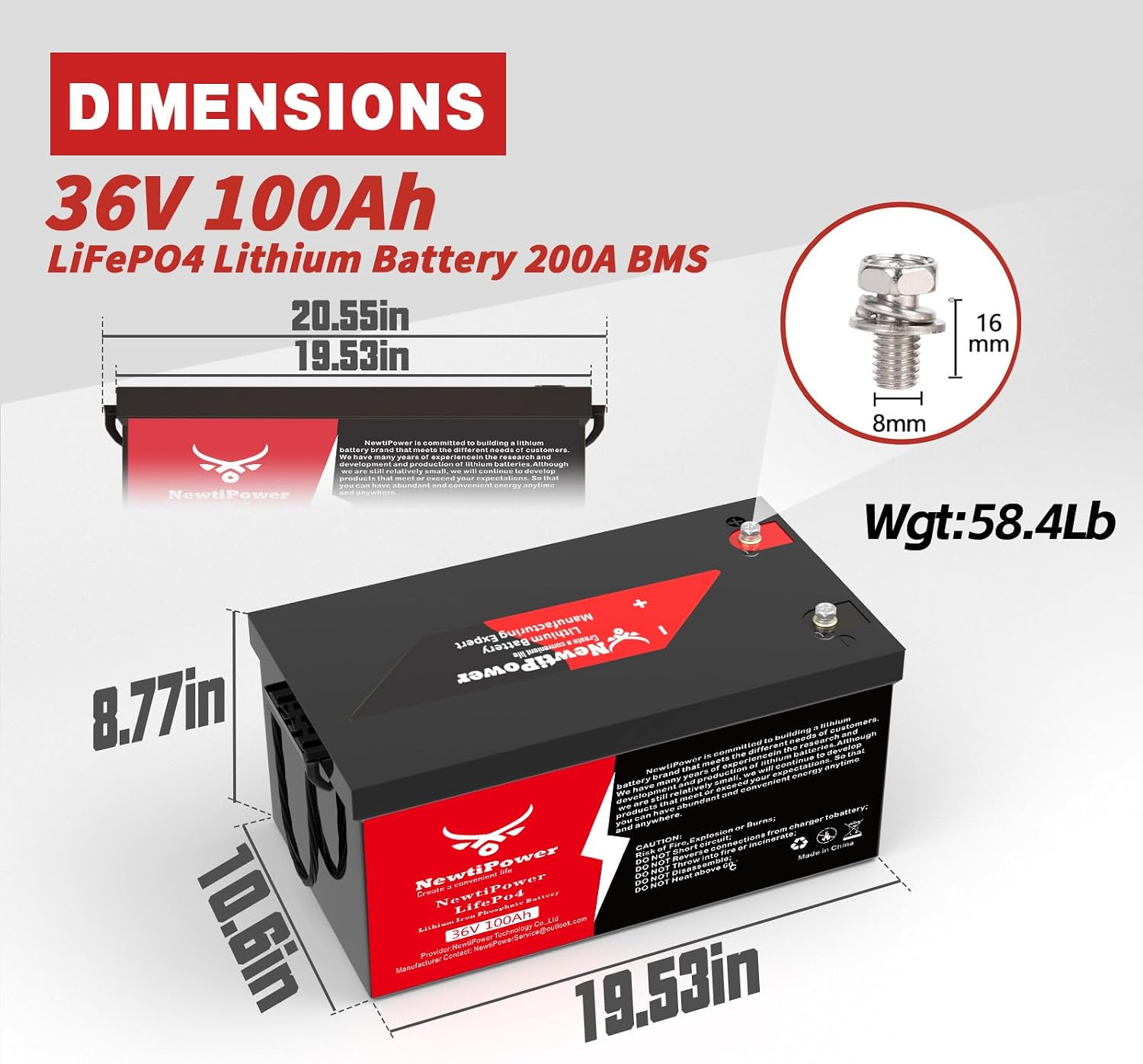
Image 4.1: Detailed dimensions of the NewtiPower 36V 100Ah LiFePO4 Battery.
5. Setup and Installation
5.1 Battery Installation
- Preparation: Ensure the area is clean and dry. Wear appropriate safety gear.
- Placement: Position the battery securely in the designated battery compartment. The compact size (18.98 x 10.51 x 8.66 inches) and lighter weight (58 lbs) facilitate easier installation compared to traditional lead-acid batteries.
- Connections: Connect the positive (+) terminal of the battery to the positive lead of your system and the negative (-) terminal to the negative lead. Ensure all connections are tight and secure.
- Parallel Connections (if applicable): The BMS supports parallel connections. For optimal performance and safety, ensure the following:
- Charge each battery separately until the voltage is consistent before connecting them in parallel.
- Use identical batteries with the same capacity (Ah) and BMS (A) from the same brand.
- It is recommended not to exceed 6 batteries in parallel.
Image 5.1: Diagram illustrating proper parallel connection of multiple batteries for increased capacity.
5.2 LCD Display Installation
- Mounting: Secure the LCD display in a convenient and visible location within your application (e.g., golf cart dashboard).
- Connection: Connect the display cable to the designated port on the battery.
Video 5.2: Demonstration of installing the LCD display and connecting it to the battery.
6. Operating Instructions
6.1 Charging the Battery
- Use Approved Charger: Always use the NewtiPower approved charger for your 36V LiFePO4 battery.
- Charging Temperature: The BMS will cut off charging if the temperature is below -30°C (-22°F) or above 75°C (167°F) to protect the battery.
- Charging Process: Connect the charger to the battery and a power source. The charger will automatically manage the charging process.

Image 6.1: Illustration of various charging methods, including generator, solar panel, and dedicated charger.
6.2 Discharging the Battery
- BMS Protection: The built-in 200A BMS protects against overdischarge, overcurrent, and short circuits.
- Continuous Current: The battery supports a 200A continuous discharge current and a 500A instantaneous current.
Image 6.2: The NewtiPower battery installed in a golf cart, demonstrating its power capabilities with 200A continuous and 500A peak current.
6.3 Monitoring Battery Status
- LCD Display: The included LCD display provides real-time information on battery status, including state of charge (SOC), voltage, current, and temperature.
- Mobile App: Utilize the dedicated mobile application to monitor battery parameters remotely via Bluetooth.
Video 6.3: A demonstration of the smart battery LCD display, showing various monitoring modes and real-time data.
7. Maintenance and Storage
- Regular Inspection: Periodically check battery terminals for cleanliness and tightness.
- Cleaning: Keep the battery clean and free from dirt and debris. Use a dry cloth for cleaning.
- Long-Term Storage: If storing the battery for an extended period, ensure it is charged to approximately 50% State of Charge (SOC) and stored in a cool, dry place away from direct sunlight and extreme temperatures.
- Avoid Deep Discharge: While the BMS protects against overdischarge, avoiding consistent deep discharges can prolong battery life.
8. Troubleshooting
If you encounter issues with your NewtiPower LiFePO4 battery, refer to the following common troubleshooting steps:
- Battery Not Charging:
- Verify that the charger is correctly connected to both the battery and the power outlet.
- Check the charging temperature. The BMS will prevent charging outside the safe temperature range (0°C to 50°C).
- Ensure the charger is functioning correctly.
- Low Power Output:
- Check the battery's State of Charge (SOC) using the LCD display or mobile app.
- Inspect all connections for tightness and corrosion.
- LCD Display Not Working:
- Ensure the display cable is securely connected to the battery.
- Check if the battery itself has sufficient charge to power the display.
- Mobile App Connectivity Issues:
- Ensure Bluetooth is enabled on your mobile device.
- Confirm that the battery is within Bluetooth range.
- Restart the mobile application and try reconnecting.
For issues not covered here, please contact NewtiPower customer support.
9. Warranty and Support
NewtiPower provides a 10-year warranty against manufacturing defects (non-human fault). For technical assistance, warranty claims, or any product-related inquiries, please contact NewtiPower customer support. We aim to respond to inquiries within 12 hours.
For further information, please visit the official NewtiPower website or refer to the contact details provided in your product documentation.
Ask a question about this manual
Ask about setup, troubleshooting, compatibility, parts, safety, or missing instructions. Manuals+ will review the question and use this page’s manual context to help answer it.