Introduction
This user manual provides comprehensive instructions for the installation, operation, and maintenance of your Kaishengyuan Upgraded Metal Phone Mount. Designed specifically for 2019+ RAM Truck 1500, 2500, 3500, and TRX models, this dash mount offers a secure and adjustable solution for holding your smartphone while driving. Please read this manual thoroughly before installation and use to ensure proper functionality and safety.
Safety Information
Always prioritize safety while driving. Ensure the phone mount is securely installed and your device is firmly held before operating your vehicle. Do not attempt to adjust the mount or your phone while driving. Keep your focus on the road. This product is not compatible with RAM Classic vehicles.
Package Contents
Please verify that all components are present before beginning installation:
- Metal Dash Mounting Base with Integrated 25mm Ball
- Stainless Steel Mounting Arm with 25mm Metal Socket Ends
- 25mm to 17mm Ball Adapter
- Flexible Phone Holder with Quick Release Button
- Accessory Bag (includes screws and wrench)
- Rubber Mat for Storage Box
Setup and Installation
Follow these steps carefully to install your Kaishengyuan phone mount:
Step 1: Remove Original Car Tray Mats
Gently remove the existing car tray mats from the dashboard storage area. This provides access to the mounting screws.

Image shows a hand lifting a car tray mat from the dashboard storage area.
Step 2: Remove Original Car Screws and Clean Dashboard Storage Box
Using an appropriate tool, remove the original screws from the dashboard storage box bottom. Clean the area with an alcohol wipe to ensure a clean surface for the new mount.
Image shows a screwdriver removing a screw from the dashboard storage box, and a hand cleaning the area with an alcohol wipe.
Step 3: Peel Off Adhesive Tape and Position Base
Peel off the adhesive tape from the bottom of the multifunctional slide rail base. Carefully position the base on the dashboard, aligning its holes with the factory holes already present in your RAM's dash.
Image shows a hand peeling adhesive tape from the base and another hand positioning the base on the dashboard.
Step 4: Install Screws
Use the screws provided in the accessory bag and the included wrench to securely fasten the base to the dashboard. Ensure it is tightened down firmly.
Image shows a hand using a wrench to tighten screws on the installed base.
Step 5: Attach 25mm to 17mm Adapter to Phone Holder
Connect the 25mm to 17mm ball adapter to the back of the flexible phone holder. Ensure it clicks or screws into place securely.
Image shows the 25mm to 17mm adapter being attached to the phone holder.
Step 6: Attach Adapter and Base Ball Head to Clamp Arm
Simultaneously attach the adapter (with phone holder) and the base ball head (from the dash mount) to the stainless steel clamp arm. Tighten the integrated thumbscrews on the clamp arm to secure both ball heads.
Image shows the phone holder assembly and the base ball head being connected to the central clamp arm.
Step 7: Place Phone Holder and Adjust Position
Place your smartphone into the phone holder. Adjust the position and angle of the phone holder using the 360° swivel mini ballhead and the adjustable clamp arm to achieve your desired viewing angle. The multifunctional slide rail base allows you to loosen a screw and move the ball head position along the rail for optimal placement.
Image shows a phone placed in the holder, with the mount fully assembled and positioned on the dashboard.
Step 8: Adjustable Rail Base Ball Head
The multifunctional slide rail base allows for flexible positioning. Loosen the screw on the base to slide the ball head to your preferred location along the rail, then tighten to secure it. This feature supports various DIY ball heads and equipment positions.

Diagram illustrating the multifunctional slide rail base with three ball head positions, showing how to loosen a screw to move the ball head.
Step 9: Install Rubber Mat
Finally, install the provided rubber mat to the bottom of the storage box, covering the installed base for a neat finish.
Image shows a hand placing the rubber mat into the dashboard storage box after the mount installation.
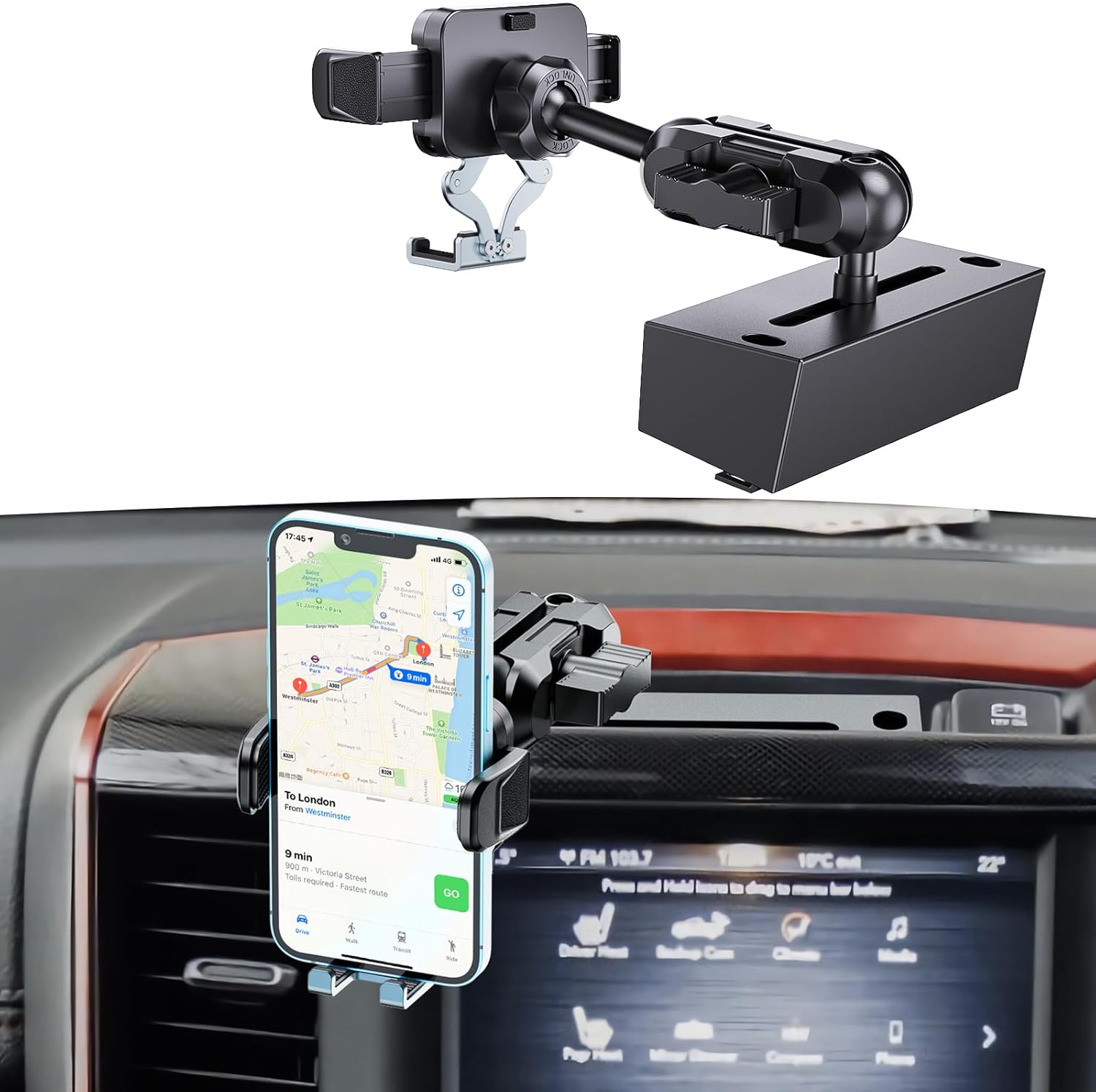
The Kaishengyuan Upgraded Metal Phone Mount securely installed on the dashboard of a Ram Truck, holding a smartphone.
Operating Instructions
Securing Your Smartphone
The phone holder features a quick-release button and adjustable clamp arms for universal compatibility with most smartphones (4-7 inches) and thick cases. To insert your phone:
- Press the quick-release button located on the side of the phone holder to open the clamp arms.
- Place your smartphone into the holder, ensuring it is centered and resting on the bottom support.
- Gently squeeze the clamp arms together until they firmly grip your phone. The holder is designed for one-handed operation.

Diagram illustrating the universal compatibility of the phone holder with various smartphone sizes and case types, and its one-handed operation feature.
Adjusting Viewing Angle
The mount offers extensive adjustability for optimal viewing:
- 360° Swivel Mini Ballhead: The phone holder is attached to a 360° swivel mini ballhead, allowing you to rotate your phone to portrait or landscape orientation and tilt it to any desired angle.
- Adjustable Clamp Arm: The stainless steel mounting arm can be adjusted to bring your phone closer or further away, and to raise or lower its height. Loosen the integrated thumbscrews on the clamp arm to adjust, then tighten to secure.
- Multifunctional Slide Rail Base: For broader positioning adjustments, loosen the screw on the dash mounting base to slide the ball head along the rail. This allows for precise placement within the dashboard area.

Diagram illustrating the 360° rotation and 180° tilt capabilities of the flexible and adjustable ball head, ensuring it does not block your view while driving.
Maintenance
To ensure the longevity and optimal performance of your phone mount:
- Cleaning: Wipe the mount regularly with a soft, damp cloth to remove dust and grime. Avoid using harsh chemicals or abrasive cleaners, which can damage the finish.
- Tightness Check: Periodically check all screws and connection points to ensure they remain tight, especially after driving on rough terrain. Re-tighten if necessary using the provided wrench.
- Storage: If removing the mount for extended periods, store it in a clean, dry place away from extreme temperatures.
Troubleshooting
If you encounter any issues with your Kaishengyuan phone mount, refer to the following common problems and solutions:
| Problem | Possible Cause | Solution |
|---|---|---|
| Mount feels loose or wobbly. | Screws are not fully tightened; ball heads are not secured. | Ensure all installation screws are tightened firmly. Check that the integrated thumbscrews on the clamp arm are fully tightened to secure the ball heads. |
| Phone does not fit in holder. | Phone size exceeds compatibility; clamp arms not fully extended. | Verify your phone size is between 4-7 inches. Press the quick-release button to fully extend the clamp arms before inserting your phone. |
| Mount blocks view. | Incorrect positioning or angle. | Adjust the 360° swivel ballhead and the adjustable clamp arm to find a position that does not obstruct your view of the road. Utilize the slide rail base for broader repositioning if needed. |
| Difficulty adjusting ball head on slide rail. | Screw not sufficiently loosened. | Ensure the screw on the multifunctional slide rail base is loosened enough to allow the ball head to slide freely. Tighten once desired position is achieved. |
Specifications
| Feature | Detail |
|---|---|
| Model Number | 60962US |
| Compatible Vehicles | 2019+ RAM Truck 1500/2500/3500 & TRX (Not for Classic) |
| Mounting Type | Dashboard |
| Compatible Phone Sizes | 4-7 inch Smartphones |
| Material | Aluminum Alloy (Base), Stainless Steel (Arm) |
| Adjustability | 360° Swivel Ballhead, Adjustable Clamp Arm, Multifunctional Slide Rail Base |
| Color | Black |
| Item Weight | 739 g |
| Dimensions (Parcel) | 24 x 18.39 x 7.19 cm |
Warranty and Support
Kaishengyuan products are manufactured with high-quality materials and undergo strict quality control. For specific warranty information or technical support, please refer to the product packaging or contact Kaishengyuan customer service through the retailer where the product was purchased. Please retain your proof of purchase for warranty claims.