
RehabRolls B004
RehabRolls Electric Wheelchair User Manual
Model: B004
1. Introduction
Welcome to the RehabRolls Electric Wheelchair user manual. This manual provides essential information for the safe and effective operation, maintenance, and care of your new electric wheelchair. Designed for adults, this lightweight and foldable motorized wheelchair offers enhanced mobility and independence with its powerful 500W motor and impressive 20-mile travel range.
Please read this manual thoroughly before using the wheelchair to ensure proper understanding of all features and safety guidelines. Keep this manual for future reference.

Image: The RehabRolls Electric Wheelchair in its operational state, showcasing its compact design and a folded version in the background for portability.

Image: A user seated in the electric wheelchair, illustrating its key performance specifications and design elements.
2. Safety Information
Your safety is paramount. Please adhere to all safety instructions to prevent injury or damage to the wheelchair.
- Always ensure the safety belt is securely fastened before operating the wheelchair.
- The anti-tip wheels must be properly installed to prevent the wheelchair from tipping backward, especially on inclines or uneven surfaces. These are located in the storage pouch on the back of the wheelchair.
- Familiarize yourself with the hand brakes and joystick controls before initial use.
- Avoid operating the wheelchair on excessively steep inclines or declines beyond its specified climbing gradient (9 degrees).
- Do not exceed the maximum load capacity of 264 lbs.
- Mileage and performance can be affected by user weight, terrain, and weather conditions.
- Statements regarding dietary supplements have not been evaluated by the FDA and are not intended to diagnose, treat, cure, or prevent any disease or health condition. This product is a mobility aid.

Image: A close-up view of the safety belt being fastened, emphasizing its importance for user security.
3. Package Contents
Upon unboxing, please verify that all components are present:
- 1 x Fully Assembled Electric Wheelchair
- 1 x User Manual (located in the storage pouch on the back of the wheelchair)
- 1 x Toolkit
- 2 x Anti-tip Wheels (located in the storage pouch on the back of the wheelchair)
- 1 x Charger
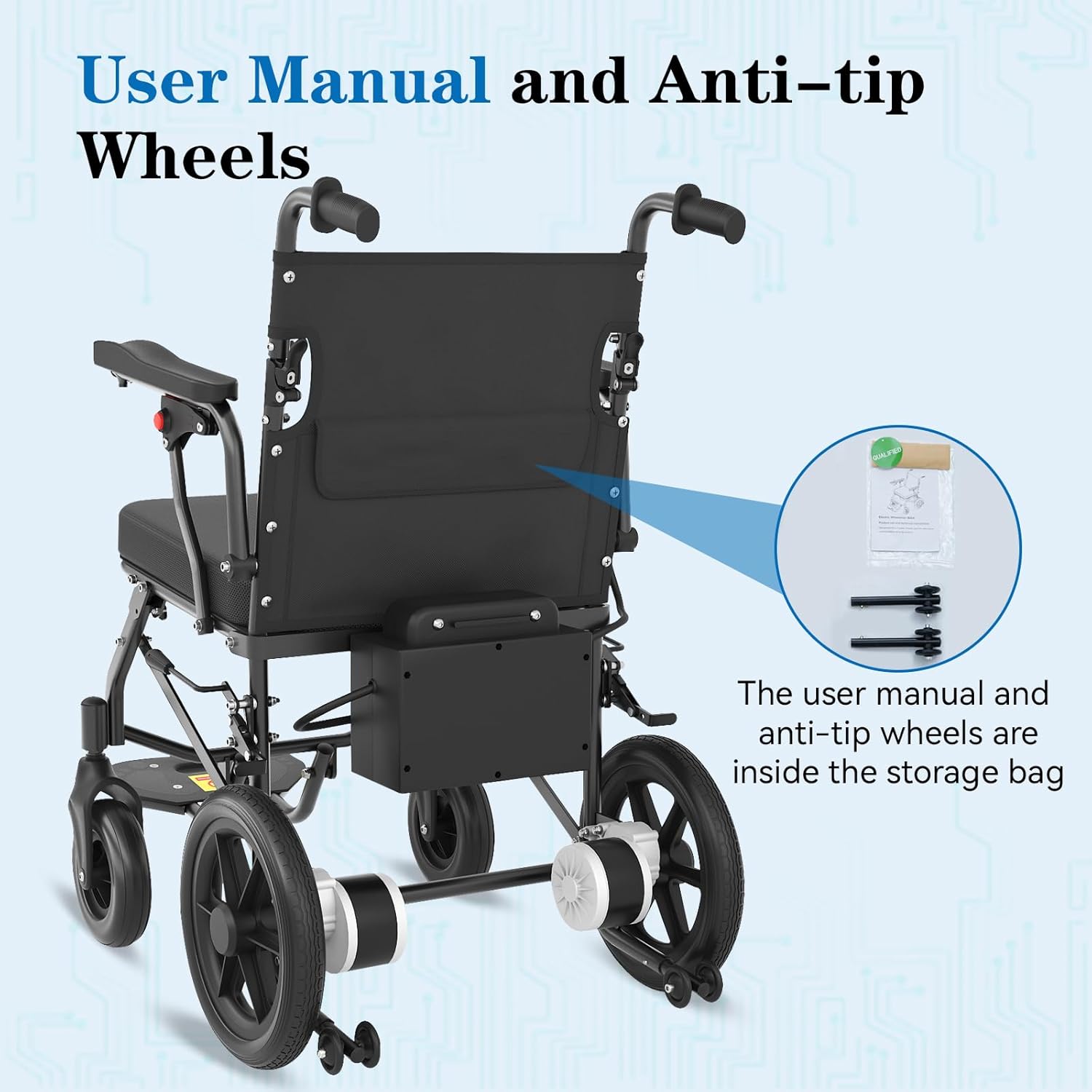
Image: The rear of the wheelchair, indicating the location of the storage pouch where the user manual and anti-tip wheels are stored.
4. Setup
4.1 Unfolding the Wheelchair
- Carefully remove the wheelchair from its packaging.
- Place the folded wheelchair on a flat, stable surface.
- Grasp the frame and gently pull the sides apart until the wheelchair fully unfolds and locks into place. Ensure all locking mechanisms are engaged.
- Lower the seat and footrest into position.
- Adjust the armrests if necessary.
4.2 Installing Anti-Tip Wheels
The anti-tip wheels provide additional stability and are crucial for safe operation. Locate them in the storage pouch and attach them to the designated points at the rear of the wheelchair frame, ensuring they are securely fastened.

Image: Visual guide demonstrating the simple steps to fold the wheelchair for convenient transport and storage.
5. Operating Instructions
5.1 Powering On and Off
To power on the wheelchair, press the power button on the joystick control. The battery indicator lights will illuminate. To power off, press and hold the power button until the lights turn off.
5.2 Using the Joystick Control
The wheelchair is equipped with a responsive 360-degree joystick for easy maneuvering. Gently push the joystick in the desired direction to move. Release the joystick to automatically engage the electromagnetic brakes and stop the wheelchair.
- Speed Control: Use the '+' and '-' buttons on the joystick to adjust the speed settings. The wheelchair has a top speed of 5.5 MPH.
- Battery Display: Monitor the battery level via the indicator lights on the joystick.
- Horn: Press the horn button to alert others.
- Controller Mounting: The joystick controller can be mounted on either the right or left armrest to suit user preference.

Image: Detailed view of the intuitive joystick control panel, showing all operational buttons and indicators.

Image: The interchangeable design of the joystick, allowing it to be positioned on either the left or right armrest for user convenience.
5.3 Travel Range and Terrain
The RehabRolls Electric Wheelchair offers an impressive travel range of up to 20 miles on a single charge, providing extended independence. Its powerful 2*250W motors enhance off-road capability, making it suitable for various terrains.
- Suitable for indoor use due to its small turning radius.
- Capable of navigating bumpy roads, parks, courtyards, and typical living spaces.
- Maximum climbing gradient: 9 degrees.

Image: Collage illustrating the wheelchair's versatility across various indoor and outdoor terrains.
5.4 Additional Features
- Liftable Armrest: The folding armrest design allows for easy transfer into and out of the wheelchair.
- Thick Padded Seat: Provides comfort and support for extended periods of sitting.
- Storage Bag: A convenient storage bag with reflective stripes is located on the back of the wheelchair.

Image: Demonstration of the liftable armrest feature, enhancing ease of access for the user.
5.5 Product Overview Video
Video: An official overview of the RehabRolls Electric Wheelchair, demonstrating its features, portability, and ease of use in various settings.
6. Maintenance
Regular maintenance ensures the longevity and optimal performance of your RehabRolls Electric Wheelchair.
- Cleaning: Wipe down the frame and components with a damp cloth. Avoid using abrasive cleaners or excessive water.
- Battery Care: Charge the battery regularly, even if the wheelchair is not in frequent use, to maintain battery health. Avoid fully discharging the battery.
- Tire Inspection: Periodically check the 12" aluminum alloy wheels and tires for wear and tear. Ensure they are free from debris.
- Joints and Fasteners: Inspect all joints, bolts, and fasteners regularly to ensure they are tight and secure. Tighten any loose components.
- Storage: When not in use, store the wheelchair in a dry, cool place, away from direct sunlight and extreme temperatures.
7. Troubleshooting
If you encounter any issues with your RehabRolls Electric Wheelchair, refer to the following common troubleshooting tips:
- Wheelchair not powering on: Check if the battery is charged and properly connected. Ensure the power button on the joystick is pressed correctly.
- Loss of power or reduced range: This may indicate a low battery. Fully charge the battery. If the issue persists, the battery may need replacement.
- Unresponsive joystick: Ensure all connections to the joystick are secure. If the joystick is damaged, contact customer support for assistance.
- Unusual noises: Inspect the wheels and motors for any obstructions or loose parts. If the noise continues, discontinue use and contact support.
- Difficulty folding/unfolding: Check for any obstructions in the folding mechanism. Ensure all release levers are properly engaged.
For issues not listed here or if troubleshooting steps do not resolve the problem, please contact RehabRolls Customer Support.
8. Specifications
| Feature | Specification |
|---|---|
| Product Dimensions (Unfolded) | 38.9"D x 24.4"W x 36.2"H |
| Item Weight | 50.6 Pounds |
| Motor Power | 2 x 250W (500W total) |
| Travel Range | Up to 20 Miles |
| Top Speed | 5.5 MPH |
| Load Capacity | 264 LBS |
| Battery | 24V 20AH (Lithium) |
| Charging Time | Approx. 7 Hours |
| Wheel Type | 12" Aluminum Alloy Wheels |
| Climbing Gradient | Max 9 degrees |
| Model Number | B004 |
| Color | Black |
9. Warranty and Support
RehabRolls is committed to providing high-quality products and excellent customer service. For any inquiries, technical support, or warranty claims, please contact us using the information below:
- Email: 24 Technical Support (Specific email not provided, refer to product documentation)
- Phone: +1 833 362 0602 (Mon-Fri 9am-5pm EST)
Please have your model number (B004) and purchase details ready when contacting support.

Image: RehabRolls Customer Support contact details for assistance.
Related Documents - B004
 |
RehabRolls Electric Wheelchair B004 User Manual and Technical Instructions Comprehensive guide for the RehabRolls Electric Wheelchair B004, covering product use, technical specifications, assembly, maintenance, troubleshooting, and after-sales service. |
 |
RoomART MILANO Desk Assembly Instructions Detailed assembly instructions for the RoomART MILANO desk, including parts list, hardware, and step-by-step guidance for building the furniture. |
 |
Electronic Time Recorder Instruction Manual - Setup, Features, and Troubleshooting Comprehensive instruction manual for the Electronic Time Recorder, covering setup, function options, detailed settings, troubleshooting, and specifications. Learn how to configure pay periods, time signals, and more. |
 |
Tripp Lite 2-Port DisplayPort 1.2 KVM Switch The Tripp Lite B004-DP2UA2-K is a 2-port KVM switch designed to enhance workspace efficiency. It allows users to control two computers from a single DisplayPort console and share USB peripherals. It supports DisplayPort 1.2, UHD resolutions up to 3840x2160 @ 60Hz, and is compatible with Windows, Mac, and Linux. |
 |
Minis Forum Mini PC User Manual: Installation, Safety, and Support Official user manual for Minis Forum Mini PC. Includes VESA mount installation guide, essential safety precautions, maintenance tips, frequently asked questions (FAQ), FCC compliance statements, and contact information for Micro Computer (HK) Tech Limited. |
Ask a question about this manual
Ask about setup, troubleshooting, compatibility, parts, safety, or missing instructions. Manuals+ will review the question and use this page’s manual context to help answer it.