
1. Introduction
This manual provides essential information for the proper use, installation, and maintenance of the PowerParts replacement body for the Silvercrest SGR 150 series meat grinders. Please read these instructions carefully before use to ensure safe and efficient operation.
This replacement part is designed for the following Silvercrest SGR 150 models:
- SGR 150 C1
- SGR 150 C2
- SGR 150 D1
- SGR 150 E1
- SGR 150 E2
It is also compatible with devices identified by the following IAN numbers:
- IAN 273263
- IAN 281307
- IAN 289440
- IAN 330806
- IAN 351602
- IAN 384106
- IAN 440465
- IAN 406251
2. Safety Instructions
Always observe the following safety precautions when handling or installing the meat grinder body:
- Ensure the main meat grinder unit is unplugged from the power source before installation or removal of any parts.
- Handle all components with care to prevent damage or injury.
- Keep hands clear of moving parts during operation of the main unit.
- This part is not a toy. Keep out of reach of children.
- Do not attempt to modify the part. Use only as intended.
3. Product Overview
The meat grinder body is a crucial component of your Silvercrest SGR 150 meat grinder, designed to house the grinding mechanism and guide ingredients. This replacement part ensures the continued functionality of your appliance.
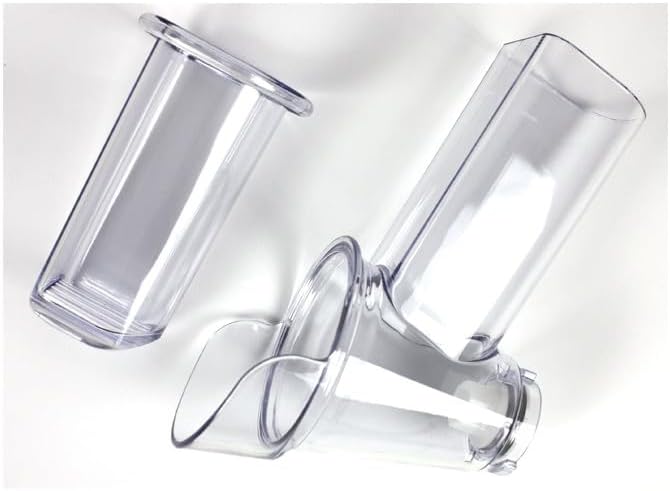
Figure 1: Components of the Silvercrest SGR 150 meat grinder body. The image displays two clear plastic parts: a main body with an angled feed opening and a separate, cylindrical feeder tube. These parts are essential for assembling the meat grinder's front section.
4. Setup and Installation
- Preparation: Ensure the main meat grinder unit is turned off and unplugged.
- Disassembly (if replacing): If replacing an existing body, carefully remove the old body and any associated components (e.g., auger, blade, grinding plates, locking ring) from the main unit.
- Assembly of new body:
- Insert the auger (screw) into the new meat grinder body.
- Place the cutting blade onto the auger shaft, ensuring it faces the correct direction (sharp edge outwards).
- Position the desired grinding plate over the blade.
- Secure these components with the locking ring, tightening it firmly but not excessively.
- Attachment to main unit: Align the assembled meat grinder body with the drive shaft opening on the main motor unit. Push it firmly into place and secure it according to your specific meat grinder model's locking mechanism (e.g., twist-lock, lever).
- Feeder Tube: Insert the feeder tube into the top opening of the meat grinder body.
Refer to your original meat grinder's instruction manual for detailed assembly steps of internal components if needed.
5. Operating Instructions
The meat grinder body itself does not have operational controls. Its function is passive, serving as the housing for the grinding mechanism. Once installed, operate your meat grinder according to the instructions provided with the main appliance.
- Ensure all parts are correctly assembled and securely fastened before plugging in and operating the meat grinder.
- Use the feeder tube and pusher to guide ingredients into the grinder. Never use your hands or fingers.
- Do not overload the grinder.
6. Maintenance and Cleaning
Proper cleaning and maintenance will extend the life of your meat grinder body and ensure hygienic food preparation.
- Disassembly: After each use, unplug the meat grinder and carefully disassemble the meat grinder body from the main unit. Remove the feeder tube, locking ring, grinding plate, blade, and auger.
- Cleaning: Wash all removable parts, including the meat grinder body, in warm, soapy water. Use a brush to remove any food residue.
- Rinsing: Rinse all parts thoroughly under running water to remove soap.
- Drying: Dry all parts immediately and completely with a soft cloth to prevent water spots or mineral buildup. Do not allow parts to air dry, as this can lead to corrosion on metal components (though this body is plastic, it's good practice for the whole assembly).
- Storage: Store the clean, dry meat grinder body and its components in a dry place until next use.
Note:
- Do not wash the meat grinder body or other components in a dishwasher unless explicitly stated in your original appliance manual, as high temperatures can cause warping or damage.
- Avoid using abrasive cleaners or scouring pads, which can scratch the surface.
7. Troubleshooting
If you encounter issues related to the meat grinder body, consider the following:
- Difficulty attaching the body: Ensure the body is correctly aligned with the main unit's drive shaft and that no obstructions are present. Check for any damage to the locking mechanism.
- Food leakage from the body: Verify that all internal components (auger, blade, plate) are correctly installed and the locking ring is tightened securely.
- Unusual noises: Disassemble and reassemble the body, ensuring all parts are correctly seated. If the noise persists, it may indicate an issue with the main motor unit or other internal components, not the body itself.
For issues not related to the body, refer to the troubleshooting section of your main Silvercrest SGR 150 meat grinder manual.
8. Specifications
| Attribute | Detail |
|---|---|
| Brand (Replacement Part) | PowerParts |
| Compatible Appliance Brand | Silvercrest (Lidl) |
| Compatible Models | SGR 150 C1, C2, D1, E1, E2 |
| Compatible IANs | 273263, 281307, 289440, 330806, 351602, 384106, 440465, 406251 |
| Material | Durable Plastic (Body), Stainless Steel (for associated internal components) |
| Item Weight | 100 grams |
Note: While some product specifications may list "Stainless Steel" for material, the visible body component is made of durable transparent plastic. Stainless steel likely refers to other internal components of the complete meat grinder assembly.
9. Warranty and Support
For warranty information and customer support regarding this PowerParts replacement component, please refer to the documentation provided with your purchase or contact the seller directly. For issues concerning the main Silvercrest SGR 150 meat grinder unit, please consult the original manufacturer's support channels.
Spare parts availability information is currently unavailable.


