
1. Introduction and Overview
The LG 22 Inch (55cm) FHD Monitor (Model: 22MR410-B.ATRQ) is designed to provide a superior visual experience for both work and entertainment. Featuring a 1920 x 1080 Full HD resolution, this monitor delivers crisp and clear images. Key features include a 100Hz refresh rate for fluid visuals, AMD FreeSync technology for tear-free gaming, and sRGB 99% (Typ) color coverage for accurate color reproduction. It also incorporates eye comfort technologies like Reader Mode and Flicker Safe, along with convenient OnScreen Control software.

Front view of the LG 22 Inch FHD Monitor.
2. Setup Guide
2.1 Package Contents
- LG 22 Inch FHD Monitor
- Power Cable
- HDMI Cable
- Stand Base and Neck
- User Manual (this document)
2.2 Assembling the Stand
- Carefully place the monitor face down on a soft, clean surface to prevent scratches.
- Attach the stand neck to the monitor panel, ensuring it clicks securely into place.
- Connect the stand base to the stand neck and tighten the screw at the bottom of the base.
2.3 Connecting Cables
Connect the necessary cables to the monitor's rear ports. The monitor supports HDMI and VGA inputs.

Rear view of the monitor showing HDMI, VGA, and audio ports.
- Power Cable: Connect the power cable to the monitor's power input and then to a wall outlet.
- HDMI Cable: For digital video and audio, connect the included HDMI cable from your computer's HDMI output to the monitor's HDMI input.
- VGA Cable: For analog video, connect a VGA cable (not included) from your computer's VGA output to the monitor's VGA input.
- Headphone Output: Connect your headphones or external speakers to the 3.5mm audio jack for sound.
3. Operating the Monitor
3.1 Power On/Off
Press the power button located on the bottom center of the monitor to turn it on or off.
3.2 Display Features
- Full HD (1920x1080): Experience clear and detailed visuals with Full HD resolution.
- 100Hz Refresh Rate: Enjoy smoother motion and reduced blur, ideal for fast-paced content and gaming.

Visual representation of Full HD resolution, 100Hz refresh rate, and AMD FreeSync technology.
- sRGB 99% (Typ): Ensures accurate and vibrant color reproduction, crucial for creative tasks.
- Virtual Borderless Design: The slim bezels on three sides provide an immersive viewing experience and are ideal for multi-monitor setups.

The monitor's 3-side borderless design and ergonomic tilt adjustment for comfortable viewing.
3.3 Eye Comfort Features
The monitor includes features to reduce eye strain during prolonged use:
- Reader Mode: Adjusts color temperature to warmer tones and reduces blue light emissions, providing a more comfortable reading experience.
- Flicker Safe: Minimizes invisible flickering on the screen, helping to prevent eye strain and fatigue.

Illustration of Reader Mode for reduced blue light and Flicker Safe for comfortable viewing.
3.4 Gaming Features
- AMD FreeSync: Synchronizes the monitor's refresh rate with your graphics card's output, eliminating screen tearing and stuttering for a smooth gaming experience.
- Black Stabilizer: Enhances visibility in dark scenes, allowing you to spot enemies or objects hidden in shadows.

Visuals demonstrating the benefits of AMD FreeSync for smooth gameplay and Black Stabilizer for improved visibility in dark areas.
3.5 OnScreen Control Software
The OnScreen Control software simplifies monitor settings adjustments. You can easily fine-tune brightness, contrast, color, and other settings directly from your connected PC, eliminating the need to use physical buttons on the monitor. It also offers a Screen Split feature for efficient window management.
3.6 Official Product Video
An official overview video highlighting the key features of the LG 22MR410 monitor, including its Full HD resolution, AMD FreeSync, and 100Hz refresh rate.
4. Maintenance
4.1 Cleaning the Monitor
- Always unplug the monitor before cleaning.
- Use a soft, lint-free cloth slightly dampened with water or a mild, non-abrasive screen cleaner.
- Do not spray liquid directly onto the screen.
- Wipe the screen gently to remove dust and smudges.
4.2 General Care
- Avoid placing heavy objects on the monitor or its cables.
- Keep the monitor away from direct sunlight, heat sources, and excessive moisture.
- Ensure proper ventilation around the monitor to prevent overheating.
5. Troubleshooting
If you encounter issues with your LG monitor, refer to the following common troubleshooting tips:
- No Display/Power: Check if the power cable is securely connected to both the monitor and the power outlet. Ensure the power outlet is functional.
- No Signal: Verify that the video cable (HDMI/VGA) is firmly connected to both the monitor and your computer. Ensure the correct input source is selected on the monitor.
- Flickering Screen: Check the video cable connection. If using a long cable, try a shorter one. Ensure your graphics card drivers are up to date. Enable Flicker Safe mode if not already active.
- Image Quality Issues (Blurry/Distorted): Ensure the monitor's resolution is set to its native 1920x1080. Adjust brightness, contrast, and color settings using the OnScreen Control software.
- Sound Issues: If using the headphone output, ensure your headphones/speakers are properly connected and functional. Check audio settings on your computer and the monitor.
For more detailed troubleshooting or persistent issues, please contact LG customer support.
6. Specifications
| Feature | Description |
|---|---|
| Brand | LG |
| Model Number | 22MR410-B.ATRQ |
| Screen Size | 22 Inches (55cm) |
| Resolution | 1920 x 1080 (Full HD) |
| Refresh Rate | 100Hz |
| Panel Type | VA |
| Color Gamut | sRGB 99% (Typ) |
| Adaptive Sync | AMD FreeSync |
| Connectivity | 1 x HDMI, 1 x VGA |
| Included Components | Power Cable, HDMI Cable |
| Item Weight | 2.46 kg |
| Product Dimensions | 508 x 1249.43 x 960.37 cm (Note: These dimensions seem unusually large for a 22-inch monitor, likely referring to packaging or shipping dimensions. Actual monitor dimensions are typically much smaller.) |
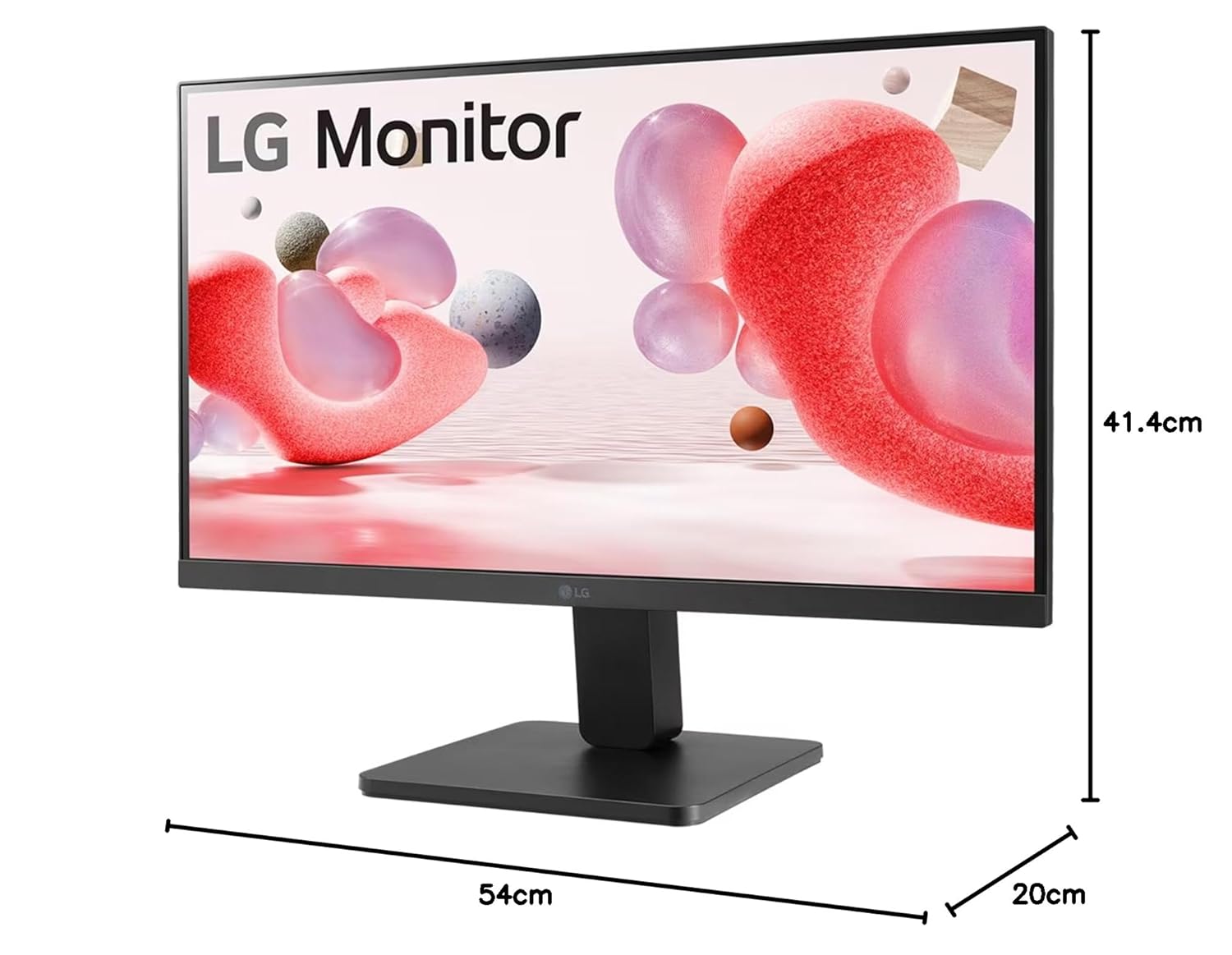
Diagram showing the approximate dimensions of the LG 22 Inch FHD Monitor.
7. Warranty and Support
7.1 Warranty Information
This LG monitor comes with a 3 Years Parts & Labor warranty from the manufacturer. Please retain your proof of purchase for warranty claims.
7.2 Customer Support
For technical assistance, warranty service, or product inquiries, please contact LG customer support:
- Email: serviceindia@lge.com
- Toll-Free Numbers: 08069379999 / 1800-315-9999
- SMS: 5757554
- Online Support: Visit the official LG India website for support resources and FAQs.