
1. Product Overview
The Avantree Medley Pebble is a complete wireless audio solution designed for enhanced TV listening. Featuring open-ear earbuds, a versatile transmitter, and a convenient charging dock, it provides clear audio without isolating you from your surroundings. Its advanced LE Audio technology ensures a perfectly synced audio and visual experience with no lip-sync delays.

Image: Avantree Medley Pebble earbuds and charging dock, showcasing the compact design.
Key features include:
- Low Latency LE Audio: Ensures audio and video are perfectly synchronized.
- Open-Ear Design: Sits comfortably on your ears, allowing awareness of surroundings.
- Versatile Connectivity: Compatible with TVs via optical, AUX, or built-in Bluetooth.
- Soundbar Pass-Through: Allows simultaneous listening through earbuds and an external soundbar.
- Extended Playtime: Up to 10 hours of continuous use.
2. Setup Guide
Setting up your Avantree Medley Pebble is designed to be straightforward. For an interactive guide, scan the QR code provided with your product or refer to the video below.
Video: Interactive User Guide for Avantree Medley Pebble TV Earbuds. This video provides step-by-step instructions for initial setup and troubleshooting.
2.1 Connecting the Transmitter to Your TV
The Medley Pebble transmitter supports various audio outputs from your TV:
- Optical (TOSLINK): For digital audio. Ensure your TV's audio output is set to PCM / Stereo when using optical.
- AUX (3.5mm): For analog audio.
- Built-in Bluetooth (for Smart TVs): If your Smart TV has built-in Bluetooth, the earbuds can connect directly, and the transmitter acts as a charging dock only.

Image: Diagram illustrating compatible TV audio outputs (Optical, AUX, Smart TV Bluetooth) and unsupported HDMI connections.
When using the transmitter, connect the audio cable to the port labeled "Input from TV."

Image: Close-up showing how to connect an optical cable to the transmitter's input port.
2.2 Initial Pairing
The earbuds and transmitter are pre-paired from the factory. Simply turn on the transmitter and place the earbuds in the charging dock. They should connect automatically. The LED indicator on the earbuds will turn solid white when connected.

Image: Illustration of the ON/OFF switch located on the transmitter base.

Image: Close-up of an earbud highlighting the LED indicator light.
2.3 Using with Smart TVs (Direct Bluetooth)
For Smart TVs with built-in Bluetooth, you can pair the Medley Pebble earbuds directly. In this scenario, the transmitter dock functions solely as a charging station and does not need to be powered on for audio transmission.

Image: Screenshot of a Smart TV's Bluetooth speaker list, showing available devices for pairing.
3. Operating Instructions
3.1 Wearing the Earbuds
The open-ear design of the Medley Pebble earbuds ensures a pressure-free fit that rests lightly and securely on your ears. This design allows you to hear TV audio clearly while remaining aware of your surroundings.

Image: A man wearing the Avantree Medley Pebble earbuds, demonstrating the open-ear fit for clear voice reception.
3.2 LE Audio Benefits
Utilizing LE Audio (Bluetooth 5.3), the Medley Pebble provides low latency audio, eliminating lip-sync delays for a seamless viewing experience. This technology also allows simultaneous connection to both the transmitter and your phone, enabling effortless switching between devices.

Image: A man watching TV with the earbuds, illustrating the absence of audio delay.

Image: Earbuds shown with a smartphone, indicating independent Bluetooth pairing capability.
3.3 Battery Life and Charging
The earbuds offer up to 10 hours of play time on a single charge. When the battery is low, simply place the earbuds back into the charging dock. A full charge typically takes about 1.5 hours.

Image: Charging dock with a '10H' icon, representing the extended playtime of the earbuds.
3.4 Soundbar Pass-Through Feature
The transmitter's pass-through feature allows you to listen to TV audio through your Medley Pebble earbuds at your preferred volume, while others can simultaneously listen through an external soundbar or TV speakers.
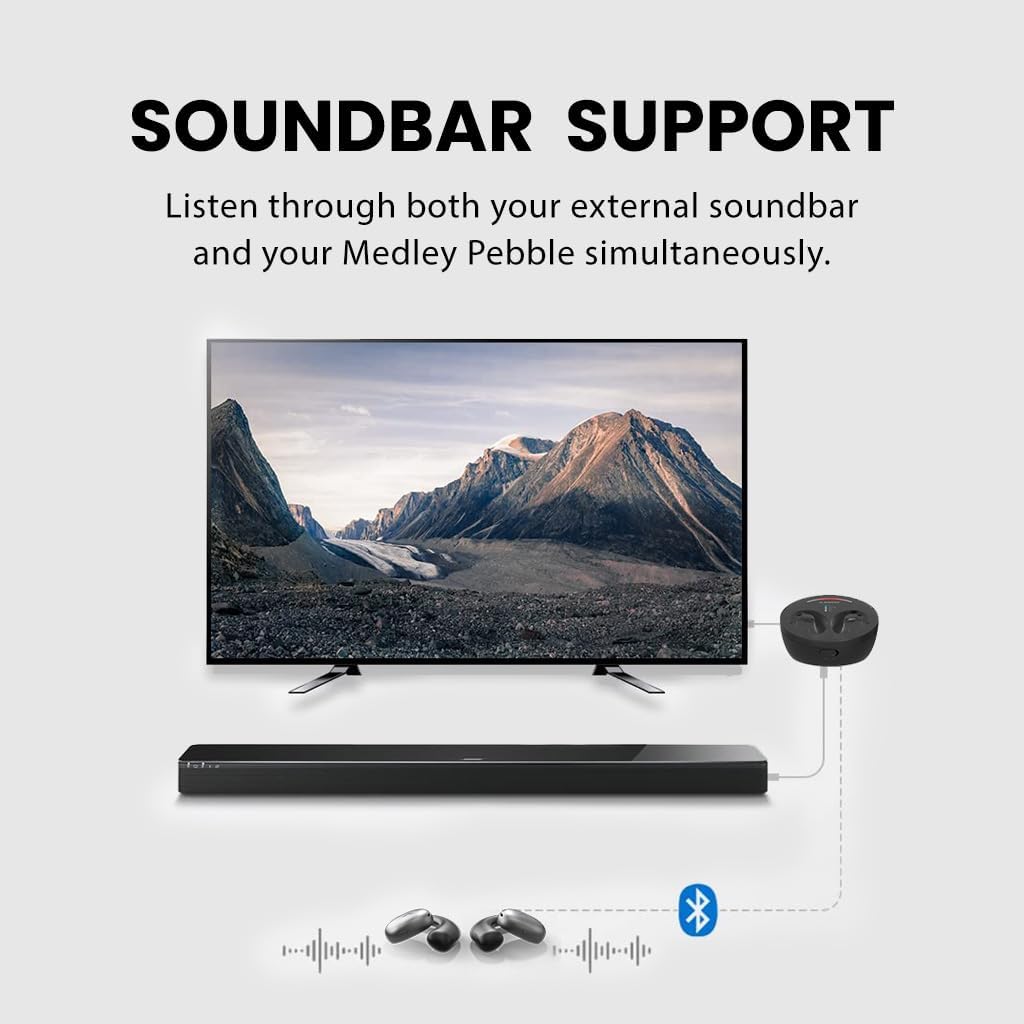
Image: Diagram showing the connection of the transmitter to a TV and soundbar, enabling simultaneous audio output.
4. Maintenance
To ensure the longevity and optimal performance of your Avantree Medley Pebble, follow these maintenance guidelines:
- Cleaning: Use a soft, dry cloth to clean the earbuds and charging dock. Avoid using abrasive cleaners or solvents.
- Storage: Store the earbuds in their charging dock when not in use to protect them and keep them charged.
- Temperature: Avoid exposing the device to extreme temperatures (hot or cold) or high humidity.
- Charging Contacts: Periodically check and gently clean the charging contacts on both the earbuds and the dock to ensure a good connection.
5. Troubleshooting
If you encounter issues with your Medley Pebble, please refer to the interactive user guide video in the Setup section (Section 2) for detailed troubleshooting steps. Here are some common issues and solutions:
- No Sound:
- Ensure all cables are securely connected to the correct input/output ports.
- Verify your TV's audio output settings. If using optical, set the TV's audio format to PCM / Stereo.
- Check if the transmitter is powered on and the earbuds are properly seated in the dock and connected.
- Pairing Issues:
- Ensure the earbuds are close to the transmitter or your Bluetooth-enabled TV during pairing.
- Try resetting both the earbuds and the transmitter (refer to the interactive guide for specific reset procedures).
- Audio Delay (Lip-Sync):
- The Medley Pebble uses LE Audio for low latency. Ensure your TV's audio settings are not introducing additional processing delays.
- Confirm the connection is stable.
For further assistance, please contact Avantree customer support.
6. Specifications
| Feature | Detail |
|---|---|
| Model Name | Medley Pebble |
| Model Number | BTHT-6126 |
| Connectivity Technology | Bluetooth, Optical, 3.5mm AUX |
| Bluetooth Version | 5.3 |
| Bluetooth Range | 10 Meters |
| Battery Life (Earbuds) | 10 Hours |
| Charging Time | 1.5 Hours |
| Ear Placement | Open Ear |
| Control Type | Button Control |
| Item Weight | 1.23 pounds |
7. Warranty and Support
Avantree products come with a standard warranty, typically 12-24 months depending on region and purchase. You may be able to register your product for an extended warranty by scanning the QR code provided with your product or visiting the Avantree website.

Image: Back of the product box displaying manufacturer details and warranty information.
For technical support, warranty claims, or any inquiries, please visit the official Avantree website or contact their customer service directly. Contact information is usually available on the product packaging or the official website.