
Bestier 618E
Bestier Gaming Desk Model 618E Instruction Manual
Model: 618E
Introduction
The Bestier Gaming Desk Model 618E is designed to provide a functional and ergonomic workspace for gaming and productivity. This manual offers detailed instructions for assembly, operation, maintenance, and troubleshooting to ensure optimal use of your desk.

Image showing the Bestier Gaming Desk Model 618E fully assembled with multiple monitors and accessories, highlighting its L-shaped design and integrated features.
Safety Information
Please read and adhere to the following safety guidelines before assembly and during use:
- Keep all liquids away from the integrated power outlets to prevent electrical hazards.
- Exercise caution when assembling and moving the desk due to its weight and size. It is recommended to have assistance during these processes.
- Anchor the desk to a wall if necessary to prevent tipping, especially in households with children or pets.
- Be aware that the LED lights may generate a small amount of heat during prolonged operation. Ensure adequate ventilation.
Package Contents
Verify that all components are present before beginning assembly. A detailed parts list is included in the separate assembly guide provided with your desk. Key integrated components include:
- Integrated Power Outlet with USB Ports
- LED Light Strip
- Foldable Cup Holder
- Headphone Hook
- Monitor Stand
- Adjustable Metal Shelf
Setup and Assembly
Your Bestier Gaming Desk Model 618E requires assembly. All necessary tools and detailed instructions are included in the packaging. Please follow the step-by-step guide carefully to ensure correct and safe assembly.
Key considerations during assembly:
- Ensure all screws and fasteners are tightened securely.
- Refer to the dimension diagram to plan your workspace layout effectively.
- The L-shaped design can be configured to suit your room's corner orientation.

Diagram illustrating the dimensions of the Bestier Gaming Desk Model 618E, including overall length, width, height, and individual shelf measurements.
Operating Instructions
Integrated Power Outlet
The desk features a built-in power strip for convenient device charging and power supply.
- AC Outlets: 4 outlets, 120V/12A, Rated Power: 1500W.
- USB Charging Ports: 2 ports, 5V 2.2A.
- A power switch is included to control the power supply to all outlets.

Close-up view of the integrated power outlet on the Bestier Gaming Desk, showing 4 AC outlets, 2 USB charging ports, and the power switch.
LED Lighting System
The desk includes an RGB LED light strip under the monitor stand to enhance your environment.
- Colors: 20 static color options.
- Modes: 22 dynamic lighting modes.
- Adjustable speed and brightness settings are available via the included controller.
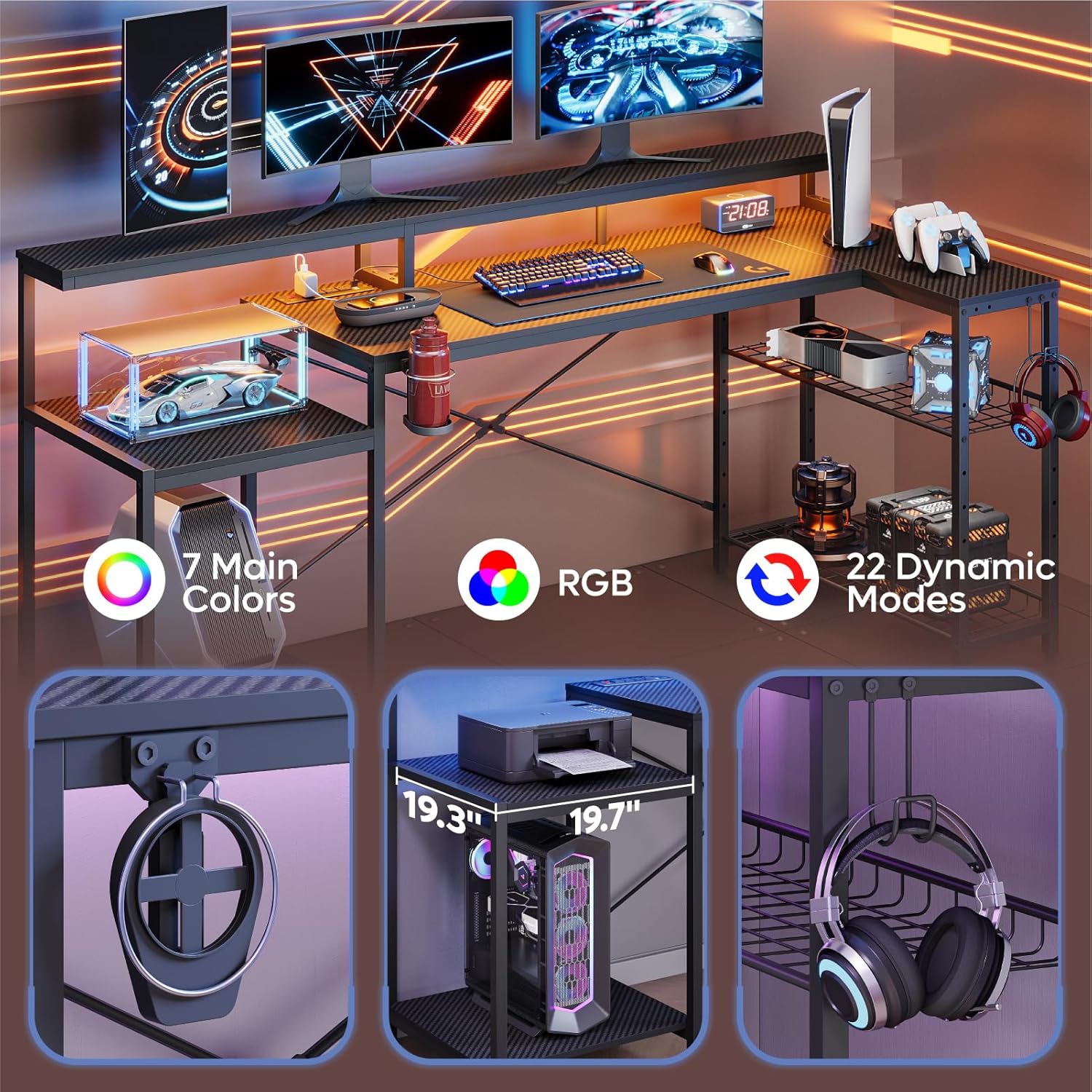
Image detailing the LED lighting strip under the monitor stand, along with the foldable cup holder, headset hook, and dedicated space for a PC tower.
Adjustable Metal Shelf
The desk features an adjustable metal shelf for flexible storage solutions.
- The shelf can be adjusted to over 3 different heights.
- It can also be tilted to your preferred angle for accessibility or display.
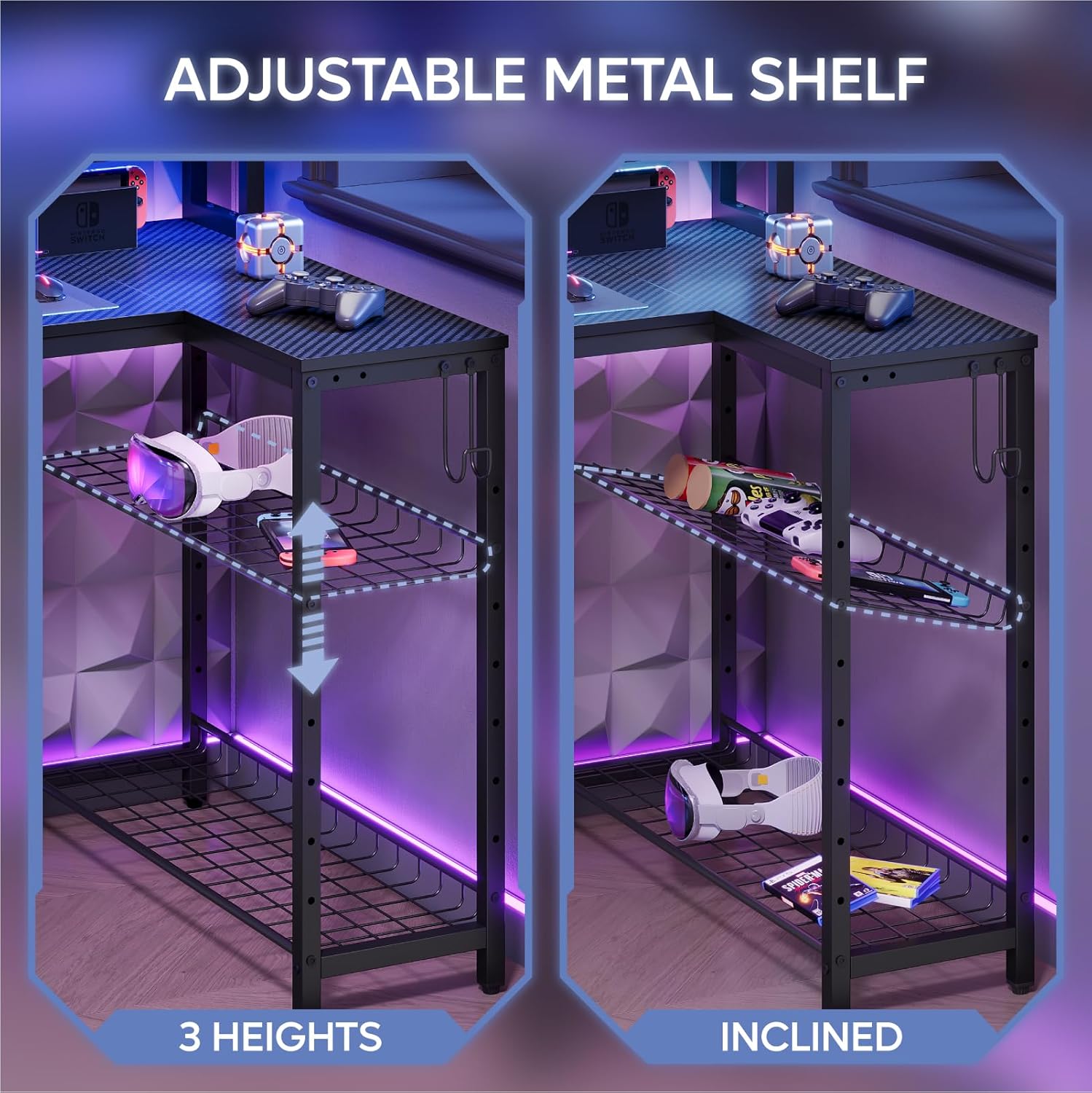
Illustration demonstrating the adjustable metal shelf, showing its three height positions and the ability to tilt for varied storage needs.
Cup Holder and Headset Hooks
For convenience, the desk includes a foldable cup holder and headset hooks.
- Both accessories offer 3 installation positions to suit your preference.
Ergonomic Monitor Stand
The integrated monitor stand is designed to elevate your monitors to an ergonomic height, promoting better posture and reducing strain.

Diagram illustrating the ergonomic benefits of the integrated monitor stand, showing improved posture compared to a desk without a stand.
Maintenance
To maintain the appearance and functionality of your Bestier Gaming Desk:
- Wipe surfaces with a soft, damp cloth. Avoid abrasive cleaners.
- Regularly check and tighten all screws and connections to ensure stability.
- Keep the desk away from direct sunlight and excessive moisture.
- Ensure the power outlets are clean and free of dust.
Troubleshooting
- Power Outlets Not Working: Check if the desk's power cord is securely plugged into a wall outlet. Ensure the power switch on the desk's integrated outlet is in the 'ON' position.
- LED Lights Not Functioning: Verify that the LED strip is properly connected to its power source and controller. Check the controller's battery if applicable.
- Desk Instability: Ensure all assembly screws are fully tightened. If the desk wobbles, re-check the assembly steps and confirm all parts are correctly aligned.
Specifications
| Feature | Specification |
|---|---|
| Brand | Bestier |
| Model Number | 618E |
| Product Dimensions | 19.7"D x 71.5"W x 35.8"H |
| Color | Black |
| Style | Modern |
| Base Material | Metal |
| Top Material Type | Carbon Fiber |
| Special Features | Built-In USB Outlet, Ergonomic, Monitor Stand, LED Lights, Cup Holder, Headphone Hook, Adjustable Shelves |
| Item Weight | 52.6 Pounds |
| Maximum Weight Recommendation | 100 Pounds |
| Power Outlet (AC) | 4 outlets, 120V/12A, 1500W |
| USB Ports | 2 ports, 5V 2.2A |
| UL Listed | Yes |
| Required Assembly | Yes (Tools Included) |
Warranty and Support
For any product-related inquiries, issues, or warranty claims, please contact Bestier Direct customer support. Bestier is committed to providing customer service and support for their products.
You can typically find contact information through the retailer where the product was purchased or by visiting the official Bestier website.
Ask a question about this manual
Ask about setup, troubleshooting, compatibility, parts, safety, or missing instructions. Manuals+ will review the question and use this page’s manual context to help answer it.