Introduction
This manual provides comprehensive instructions for the assembly, operation, and maintenance of your Seventable White Computer Desk. Please read this manual thoroughly before assembly and use to ensure proper functionality and safety.
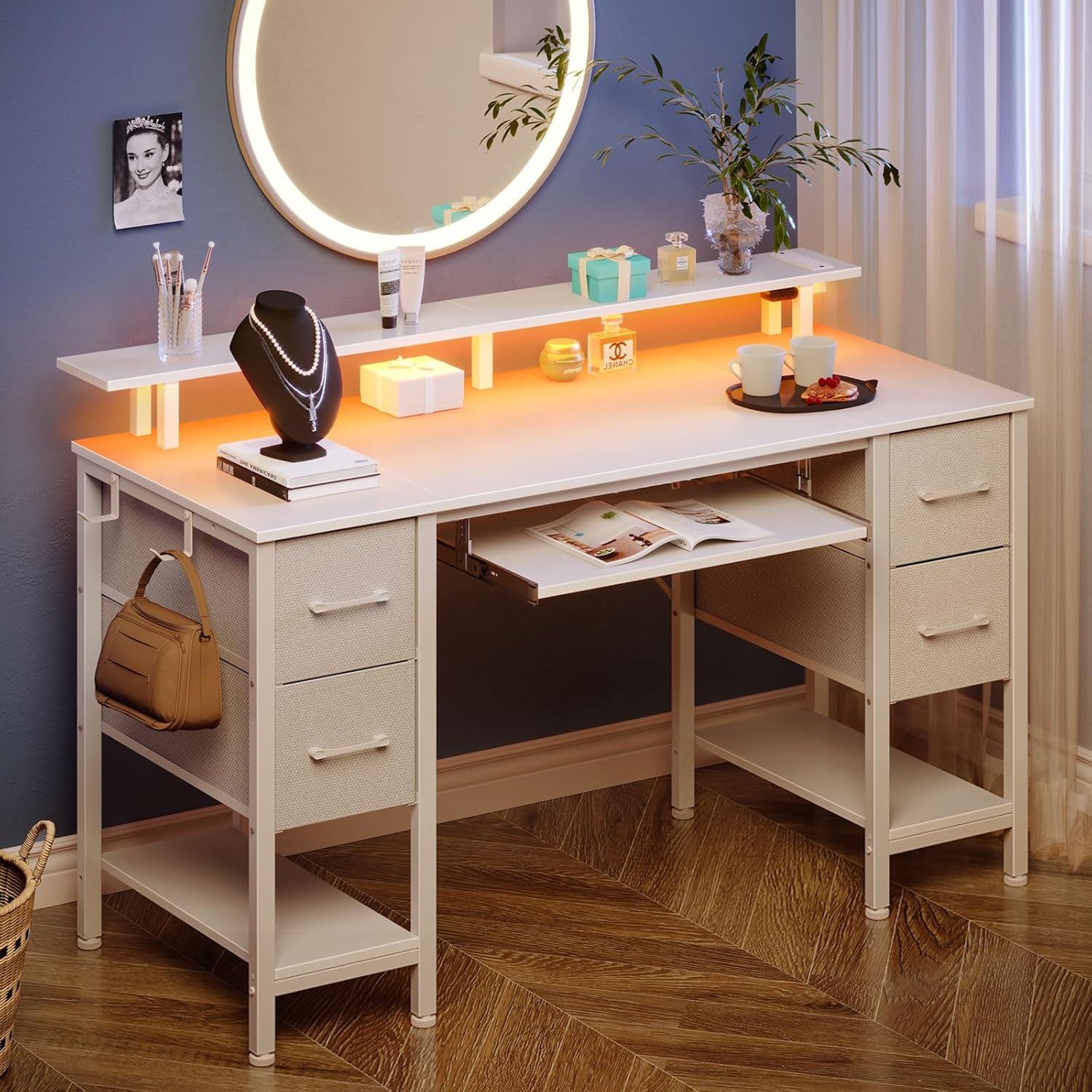
Figure 1: Seventable White Computer Desk in a modern room setting, showcasing its design and features.
Safety Information
- This product requires assembly. Ensure all components are securely fastened before use.
- Use the UL-certified charging ports for safe and efficient charging of devices.
- Do not overload the desk or shelves beyond their stated weight capacities.
- Keep liquids away from electrical components, including the power strip and LED lights.
- For optimal stability, place the desk on a flat, level surface.
Components and Parts List
Before beginning assembly, verify that all parts listed below are present and undamaged. Refer to the assembly diagram for visual identification of components.

Figure 2: Exploded view of the desk components with dimensions and weight capacities.
Main Components:
- Desktop Panels
- Monitor Stand
- Keyboard Tray
- Side Frames and Support Bars
- Fabric Drawers (4 units)
- Power Strip with 2 AC Outlets, 2 USB Ports, and 1 Type C Port
- LED Light Strips
Hardware:
Assorted screws, bolts, and an Allen wrench are typically included. Please refer to the detailed parts list in your packaging for exact quantities and types.
Setup and Assembly
Assembly is required for this product. It is recommended that two people work together to facilitate the installation process.
General Assembly Steps:
- Unpack and Organize: Carefully unpack all components and lay them out on a clean, soft surface to prevent scratches. Verify all parts against the provided parts list.
- Assemble Frame: Attach the side frames and support bars according to the included diagram. Ensure all connections are secure but do not overtighten screws until the desk is fully assembled.
- Install Desktop Panels: Secure the main desktop panels to the assembled frame.
- Attach Monitor Stand: Mount the monitor stand to the designated positions on the desktop.
- Install Keyboard Tray: Attach the sliding rails and then the keyboard tray beneath the main desktop.
- Insert Fabric Drawers: Assemble the non-woven fabric drawers by inserting the bottom panels and place them into the designated shelving tiers. The drawer configuration is customizable.
- Install Power Strip and LED Lights: Secure the power strip into its designated slot. Attach the LED light strips to the underside of the monitor stand or desktop as per instructions. Connect the power strip and LED lights to a power source.
- Final Tightening: Once all components are in place, carefully tighten all screws and bolts.
- Leveling: Adjust the desk's feet to ensure it is stable and level on your floor.

Figure 3: Assembly diagram for the Seventable Computer Desk.
Figure 4: Fabric drawer assembly steps.
Operating Instructions
Power Strip:
The desk features a built-in power strip with 2 AC outlets, 2 USB ports, and 1 Type C port. This allows for convenient charging of multiple devices simultaneously, such as phones, tablets, gaming consoles, and other electronics. Ensure the power strip is properly connected to a wall outlet.

Figure 5: Integrated power strip with various charging ports.
LED Lights:
The desk is equipped with dynamic multi-color RGB LED light strips. These lights can be controlled via a phone application or a physical controller. You can personalize brightness, color (over 60,000 options), mode, and timer settings. The LED lights can also synchronize with music for an enhanced ambiance.

Figure 6: Desk with RGB LED lighting in a gaming environment.
Storage Drawers:
The desk includes 4 non-woven fabric drawers and two shelving tiers. These provide ample storage for files, office supplies, or gaming equipment. The drawers and shelves are customizable, allowing you to arrange them based on your specific storage needs.

Figure 7: Customizable fabric drawers for organized storage.
Monitor Stand:
The full-size monitor stand is designed to accommodate two monitors at an optimal height. This ensures your computer screen aligns with your eye level, promoting a comfortable viewing angle and minimizing neck and back strain. It also offers additional storage space for books, pens, and other items, maximizing desktop area.

Figure 8: Ergonomic design of the monitor stand for correct posture.
Keyboard Tray:
A pull-out keyboard tray is included, spacious enough for a full-size 108-key keyboard or an 87-key keyboard with a mouse. This feature helps maximize desktop space and positions the keyboard to prevent eye strain from being too close to the computer screen.

Video 1: Overview of the Seventable Computer Desk features, including the keyboard tray.

Figure 9: Pull-out keyboard tray for ergonomic typing.
Additional Features:
- Headphone Hook: A convenient hook is provided for hanging headphones, keeping them easily accessible and off the desktop.
- Adjustable Feet: The desk includes adjustable feet to ensure stability on uneven floors.

Figure 10: Convenient headphone hook.

Figure 11: Adjustable foot for stability.
Maintenance
- Cleaning: Wipe the desk surfaces with a soft, damp cloth. Avoid harsh chemicals or abrasive cleaners that may damage the finish.
- Hardware Check: Periodically check all screws and bolts to ensure they remain tight. Retighten if necessary.
- Drawer Care: The fabric drawers can be spot cleaned with a mild detergent and water. Allow to air dry completely.
- Electrical Components: Ensure the power strip and LED lights are kept dry and free from dust. Disconnect from power before cleaning.
Troubleshooting
- Desk Wobbles: Check that all assembly hardware is securely tightened. Adjust the leveling feet on the bottom of the desk to stabilize it on uneven floors.
- LED Lights Not Working: Ensure the LED lights are properly connected to the power strip and that the power strip is plugged into a functional wall outlet. Check the controller or phone app settings.
- Devices Not Charging: Verify that the power strip is plugged in and turned on. Ensure your devices and charging cables are functioning correctly.
- Drawers Stick/Don't Slide Smoothly: Check for any obstructions in the drawer rails. Ensure the drawers are correctly assembled and inserted into their slots.
Specifications
| Feature | Detail |
|---|---|
| Brand | Seventable |
| Model Number | hq-dnzh041-09 |
| Color | White |
| Product Dimensions | 18.5"D x 47.2"W x 34.7"H |
| Item Weight | 41.9 Pounds |
| Material Type | Engineered Wood (Top), Alloy Steel (Base) |
| Number of Drawers | 4 (Fabric) |
| Number of Shelves | 2 |
| Power Outlets | 2 AC Outlets, 2 USB Ports, 1 Type C Port |
| Special Features | LED Lights, Monitor Stand, Keyboard Tray, Storage |
| Assembly Required | Yes |
| UL Listed | Yes |
Warranty
This product comes with No Warranty as per manufacturer specifications.
Support
For any questions, concerns, or assistance with your Seventable Computer Desk, please contact the manufacturer directly.
Email: cs@seventable.com
Please have your model number (hq-dnzh041-09) and purchase information ready when contacting support.