
1. Introduction
This manual provides essential information for the safe and efficient operation of your Pyle PBMSPG82.5 Portable Bluetooth PA Speaker System. Please read this manual thoroughly before using the device and retain it for future reference.

Image 1.1: The Pyle PBMSPG82.5 Portable Bluetooth PA Speaker System, shown with its remote control. This system features integrated LED party lights and rolling wheels for portability.
2. Important Safety Instructions
- Read all instructions before operating the appliance.
- Keep this manual for future reference.
- Do not use this apparatus near water.
- Clean only with a dry cloth.
- Do not block any ventilation openings. Install in accordance with the manufacturer's instructions.
- Do not install near any heat sources such as radiators, heat registers, stoves, or other apparatus (including amplifiers) that produce heat.
- Do not defeat the safety purpose of the polarized or grounding-type plug. A polarized plug has two blades with one wider than the other. A grounding-type plug has two blades and a third grounding prong. The wide blade or the third prong are provided for your safety. If the provided plug does not fit into your outlet, consult an electrician for replacement of the obsolete outlet.
- Protect the power cord from being walked on or pinched, particularly at plugs, convenience receptacles, and the point where they exit from the apparatus.
- Only use attachments/accessories specified by the manufacturer.
- Use only with the cart, stand, tripod, bracket, or table specified by the manufacturer, or sold with the apparatus. When a cart is used, use caution when moving the cart/apparatus combination to avoid injury from tip-over.
- Unplug this apparatus during lightning storms or when unused for long periods of time.
- Refer all servicing to qualified service personnel. Servicing is required when the apparatus has been damaged in any way, such as power-supply cord or plug is damaged, liquid has been spilled or objects have fallen into the apparatus, the apparatus has been exposed to rain or moisture, does not operate normally, or has been dropped.
3. What's in the Box
Upon unpacking, please ensure all items listed below are present and in good condition:
- Pyle PBMSPG82.5 Speaker System
- Remote Control
- Power Adapter

Image 3.1: The Pyle PBMSPG82.5 speaker system, remote control, and power adapter as included in the product packaging.
4. Setup
4.1 Initial Charging
Before first use, fully charge the speaker's built-in rechargeable battery. Connect the provided power adapter to the speaker's DC 15V input and plug it into a power outlet. The charging indicator will illuminate. A full charge ensures optimal portable performance.

Image 4.1: The Pyle PBMSPG82.5 speaker system features a built-in 4500 mAh rechargeable battery for portable use.
4.2 Control Panel Overview
Familiarize yourself with the control panel located on the top of the speaker. This panel includes buttons for mode selection, playback control, volume adjustment, and input jacks.
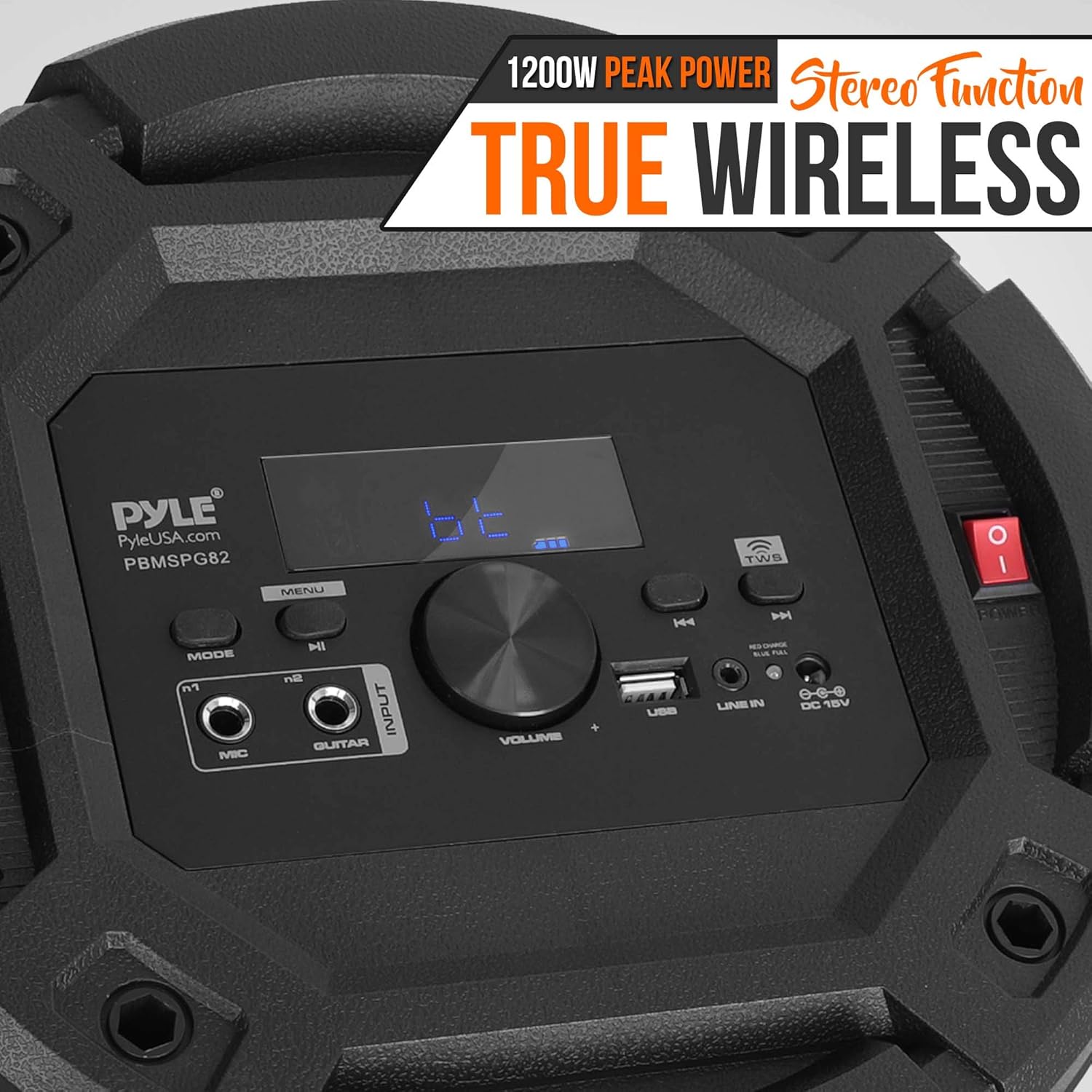
Image 4.2: Detailed view of the speaker's control panel, showing the display, mode button, volume knob, USB port, line-in, and microphone/guitar inputs.
5. Operating Instructions
5.1 Power On/Off
To power on the speaker, locate the power switch on the top panel and toggle it to the 'ON' position. To power off, toggle the switch to 'OFF'.
5.2 Bluetooth Connectivity
- Ensure the speaker is powered on.
- Press the 'MODE' button on the control panel until "BLUE" appears on the digital display, indicating Bluetooth mode.
- On your device (smartphone, tablet, etc.), enable Bluetooth and search for available devices.
- Select "PYLEUSA" from the list of devices to pair.
- Once paired, you can stream audio wirelessly to the speaker.

Image 5.1: The speaker connected via Bluetooth 5.0 to a smartphone, ready for wireless music streaming.
5.3 True Wireless Stereo (TWS) Function
The TWS function allows you to connect two PBMSPG82.5 speakers wirelessly for a stereo sound experience.
- Ensure both speakers are powered on and in Bluetooth mode.
- On one speaker, press and hold the TWS button (usually labeled with a TWS icon). The speaker will emit a tone and begin searching for another TWS-compatible speaker.
- Once connected, the two speakers will play audio in stereo.
- Connect your Bluetooth device to the primary speaker (the one you initiated TWS pairing on).
5.4 USB Playback
Insert a USB flash drive (up to 32GB) containing MP3 audio files into the USB port. The speaker will automatically switch to USB mode and begin playing music. Use the playback controls on the speaker or remote to navigate tracks.
5.5 FM Radio
Press the 'MODE' button to select FM radio mode. Use the playback buttons to scan for stations. The digital display will show the frequency.
5.6 AUX Input
Connect an external audio device (e.g., MP3 player, laptop) to the 3.5mm AUX input using a standard audio cable. Press the 'MODE' button to select AUX input. Audio will play from the connected device.
5.7 Microphone/Guitar Input
Connect a microphone or guitar to the 1/4'' input jacks. Adjust the microphone/guitar volume and echo using the dedicated controls on the top panel.
5.8 LED Party Lights
The speaker features built-in LED flashing party lights that can bounce to the beat of the music. There is an ON/OFF switch for the LED lights, typically located on the control panel or accessible via the remote control.

Image 5.2: The speaker's integrated DJ lights flashing in sync with music, creating a dynamic visual effect.
6. Maintenance
6.1 Cleaning
Wipe the speaker's exterior with a soft, dry cloth. Do not use liquid cleaners or abrasive materials, as they may damage the finish or internal components.
6.2 Battery Care
To prolong battery life, avoid fully discharging the battery frequently. Recharge the speaker regularly, especially if it will be stored for an extended period. Store the speaker in a cool, dry place.
7. Troubleshooting
| Problem | Possible Cause | Solution |
|---|---|---|
| No power | Battery is discharged; Power adapter not connected or faulty. | Connect the power adapter and charge the battery. Ensure the power adapter is securely connected and functional. |
| No sound | Volume is too low; Incorrect input mode selected; Device not properly connected (Bluetooth, AUX, USB). | Increase the volume. Select the correct input mode. Re-pair Bluetooth, check AUX cable, or re-insert USB drive. |
| Bluetooth pairing fails | Speaker not in Bluetooth mode; Device too far; Interference; Speaker already paired to another device. | Ensure speaker is in Bluetooth mode. Move device closer to speaker. Turn off other Bluetooth devices. Disconnect from previous device. |
| TWS connection fails | Speakers too far apart; TWS pairing not initiated correctly. | Ensure speakers are within close proximity. Follow TWS pairing instructions carefully. |
| Distorted sound | Volume too high; Audio source quality is poor; Cables are loose or damaged. | Reduce volume. Check audio source. Ensure all cables are securely connected and undamaged. |
8. Technical Specifications
- Power Output: 1200 Watt MAX
- Sound System: (2) 8'' Subwoofers, (2) 3'' Speakers, (2) 1'' Tweeters
- Impedance: 3 Ohm
- T.H.D.: <1%
- Frequency Response: 50-20KHz
- S/N Ratio: 80dB
- Sensitivity: 89dB (+/-1dB)
- USB Interface Type: 2.0
- Construction Material: PP + Iron grill
- Digital Media File Compatibility: MP3
- Maximum USB Flash Drive Support: Up to 32GB
- LED Lights: ON / OFF function
- Built-in Rechargeable Battery: 12V Lithium power battery, 4500 mAh
- Remote Control Battery: Requires (2) x 'AAA' (Not Included)
- Power Supply: 120/240V (15V Power Adapter)
- Product Dimensions (L x W x H): 11.8'' x 11.8'' x 34.6'' -inches
- Item Weight: 24.4 pounds
- Bluetooth Version: 5.0
- Bluetooth Network Name: 'PYLEUSA'
- Wireless Range: Up to 32' ft
9. Warranty and Support
For warranty information, technical support, or customer service inquiries, please refer to the official Pyle website or contact their customer support directly. Keep your purchase receipt as proof of purchase.
An official PDF user manual is also available for download: Pyle PBMSPG82.5 User Manual (PDF)


