
1. Product Overview
The JaeJaes Motorized Smart Shades are designed to provide convenience and privacy for your indoor windows. These blackout roller shades feature remote control operation and can be integrated with smart home systems for enhanced control.
Key Features:
- 100% Blackout Fabric: Made from high-quality polyester with a PVC backing, these shades effectively block light, reduce noise, and protect privacy.
- Long-lasting Battery: A full 6-hour charge provides 4-5 months of operation. Optional solar panel charging is available (sold separately).
- Smart Home Integration: Compatible with a WiFi gateway (sold separately) for app control, scheduling, scene linking, and voice control via Alexa/Google Assistant.
- Easy Installation: Designed for straightforward installation, suitable for both inside and outside mounts.
- Effortless Remote Control: A sleek remote allows for easy adjustment of the shades. The cordless design enhances safety for households with children and pets.
2. Package Contents
Please ensure all components are present before beginning installation.
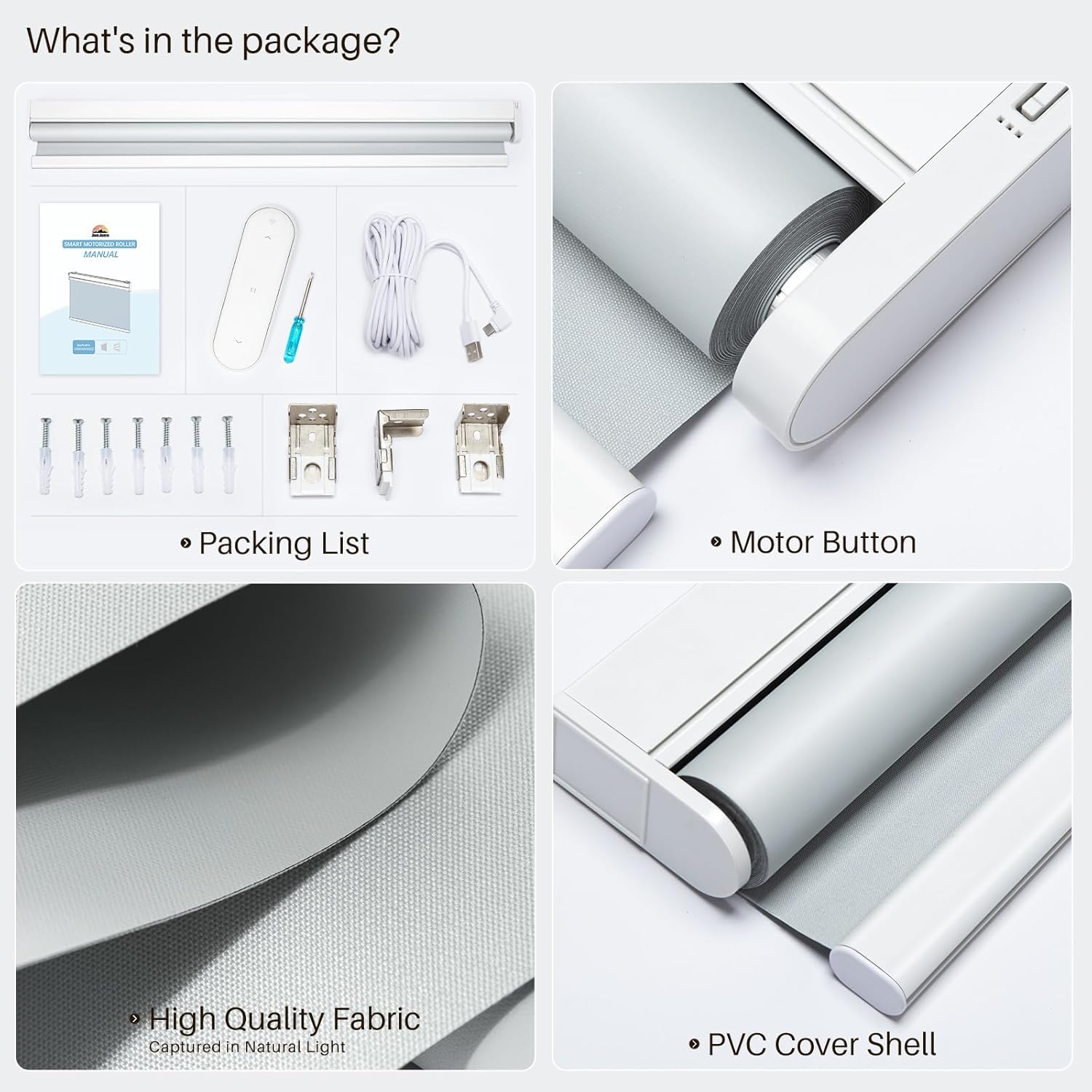
Figure 2.1: Package Contents. Includes the motorized roller shade, remote control, charging cable, screwdriver, mounting brackets, and screws.
- Motorized Roller Shade Unit
- Remote Control
- USB-C Charging Cable (5M)
- Mounting Brackets (3)
- Screws and Wall Anchors
- Small Screwdriver
- Instruction Manual
3. Measuring for Installation
Accurate measurements are crucial for a proper fit. Please refer to the diagrams below for guidance.
Inside Mount Measurement:
- Width: Measure the window width at the top, middle, and bottom of the inner frame. Use the smallest measurement and subtract 1/4 inch (0.64 cm) for the order width.
- Height: Measure the window height at the left, center, and right vertical positions. Use the maximum measurement. The shade's full extended height is 72 inches (182.88 cm).
- Depth: The window frame depth should be at least 1.5 inches (3.81 cm).

Figure 3.1: Inside Mount Measurement Guide.
Outside Mount Measurement:
- Width: Measure the window width at the top, middle, and bottom of the outer frame. Use the maximum measurement and add 4 inches (10.16 cm) for the order width.
- Height: Measure the window height at the left, center, and right vertical positions. Use the maximum measurement. The shade's full extended height is 72 inches (182.88 cm).

Figure 3.2: Outside Mount Measurement Guide.
Note:
- A tiny light gap may exist on each side with inside mounts. For 100% blackout, consider an outside mount.
- The shade's height can be adjusted from 3 inches to 72 inches.
4. Installation
Follow these steps to install your motorized smart shades.
Installation Steps:
- Mount the Brackets: Securely attach the mounting brackets to your window frame or wall using the provided screws and anchors. Ensure they are level and spaced correctly according to your shade's width.
- Attach the Shade: Carefully align the motorized shade unit with the installed brackets and snap it into place. Ensure it is firmly secured.
- Test Operation: Use the remote control to test the up and down movement of the shade.

Figure 4.1: Easy Installation Steps.
Installation Video Guide:
Video 4.1: JaeJaes Installation Guide. This video provides a visual walkthrough of the installation process for the motorized shades.
5. Initial Setup and First-Time Use
Before regular use, set the bottom stop position for your shades.
Setting the Bottom Stop Position:
- Disassemble Remote: Carefully open the remote control by removing the screw on the back.
- Remove Battery Tab: Remove the white paper tab from the battery compartment to activate the remote.
- Switch to Admin State: Locate the small toggle switch inside the remote and move it to the "admin" state.
- Lower Shade: Use the down arrow button on the remote to lower the shade to your desired bottom position. Press the pause button to stop.
- Set Position: While in "admin" mode, hold the down arrow button for 2 seconds. The shade will rotate forwards and backwards once, indicating successful setting.
- Switch to User State: Move the toggle switch back to the "user" state to save the setting and complete the setup.
- Reassemble Remote: Replace the back cover and tighten the screw.
Initial Operations Video Guide:
Video 5.1: JaeJaes Initial Operations. This video demonstrates how to set the bottom stop position for the shades using the remote control.
6. Operating Instructions
Your JaeJaes Smart Shades offer multiple ways to control them for maximum convenience.
Remote Control Operation:
The included remote control allows for direct and easy adjustment of your shades.
- Up Arrow: Raises the shade.
- Down Arrow: Lowers the shade.
- Pause Button: Stops the shade at its current position.

Figure 6.1: Remote Control Operation.
Smart Control (App & Voice):
To unlock advanced smart features, a WiFi gateway (sold separately) is required. This allows for app control, scheduling, and voice commands.
- App Control: Use the dedicated app (e.g., Tuya Smart Life) to control your shades from anywhere, set schedules, and link scenes.
- Voice Control: Integrate with Alexa or Google Assistant via the WiFi gateway to control your shades with voice commands.

Figure 6.2: Smart Control with Alexa and App.
Smart Control Setup Video Guide:
Video 6.3: Alexa APP Pair. This video demonstrates the process of pairing your shades with the Alexa app for voice control.
Video 6.4: How to connect shade with APP and Alexa? - By a Zigbee Hub. This video explains how to connect your shades to a smart app and Alexa using a Zigbee hub.
7. Charging
The shades are powered by a high-capacity battery that lasts 4-5 months on a single charge.
Charging Options:
- USB-C Cable: Use the included 5-meter USB-C charging cable to charge the shades.
- Solar Panel (Optional): A solar panel can be purchased separately to continuously charge the shades, reducing reliance on traditional power sources.

Figure 7.1: Charging Methods.
8. Maintenance
To ensure the longevity and optimal performance of your JaeJaes Smart Shades, follow these simple maintenance guidelines:
- Cleaning: Spot clean the fabric only. Do not immerse in water or use harsh chemicals.
- Battery Care: Recharge the battery when the indicator light suggests low power. Avoid completely draining the battery frequently.
- General Inspection: Periodically check the mounting brackets and shade mechanism for any signs of wear or looseness.
9. Troubleshooting
If you encounter any issues with your shades, try the following solutions:
- Shade Not Responding to Remote:
- Ensure the remote is in "user" mode (if applicable).
- Check if the remote battery is active and correctly inserted.
- Ensure there are no obstructions between the remote and the shade.
- Shade Not Responding to App/Voice Control:
- Verify your WiFi gateway is powered on and connected to your 2.4GHz Wi-Fi network.
- Check the app for device status and ensure it's online.
- Confirm that the smart home integration (Alexa/Google Assistant) is correctly linked and enabled.
- Shade Not Moving Smoothly:
- Check for any physical obstructions in the shade's path.
- Ensure the mounting brackets are securely fastened and the shade is properly seated.
- Battery Drains Quickly:
- Ensure the shades are fully charged (6 hours for a complete charge).
- If using a solar panel, ensure it is clean and receiving adequate sunlight.
For further assistance, please contact JaeJaes customer support.
10. Specifications
| Feature | Detail |
|---|---|
| Model Number | V0001 |
| Dimensions | 72"L x 35"W (182.88 cm L x 88.9 cm W) |
| Color | Grey |
| Material | Polyester (front), PVC (back) |
| Opacity | 100% Blackout |
| Operation Mode | Automatic (Motorized) |
| Control Type | Remote Control, Smart Home Integration (with optional WiFi hub) |
| Compatible Devices | WiFi hub, Alexa, Google Assistant |
| Battery | 1 Lithium Ion battery (included) |
| Battery Life | 4-5 months on a full 6-hour charge |
| Mounting Type | Inside Mount, Outside Mount |
| Item Weight | 4.52 pounds (2.05 kg) |
| Manufacturer | JaeJaes |
11. Warranty and Support
JaeJaes is committed to providing high-quality products and excellent customer service.
- Warranty Information: Please refer to the product packaging or contact JaeJaes customer support for specific warranty details.
- Customer Support: For any questions, technical assistance, or warranty claims, please visit the official JaeJaes store or contact their customer service team.