
Introduction
This instruction manual provides essential information for the proper installation, operation, and maintenance of your Miuzei 12g Micro RC Metal Gear Digital Servo. Designed for high performance and durability, this servo is suitable for a wide range of remote-controlled applications.

Figure 1: Miuzei 12g Micro RC Metal Gear Digital Servo.
Product Features
- Wide Application: Compatible with SCX24 AX24 1/24 RC cars, rigid ailerons, helicopters, marine models, small robots, robotic arms, and other models.
- Compact Design: Mini digital servo dimensions of 23mm x 11.5mm x 24mm with a 25cm cable for easy connection.
- High Performance: Equipped with high-precision potentiometers and a high-resolution digital chip for stable performance, fast response, strong anti-interference capability, low noise, and rapid heat dissipation.
- Durable Metal Gears: Made with high-quality metal gears for increased stability, reliability, and resistance to breakage compared to plastic gears.
- 180-Degree Rotation: Provides a 180-degree rotation angle (for PWM 500 ~ 2500 usec).

Figure 2: Key features of the Miuzei Digital Servo, highlighting its full metal gear system.
Specifications
| Parameter | Value |
|---|---|
| Net Weight | 12g ± 5% |
| Gear Type | Metal |
| Bearing | 2BB |
| Dead Zone | 3 usec |
| Operating Temperature | -25°C ~ 70°C |
| Rotation Angle | 180° (for PWM 500 ~ 2500 usec) |
| Operating Voltage | 4.8V - 6.0V |
| Stall Torque (4.8V) | 1.6 kg/cm |
| Stall Torque (6.0V) | 2.0 kg/cm |
| Operating Speed (4.8V) | 0.12 sec/60° (no load) |
| Operating Speed (6.0V) | 0.1 sec/60° (no load) |
| Dimensions | 23mm x 11.5mm x 24mm |
| Cable Length | 25cm (approx. 10 inches) |

Figure 3: Detailed technical specifications for the Miuzei 12g Micro RC Servo.
Package Contents
The Miuzei 12g Micro RC Metal Gear Digital Servo package typically includes:
- Miuzei 12g Micro RC Digital Servo (quantity as purchased)
- Servo mounting bracket(s)
- Various servo horns (different shapes)
- Mounting screws and installation tools

Figure 4: The Miuzei 12g Micro RC Servo shown with included accessories, such as mounting brackets and various servo horns.
Setup and Installation
Follow these steps for proper installation of your Miuzei micro servo:
- Mounting the Servo: Secure the servo in your model (RC car, robot, etc.) using the provided mounting bracket and screws. Ensure it is firmly attached to prevent movement during operation.
- Attaching Servo Horn: Select the appropriate servo horn for your application and attach it to the servo output shaft. Use the small screw provided to secure the horn.
- Electrical Connection: Connect the servo's 3-wire cable to your receiver or control board (e.g., Arduino). The standard color coding is typically:
- Brown/Black: Ground (GND)
- Red: Power (VCC, 4.8V-6.0V)
- Orange/Yellow/White: Signal (PWM)
- Power Supply: Ensure your power supply provides the correct voltage (4.8V-6.0V) to the servo. Incorrect voltage can damage the servo.
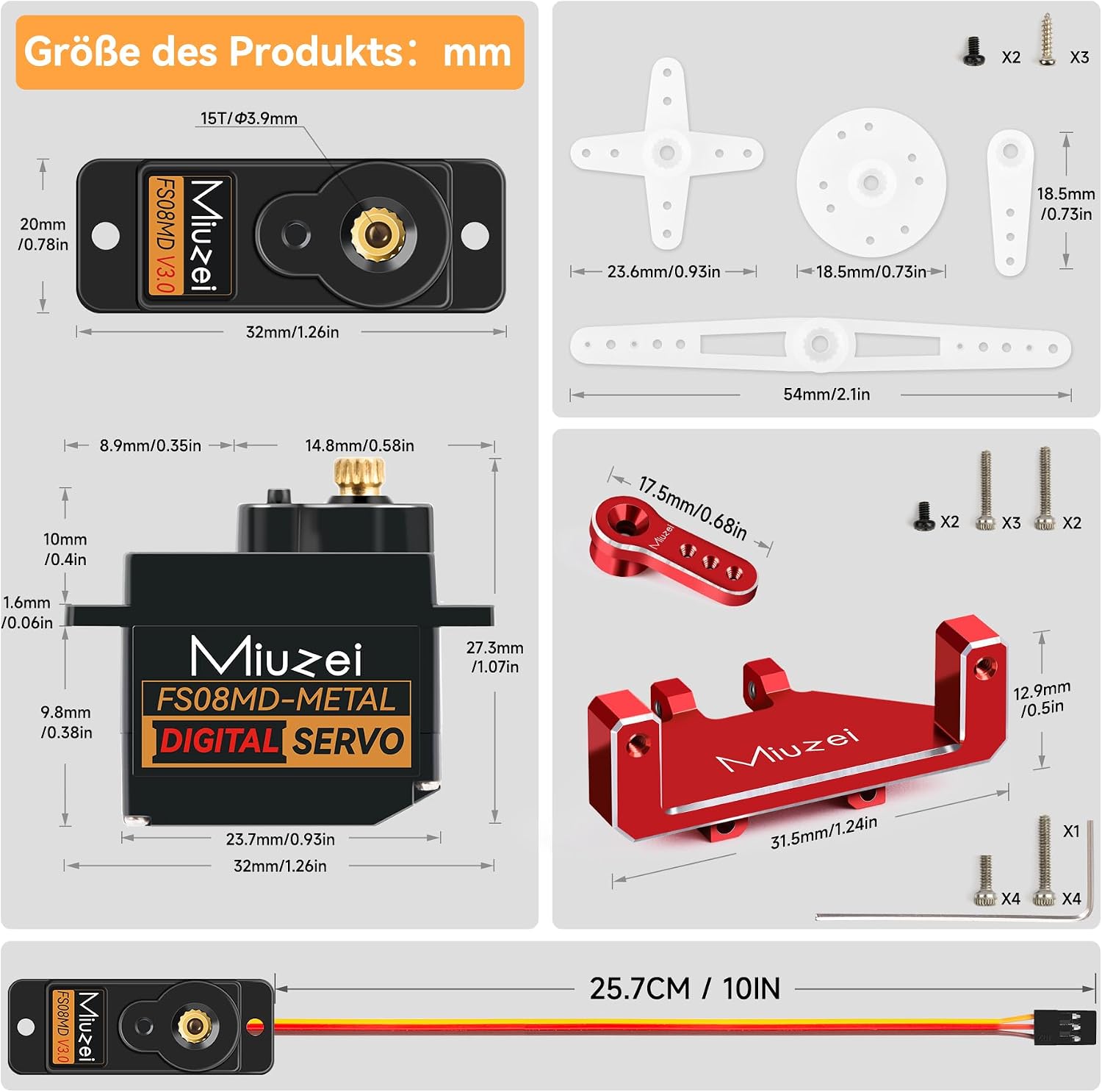
Figure 5: Detailed dimensions of the servo and various mounting accessories, including servo horns and brackets, to aid in installation.
Operating Instructions
The Miuzei 12g Micro RC Digital Servo operates based on Pulse Width Modulation (PWM) signals from your receiver or microcontroller. The servo translates these signals into angular position.
- Control Signal: The servo expects a PWM signal, typically a pulse between 500 and 2500 microseconds, to control its 180-degree rotation. A 1500 microsecond pulse usually corresponds to the neutral (center) position.
- Movement: Varying the pulse width will cause the servo to rotate to a specific angle within its 180-degree range.
- Initial Test: Before full deployment, perform a simple test to ensure the servo responds correctly to control inputs and moves smoothly without binding.

Figure 6: The Miuzei 12g Micro RC Servo demonstrating its 180-degree range of motion when installed in an RC car.
Maintenance
Proper maintenance ensures the longevity and optimal performance of your servo:
- Keep Clean: Regularly clean the servo from dust, dirt, and debris, especially around the output shaft and gears.
- Avoid Overloading: Do not exceed the specified stall torque. Excessive force can damage the internal gears and motor.
- Temperature Management: Operate the servo within its specified temperature range (-25°C to 70°C). The servo is designed for rapid heat dissipation, but extreme temperatures can affect performance.
- Inspect Gears: Periodically inspect the metal gears for any signs of wear or damage. While durable, extreme impacts can still cause issues.
Troubleshooting
If you encounter issues with your Miuzei servo, consider the following:
| Problem | Possible Cause | Solution |
|---|---|---|
| Servo not responding | Incorrect wiring, insufficient power, faulty control signal. | Check all connections (Ground, VCC, Signal). Ensure power supply is within 4.8V-6.0V. Verify control signal from receiver/microcontroller. |
| Erratic movement or twitching | Signal interference, loose connection, power fluctuations. | Ensure signal cable is securely connected. Check for sources of electrical interference. Verify stable power supply. |
| Servo makes noise but doesn't move | Mechanical obstruction, damaged gears, motor issue. | Check for any physical obstructions preventing movement. Inspect gears for damage. If gears are intact, the motor may be faulty. |
| Weak or inconsistent torque | Low voltage, excessive load, worn gears. | Ensure adequate power supply voltage. Reduce mechanical load on the servo. Inspect and replace worn gears if necessary. |
The Miuzei servo features durable metal gears, which significantly reduce the risk of gear breakage compared to servos with plastic gears. This contributes to greater reliability and a longer lifespan.
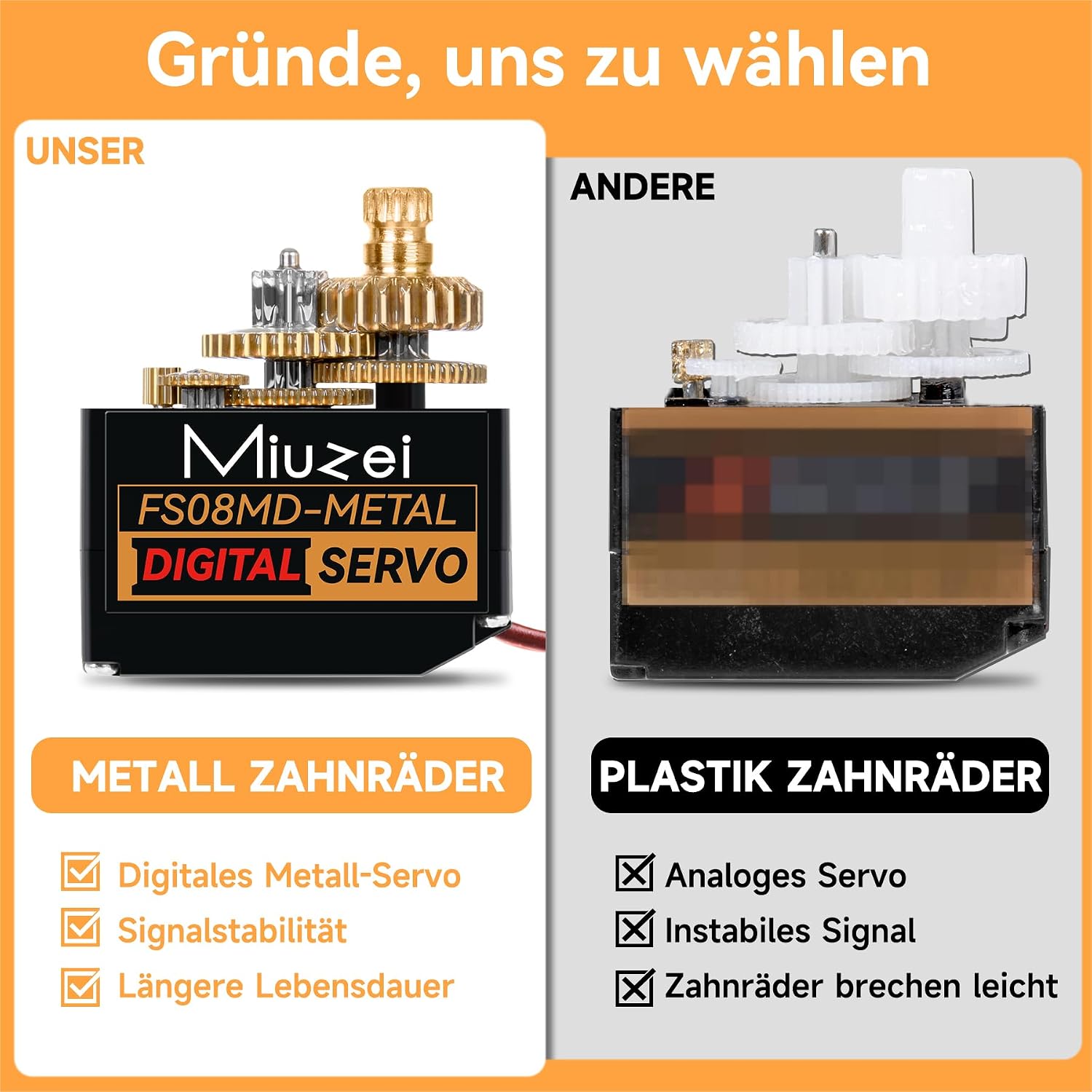
Figure 7: Comparison illustrating the robust metal gears of the Miuzei servo against typical plastic gears found in other models, highlighting enhanced durability.
Safety Information
- Always ensure correct polarity when connecting power to avoid damage to the servo and other components.
- Do not expose the servo to water or excessive moisture unless explicitly stated as waterproof.
- Keep out of reach of small children due to small parts.
- Disconnect power before performing any maintenance or adjustments.
Warranty and Support
For warranty information or technical support, please contact Miuzei customer service through their official channels or the retailer from whom the product was purchased. Please have your purchase details and product model number (FS08MD-METAL) ready when contacting support.