
lanema 2C23T
lanema 2C23T 3-in-1 Oscilloscope, Multimeter, and Function Generator User Manual
Model: 2C23T | Brand: lanema
1. Introduction
The lanema 2C23T is a versatile 3-in-1 digital instrument designed for various applications in maintenance, development, education, and home use. It integrates the functionalities of a dual-channel digital oscilloscope, a true RMS multimeter, and a DDS function signal generator into a single compact device.
This manual provides detailed instructions for the safe and effective operation of your 2C23T device. Please read it thoroughly before use and retain it for future reference.
2. Safety Information
To ensure safe operation and prevent damage to the device or injury, observe the following safety precautions:
- Always use the provided test leads and accessories. Ensure they are in good condition before each use.
- Do not exceed the maximum input voltage ratings specified in the technical specifications. The oscilloscope supports voltage measurement up to 400V.
- Avoid operating the device in wet or damp environments.
- Do not open the device casing unless instructed by qualified personnel. There are no user-serviceable parts inside.
- Ensure the device is properly charged using the provided USB cable.
- Disconnect all test leads before cleaning the device. Use a soft, dry cloth for cleaning.
3. Package Contents
Verify that all items listed below are present in your package:
- lanema 2C23T Handheld Digital Oscilloscope Multimeter
- Oscilloscope Probes (2 sets)
- Multimeter Test Leads (1 set)
- BNC to Alligator Clip Cable (for Function Generator)
- USB Charging Cable
- User Manual (this document)
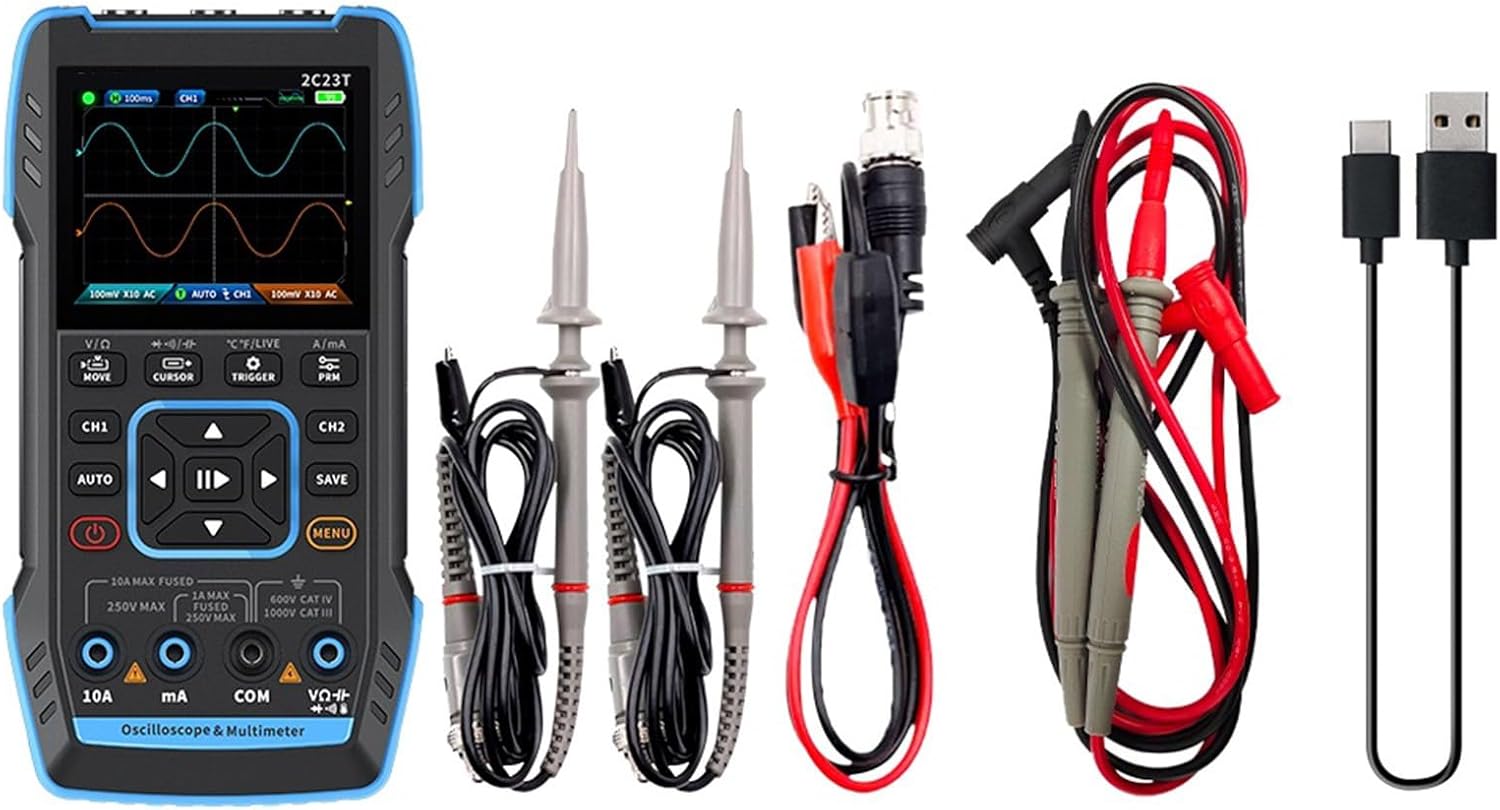
Image 3.1: The lanema 2C23T device shown with its complete set of accessories, including oscilloscope probes, multimeter test leads, a BNC to alligator clip cable, and a USB charging cable.
4. Product Overview
4.1 Key Features
- 3-in-1 Functionality: Digital Oscilloscope, True RMS Multimeter, DDS Function Generator.
- Oscilloscope: Dual-channel, 10MHz analog bandwidth, 50MS/s sampling rate, 400V high-voltage protection.
- Multimeter: 4-digit, 10000 counts, AC/DC voltage and current, capacitance, resistance, diode, continuity, temperature measurement.
- Function Generator: 7 functional signals, up to 2MHz output, adjustable frequency, amplitude, and duty cycle.
- Display: 2.8-inch 320x240 resolution HD LCD screen.
- Battery: Built-in 3000mAh rechargeable lithium battery, up to 6 hours standby time.
- Data Management: Waveform saving and viewing, computer export.
- Durability: ABS-silicone shell, high-quality PCB with gold deposition process.

Image 4.1: An internal diagram highlighting the robust construction, including the 2.8-inch HD color screen, ABS-silicone shell, and high-quality PCB with gold deposition process, ensuring durability and stable performance.
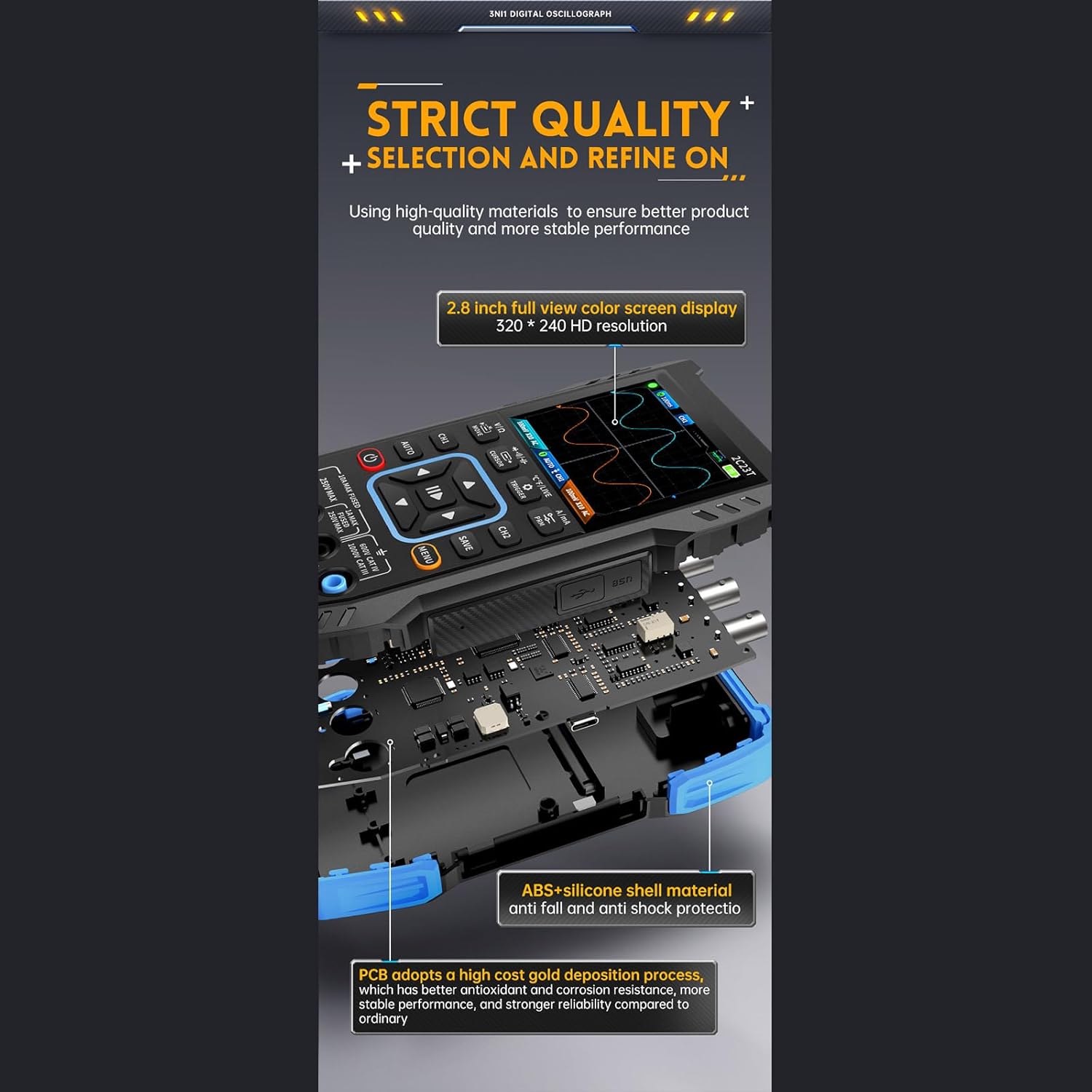
Image 4.2: An infographic showcasing the integrated functions of the 2C23T, such as multi-functionality, dual channel, auto adjustment, intelligent anti-burning, True RMS, automatic shutdown, extended battery endurance, HD color screen, firmware upgrade, waveform saving, computer export, and desktop stand.
4.2 Device Layout
The device features a clear 2.8-inch display, intuitive button controls, and clearly labeled input ports for oscilloscope channels (CH1, CH2), multimeter (10A, mA, COM, VΩ), and function generator (DDS).

Image 4.3: A detailed view of the device's input ports, clearly indicating CH1 and CH2 for oscilloscope measurements and the DDS output port for the function generator.
5. Setup
5.1 Initial Charging
- Connect the provided USB charging cable to the device's USB port.
- Plug the other end of the USB cable into a standard USB power adapter (not included) or a computer's USB port.
- Allow the device to charge fully before first use. The charging indicator on the screen will show the battery status.
5.2 Powering On/Off
- To power on, press and hold the power button until the screen illuminates.
- To power off, press and hold the power button until the device shuts down.
6. Operating Instructions
6.1 Oscilloscope Mode
The 2C23T functions as a dual-channel digital oscilloscope with a 10MHz bandwidth and 50MS/s sampling rate.
- Connect the oscilloscope probes to the CH1 and/or CH2 input ports.
- Attach the probe clips to the circuit points you wish to measure.
- Select the oscilloscope mode from the main menu or dedicated button.
- Use the navigation buttons to adjust parameters such as vertical sensitivity (V/div), horizontal time base (s/div), trigger level, and coupling (AC/DC).
- Press the 'AUTO' button for automatic waveform adjustment.

Image 6.1: Display showing various waveform measurements, including mains power, switching power supply, pulse signals, crystal oscillator waveforms, power ripple, and audio signals, demonstrating the oscilloscope's versatility.
6.2 Multimeter Mode
The integrated multimeter provides 10000 counts true RMS measurements for various electrical parameters.
- Connect the multimeter test leads to the appropriate input ports (COM, VΩ, mA, 10A).
- Select the multimeter mode and the desired measurement function (e.g., DC voltage, AC current, resistance, capacitance, diode, continuity, temperature).
- Apply the test leads to the circuit or component under test according to standard measurement practices.

Image 6.2: Multiple display examples of the 2C23T in multimeter mode, showing measurements for DC voltage, AC voltage, high current, small current, resistance, capacitance, buzzer continuity, diode, zero line/live line detection, and temperature.
6.3 Function Generator Mode
The DDS function generator can output 7 types of functional signals with adjustable parameters.
- Connect the BNC to alligator clip cable to the DDS output port.
- Connect the alligator clips to the circuit where the signal is required.
- Select the function generator mode.
- Choose the desired waveform type (e.g., sine, square, triangle).
- Adjust the frequency (up to 2MHz), amplitude, and duty cycle using the navigation buttons. The step size for frequency adjustment is 1Hz.
7. Waveform Saving and Analysis
The 2C23T allows users to save waveform screenshots for later review and analysis.
- While in oscilloscope mode, press the 'SAVE' button to capture the current waveform displayed on the screen.
- Saved waveforms can be viewed directly on the device.
- For more detailed analysis, connect the device to a computer via the USB cable to export the saved waveform data. Refer to the device's software (if applicable) for computer connectivity and data transfer instructions.

Image 7.1: The 2C23T device displaying a saved waveform, with an illustration of it connected to a laptop, indicating the capability for secondary analysis and data export.
8. Language Settings
The device supports multiple languages for its user interface.
- Navigate to the system settings menu on the device.
- Locate the 'Language' option.
- Select your preferred language from the available options (e.g., English, Russian, Portuguese, Japanese, German).

Image 8.1: The 2C23T display illustrating the option to switch between five languages: English, Russian, Portuguese, Japanese, and German.
9. Maintenance
- Cleaning: Use a soft, dry cloth to clean the device and screen. Do not use abrasive cleaners or solvents.
- Storage: Store the device in a cool, dry place away from direct sunlight and extreme temperatures.
- Battery Care: For optimal battery life, avoid fully discharging the battery frequently. If storing for extended periods, charge the battery to approximately 50% every few months.
- Probe Inspection: Regularly inspect test leads and probes for any signs of damage, such as cracked insulation or bent connectors. Replace damaged accessories immediately.
10. Troubleshooting
- Device does not power on: Ensure the battery is charged. Connect the USB cable and attempt to power on while charging.
- No waveform displayed in oscilloscope mode: Check probe connections. Ensure the trigger settings are appropriate for the input signal. Try the 'AUTO' button. Verify the input signal is within the device's voltage range.
- Incorrect multimeter readings: Ensure test leads are connected to the correct ports for the selected measurement function. Check for proper contact with the circuit. Verify the component is functioning correctly.
- Function generator not outputting signal: Check cable connections from the DDS port. Ensure the function generator mode is active and parameters (frequency, amplitude) are set correctly.
- Screen is unresponsive or frozen: Attempt a soft reset by holding the power button for an extended period (e.g., 10-15 seconds) until the device restarts.
11. Specifications
| Model | 2C23T |
| Display | 2.8-inch LCD, 320x240 resolution |
| Hardware Architecture | FPGA+MCU+ADC |
| Oscilloscope Bandwidth | 10MHz |
| Oscilloscope Sampling Rate | 50MS/s |
| Max Input Voltage (Oscilloscope) | 400V |
| Multimeter Counts | 10000 (True RMS) |
| Function Generator Output Frequency | Up to 2MHz (1Hz step size) |
| Battery | Built-in 3000mAh Rechargeable Lithium Battery |
| Standby Time | Up to 6 hours |
| Material | ABS-silicone shell |
12. Warranty and Support
For warranty information and technical support, please refer to the contact details provided with your purchase or visit the official lanema website. Keep your purchase receipt as proof of purchase for warranty claims.
Ask a question about this manual
Ask about setup, troubleshooting, compatibility, parts, safety, or missing instructions. Manuals+ will review the question and use this page’s manual context to help answer it.