
1. Introduction
The Cleyver USB-QD Y-Cable for Jabra is designed to enhance training sessions and facilitate dual listening during calls. This cable combines the versatility of a dual Quick Disconnect (QD) connector with a modern USB connector, enabling a shared audio experience. Its Y-design allows two Jabra headsets to be connected simultaneously to a single PC via USB. This makes it an ideal tool for training scenarios where supervision and interaction are essential.
The integrated control box on the cable provides convenient operation, allowing users to adjust volume, answer calls, and manage microphone mute functions directly from the cable, without needing to interact with the PC. The USB-QD Y-Cable is designed for intuitive use, offering a practical solution for any situation requiring shared listening.
2. Product Overview
The Cleyver USB-QD Y-Cable (Model: ODYQDUSBGN) is a specialized cable featuring:
- Dual Listening Capability: Allows simultaneous connection of two Jabra headsets to one PC via USB.
- Versatile Application: Suitable for training, team collaboration, and any scenario requiring shared audio.
- Integrated Control Box: Provides direct control for volume adjustment, call answering, and microphone mute.
- Intuitive Setup: Simple plug-and-play functionality for immediate use.
- Robust Design: Constructed for durability and frequent use.
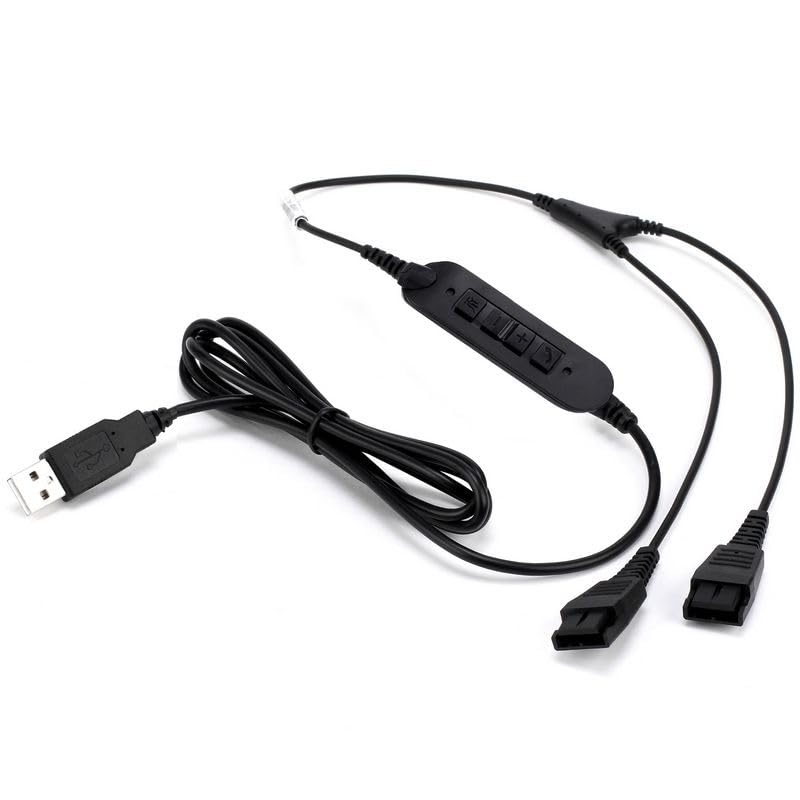
Image 1: The Cleyver USB-QD Y-Cable, showing the USB connector, the integrated control box, and the two Quick Disconnect (QD) ports for Jabra headsets.
3. Setup Instructions
Follow these steps to set up your Cleyver USB-QD Y-Cable:
- Connect Headsets: Take your two Jabra headsets and connect each one to a Quick Disconnect (QD) port on the Y-cable. Ensure a secure connection.
- Connect to PC: Plug the USB connector of the Y-cable into an available USB port on your computer (PC).
- System Recognition: Your operating system should automatically detect and install the necessary drivers for the USB device. This process usually takes a few moments.
- Audio Settings: Once recognized, verify your computer's audio settings. Ensure the Cleyver USB-QD Y-Cable is selected as the default audio input and output device in your sound settings or communication software (e.g., Microsoft Teams, Zoom).
- Ready for Use: The cable and connected headsets are now ready for dual listening and communication.
4. Operating Instructions
The integrated control box on the Cleyver USB-QD Y-Cable provides easy access to essential call functions.
- Volume Control: Use the Volume Up and Volume Down buttons on the control box to adjust the listening volume for both connected headsets.
- Answer/End Call: Press the Call button (often indicated by a phone icon) to answer an incoming call or end an active call.
- Microphone Mute: Press the Mute button (often indicated by a microphone icon) to mute or unmute the microphones on both connected headsets. An indicator light on the control box may show the mute status.
These controls operate independently of your PC's software, providing quick and convenient management of your audio experience.
5. Maintenance
To ensure the longevity and optimal performance of your Cleyver USB-QD Y-Cable, follow these maintenance guidelines:
- Cleaning: Gently wipe the cable and control box with a soft, dry cloth. Avoid using liquid cleaners or abrasive materials.
- Storage: When not in use, store the cable in a cool, dry place, away from direct sunlight and extreme temperatures. Avoid tightly coiling the cable to prevent damage.
- Handling: Always grasp the connectors when plugging or unplugging the cable. Avoid pulling directly on the cable itself.
- QD Connections: Ensure the Quick Disconnect connections are clean and free of debris to maintain clear audio transmission.
6. Troubleshooting
If you encounter issues with your Cleyver USB-QD Y-Cable, refer to the following common problems and solutions:
| Problem | Possible Cause | Solution |
|---|---|---|
| No audio from headsets |
|
|
| Microphone not working |
|
|
| Intermittent audio or static |
|
|
7. Specifications
| Feature | Detail |
|---|---|
| Brand | Cleyver |
| Model Number | ODYQDUSBGN |
| Cable Type | USB to Dual Quick Disconnect (QD) |
| Compatible Devices | PC, Jabra Headsets with QD connector |
| Connectivity | USB |
| Integrated Controls | Volume Up/Down, Answer/End Call, Microphone Mute |
| First Available Date | December 5, 2023 |
8. Warranty and Support
For warranty information and technical support, please refer to the documentation provided with your purchase or visit the official Cleyver website.
Manufacturer: Cleyver