
Philips EP0820.00
Philips Series 800 Automatic Espresso Machine
Model: EP0820.00 - User Instruction Manual
1. Introduction
This manual provides essential information for the safe and efficient operation, maintenance, and troubleshooting of your Philips Series 800 Automatic Espresso Machine (Model EP0820.00). Please read this manual thoroughly before first use and keep it for future reference.

Figure 1: Philips Series 800 Automatic Espresso Machine (EP0820.00)
This image shows the Philips Series 800 automatic espresso machine from a slight angle, displaying its sleek black design, control panel, coffee spouts, and drip tray. Two espresso cups filled with coffee are placed on the drip tray.
2. Product Overview
The Philips Series 800 is a compact bean-to-cup coffee machine designed to deliver fresh coffee and espresso with ease. It features an intuitive control panel and a classic milk frother for various coffee beverages.
2.1 Components
- Water Tank
- Bean Hopper
- Ground Coffee Compartment
- Control Panel
- Coffee Spout
- Drip Tray
- Coffee Grounds Container
- Classic Milk Frother (Steam Wand)
- Brew Group (internal)

Figure 2: Front View and Control Panel
This image provides a direct front view of the Philips Series 800 espresso machine, highlighting the control panel with its various icons for different coffee types and functions, the Philips logo, and the coffee spouts. Two espresso cups are visible on the drip tray.
3. Initial Setup
Before using your machine for the first time, follow these steps:
- Unpacking: Carefully remove the machine from its packaging. Retain packaging for future transport or service.
- Placement: Place the machine on a stable, level surface, away from heat sources and direct sunlight. Ensure adequate ventilation around the machine.
- Rinse Cycle: Fill the water tank with fresh tap water up to the MAX indication. Place a container under the coffee spout and steam wand. Turn on the machine. The machine will perform an automatic rinse cycle.
- Fill Bean Hopper: Open the bean hopper lid and fill with fresh coffee beans. Do not use caramelized or flavored beans as they can clog the grinder.
- Power Connection: Plug the power cord into a grounded wall socket.

Figure 3: Product Packaging
This image displays the Philips Series 800 espresso machine inside its retail packaging, highlighting the product's branding and key features mentioned on the box, such as "2 delicious fresh bean coffees, easier than ever."
4. Operating Instructions
4.1 Making Coffee/Espresso
- Ensure the water tank is filled and the bean hopper contains coffee beans.
- Place a cup under the coffee spout.
- Press the desired coffee button (e.g., Espresso, Coffee). The machine will automatically grind the beans and brew your drink.
- To stop brewing prematurely, press the button again.
4.2 Using Pre-Ground Coffee
- Open the pre-ground coffee compartment lid.
- Add one scoop of pre-ground coffee. Do not add more than one scoop to avoid clogging.
- Select the pre-ground coffee function on the control panel.
- Place a cup under the coffee spout and press the desired coffee button.
4.3 Dispensing Hot Water
- Place a cup under the hot water spout (steam wand).
- Press the 'Hot Water' button on the control panel.
- Press the button again to stop dispensing.
4.4 Frothing Milk with the Classic Milk Frother
- Fill a milk jug with cold milk (preferably semi-skimmed or full-fat) up to one-third full.
- Place the milk jug under the steam wand.
- Press the 'Steam' button on the control panel. Wait for the steam icon to illuminate steadily.
- Immerse the steam wand into the milk, just below the surface.
- Turn the steam knob to release steam. Move the jug up and down to create foam.
- Once desired foam is achieved, turn off the steam knob and press the 'Steam' button again to stop.
- Clean the steam wand immediately after use with a damp cloth to prevent milk residue from drying.
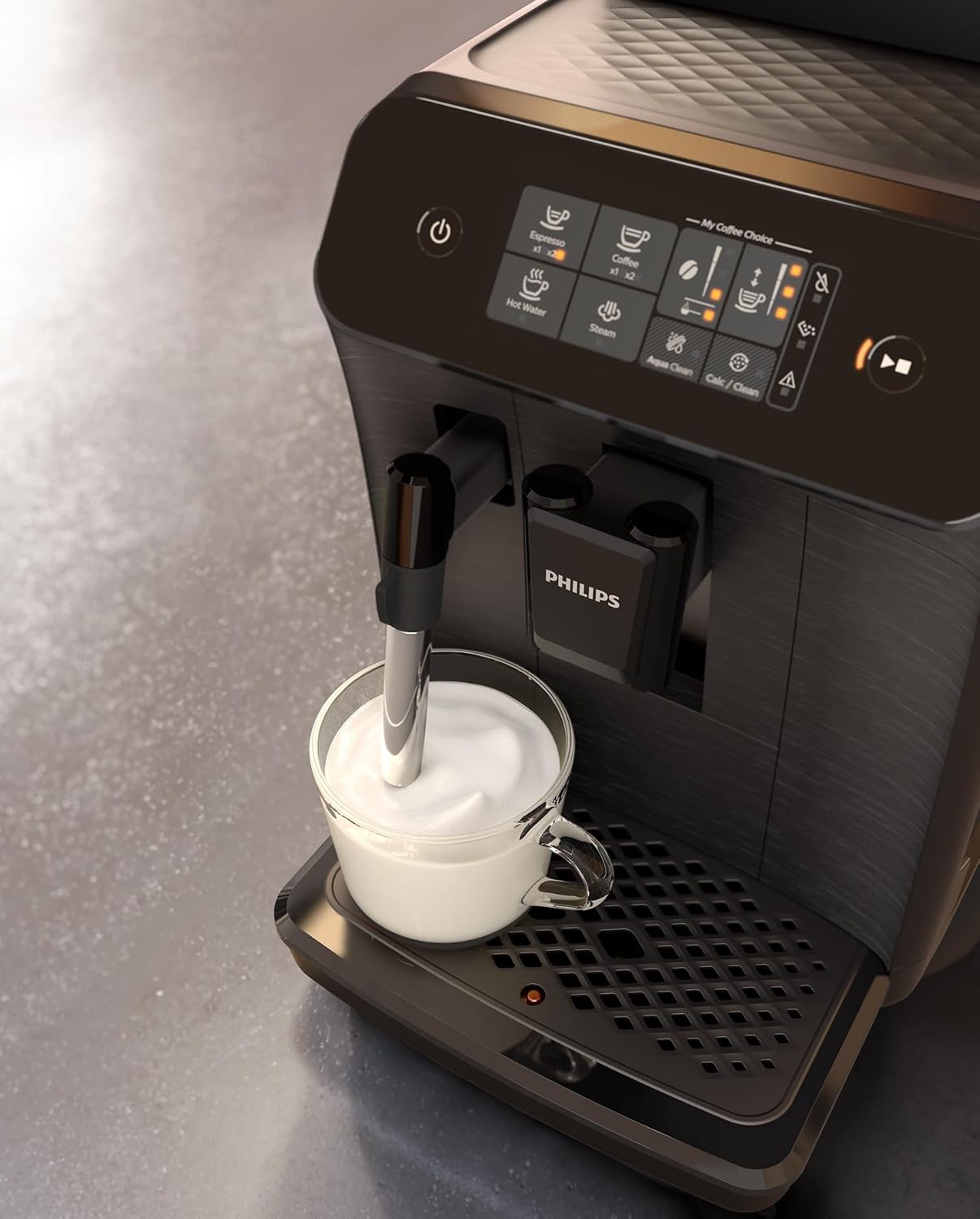
Figure 4: Frothing Milk
This image shows the Philips Series 800 espresso machine in action, with the classic milk frother (steam wand) being used to froth milk in a glass cup, demonstrating its capability to prepare milk-based coffee beverages.
5. Maintenance
Regular maintenance ensures optimal performance and extends the lifespan of your machine.
5.1 Daily Cleaning
- Drip Tray and Coffee Grounds Container: Empty and rinse daily.
- Brew Group: Remove and rinse under tap water daily. Allow to air dry before reinserting.
- Water Tank: Rinse daily and refill with fresh water.
- Steam Wand: Clean immediately after each use with a damp cloth.
5.2 Weekly Cleaning
- Coffee Spout: Clean with a damp cloth.
- Bean Hopper: Wipe clean with a dry cloth to remove coffee oil residue.
5.3 Descaling
The machine will indicate when descaling is required. Use only Philips descaling solution. Follow the on-screen instructions or refer to the detailed descaling procedure in the full manual (available online).
5.4 AquaClean Filter
The machine is compatible with the Philips AquaClean water filter. Installing and activating an AquaClean filter reduces the need for descaling. Replace the filter when indicated by the machine, typically every 3 months or 95 liters of water.
6. Troubleshooting
| Problem | Possible Cause | Solution |
|---|---|---|
| No coffee comes out. | Water tank empty; brew group clogged; coffee spout blocked. | Refill water tank; clean brew group; clean coffee spout. |
| Coffee is too weak/watery. | Grind setting too coarse; insufficient coffee dose; brew group dirty. | Adjust grind setting finer; ensure enough beans in hopper; clean brew group. |
| Machine makes unusual noise. | Air in the system; brew group not inserted correctly. | Dispense hot water to prime the system; reinsert brew group correctly. |
| Milk frother not producing steam. | Steam wand clogged; not heated sufficiently. | Clean steam wand thoroughly; wait for steam icon to stabilize. |
For more detailed troubleshooting, please refer to the complete user manual or contact Philips customer support.
7. Specifications
- Model: EP0820.00
- Brand: Philips
- Colour: Black/White
- Product Dimensions: 35 x 25 x 40 cm
- Item Weight: 9.4 kg
- Voltage: 120 Volts
- Auto Shutoff: Yes
- Recommended Use: Preparing coffee and espresso drinks
- Specific Use: Grinding
8. Warranty and Support
Your Philips Series 800 Automatic Espresso Machine comes with a standard manufacturer's warranty. Please refer to the warranty card included with your product for specific terms and conditions, or visit the official Philips website for detailed warranty information.
For technical support, spare parts, or service, please contact Philips Customer Service. You can find contact details on the Philips website or in the documentation provided with your machine.
Online Resources:
Related documentsEP0820.00


Ask a question about this manual
Ask about setup, troubleshooting, compatibility, parts, safety, or missing instructions. Manuals+ will review the question and use this page’s manual context to help answer it.