
MZ GPSMZM55VP-Black
MZ M55VP Portable Bluetooth Karaoke Speaker User Manual
Model: GPSMZM55VP-Black
Introduction
Thank you for choosing the MZ M55VP Portable Bluetooth Karaoke Speaker. This manual provides essential information for setting up, operating, and maintaining your speaker to ensure optimal performance and longevity. The MZ M55VP is designed to deliver clear and powerful sound, offering seamless wireless connectivity and a portable design perfect for various environments, from indoor gatherings to outdoor adventures.

Figure 1: Front view of the MZ M55VP speaker with a smartphone in the cradle.
Package Contents
Please check the package carefully to ensure all items are present and in good condition.
- 1 x MZ M55VP Portable Bluetooth Karaoke Speaker
- 1 x Wired Microphone
- 1 x Charging Cable
- 1 x User Manual (this document)
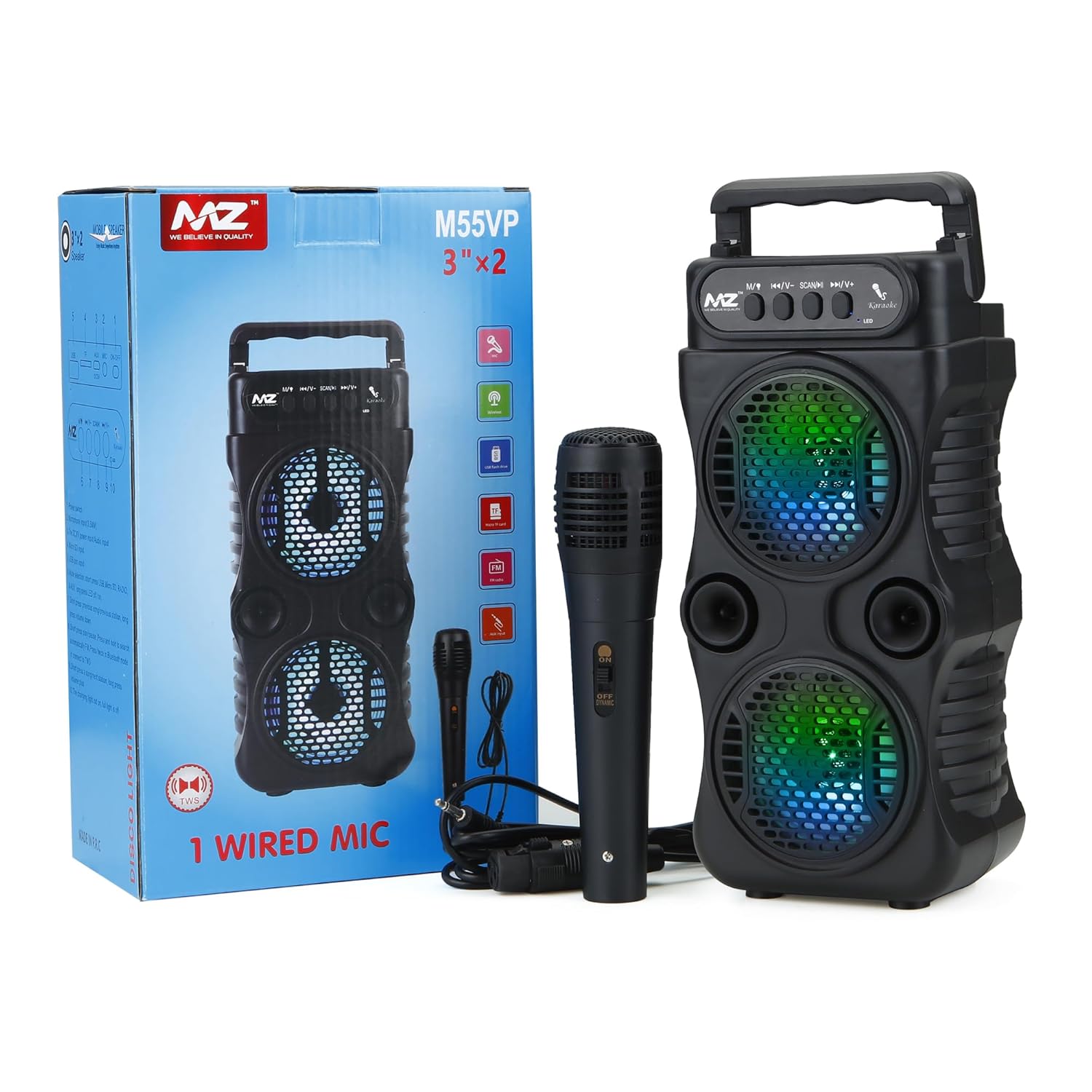
Figure 2: Contents of the MZ M55VP package, including the speaker, wired microphone, and product box.
Product Features
- High-Quality Sound: Delivers clear and powerful audio for an enhanced listening experience.
- Compact and Portable: Lightweight design for easy transport, allowing music enjoyment anywhere.
- Seamless Wireless Connectivity: Equipped with Bluetooth technology for streaming music, podcasts, and calls.
- Long-Lasting Battery Life: Ensures extended playback for uninterrupted entertainment.
- Durable Construction: Crafted from high-quality plastic to withstand everyday wear and tear.
- Karaoke Functionality: Includes a wired microphone for karaoke sessions.
- Waterproof Design: Suitable for various environments, including outdoor use.
Setup
1. Initial Charging
Before first use, fully charge the speaker. Connect the charging cable to the speaker's charging port and the other end to a compatible USB power adapter (e.g., 5V/1A). The charging indicator light will typically show charging status and turn off or change color when fully charged.
2. Powering On/Off
- To power on the speaker, locate the power button (usually labeled "Power" or indicated by a universal power symbol) and press and hold it for a few seconds until you hear an audible prompt or see an indicator light illuminate.
- To power off, press and hold the power button again until the speaker shuts down.
Operating Instructions
1. Bluetooth Pairing
- Ensure the speaker is powered on and in Bluetooth pairing mode. The Bluetooth indicator light will typically flash rapidly.
- On your smartphone, tablet, or other Bluetooth-enabled device, navigate to the Bluetooth settings.
- Search for available devices. The speaker will appear as "MZ M55VP" or a similar name.
- Select "MZ M55VP" from the list to initiate pairing.
- Once connected, the speaker will provide an audible confirmation, and the Bluetooth indicator light will become solid.
- You can now play audio from your device through the speaker.

Figure 3: The MZ M55VP speaker ready for use with a smartphone and wired microphone.
2. Using the Wired Microphone (Karaoke Function)
- Locate the microphone input port on the speaker (often labeled "MIC" or with a microphone icon).
- Plug the wired microphone's connector firmly into the microphone input port.
- Ensure the microphone's power switch (if present) is in the "ON" position.
- Adjust the microphone volume using the dedicated knob or button on the speaker, if available, or through the main volume controls.
- You can now sing along to your music playing through the speaker.
3. Control Buttons
The speaker features several control buttons on its top panel:
- M / ↪ (Mode / Repeat): Press to switch between input modes (e.g., Bluetooth, USB, AUX, FM Radio if supported). Long press for repeat function (if applicable).
- ⏮︎ / V- (Previous / Volume Down): Press to go to the previous track. Long press to decrease the volume.
- SCAN / M (Play/Pause / Scan): Press to play or pause audio. In FM mode, long press to scan for radio stations.
- ⏭︎ / V+ (Next / Volume Up): Press to go to the next track. Long press to increase the volume.

Figure 4: Close-up of the speaker's control panel and LED lighting effects.
Maintenance
- Cleaning: Use a soft, dry cloth to wipe the speaker's surface. Do not use abrasive cleaners, waxes, or solvents.
- Storage: When not in use for extended periods, store the speaker in a cool, dry place away from direct sunlight and extreme temperatures.
- Battery Care: To prolong battery life, avoid fully discharging the battery frequently. Charge the speaker regularly, even if not in use.
- Water Exposure: While the speaker is waterproof, avoid submerging it for prolonged periods or exposing it to high-pressure water jets. Ensure all ports are securely closed before exposure to water.
Troubleshooting
| Problem | Possible Cause | Solution |
|---|---|---|
| Speaker does not power on. | Low battery; Power button not pressed correctly. | Charge the speaker fully. Press and hold the power button for a few seconds. |
| No sound from speaker. | Volume too low; Device not connected; Incorrect mode. | Increase speaker and device volume. Ensure Bluetooth is connected. Press 'M' button to cycle modes. |
| Bluetooth connection fails. | Speaker not in pairing mode; Device too far; Interference. | Ensure speaker is in pairing mode. Move device closer to speaker. Turn off other Bluetooth devices. Forget and re-pair the device. |
| Microphone not working. | Microphone not plugged in correctly; Microphone switch off. | Ensure microphone is fully inserted into the MIC port. Check if the microphone's power switch is ON. |
Specifications
| Feature | Detail |
|---|---|
| Brand | MZ |
| Model Name | PORTABLE BLUETOOTH KARAOKE SPEAKER |
| Item Model Number | GPSMZM55VP-Black |
| Material | Plastic |
| Speaker Type | Component |
| Special Features | Wireless, Portable, Bluetooth |
| Recommended Uses | Tablets For Music Players, For Smartphones or Tablets |
| Compatible Devices | Tablet, Smartphone |
| Surround Sound Channel Configuration | 2.0 |
| Colour | Black |
| Included Components | 10 W Bluetooth Party Speaker |
| Product Dimensions | 26D x 23W x 9H Centimeters |
| Waterproof | TRUE |
| Speaker Maximum Output Power | 10 Watts |
| Connectivity Technology | Bluetooth |
| Audio Output Mode | Stereo |
| Mounting Type | Floor Standing |
Warranty and Support
For warranty information or technical support, please contact the manufacturer or your point of purchase.
Manufacturer: YIWU EVERISING IMPORT & EXPORT CO., LTD. CHINA
Ask a question about this manual
Ask about setup, troubleshooting, compatibility, parts, safety, or missing instructions. Manuals+ will review the question and use this page’s manual context to help answer it.