
Confixpand B0CPHYTTT6
Confixpand 5-Band Cell Phone Signal Booster Instruction Manual
Model: B0CPHYTTT6
1. Introduction
This manual provides detailed instructions for the installation, operation, and maintenance of your Confixpand 5-Band Cell Phone Signal Booster. This device is designed to improve cellular signal strength for 2G, 3G, 4G LTE, and 5G networks across various frequency bands, including Band 2 (1900MHz), Band 4/66 (1700/2100MHz), Band 5 (850MHz), Band 7 (2600MHz), and Band 28 (700MHz). It is compatible with most major carriers in Canada, USA, Colombia, Mexico, and Panama.
The booster is engineered to eliminate signal dead zones and enhance weak signals, providing reliable voice and data connectivity in areas up to 5,000 sq. ft. Please read this manual thoroughly before installation to ensure optimal performance and safety.
2. Package Contents
Verify that all items listed below are included in your package:
- 1 x Cell Phone Signal Booster
- 1 x Omni Antenna (Outdoor)
- 1 x Panel Antenna (Indoor)
- 1 x 13 Meters (43 feet) Coaxial Cable
- 1 x Power Adapter
- 1 x User Manual
- Installation Accessories (brackets, screws, etc.)


3. Setup and Installation
Proper installation is crucial for the optimal performance of your signal booster. Follow these steps carefully:
3.1. Find a Good Outdoor Signal Location
Before installing the outdoor antenna, identify a location on your roof or outside your building where the cellular signal is strongest. Use your mobile phone to check signal strength. A signal stronger than -80dB or at least 3 bars is recommended. Ensure there are no obstructions between the outdoor antenna and the nearest cell tower.
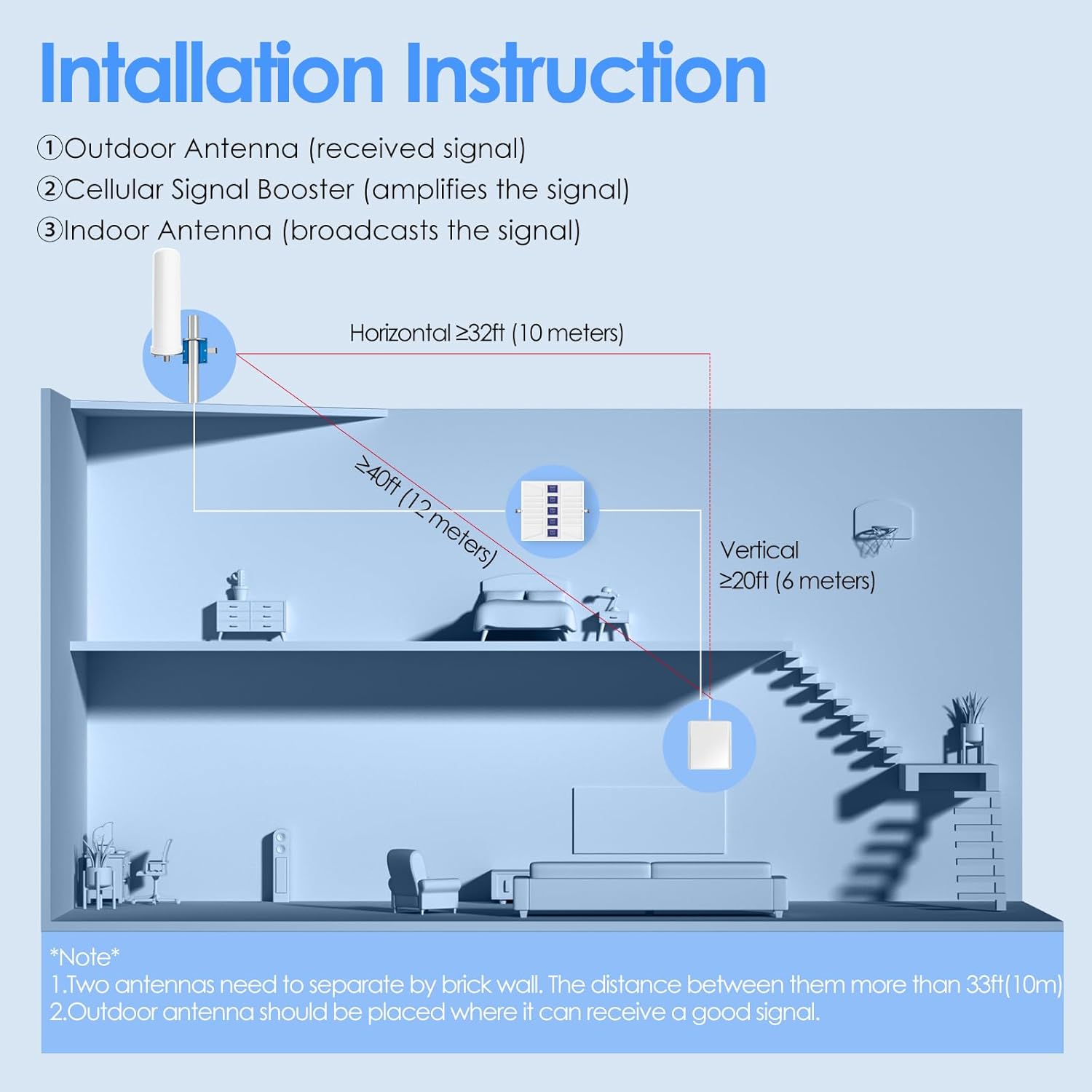

3.2. Install the Outdoor Antenna
Mount the omni antenna on a pole or mast in the chosen outdoor location. Ensure it is securely fastened using the provided installation accessories. The omni antenna receives signals from all directions. Connect one end of the 13-meter coaxial cable to the outdoor antenna and wrap the connection with waterproof tape to protect it from weather elements.
3.3. Install the Indoor Antenna
Choose a central location inside your home or office where you need improved signal. The indoor panel antenna should be mounted on a wall, facing the area where signal is desired. Ensure there is adequate separation between the outdoor and indoor antennas (at least 32 feet horizontal and 20 feet vertical) to prevent oscillation and maximize booster gain.
3.4. Connect the Booster
- Route the coaxial cable from the outdoor antenna to the signal booster. Connect this cable to the port labeled "BTS" (Base Transceiver Station) on the booster.
- Route the cable from the indoor antenna to the signal booster. Connect this cable to the port labeled "MS" (Mobile Station) on the booster.
- Ensure all connections are hand-tightened.
3.5. Power On
Connect the power adapter to the booster and then plug it into a power outlet. The booster will power on, and the LCD screen will display signal strength information. Allow a few moments for the system to initialize.
3.6. Installation Videos
For a visual guide to the installation process, please refer to the following videos:
Video 3.1: This video demonstrates the installation process for a 5-Band Signal Booster, covering outdoor antenna placement, cable routing, and booster connections.
Video 3.2: A detailed guide on installing a 5-Band Cell Phone Signal Booster Set, showing step-by-step procedures for both outdoor and indoor components.
4. Operating Instructions
4.1. How the Booster Works
The Confixpand signal booster operates by receiving weak cellular signals from the nearest cell tower via the outdoor antenna. These signals are then amplified by the booster unit and re-broadcasted indoors through the indoor antenna. This process creates a stronger, more reliable signal for your mobile devices.
Video 4.1: An animated explanation of how the cell phone signal booster system functions to enhance indoor cellular coverage.
4.2. Automatic Gain Control (AGC)
This cellular signal booster features an Automatic Gain Control function. It intelligently detects the existing signal strength and adjusts its performance to prevent interference with the carrier's network. The signal strength will be displayed on the booster's LCD for real-time monitoring.

4.3. Compatibility and Coverage
The booster supports 2G, 3G, 4G LTE, and 5G networks on Band 2, 4/66, 5, 7, and 28. It can improve signal for 5-20 users and devices simultaneously, covering up to 5,000 sq. ft. This makes it suitable for homes, offices, basements, garages, and remote areas.


4.4. Checking Signal Band
To confirm your phone's signal band before or after installation, use the following methods:
- For iPhone: Dial *3001#12345#*, press call button, click "Serving Cell Info", then check "Band Info".
- For Android: Download the app "Network Cell Info Lite", choose "GAUGE", then click "BAND".

5. Maintenance
The Confixpand Cell Phone Signal Booster is designed for minimal maintenance. To ensure longevity and optimal performance:
- Keep the booster unit clean and free from dust. Use a dry, soft cloth for cleaning.
- Regularly inspect outdoor antenna connections for any signs of wear or weather damage. Re-wrap with waterproof tape if necessary.
- Ensure the power adapter is not damaged and is securely connected.
- Avoid placing the booster in areas with extreme temperatures or high humidity.
6. Troubleshooting
If you experience issues with your signal booster, refer to the following common problems and solutions:
| Problem | Possible Cause | Solution |
|---|---|---|
| No signal improvement | Insufficient separation between outdoor and indoor antennas. | Increase the horizontal and/or vertical distance between the antennas. Ensure at least 32 feet horizontal and 20 feet vertical separation. |
| No signal improvement | Outdoor antenna not receiving strong enough signal. | Relocate the outdoor antenna to a higher point or a different direction to find a stronger signal source. Check signal strength with your phone. |
| Booster not powering on | Power adapter not connected or faulty. | Ensure the power adapter is securely plugged into the booster and a working power outlet. Test the outlet with another device. |
| Fluctuating signal | Loose cable connections. | Check and tighten all coaxial cable connections at both antennas and the booster. |
| Booster shows error/warning | Signal oscillation or feedback. | Increase antenna separation. Ensure the outdoor antenna is not pointing towards the indoor antenna. |
If the problem persists after trying these solutions, please contact customer support for further assistance.
7. Specifications
| Feature | Detail |
|---|---|
| Product Model | B0CPHYTTT6 |
| Supported Bands | Band 2 (1900MHz), Band 4/66 (1700/2100MHz), Band 5 (850MHz), Band 7 (2600MHz), Band 28 (700MHz) |
| Supported Networks | 2G, 3G, 4G LTE, 5G |
| Max Gain | 70 dB |
| Coverage Area | Up to 5,000 sq. ft. |
| Automatic Gain Control | Yes |
| Product Dimensions | 14.61 x 5.39 x 8.5 inches |
| Item Weight | 6.49 pounds (2.95 Kilograms) |
| Manufacturer | Confixpand |
| FCC ID | 2A99P-GB20 (Note: Another variant shows 2A99P-GB3CPA4) |
| Certifications | IC, FCC, CE |

8. Warranty and Support
Confixpand is committed to providing high-quality products and customer satisfaction. Your signal booster comes with the following:
- 30-Day Money-Back Guarantee: If you are not satisfied with your purchase.
- 3-Month Free Replacement: For any manufacturing defects.
- 5-Year Manufacturer Warranty: Covering defects in materials and workmanship.
- Lifetime Professional Technical Support: Assistance with installation, troubleshooting, and general inquiries.
For technical support or warranty claims, please refer to the contact information provided on the product packaging or the official Confixpand website.
Ask a question about this manual
Ask about setup, troubleshooting, compatibility, parts, safety, or missing instructions. Manuals+ will review the question and use this page’s manual context to help answer it.