1. Introduction
This instruction manual provides essential information for the proper installation, operation, and maintenance of your FilterTech 7EA Premium Replacement Water Filter Set, designed for use with Coway CHP-671L water purifiers. Adhering to these guidelines will ensure optimal performance and longevity of your water filtration system.
2. Product Overview
The FilterTech 7EA Premium Replacement Water Filter Set provides a comprehensive 1-year supply of filters for your Coway CHP-671L system. This set includes a total of 7 filters, each designed for a specific stage of water purification:
- Sediment Filters (4EA): Removes larger particles such as rust, sand, and dirt.
- Pre-Carbon Filters (2EA): Absorbs chlorine, organic chemicals, and odors.
- RO Membrane Filter (1EA): Provides advanced filtration, removing dissolved solids, heavy metals, and other contaminants.
- Post-Carbon Filter (1EA): Further enhances water taste and removes any residual odors.
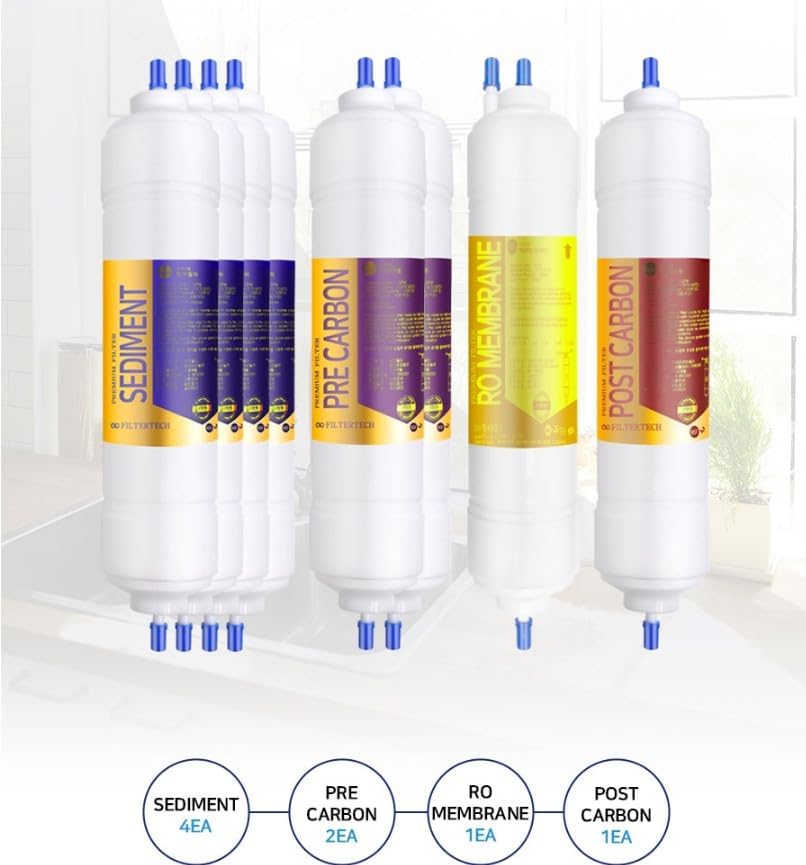
Image 1: The complete FilterTech 7EA Premium Replacement Water Filter Set, illustrating the different types of filters included for a full year's supply.
3. Safety Information
Important Flushing Procedure: Before consuming water after filter replacement, it is crucial to flush each new filter thoroughly. This process discharges air and removes carbon powder (charcoal powder) that may be present from the filter manufacturing process. Failure to flush properly may result in cloudy water or an initial unpleasant taste.
- Always turn off the water supply to your Coway CHP-671L unit before attempting any filter replacement.
- Depressurize the system by opening a faucet or dispensing water until the flow stops.
- Ensure all connections are secure after installation to prevent leaks.
- Do not use with water that is microbiologically unsafe or of unknown quality without adequate disinfection before or after the system.
4. Installation
Follow these general steps for replacing the water filters in your Coway CHP-671L system. Refer to your Coway unit's specific manual for detailed instructions on accessing the filter compartments.
- Turn Off Water Supply: Locate the main water shut-off valve for your water purifier and turn it off.
- Depressurize System: Open the dispenser faucet on your Coway unit to release any remaining pressure and drain water from the system.
- Remove Old Filters: Carefully remove the old filters according to your Coway CHP-671L manual. Be prepared for some water spillage.
- Install New Filters: Insert the new FilterTech replacement filters into their respective housings. Ensure they are correctly oriented and securely seated. The set includes 4 Sediment, 2 Pre-Carbon, 1 RO Membrane, and 1 Post-Carbon filter.
- Restore Water Supply: Slowly turn the main water supply back on. Check for any leaks around the newly installed filters.
- Flush Filters: Perform the crucial flushing procedure as described in the 'Operation' section.

Image 2: Example of water filters installed within a purification system, demonstrating typical placement.
5. Operation
After installing new filters, the primary operational step is the initial flushing:
- Initial Flushing: For each newly installed filter, allow water to flow through the system for approximately 2 minutes (or about 4 liters). This flushes out any carbon fines and air from the filter. Repeat this process for each filter type that has been replaced.
- After flushing, your water purifier is ready for normal operation.
6. Maintenance
Regular filter replacement is essential for maintaining water quality and system efficiency. This 7EA set is designed to provide a 1-year supply, assuming typical usage.
| Filter Type | Quantity in Set | Recommended Replacement Interval |
|---|---|---|
| Sediment Filter | 4 | Every 3 months |
| Pre-Carbon Filter | 2 | Every 6 months |
| RO Membrane Filter | 1 | Every 12 months |
| Post-Carbon Filter | 1 | Every 12 months |
Note: Actual replacement intervals may vary based on water quality and usage volume. Monitor your water taste and flow rate for signs of filter exhaustion.
7. Troubleshooting
- Low Water Flow: This often indicates a clogged filter. Check the replacement schedule and replace any overdue filters. Ensure the water supply valve is fully open.
- Unpleasant Taste or Odor: This can occur if filters are not flushed properly after installation or if they are past their service life. Perform the flushing procedure again or replace the relevant carbon filters.
- Leaks: Turn off the water supply immediately. Check all filter connections and O-rings for proper seating and tightness. Ensure filters are installed correctly.
- Cloudy Water: This is typically due to air trapped in the system or carbon fines from new filters. Continue flushing the system until the water runs clear.
8. Specifications
- Model Number: CHP-671L (Compatible Replacement Set)
- Material: Carbon Fiber (for carbon filters)
- Product Benefits: Removes impurities and provides high capacity point-of-use filtration.
- Number of Items: 7 filters per set
- Approximate Product Dimensions (Individual Filter): 6"D x 11"W x 22"H (This dimension seems to be for the entire product package, not individual filters. Please refer to your Coway manual for exact filter dimensions if needed for fitment.)

Image 3: FilterTech filters highlighting their quality and compliance with standards.
9. Warranty and Support
For warranty information or technical support regarding your FilterTech replacement filters, please contact the seller or manufacturer directly through your purchase platform. Keep your proof of purchase for any warranty claims.
For issues related to your Coway CHP-671L water purifier unit itself, please refer to your Coway product manual or contact Coway customer service.