1. Introduction
This manual provides essential information for the safe and efficient operation of your RATTMMOTOR 0.8KW 110V CNC Air Cooled Spindle Motor Kit. Please read this manual thoroughly before installation, operation, or maintenance. Keep this manual for future reference.
2. Safety Information
WARNING: Improper installation or operation can result in electric shock, fire, or serious injury. Always follow safety guidelines.
- Ensure all electrical connections are made by a qualified professional and comply with local electrical codes.
- Disconnect power before performing any installation, maintenance, or troubleshooting.
- Wear appropriate personal protective equipment (PPE), including eye protection, during operation.
- Do not operate the spindle motor if any part is damaged or if it emits unusual noises or smells.
- Keep hands and loose clothing away from rotating parts.
- Ensure adequate ventilation for the air-cooled spindle motor to prevent overheating.
- The speed controller operates with high voltage. Exercise extreme caution.
3. Package Contents
Verify that all components listed below are included in your package:
- 0.8KW 110V Air Cooled Spindle Motor (52mm diameter, ER16 collet)
- Mach3 Speed Controller Governor with Power Supply (AC100-220V input, 0-110V DC output)
- 52mm Spindle Mount Clamp
- Carbon Brushes (spare set)
- Engraving Bits (assorted set)

Image 3.1: Overview of the RATTMMOTOR 0.8KW 110V CNC Air Cooled Spindle Motor Kit components, including the spindle motor, speed controller, and mount clamp.
4. Product Overview and Components
4.1 Spindle Motor
The 0.8KW air-cooled spindle motor is designed for CNC routing applications. It features an ER16 collet for tool holding and an integrated cooling fan at the rear for heat dissipation.
- Power: 800W
- Voltage: 110V DC
- Idling Speed: 5000-20000 r/min
- Torque: 0.79 NM
- Diameter: 52mm
- Supports reverse rotation (by reversing power supply polarity).

Image 4.1.1: Dimensional drawing of the spindle motor, showing key measurements in millimeters.

Image 4.1.2: Visual representation of the air-cooled spindle motor highlighting its low noise, high speed, and quality assurance features.
4.2 Speed Controller Governor
The speed controller provides variable speed control for the spindle motor and includes safety features.
- Power: 800W
- Input Voltage: AC100-AC220V ±10% (Global voltage 50/60Hz)
- Output Voltage: 0-110V DC
- Current Limit: 6A
- Supports Mach3 function for external control.
- Features overcurrent protection and a soft start device.
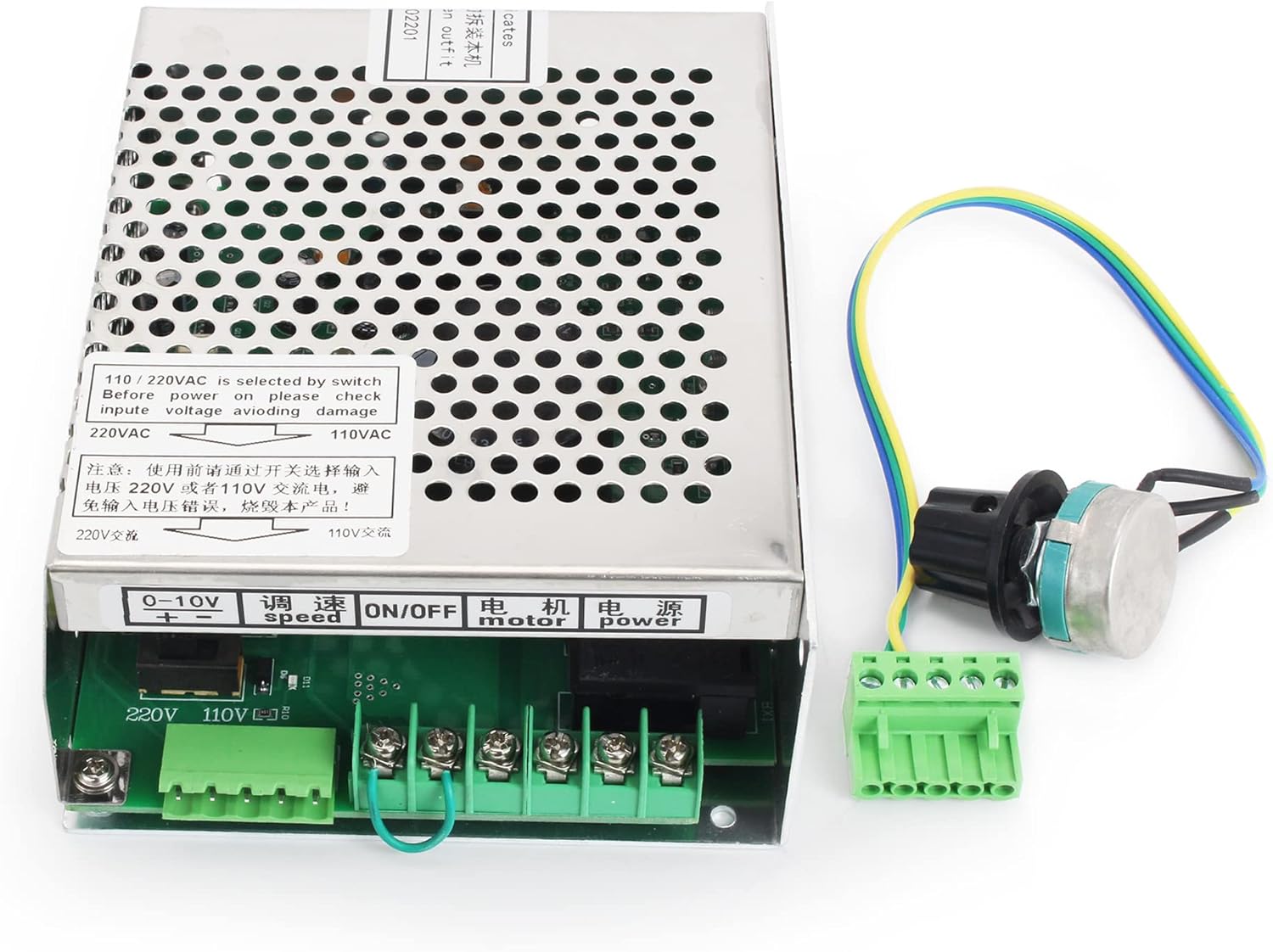
Image 4.2.1: Detailed wiring diagram for the speed controller, showing connections for power, motor, potentiometer, and Mach3 signal.
4.3 Spindle Mount Clamp
The aluminum spindle mount clamp securely holds the spindle motor in place on your CNC machine.
- Diameter: 52mm (for 52mm spindle motors)
- Includes mounting screws.
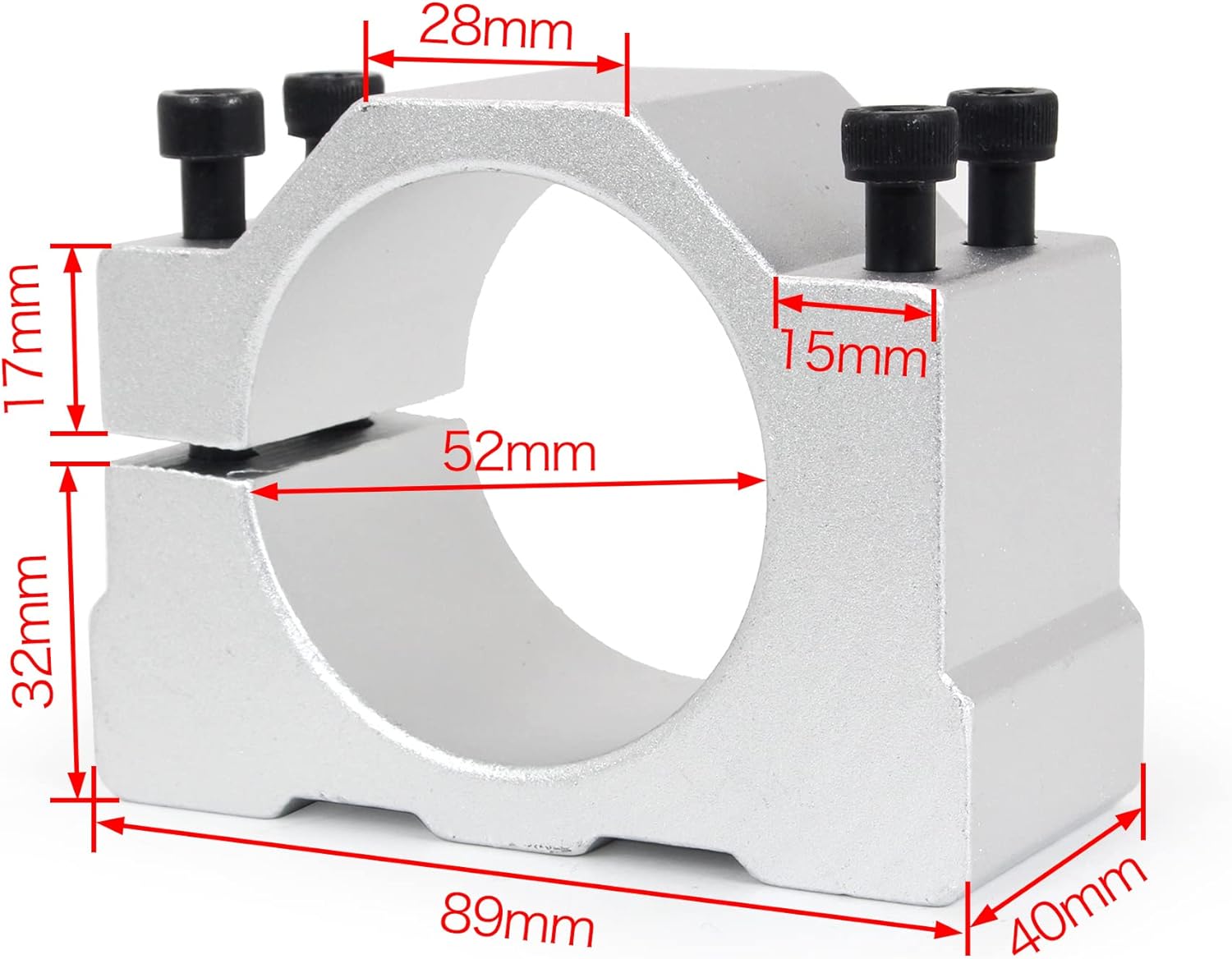
Image 4.3.1: Dimensional drawing of the 52mm spindle mount clamp, indicating its size and mounting points.
5. Specifications
| Feature | Specification |
|---|---|
| Brand | RATTMMOTOR |
| Model Number | 800W-ER16 |
| Spindle Power | 800W |
| Spindle Voltage | 110V DC |
| Spindle Idling Speed | 5000-20000 r/min |
| Spindle Torque | 0.79 NM |
| Spindle Diameter | 52mm |
| Collet Type | ER16 |
| Cooling Method | Air Cooled |
| Speed Controller Power | 800W |
| Speed Controller Input Voltage | AC100-AC220V ±10% (50/60Hz) |
| Speed Controller Output Voltage | 0-110V DC |
| Speed Controller Current Limit | 6A |
| Mach3 Function Support | Yes |
| Spindle Mount Clamp Diameter | 52mm |
| Material | Aluminum (Clamp) |
| Product Dimensions | 2.05 x 2.05 x 8.01 inches (Spindle) |
| Item Weight | 3.78 pounds |
6. Setup
6.1 Mounting the Spindle Motor
- Secure the 52mm spindle mount clamp to your CNC router machine's Z-axis carriage using appropriate fasteners. Ensure it is firmly attached and aligned.
- Carefully insert the 0.8KW spindle motor into the mount clamp. Tighten the clamp screws evenly to hold the motor securely without over-tightening, which could deform the motor housing.
6.2 Electrical Connections
Refer to Image 4.2.1 for the wiring diagram.
- Power Input: Connect the AC power supply (AC100-220V) to the input terminals of the speed controller. Ensure the voltage switch on the controller is set correctly for your region (110V or 220V) before powering on to avoid damage.
- Motor Output: Connect the DC output terminals (0-110V DC) of the speed controller to the spindle motor. The motor supports reverse rotation; if the motor spins in the wrong direction, simply reverse the polarity of the motor wires connected to the controller.
- Speed Control: The kit includes a potentiometer for manual speed adjustment. Connect the potentiometer to the designated 'speed' terminals on the controller.
- Mach3 Control (Optional): If using Mach3 or another external CNC controller, connect its 0-10V DC signal output to the corresponding terminals on the speed controller for automated speed control. Disconnect the manual potentiometer if using Mach3 control.
Video 6.2.1: Demonstration of the RATTMMOTOR 110V 800W CNC Air Cooled Spindle Motor Kit, showing components and basic connections.
6.3 Installing Collet and Tool
- Ensure the spindle motor is powered off.
- Insert the ER16 collet into the collet nut.
- Thread the collet nut onto the spindle shaft.
- Insert your desired engraving bit or tool into the collet.
- Tighten the collet nut firmly with a wrench to secure the tool. Do not overtighten without a tool inserted, as this can damage the collet.
7. Operating Instructions
- After completing all electrical connections and mounting, connect the speed controller to the main power supply.
- If using manual speed control, slowly turn the potentiometer knob to increase the spindle speed. Observe the motor for smooth operation.
- If using Mach3 control, ensure your CNC software is configured correctly to send speed commands to the controller.
- Always start the spindle before engaging the tool with the workpiece.
- Adjust the speed according to the material being machined and the tool being used.
- To stop the spindle, turn the potentiometer to its minimum setting or issue a stop command from your CNC software, then disconnect power.
Video 7.1.1: A demonstration of the RATTMMOTOR 800W 110V Spindle Motor Kit in operation, showcasing speed control.
8. Maintenance
- Regular Cleaning: Keep the spindle motor and speed controller free from dust and debris. Use compressed air to clean the cooling fan and vents regularly.
- Carbon Brush Replacement: The spindle motor uses carbon brushes, which are consumable parts. If the motor performance degrades or it stops working, inspect and replace the carbon brushes. Spare brushes are included in the kit.
- Collet and Nut Inspection: Regularly inspect the ER16 collet and collet nut for wear or damage. Replace if necessary to ensure proper tool gripping and accuracy.
- Wiring Check: Periodically check all electrical connections for tightness and signs of wear or damage.
9. Troubleshooting
| Problem | Possible Cause | Solution |
|---|---|---|
| Motor does not start | No power, incorrect wiring, faulty carbon brushes, controller issue. | Check power supply, verify all wiring connections, inspect and replace carbon brushes, test controller. |
| Motor runs but speed is inconsistent | Loose potentiometer connection, faulty potentiometer, controller issue. | Check potentiometer wiring, replace potentiometer, consult manufacturer for controller issues. |
| Motor overheats | Insufficient ventilation, prolonged high load, faulty cooling fan. | Ensure clear airflow around the motor, reduce load or operating time, check cooling fan for obstructions or damage. |
| Excessive vibration or noise | Unbalanced tool, loose collet/nut, worn bearings, motor imbalance. | Ensure tool is balanced and correctly inserted, tighten collet nut, inspect bearings for wear, contact support if motor imbalance is suspected. |
| Motor spins in reverse | Incorrect motor wiring polarity. | Reverse the positive and negative wires connecting the speed controller to the spindle motor. |
10. Warranty and Support
This product is sold by Kuku Tech. For warranty claims, technical support, or replacement parts, please contact the seller directly through your purchase platform. Refer to your purchase documentation for specific return policies and warranty periods.
Additional protection plans may be available for purchase. Please check the product listing for details on 3-Year, 4-Year, or Complete Protect plans.


