
1. Introduction
The Barrina Black Light Bar is designed to provide vibrant UV-A illumination for various applications such as glow parties, fluorescent poster displays, body painting, and Halloween decorations. Featuring magnetic mounting options and a linkable design, these 10W, 1FT LED black lights offer versatile and easy setup for both temporary and permanent installations. This manual provides essential information for safe and effective use of your Barrina Black Light Bar.

Image: Two Barrina Black Light Bars, each with an attached power cord featuring an on/off switch. Various mounting accessories are also visible, including magnetic pads, clips, screws, and zip ties.
2. What's in the Box
Please check the package contents upon opening to ensure all items are present and undamaged:
- 2 x Barrina UV LED Black Light Bars (1FT)
- 2 x 59-inch Power Cords with On/Off Switch
- 1 x 20-inch Connecting Cable
- 2 x Mounting Kits (includes clips, zip ties, screws, and adhesive iron sheets)
- 1 x Instruction Manual

Image: A visual representation of the Barrina Black Light Bar packing list, detailing the two light bars, two power cords, one connecting cable, and various mounting accessories such as clips, screws, wall anchors, adhesive iron sheets, and zip ties.
3. Safety Information
To ensure safe operation and prevent damage, please read and adhere to the following safety guidelines:
- Indoor Use Only: This product is designed for indoor use. Do not expose to water or high humidity.
- Electrical Safety: Ensure the power outlet voltage matches the product's requirements (265 Volts AC). Do not overload electrical circuits.
- Eye Protection: Avoid direct and prolonged exposure to the UV light. While UV-A is less harmful than UV-B or UV-C, prolonged exposure can still be detrimental to eyes and skin.
- Ventilation: Ensure adequate ventilation around the light bar to prevent overheating.
- Handling: Do not drop or subject the light bar to strong impacts.
- Cleaning: Disconnect from power before cleaning. Use a soft, dry cloth. Do not use abrasive cleaners or solvents.
- Children and Pets: Keep out of reach of children and pets.
4. Setup and Installation
The Barrina Black Light Bar offers multiple installation options for versatility.
4.1 Mounting Options
Choose the most suitable mounting method for your application:
- Magnetic Mounting: The light bars have small magnets on both ends. They can be directly attached to any ferrous metal surface. For non-magnetic surfaces, use the provided adhesive iron sheets. Peel the backing from the adhesive iron sheet and stick it to your desired surface, then attach the light bar magnetically.
- Clip Mounting: Use the provided mounting clips and screws to secure the light bar to a wall or ceiling. Mark the desired positions, drill pilot holes if necessary, insert wall anchors (if applicable), and screw the clips into place. Snap the light bar into the clips.
- Zip Tie Mounting: For temporary installations or attachment to pipes/bars, use the provided zip ties through the designated holes on the mounting clips.
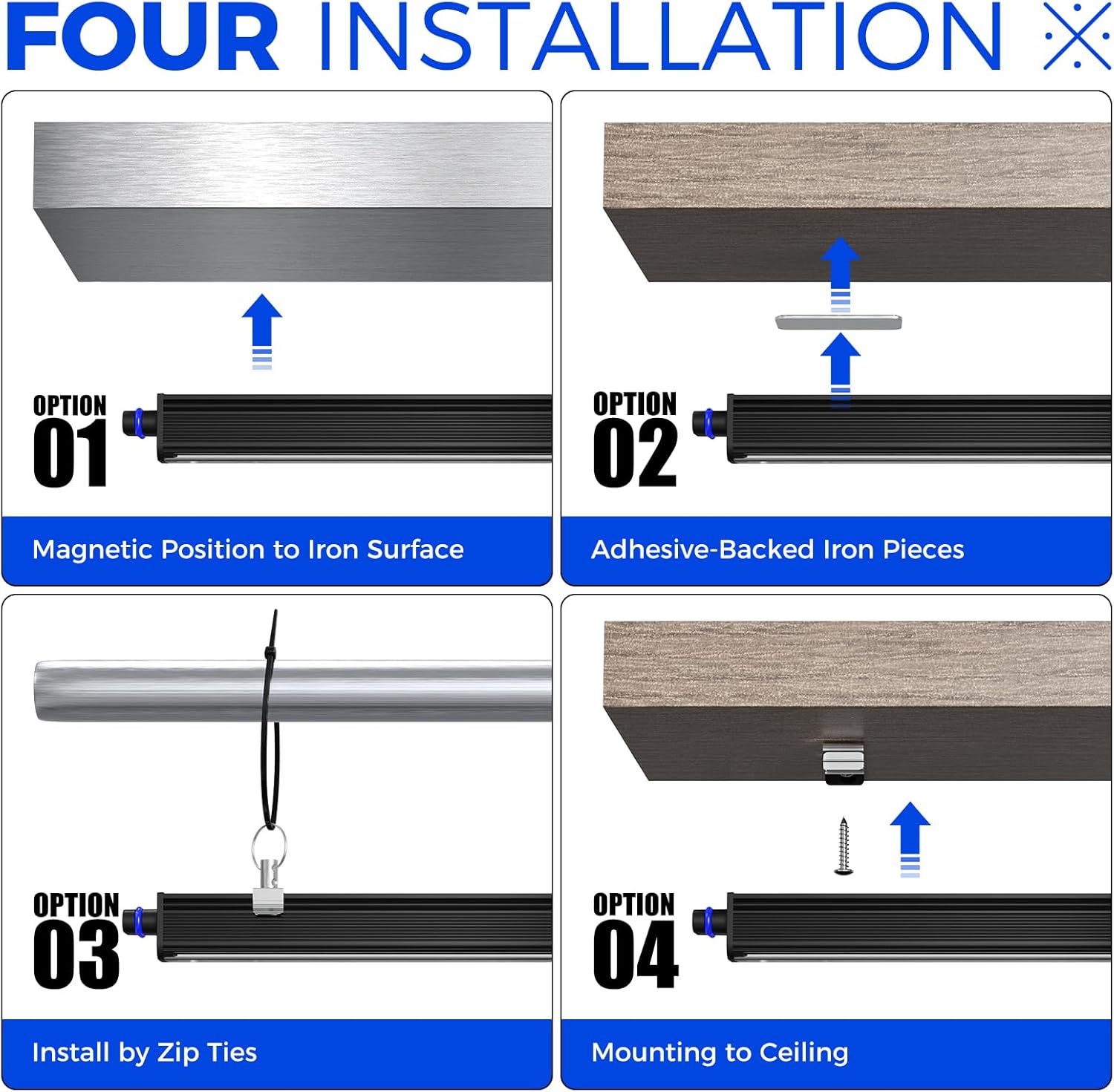
Image: A diagram illustrating four different installation methods: magnetic attachment to an iron surface, attachment using adhesive-backed iron pieces, installation with zip ties, and direct mounting to a ceiling using screws.
4.2 Linking Multiple Units
Multiple Barrina Black Light Bars can be connected to create a longer continuous light source. You can link up to 12 tube lights together using the provided seamless connectors or 20-inch connector cords.
- Using Connecting Cables: Insert one end of the 20-inch connecting cable into the input port of the first light bar and the other end into the output port of the next light bar.
- Direct Connection: For a seamless connection, align the input and output ports of two light bars and push them together until they click into place.

Image: A visual guide showing two methods to connect Barrina Black Light Bars: directly linking them end-to-end and connecting them using a 19.7-inch connecting cable.
5. Operating Instructions
Operating the Barrina Black Light Bar is straightforward:
- Connect Power: Plug the 59-inch power cord into a standard electrical outlet.
- Turn On/Off: Use the built-in on/off switch located on the power cord to control the light.

Image: A close-up view of the Barrina Black Light Bar connected to its 59-inch power cord, highlighting the integrated on/off switch for easy operation.
6. Maintenance
Regular maintenance ensures the longevity and optimal performance of your Barrina Black Light Bar.
- Cleaning: Disconnect the light bar from the power source before cleaning. Use a soft, dry, lint-free cloth to wipe down the surface. Do not use liquid cleaners, aerosols, or abrasive materials, as they may damage the finish or internal components.
- Storage: When not in use for extended periods, store the light bar in a cool, dry place, away from direct sunlight and extreme temperatures. Keep it in its original packaging or a protective container to prevent dust accumulation and physical damage.
- Inspection: Periodically inspect the power cord and the light bar for any signs of damage, such as frayed wires, cracks, or loose connections. If any damage is found, discontinue use and contact customer support.
7. Troubleshooting
If you encounter issues with your Barrina Black Light Bar, refer to the following troubleshooting guide:
| Problem | Possible Cause | Solution |
|---|---|---|
| Light does not turn on | No power supply Switch is off Faulty power cord/unit | Ensure the power cord is securely plugged into a working outlet. Toggle the on/off switch to the 'On' position. Try a different outlet. If the issue persists, contact customer support. |
| Light flickers or dims | Loose connection Power fluctuation Overheating | Check all connections, including linked units. Ensure the power supply is stable. Ensure adequate ventilation around the light bar. Disconnect and allow to cool before reconnecting. |
| Light bars not linking properly | Incorrect connection Damaged connector | Ensure connectors are fully inserted and aligned correctly. Try a different connecting cable or direct connection. |
8. Specifications
Detailed technical specifications for the Barrina Black Light Bar (Model QC10):
| Feature | Detail |
|---|---|
| Model Name | QC10 |
| Product Dimensions | 12.99"D x 3.34"W x 2.16"H |
| Item Weight | 0.95 Pounds (approx. 15.2 ounces) |
| Lamp Type | LED |
| Light Source Type | LED |
| Light Color | Purple (UV-A, 385-400nm) |
| Wattage | 10 watts |
| Voltage | 265 Volts (AC) |
| Power Source | Corded Electric |
| Switch Type | Touch (On/Off switch on cord) |
| Material | Aluminum, Polycarbonate |
| Finish Type | Painted |
| Mounting Type | Wall Mount (Multiple Mounting Options) |
| Indoor/Outdoor Usage | Indoor |
| Special Features | Corded, Energy Efficient, Instant On, Magnetic, Portable |
| Number of Items | 2 (per pack) |
9. Warranty and Support
Barrina is committed to providing high-quality lighting solutions. For any product-related inquiries, technical assistance, or support, please contact Barrina customer service. While specific warranty details are not provided in this manual, please refer to the product packaging or the official Barrina website for the most up-to-date warranty information.
For further assistance, you may visit the official Barrina store on Amazon: Barrina Store
Note: No official product videos were available for embedding based on the provided product data.