Introduction
This manual provides instructions for the safe and effective use of your Connexx Charging+ Station B-P. This device is designed to charge, dry, and disinfect compatible hearing aids. Please read this manual thoroughly before using the product and keep it for future reference.
The Connexx Charging+ Station B-P is specifically designed for use with Signia and Audio Service P Li-Ion G6 hearing aids.
Safety Information
Please observe the following safety precautions to prevent damage to the device or injury to yourself:
- Do not expose the device to water or excessive moisture.
- Do not attempt to open or repair the device yourself. Refer all servicing to qualified personnel.
- Use only the provided power adapter.
- Keep out of reach of children and pets.
- Ensure proper ventilation during operation.
- Do not place foreign objects into the charging slots.
Product Overview
The Connexx Charging+ Station B-P is a compact and portable charging solution for your hearing aids. It combines charging, drying, and UV disinfection functions in one unit.
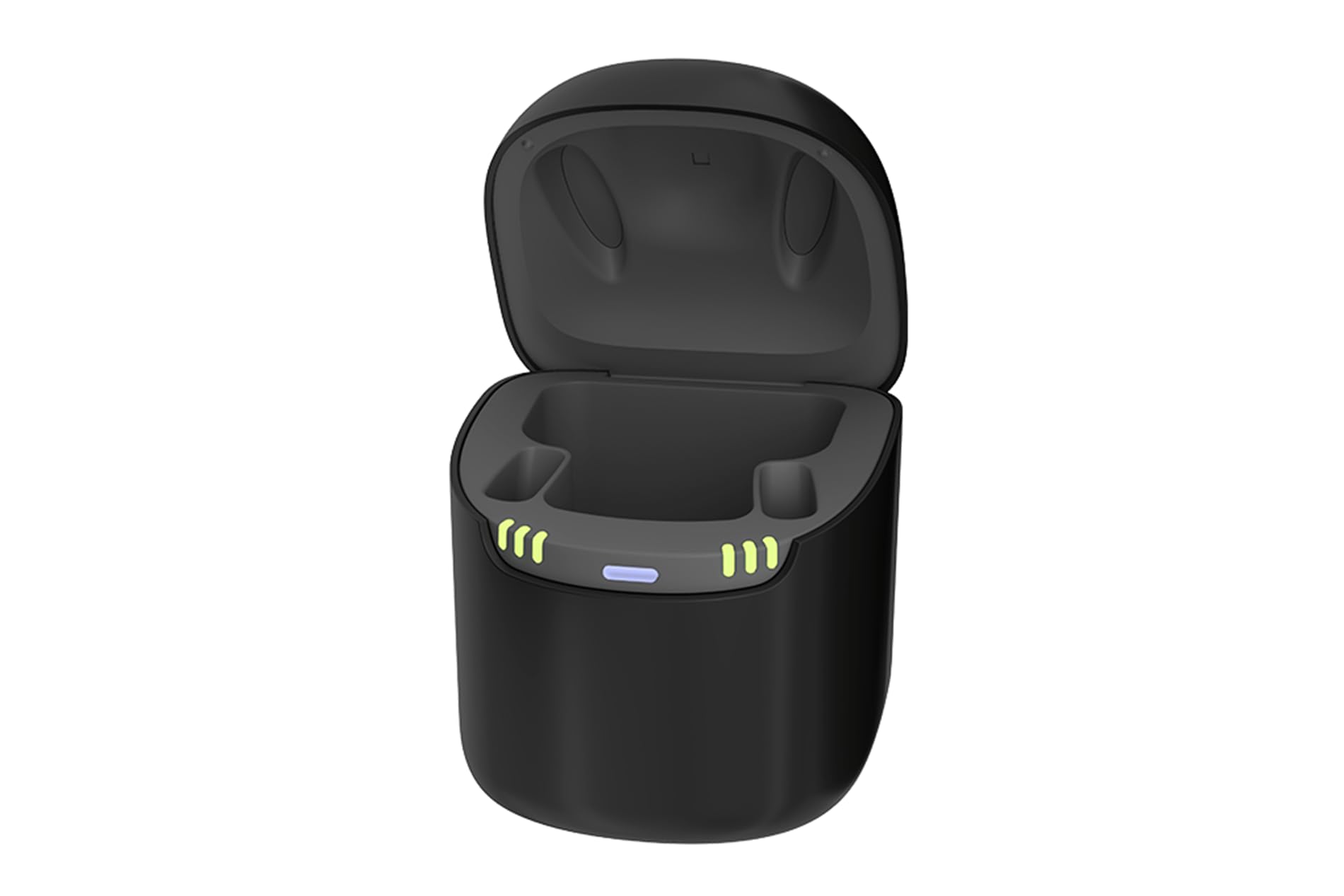
Figure 1: Front view of the Connexx Charging+ Station B-P. The device is black with a sleek, rounded design. Indicator lights are visible on the front panel, showing charging status.
Key Features:
- Reliable charging for P Li-Ion G6 hearing aids.
- Integrated drying function to protect hearing aids from moisture.
- UV light for thorough disinfection.
- Portable design.
- Easy to use.
Package Contents:
- 1 x Connexx Charging+ Station (B-P)
- 1 x Power Adapter
- 1 x User Manual
Setup
- Unpack the Device: Carefully remove the Charging+ Station and all accessories from the packaging.
- Connect Power: Connect the provided power adapter to the charging station's USB port. Plug the adapter into a standard electrical outlet (Type E – 2 pins, France compatible).
- Initial Charge: It is recommended to fully charge the station before first use, if it has an internal battery. The indicator lights will show the charging status.

Figure 2: Top view of the Connexx Charging+ Station B-P with the lid open, revealing two dedicated slots for placing hearing aids. The internal design facilitates proper positioning for charging, drying, and UV disinfection.
Operating Instructions
- Place Hearing Aids: Open the lid of the Charging+ Station. Carefully place your compatible Signia or Audio Service P Li-Ion G6 hearing aids into the designated charging slots. Ensure they are correctly seated.
- Close Lid: Close the lid of the charging station. This initiates the charging, drying, and UV disinfection cycle.
- Monitor Status: The indicator lights on the front of the station will show the current status (e.g., charging, drying, disinfection complete). Refer to the specific light patterns in the table below for detailed information.
- Remove Hearing Aids: Once the cycle is complete (indicated by the lights), open the lid and remove your clean, dry, and charged hearing aids.
Indicator Light Guide:
| Light Pattern | Status |
|---|---|
| Solid Green | Fully Charged / Cycle Complete |
| Pulsing Green | Charging in Progress |
| Solid Blue | Drying / UV Disinfection in Progress |
| Flashing Red | Error / Malfunction (refer to Troubleshooting) |
Note: Specific light patterns may vary slightly. Consult the full manual for precise details if available.
Maintenance
- Cleaning: Wipe the exterior of the charging station with a soft, dry cloth. Do not use abrasive cleaners or solvents. Ensure the device is unplugged before cleaning.
- Internal Cleaning: Periodically inspect the charging slots for dust or debris. Use a soft brush or cotton swab to gently clean if necessary. Ensure no moisture enters the slots.
- Storage: When not in use for extended periods, store the device in a cool, dry place.
Troubleshooting
| Problem | Possible Cause | Solution |
|---|---|---|
| Device not charging / no indicator lights | No power connection; faulty adapter; device malfunction. | Check power adapter connection to both the station and the outlet. Try a different outlet. Ensure the lid is closed. If problem persists, contact support. |
| Hearing aids not charging | Hearing aids not correctly seated; incompatible hearing aids; dirty charging contacts. | Ensure hearing aids are properly placed in the slots. Verify compatibility (P Li-Ion G6). Clean charging contacts on both hearing aids and station. |
| Flashing Red Light | General error; overheating; foreign object. | Unplug the device, wait 5 minutes, then plug it back in. Ensure no foreign objects are in the slots. If the error persists, contact customer support. |
Specifications
| Brand: | Connexx |
| Model: | Charging+ Station B-P |
| Compatible Devices: | Signia and Audio Service P Li-Ion G6 Hearing Aids |
| Connector Type: | USB Type A |
| Output Current: | 2.4 A |
| Output Voltage: | 3.7 Volts (DC) |
| Power Source: | Corded Electric |
| Electrical Plug Type: | Type E – 2 pins (France) |
| Material: | Plastic |
| Portability: | Yes |
| Weight: | 150.00 Grams |
| ASIN: | B0CPFPWVND |
| Reference Number (REF): | 10991663 |
| GTIN/UPC: | 0105714880106213 |
| Serial Number (SN): | 21JB922000BP00282 |
Warranty Information
Warranty information is typically provided with the product packaging or available from the point of purchase. Please retain your proof of purchase for warranty claims. For specific warranty terms and conditions, refer to the documentation included with your product or contact your retailer.
Support
For technical assistance, troubleshooting beyond this manual, or inquiries regarding your Connexx Charging+ Station B-P, please contact your authorized Connexx dealer or the retailer from whom you purchased the product. Please have your product model and serial number ready when contacting support.
Manufacturer: Connexx