
Introduction
The UGREEN MagFlow Qi2 Magnetic Foldable Charging Station is a versatile 2-in-1 wireless charger designed for efficient power delivery to your compatible devices. Featuring Qi2 certification, it provides fast and secure charging for iPhones and wireless earbuds, all within a compact and portable design.
What's in the Box
- 1x UGREEN 2-in-1 Magnetic Wireless Charging Station
- 1x User Manual
- 1x 3 FT USB-C Cable
- 1x Tip Card
Setup
- Unfold the Charger: Gently unfold the charging station from its compact, folded state. The magnetic charging pad will extend upwards, and the base will provide a stable platform.
- Connect Power: Insert the provided 3 FT USB-C cable into the input port located at the back of the charging station's base. Connect the other end of the USB-C cable to a compatible power adapter (not included). For optimal 15W fast charging, a power adapter of 30W or higher is recommended.
- Power Indicator: A small LED indicator on the base will illuminate, confirming that the charging station is powered on and ready for use.

Image: The UGREEN MagFlow Qi2 Magnetic Foldable Charging Station shown in both its compact, folded form and its upright, unfolded position with AirPods placed on the base. This illustrates its portability and readiness for use.
Operating Instructions
Charging Your iPhone
- Placement: Align your compatible iPhone (iPhone 12 series and above) with the magnetic charging pad. The strong N48*16 magnets will securely snap your device into place, ensuring optimal charging alignment.
- Fast Charging: The Qi2 certification enables 15W fast wireless charging for your iPhone. For iPhone 13-16 series models, ensure your iOS is updated to 17.2 or above for 15W fast charging with animation. For iPhone 12 series, iOS 17.4 or above is required for 15W fast charging with animation.
- Adjustable Viewing: The magnetic charging pad allows for 360° rotation and a 70° adjustable angle, enabling you to view your iPhone in portrait or landscape mode while charging. This is ideal for watching videos, making video calls, or using StandBy mode.
Charging Your Wireless Earbuds
- Placement: Place your Qi-enabled wireless earbuds (e.g., AirPods 2/3/Pro, Galaxy Buds, Xiaomi Air 2s) onto the designated charging area in the base of the station.
- Charging Speed: This area provides 5W wireless charging for your earbuds.

Image: An iPhone is shown charging on the UGREEN MagFlow Qi2 station, highlighting the 15W fast charging capability. A comparison chart illustrates 15W for UGREEN Qi2, 7.5W for Product Qi, and 5W for Other Magnetic chargers.
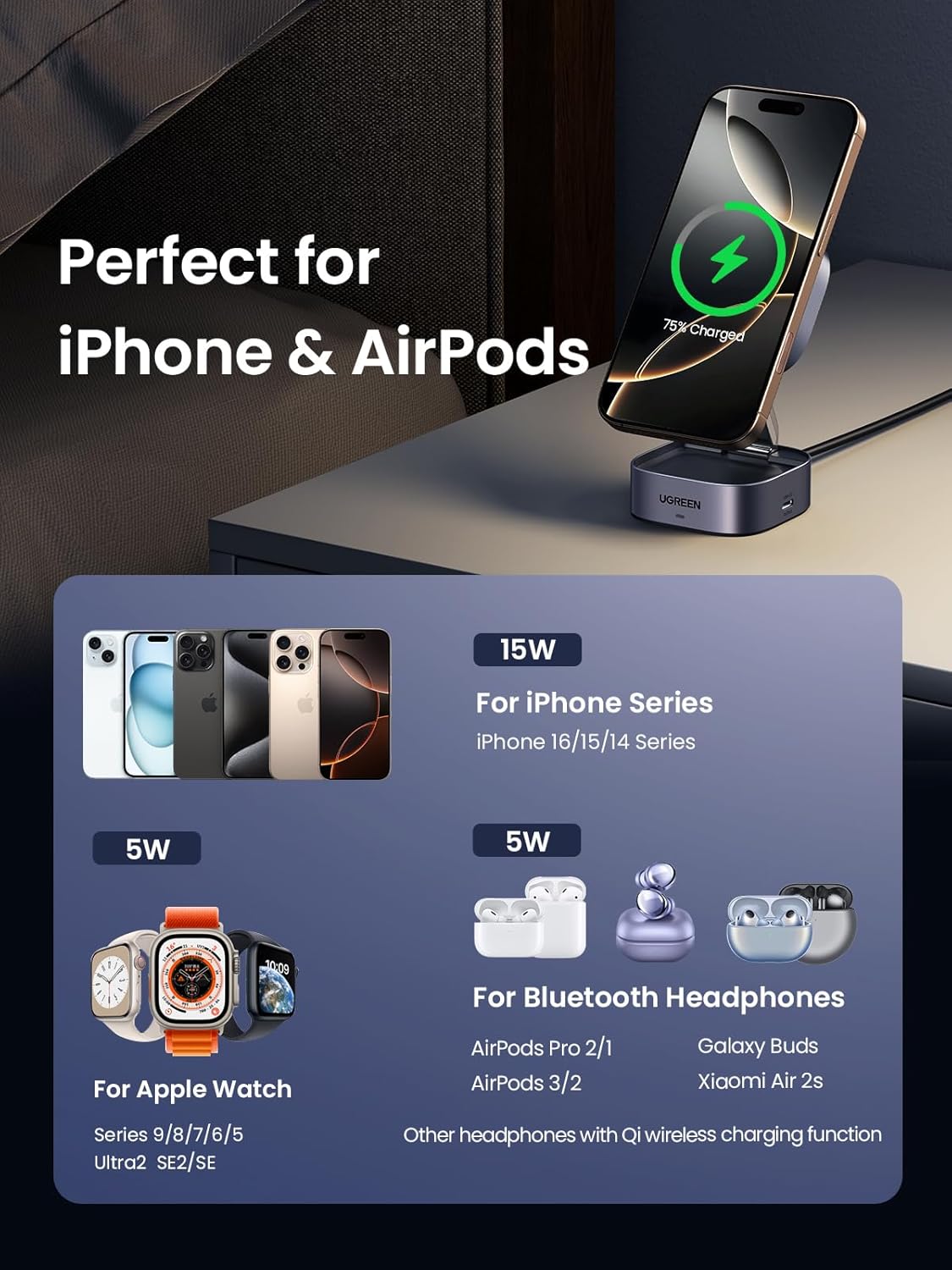
Image: A visual guide to device compatibility, showing 15W charging for iPhone 16/15/14 series, 5W for Bluetooth Headphones (AirPods Pro 2/1, AirPods 3/2, Galaxy Buds, Xiaomi Air 2s), and 5W for Apple Watch Series 9/8/7/6/5/Ultra2/SE/SE (requires external watch charger connected to USB-C output).
Video: Official product video showcasing the UGREEN 2-in-1 Magnetic Foldable Charging Station, demonstrating its features and usage.
Safety Information
The UGREEN MagFlow Qi2 Charging Station is equipped with comprehensive safety features to protect your devices during charging:
- Overvoltage Protection: Prevents damage from excessive voltage input.
- Overcurrent Protection: Safeguards against harmful current levels.
- Overheat Protection: Monitors temperature to prevent overheating.
- Short Circuit Protection: Protects against short circuits.

Image: Icons representing Overvoltage Protection, Overcurrent Protection, Short Circuit Protection, and Overheat Protection, illustrating the comprehensive safety features of the charger.
Maintenance
- Keep the charging station clean and free from dust. Use a soft, dry cloth for cleaning.
- Avoid exposing the device to extreme temperatures or humidity.
- Do not disassemble or attempt to repair the charging station yourself. Contact customer support if issues arise.
Troubleshooting
- Device not charging:
- Ensure the USB-C cable is securely connected to both the charger and the power adapter.
- Verify that the power adapter is functioning correctly and provides sufficient wattage (30W or higher recommended for optimal performance).
- Check if your device is properly aligned on the magnetic charging pad or the earbud charging area.
- Remove any thick phone cases that might interfere with wireless charging.
- Slow charging:
- Confirm your power adapter meets the recommended 30W or higher output.
- Ensure your iPhone's iOS is updated to the latest version (17.2+ for iPhone 13-16 series, 17.4+ for iPhone 12 series) for 15W fast charging.
- Avoid placing metal objects or foreign materials between the charger and your device.
- LED indicator not lighting up:
- Check the power connection to the charging station.
- Try a different USB-C cable or power adapter.
Specifications
| Feature | Detail |
|---|---|
| Brand | UGREEN |
| Model Number | 35316 |
| Connectivity Technology | Wireless |
| Connector Type | USB Type C |
| Compatible Devices | Smartphones, Earphones (Qi-enabled) |
| Compatible Phone Models | iPhone 12/13/14/15/16 series (iOS 17.2+ or 17.4+ for 15W) |
| Special Feature | Magnetic, Foldable, Adjustable Viewing |
| Color | Dark Grey |
| Input Voltage | 12 Volts (requires 30W+ adapter) |
| Output (Smartphone) | 15W (Qi2 Certified) |
| Output (Earbuds) | 5W |
| Item Weight | 7.7 ounces |
| Package Dimensions | 4.02 x 3.98 x 1.85 inches |
Warranty & Support
For warranty information or technical support, please refer to the included Tip Card or visit the official UGREEN website. Contact details for customer service can typically be found in the User Manual or on the product packaging.