
zengznegkeji for iPhone 14 Pro Max 6.7"
User Manual
6-in-1 Accessory Kit for iPhone 14 Pro Max 6.7"
Brand: zengznegkeji
Introduction
This user manual provides detailed instructions for the 6-in-1 Accessory Gift Box Kit, designed for the iPhone 14 Pro Max 6.7". This comprehensive kit includes essential accessories to enhance your device's functionality and protection. Please read this manual carefully before using the products to ensure optimal performance and safety.
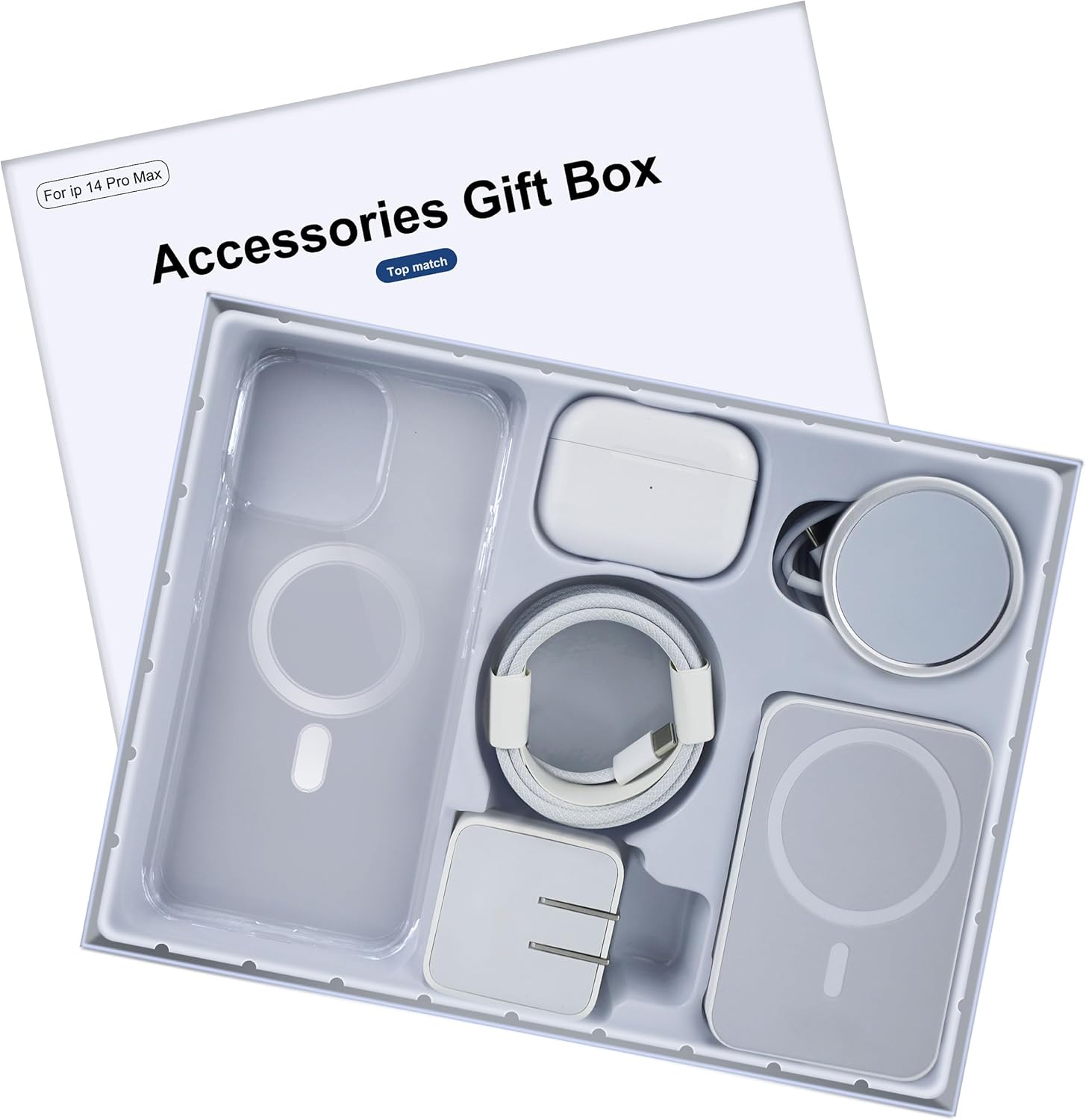
Image: The complete 6-in-1 accessory gift box kit, showcasing all included items neatly arranged within the packaging.

Image: An overview diagram illustrating each of the six components included in the kit, clearly labeled for identification.
Kit Components
- Bluetooth Headphones: Designed for advanced audio performance with noise cancellation.
- 35W Dual Hole Fast Charger: Ultra-portable charger with two ports for simultaneous charging.
- PD Fast Charging Cable: MFI Certified cable for safe and efficient fast charging.
- Clear Crystal Magnetic Case: Transparent case with built-in magnets for MagSafe compatibility and high-speed charging.
- Magnetic Wireless Charger: Prevents overcharging and provides a safe charging experience.
- Magnetic Wireless Power Bank: Portable power solution with magnetic attachment.
Setup
1. Clear Crystal Magnetic Case Installation
Align your iPhone 14 Pro Max 6.7" with the case. Gently press the phone into the case, ensuring all edges are securely covered. The built-in magnets will align with your device for MagSafe compatibility.
2. 35W Dual Hole Fast Charger Setup
Plug the 35W Dual Hole Fast Charger into a standard wall outlet. The foldable pins allow for compact storage and travel. Connect your PD Fast Charging Cable or other compatible USB-C cables to the charger's dual ports.

Image: Detailed view of the 35W Dual Hole Fast Charger, highlighting its dual interface and foldable pin design for portability.
3. Bluetooth Headphones Pairing
- Ensure the headphones are charged.
- Open the headphone case to activate pairing mode (refer to headphone specific instructions if needed).
- On your iPhone, go to Settings > Bluetooth.
- Select the headphones from the list of available devices to pair.
4. Magnetic Wireless Charger & Power Bank Preparation
Ensure both the Magnetic Wireless Charger and Magnetic Wireless Power Bank are charged before first use. Connect them to a power source using the PD Fast Charging Cable and the 35W Dual Hole Fast Charger.
Operating Instructions
1. Charging Your Device
- Wired Charging: Connect your iPhone to the 35W Dual Hole Fast Charger using the PD Fast Charging Cable. This setup supports high-speed charging.
- Magnetic Wireless Charging (Charger): Place your iPhone (with the Magnetic Case installed) onto the Magnetic Wireless Charger. The magnets will align, initiating automatic charging.
- Magnetic Wireless Charging (Power Bank): Attach the Magnetic Wireless Power Bank to the back of your iPhone (with the Magnetic Case installed). The power bank will magnetically snap into place and begin charging your device on the go.

Image: Visual representation of the multiple safety protections integrated into the charging components, including overpower, overcharge, and over-temperature protection.

Image: Depiction of the fast charging capability, highlighting the speed and efficiency of the PD Fast Charging Cable.

Image: Illustration of the magnetic wireless charging process, demonstrating the secure attachment and automatic charging initiation.
2. Using Bluetooth Headphones
Once paired, the headphones will automatically connect to your iPhone when taken out of their case. Use them for audio playback, calls, and voice assistant functions. Refer to the specific headphone manual for advanced controls.
Maintenance
- Cleaning: Use a soft, dry, lint-free cloth to clean all components. For the case, a slightly damp cloth can be used, but ensure it is completely dry before re-installing your phone.
- Storage: Store all accessories in a cool, dry place away from direct sunlight and extreme temperatures.
- Cable Care: Avoid sharp bends or kinks in the PD Fast Charging Cable to prevent internal damage.
- Battery Care (Power Bank/Headphones): For optimal battery life, avoid fully discharging the power bank and headphones frequently. Recharge them regularly.
Troubleshooting
| Problem | Possible Cause | Solution |
|---|---|---|
| Device not charging with wired charger. | Cable or charger not properly connected; faulty cable/charger; dirty charging port. | Ensure secure connections. Try a different outlet. Inspect cable and charger for damage. Clean phone's charging port gently. |
| Wireless charging not working. | Phone not aligned correctly; case interference; charger/power bank not powered. | Ensure phone is centered on the magnetic charger/power bank. Verify the charger/power bank is powered. |
| Bluetooth headphones not pairing. | Headphones not in pairing mode; out of range; low battery. | Ensure headphones are in pairing mode. Move closer to iPhone. Charge headphones. |
| Case does not fit iPhone. | Incorrect iPhone model. | Verify your iPhone model is 14 Pro Max 6.7". This case is specifically designed for this model. |
Specifications
- Product Name: 6 Pack Accessories Gift Box Kit
- Compatible Device: iPhone 14 Pro Max 6.7"
- Brand: zengznegkeji
- 35W Dual Hole Fast Charger:
- Power Output: 35W (Max)
- Ports: Dual USB-C
- Features: Foldable pins, Over-protection features
- PD Fast Charging Cable:
- Certification: MFI Certified
- Type: USB-C to Lightning (assumed based on iPhone compatibility)
- Clear Crystal Magnetic Case:
- Material: Clear PC/TPU (assumed)
- Features: Built-in magnets for MagSafe, supports 35W high-speed charging
- Magnetic Wireless Charger & Power Bank:
- Charging Type: Magnetic Wireless
- Safety: Overcharge, overcurrent, overvoltage, overheating, short circuit protection
- Bluetooth Headphones:
- Connectivity: Bluetooth
- Features: Noise cancellation, immersive sound, low-distortion driver
- Item Weight: 1.32 pounds (total kit)
- Package Dimensions: 10.24 x 7.87 x 1.57 inches
Warranty and Support
For warranty information and customer support, please contact the manufacturer, zengznegkeji, directly through their official channels or the retailer where the product was purchased. Keep your proof of purchase for warranty claims.
Manufacturer: zengznegkeji
Model Number: for iPhone 14 Pro Max 6.7"
ASIN: B0CPF3HBKS
Ask a question about this manual
Ask about setup, troubleshooting, compatibility, parts, safety, or missing instructions. Manuals+ will review the question and use this page’s manual context to help answer it.