Introduction
Thank you for choosing the Suttik Professional Hair Clippers Set. This comprehensive barber kit includes a hair clipper, a detail trimmer, and an electric foil shaver, designed for versatile hair cutting, trimming, and shaving needs. With advanced features like a powerful motor, long-lasting battery, and smart LED display, this set provides a professional grooming experience at home or in a barbershop. Please read this manual thoroughly before first use to ensure proper operation, maintenance, and safety.
Safety Information
To prevent injury or damage to the product, always adhere to the following safety guidelines:
- Avoid contact with eyes, skin, and water. Do not immerse the devices in water.
- Do not use on infants.
- Ensure the devices are fully charged before use to maintain optimal performance.
- Keep out of reach of children.
- Only use the provided charging cables and adapters.
- Do not disassemble or attempt to repair the devices yourself. Contact customer support for assistance.
- Follow recommended cleaning and maintenance procedures to ensure hygiene and longevity of the product.
- Store the set in the provided travel case when not in use to protect it from damage.
Package Contents
Upon opening your Suttik Professional Hair Clippers Set, please verify that all the following items are included:
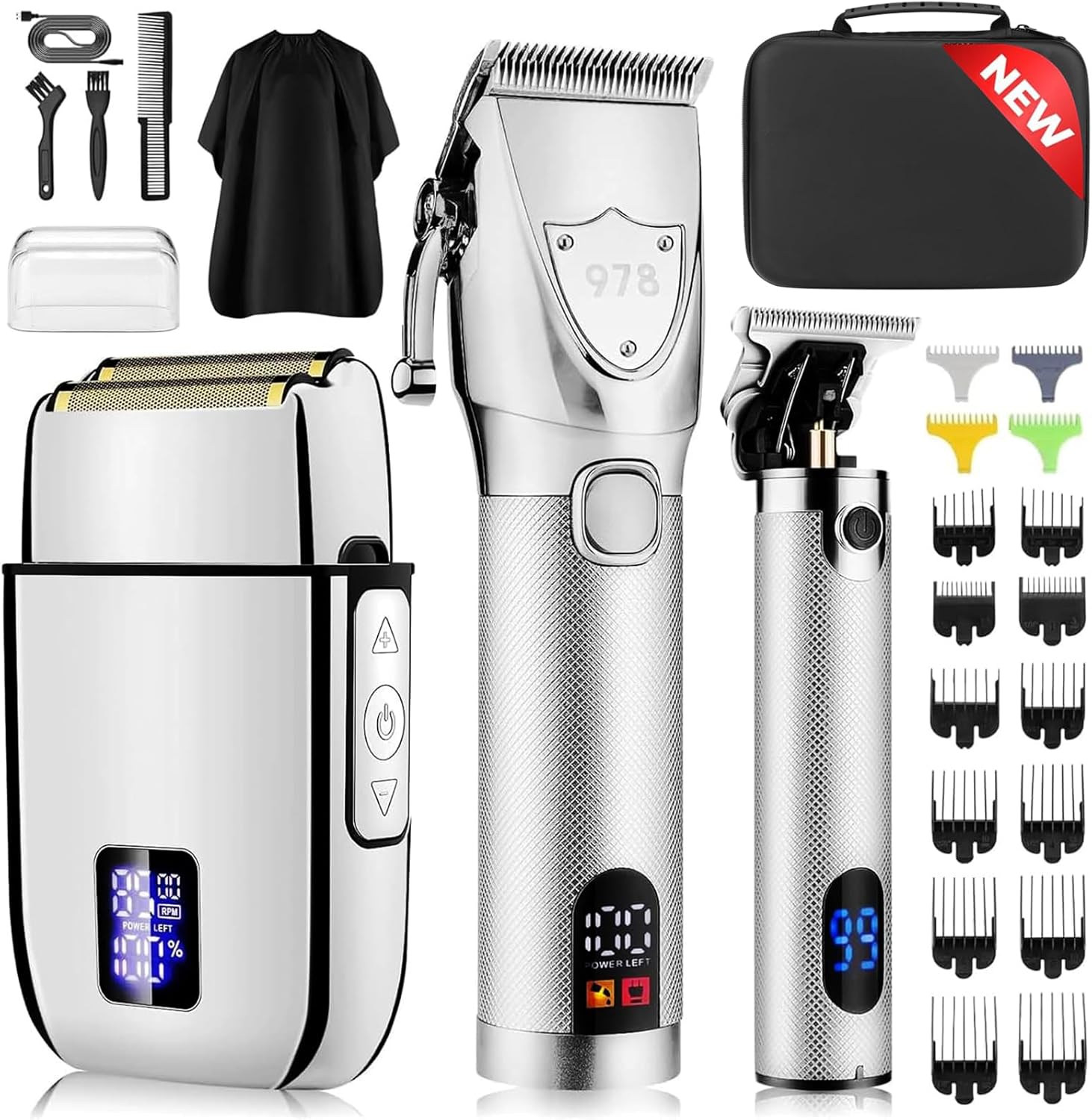
Image: The complete Suttik Professional Hair Clippers Set, including the main clipper, detail trimmer, electric shaver, various guide combs, cleaning brush, oil, and travel case.
- 1 x Professional Hair Clipper
- 1 x Detail Trimmer
- 1 x Electric Foil Shaver
- 12 x Hair Clipper Guard Attachments (1.5mm, 3mm, 4.5mm, 6mm, 10mm, 13mm, 16mm, 19mm, 22mm, 25mm, Left Ear Taper, Right Ear Taper)
- 4 x Hair Trimmer Guards (1mm, 2mm, 3mm, 4mm)
- 1 x EVA Travel Case
- 1 x Cleaning Brush
- 1 x Lubricating Oil
- Charging Cables (for each device)
- User Manual (this document)
Setup and Charging
Before using your Suttik grooming tools for the first time, it is recommended to fully charge each device.
Charging Instructions:
- Connect the appropriate charging cable to the charging port on each device (clipper, trimmer, shaver).
- Plug the other end of the charging cable into a compatible USB power adapter (not included) or a USB port.
- The LED display on each device will indicate the charging status.
- Allow each device to charge for the recommended time:
- Hair Clipper: Approximately 2.5 hours for up to 150 minutes of run time.
- Detail Trimmer: Approximately 2 hours for up to 180 minutes of run time.
- Electric Foil Shaver: Approximately 2 hours for up to 90 minutes of run time.
- Once fully charged, the LED display will show 100% or a full battery indicator. Disconnect the device from the charger.

Image: Visual representation of charging times and corresponding working times for each grooming tool.
Operating Instructions
This set provides three distinct tools for various grooming needs. Familiarize yourself with each device's operation.
1. Hair Clipper Operation

Image: The main hair clipper, highlighting its adjustable taper lever and demonstrating its use for hair cutting.
- Attaching Guide Combs: Select the desired hair clipper guard attachment (1.5mm to 25mm, or ear tapers). Align the comb with the clipper blade and snap it securely into place.
- Adjusting Taper Lever: Use the adjustable taper lever on the side of the clipper to fine-tune the cutting length between 0.8mm and 2.0mm without a guard, or to blend sections with a guard.
- Power On/Off: Press the power button to turn the clipper on. The LED display will show the remaining power and other indicators.
- Cutting Hair: Hold the clipper with the blade flat against the head and move it slowly against the direction of hair growth. For best results, ensure hair is clean and dry.
- LED Display: The smart LED display shows remaining power, a low oil reminder, and a charging reminder.

Image: Detailed view of the clipper's adjustable taper lever and the full range of 12 guide combs for precise length control.
2. Detail Trimmer Operation

Image: The detail trimmer, emphasizing its zero-gap blade for precise outlining and a demonstration of its use for hair lining.
- Attaching Guide Combs: For longer stubble or beard lengths, attach one of the 4 hair trimmer guards (1mm to 4mm).
- Power On/Off: Press the power button to activate the trimmer. The LED display will show battery status.
- Trimming and Outlining: Use the trimmer for precise lines, edging, and detailing around the neckline, sideburns, and beard. The zero-gapped blade allows for a very close cut.
- Beard Trimming: Move the trimmer against the direction of hair growth for an even trim.
3. Electric Foil Shaver Operation

Image: The electric foil shaver, highlighting its hypoallergenic titanium foil for a close shave and a person demonstrating its use for beard shaving.
- Power On/Off: Press the power button to turn on the shaver.
- Adjustable Speed: The shaver features 3 adjustable speeds (7500 RPM Low, 8000 RPM Medium, 8500 RPM High). Press the speed adjustment button to cycle through the settings.
- Shaving: Hold the shaver at a right angle to your skin and move it in short, gentle strokes against the direction of hair growth. The dual floating blades and ultra-thin foil adapt to facial contours for a smooth, close shave.
- For Best Results: Use on clean, dry skin. For longer stubble, pre-trim with the detail trimmer before using the shaver.

Image: Diagram showing the three distinct speed settings (Low, Medium, High) available on the electric foil shaver.
Maintenance and Cleaning
Regular cleaning and maintenance will ensure the longevity and optimal performance of your Suttik grooming set.
- After Each Use:
- Turn off and unplug the device.
- Remove any attached guide combs.
- Use the provided cleaning brush to brush away loose hairs from the blades and cutting head. For the shaver, carefully remove the foil head and brush out trapped hairs.
- Do not rinse the main body of the clipper or trimmer under water. The blades of the clipper and trimmer can be carefully rinsed under running water, but ensure they are completely dry before reattaching or storing. The shaver head can be rinsed.
- Oiling Blades (Clipper & Trimmer):
- After every few uses, or when the LED display indicates a lubrication reminder, apply 1-2 drops of the provided lubricating oil to the blades of the hair clipper and detail trimmer.
- Turn the device on for a few seconds to allow the oil to distribute evenly.
- Wipe off any excess oil with a clean, dry cloth.
- Storage: Store all components in the provided EVA travel case to protect them from dust and damage. Ensure devices are dry before storing.
Troubleshooting
If you encounter any issues with your Suttik Professional Hair Clippers Set, please refer to the following common solutions:
| Problem | Possible Cause | Solution |
|---|---|---|
| Device not turning on. | Battery is depleted. | Charge the device fully as per the "Setup and Charging" section. |
| Blades pulling hair or cutting poorly. | Blades are dull, dirty, or not lubricated. | Clean the blades thoroughly and apply lubricating oil. If the problem persists, the blades may need replacement (contact support). |
| Device making unusual noise. | Blades are not properly aligned or need lubrication. | Ensure blades are clean and oiled. If noise continues, discontinue use and contact customer support. |
| LED display not working. | Device is off or battery is completely dead. | Turn on the device. If it doesn't respond, try charging it. If still unresponsive, contact customer support. |
If the issue persists after attempting these solutions, please contact Suttik customer support for further assistance.
Specifications
Key technical specifications for the Suttik Professional Hair Clippers Set:
- Model Number: 978-silver
- Brand: Suttik
- Power Source: Battery Powered (Lithium Ion batteries included)
- Blade Material: High Carbon Steel
- Motor Speed (Clipper): 6500 RPM
- Noise Level: Less than 60 decibels
- Clipper Run Time: Up to 150 minutes (2.5 hours charge)
- Trimmer Run Time: Up to 180 minutes (2 hours charge)
- Shaver Run Time: Up to 90 minutes (2 hours charge)
- Shaver Speed Settings: 3 (7500 RPM, 8000 RPM, 8500 RPM)
- Package Dimensions: 10.55 x 8.98 x 3.82 inches
- Package Weight: 3.42 Pounds
- Manufacturer: Suttik
Warranty and Support
Suttik products are manufactured with high-quality standards. For information regarding warranty coverage, product support, or to purchase replacement parts, please visit the official Suttik website or contact their customer service directly. Keep your purchase receipt as proof of purchase for any warranty claims.
Suttik Official Store: Visit the Suttik Store on Amazon


