1. Introduction
This manual provides essential instructions for the safe and effective use of your VEVOR Alternating Air Pressure Mattress, Model HF809. This system is designed to provide pressure redistribution and comfort for individuals requiring prolonged bed rest, helping to prevent and manage pressure ulcers.
Please read this manual thoroughly before initial setup and operation. Keep it for future reference.
2. Safety Instructions
- Always place the mattress on a standard hospital bed or a firm, stable bed base.
- Ensure the power cord is not pinched or damaged. Do not operate the pump with a damaged cord or plug.
- Keep the pump unit away from water or excessive moisture.
- Do not smoke or use open flames near the mattress or pump.
- Do not allow children or unauthorized persons to operate the device.
- Regularly inspect the mattress and pump for any signs of wear or damage. Discontinue use and contact support if damage is found.
- Ensure the patient's weight does not exceed the maximum capacity of 450 lbs (205 kg).
- In case of emergency, utilize the CPR emergency rescue function for rapid deflation.
- Consult a healthcare professional for appropriate pressure settings and usage duration based on individual patient needs.
3. Product Overview
3.1 Components
The VEVOR Alternating Air Pressure Mattress system consists of the mattress pad and an electric air pump unit.
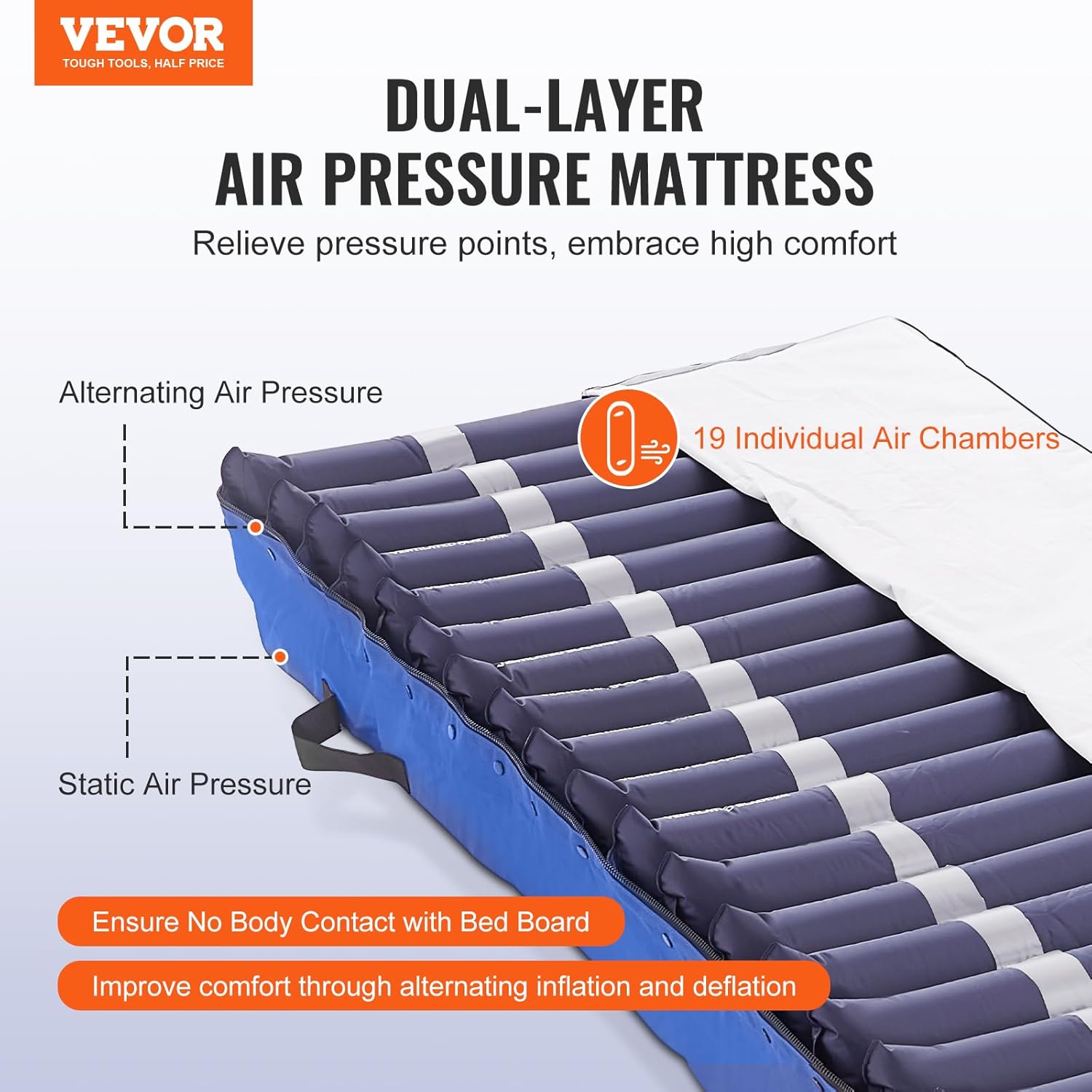
Image: The VEVOR Dual-Layer Alternating Air Pressure Mattress showing its 19 individual air chambers and the connected pump unit.
3.2 Key Features
- Dual-Layer Design: Prevents direct contact with the bed board and provides effective pressure relief.
- 19 Individual Air Chambers: Alternately inflate and deflate to redistribute pressure and improve circulation.
- 450 lbs Weight Capacity: Supports a wide range of patient weights with customizable pressure settings.
- A, B-C Pressure Modes: Innovative modes for humanized inflation/deflation, including a head pillow feature for stable head positioning.
- Quiet Electric Pump: Operates at 30dB, ensuring a peaceful environment.
- LED Display: Provides clear and accurate pressure readings.
- Intelligent Functions: Includes low-pressure alarm and quick deflation for safety and convenience.
- CPR Emergency Rescue Function: Safety valve for rapid deflation in critical situations.
- High-Quality Waterproof Nylon: Skin-friendly, waterproof, and heat-dissipating material for easy cleaning and patient comfort.
4. Setup Instructions
- Prepare the Bed: Place the alternating air pressure mattress directly on top of the existing mattress or bed frame. Ensure the mattress is centered and lies flat.
- Position the Pump: Place the electric pump unit on a flat, stable surface at the foot end of the bed, or hang it securely on the bed frame using the integrated hooks. Ensure it is easily accessible and the air hoses can reach the mattress without kinking.
- Connect Air Hoses: Connect the two air hoses from the mattress to the corresponding air outlets on the pump unit. Ensure a secure connection.
- Connect Power: Plug the pump's power cord into a grounded electrical outlet.
- Initial Inflation: Turn on the pump using the Power On/Off button. The mattress will begin to inflate. Allow approximately 20-30 minutes for the mattress to fully inflate and stabilize before placing a patient on it.

Image: The VEVOR Alternating Air Pressure Mattress correctly installed on a hospital bed, with the pump unit connected and operating.
5. Operating Instructions
5.1 Pump Control Panel
The pump unit features an LED display and various control buttons for easy operation.

Image: Detailed view of the multi-function electronic pump control panel, highlighting the various indicators and control buttons.
- Power On/Off: Press to turn the pump unit on or off.
- Weight Control: Use the '+' and '-' buttons to adjust the pressure setting based on the patient's weight and comfort. The LED display shows the current pressure in mmHg.
- Sitting Mode: Activates a specific pressure configuration suitable for when the patient is in a sitting position.
- Static Mode: Maintains a constant, non-alternating pressure across the mattress.
- Alarm: Indicates a low-pressure condition.
- Lock: Press and hold for 2 seconds to lock/unlock the control panel to prevent accidental changes.
5.2 Pressure Modes (A, B-C)
The mattress offers advanced pressure modes to optimize patient comfort and pressure redistribution.
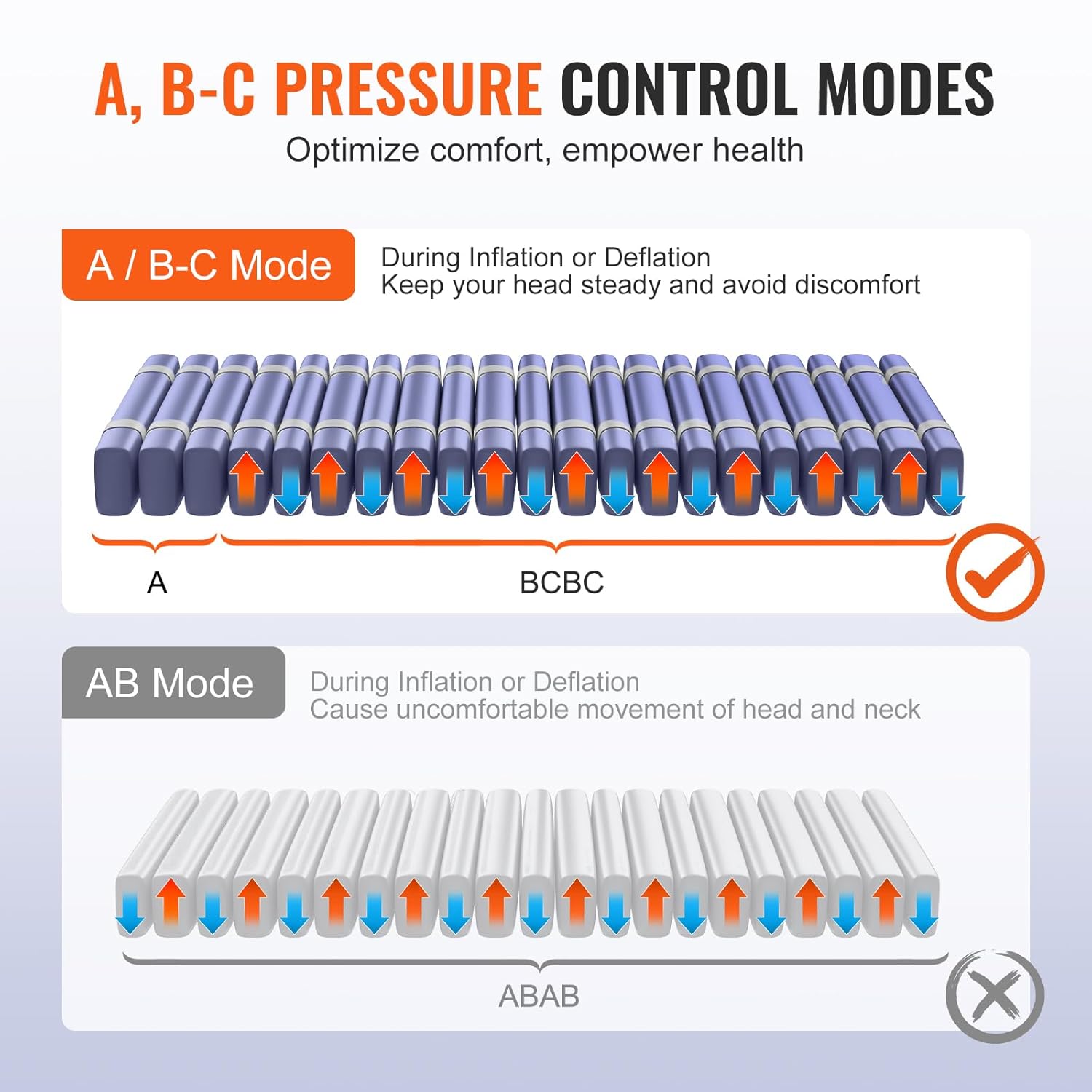
Image: Comparison of A, B-C pressure control modes, which maintain head stability, versus a standard ABAB mode that can cause head movement.
- A, B-C Mode: This mode provides alternating inflation and deflation cycles while maintaining stable pressure in the head section (A) to prevent uncomfortable head movement. This is the recommended mode for continuous pressure redistribution.
- Static Mode: For periods when a stable, non-alternating surface is preferred, such as during patient transfers or specific medical procedures.
5.3 CPR Emergency Rescue Function
In an emergency requiring cardiopulmonary resuscitation (CPR), quickly pull the red CPR valve located on the side of the mattress to rapidly deflate the mattress, providing a firm surface for resuscitation efforts.
6. Maintenance
6.1 Cleaning
The mattress cover is made of high-quality waterproof nylon, making it easy to clean.

Image: The mattress cover made from high-quality waterproof nylon, illustrating its easy-to-clean, heat-dissipating, and waterproof features.
- Wipe the mattress surface with a damp cloth and a mild disinfectant solution.
- Do not use abrasive cleaners or solvents, as these can damage the material.
- Ensure the mattress is completely dry before re-use or storage.
- The pump unit should be wiped clean with a dry or slightly damp cloth. Do not immerse the pump in water.
6.2 Storage
- Deflate the mattress completely.
- Fold or roll the mattress neatly.
- Store the mattress and pump unit in a cool, dry place, away from direct sunlight and sharp objects.
7. Troubleshooting
| Problem | Possible Cause | Solution |
|---|---|---|
| Pump not turning on | Power cord unplugged or damaged; power outlet malfunction. | Check power cord connection. Try a different outlet. Inspect cord for damage. |
| Mattress not inflating or losing air | Air hoses not securely connected; leak in mattress or hoses; pump malfunction. | Ensure all air hose connections are tight. Check mattress and hoses for visible punctures or tears. Use the provided repair kit for small punctures. If the pump is suspected, contact support. |
| Low-pressure alarm sounds | Air leak; patient weight exceeds capacity; pump not maintaining pressure. | Check for leaks. Verify patient weight is within limits. Ensure pressure setting is appropriate. |
| Mattress feels too firm or too soft | Incorrect pressure setting. | Adjust the pressure using the '+' and '-' buttons on the pump unit until desired comfort and therapeutic pressure are achieved. Consult a healthcare professional for optimal settings. |
8. Specifications

Image: Technical specifications and dimensions of the VEVOR Alternating Air Pressure Mattress, Model HF809.
| Specification | Value |
|---|---|
| Item Model Number | HF809 |
| Product Dimensions | 79.1 x 34.1 x 8.3 inches (2010 x 865 x 210 mm) |
| Item Weight | 18.5 pounds (8.4 kg) |
| Weight Capacity | 450 lbs (205 kg) |
| Rated Voltage | AC120V 60Hz |
| Rated Power | 7W |
| Air Flow Rate | 6-8 L/min |
| Main Materials | Nylon TPU + Elastic Cloth PU |
| Air Chamber Size | 3.7 x 1.2 in / 94 x 30 mm |
| Fuse Current | 1A |
| Digital Display Adjustable Pressure Range | 20-180 mmHg |
9. What's in the Box
Upon unpacking, you should find the following items:
- 1 x VEVOR Alternating Air Pressure Mattress
- 1 x Electric Air Pump Unit
- 1 x Spare Air Chamber
- 1 x Repair Kit
- 1 x Fastening Strap
- 1 x User Manual (this document)
10. Warranty and Support
For warranty information and technical support, please refer to the warranty card included with your product or visit the official VEVOR website. You can also contact VEVOR customer service directly for assistance with product inquiries, troubleshooting, or replacement parts.
VEVOR Official Website: www.vevor.com
Technical Support & E-Warranty Certificate: www.vevor.com/support


