
1. Introduction
This user manual provides comprehensive instructions for the safe and efficient operation of your OLTEANP 2200 Watts Pure Sine Wave Inverter. This device is designed to convert 12V DC power from a battery source into stable 110V AC power, suitable for a wide range of electronics and home appliances. Its advanced pure sine wave technology ensures clean power output, protecting sensitive equipment from damage. Ideal for use in trucks, vehicles, RVs, during power outages, and for various outdoor applications.
2. Safety Information
Please read and understand all safety warnings and instructions before operating the inverter. Failure to do so may result in electric shock, fire, serious injury, or property damage.
- Ventilation: Ensure adequate ventilation around the inverter. Do not block ventilation openings. Overheating can cause the inverter to shut down or be damaged.
- Environment: Operate the inverter in a dry, well-ventilated area, away from direct sunlight, heat sources, flammable materials, and moisture.
- Wiring: Use appropriate gauge wiring for battery connections as specified in the setup section. Incorrect wiring can lead to overheating and fire hazards. Ensure all connections are tight and secure.
- Overload Protection: Do not exceed the inverter's continuous power rating (2200W) or peak power rating (4400W). Overloading can damage the inverter and connected appliances.
- Spark-Free Protection: The inverter is equipped with a professional spark-free protection circuit. However, always exercise caution when connecting or disconnecting battery cables to minimize sparking.
- Grounding: Ensure the inverter is properly grounded as per local electrical codes.
- Children and Pets: Keep the inverter out of reach of children and pets.
- Maintenance: Disconnect all power sources before performing any maintenance or cleaning.
3. Product Overview
The OLTEANP 2200W Pure Sine Wave Inverter is designed for reliable power conversion. Key components and features include:
- Pure Sine Wave Output: Provides clean, stable AC power, ideal for sensitive electronics.
- High Power Output: 2200 Watts continuous power, 4400 Watts peak power.
- Multiple Output Ports: Four (4) 110V AC outlets, one (1) 5V/3.1A USB port, and one (1) 30W Type-C port.
- Adjustable Input Voltage: Allows setting low voltage shutdown points (9.5V-11V) for compatibility with various battery types, including lithium batteries, and to extend battery life.
- Remote Control with LCD Display: A wired remote control with an LCD screen provides real-time monitoring of inverter status, battery voltage, AC output, load wattage, and displays fault codes.
- Multi-functional Safety Protection: Includes high-voltage, overload, high-temperature, low-voltage, and short-circuit protection.
- Efficient Cooling: Equipped with intelligent cooling fans that activate automatically to prevent overheating.

Figure 3.1: OLTEANP 2200W Pure Sine Wave Inverter and included accessories (remote control, battery cables).

Figure 3.2: The inverter providing power to multiple appliances simultaneously via its AC outlets, USB, and Type-C ports.

Figure 3.3: Examples of devices that can be powered by the inverter, highlighting its versatility for various applications.

Figure 3.4: The inverter's intelligent chip provides comprehensive safety protections for reliable operation.
4. Setup
Follow these steps to set up your OLTEANP Pure Sine Wave Inverter:
- Placement: Choose a dry, cool, and well-ventilated location for the inverter. Ensure there is sufficient space around the unit for airflow.
- Battery Connection:
- Connect the red battery cable to the positive (+) terminal of the inverter and the positive (+) terminal of your 12V battery.
- Connect the black battery cable to the negative (-) terminal of the inverter and the negative (-) terminal of your 12V battery.
- Ensure all connections are tight and secure to prevent voltage drop and overheating.
- Refer to Figure 4.2 for a typical wiring diagram.
- Grounding: Connect a ground wire from the inverter's grounding terminal to a suitable earth ground point (e.g., vehicle chassis, ground rod). This enhances safety and reduces interference.
- Remote Control Connection: Plug the remote control cable into the designated port on the inverter. The remote control allows for convenient operation and monitoring from a distance.
- Adjustable Input Voltage Setting: Before turning on the inverter, you can adjust the low voltage shutdown threshold using the DIP switches on the inverter. This feature is crucial for optimizing battery health, especially with lithium batteries.
- Consult the table below or on the inverter for specific switch positions and corresponding voltage settings (e.g., 9.5V, 10V, 10.5V, 11V).
- Important: Adjust the voltage setting only when the inverter is turned off.

Figure 4.1: Table showing selectable input voltage shutdown settings based on DIP switch positions, compatible with various battery types.

Figure 4.2: Example wiring diagram illustrating connections between solar panels, charge controller, battery, and the inverter.
5. Operating Instructions
Once the inverter is properly set up, follow these steps for operation:
- Power On: Press the power button on the inverter or the remote control. The LCD display on the remote will illuminate, showing current status.
- Connect Appliances: Plug your AC appliances into the 110V AC outlets. For USB-powered devices, use the 5V/3.1A USB port or the 30W Type-C port.
- Monitor Status: The remote control's LCD display provides real-time information:
- Battery Capacity: Indicated by a battery icon.
- DC Input Voltage: Shows the current battery voltage.
- AC Output Voltage: Displays the inverter's output voltage (typically 110V-120V).
- Load Wattage: Shows the total power consumption of connected devices.
- Fault Indicators: Symbols will flash to indicate issues such as high voltage, low voltage, overload, short-circuit, or overheat. Refer to the Troubleshooting section for details.
- Power Off: When finished, disconnect all appliances, then press the power button on the inverter or remote control to turn off the unit.
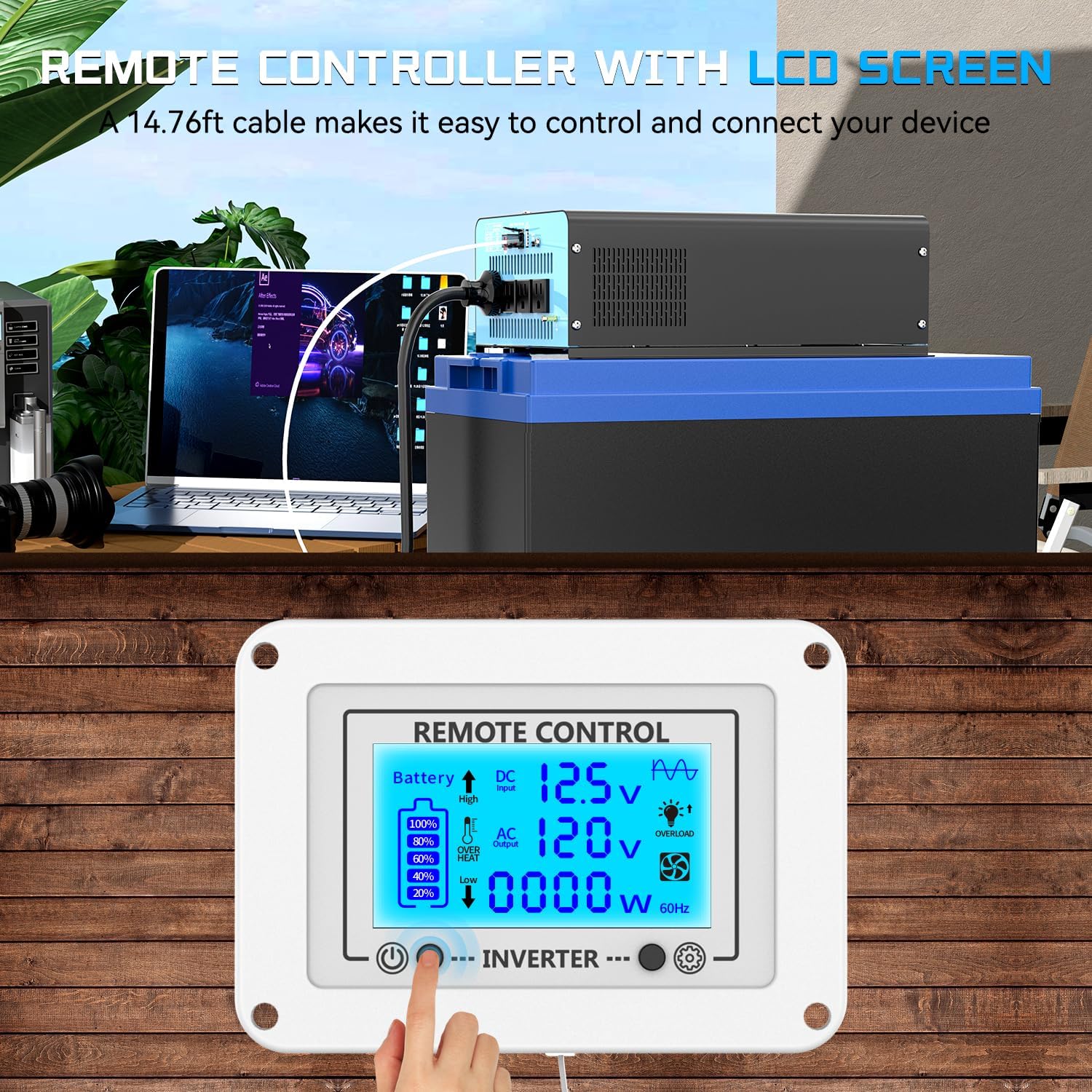
Figure 5.1: The remote control connected to the inverter, allowing convenient monitoring and operation from a distance.

Figure 5.2: Detailed explanation of the remote control LCD display, including input voltage, battery capacity, output voltage, load wattage, and various fault indicators.
6. Maintenance
Regular maintenance ensures the longevity and optimal performance of your inverter:
- Cleaning: Periodically clean the exterior of the inverter with a soft, dry cloth. Do not use liquid cleaners or solvents. Ensure ventilation openings are free from dust and debris.
- Connection Check: Regularly inspect all battery cable connections to ensure they are tight and free from corrosion. Loose connections can cause voltage drops and heat buildup.
- Ventilation: Ensure the inverter's cooling fans are not obstructed. The intelligent cooling fans will activate as needed to maintain optimal operating temperature. If fans are not spinning when the unit is under load and warm, check for obstructions or contact support.
- Storage: If storing the inverter for an extended period, disconnect it from the battery and store it in a cool, dry place.
7. Troubleshooting
The remote control's LCD display provides valuable diagnostic information. Refer to the flashing symbols to identify and resolve common issues:
| Symptom / LCD Indicator | Possible Cause | Solution |
|---|---|---|
| No Power Output / Inverter Off | Battery voltage too low or too high; Loose battery connections; Overload; Inverter internal fault. | Check battery voltage. Ensure connections are secure. Reduce load. Power cycle the inverter. |
| Low Voltage Shutdown (Flashing Low Voltage Symbol) | Battery voltage has dropped below the set low voltage shutdown threshold. | Recharge or replace the battery. Check battery connections for looseness or corrosion. Adjust low voltage shutdown setting if necessary (when inverter is off). |
| High Voltage Shutdown (Flashing High Voltage Symbol) | Input DC voltage exceeds the inverter's maximum allowable input. | Verify battery voltage is within the specified operating range (12V nominal). Disconnect any charging sources that might be overcharging the battery. |
| Overload (Flashing Overload Symbol) | Connected appliances draw more power than the inverter's continuous or peak rating. | Disconnect some appliances to reduce the load. Ensure total wattage does not exceed 2200W continuous or 4400W peak. |
| Overheat (Flashing Overheat Symbol) | Inverter internal temperature is too high. | Ensure proper ventilation around the inverter. Clear any obstructions from cooling fans. Allow the inverter to cool down before restarting. Reduce load. |
| Short-Circuit (Flashing Short-Circuit Symbol) | A short circuit detected in the output. | Disconnect all AC loads. Check AC cables and appliances for short circuits. Reconnect one by one to identify the faulty device. |


Figure 7.1: Examples of fault indicators on the LCD display for high voltage, low voltage, short-circuit/overload, and overheat conditions.
8. Specifications
| Feature | Specification |
|---|---|
| Model | 12V-2200W (ae2c0f40-ec8b-4bf7-bfe5-c2fd435f5fd6) |
| Continuous Power | 2200 Watts |
| Peak Power | 4400 Watts |
| Input DC Voltage | 12V DC |
| Output AC Voltage | 110V AC |
| Output Waveform | Pure Sine Wave |
| AC Outlets | 4 |
| USB Port | 1 (5V/3.1A) |
| Type-C Port | 1 (30W) |
| Product Dimensions | 13 x 7.87 x 4 inches (330 x 200 x 102 mm) |
| Item Weight | 10.58 pounds (4.8 kg) |
| Recommended Uses | Home, Car, Power Outage, Vehicles, Truck, Outdoors, Boat, RV, Trip |
| Power Source | Solar and Battery Powered |
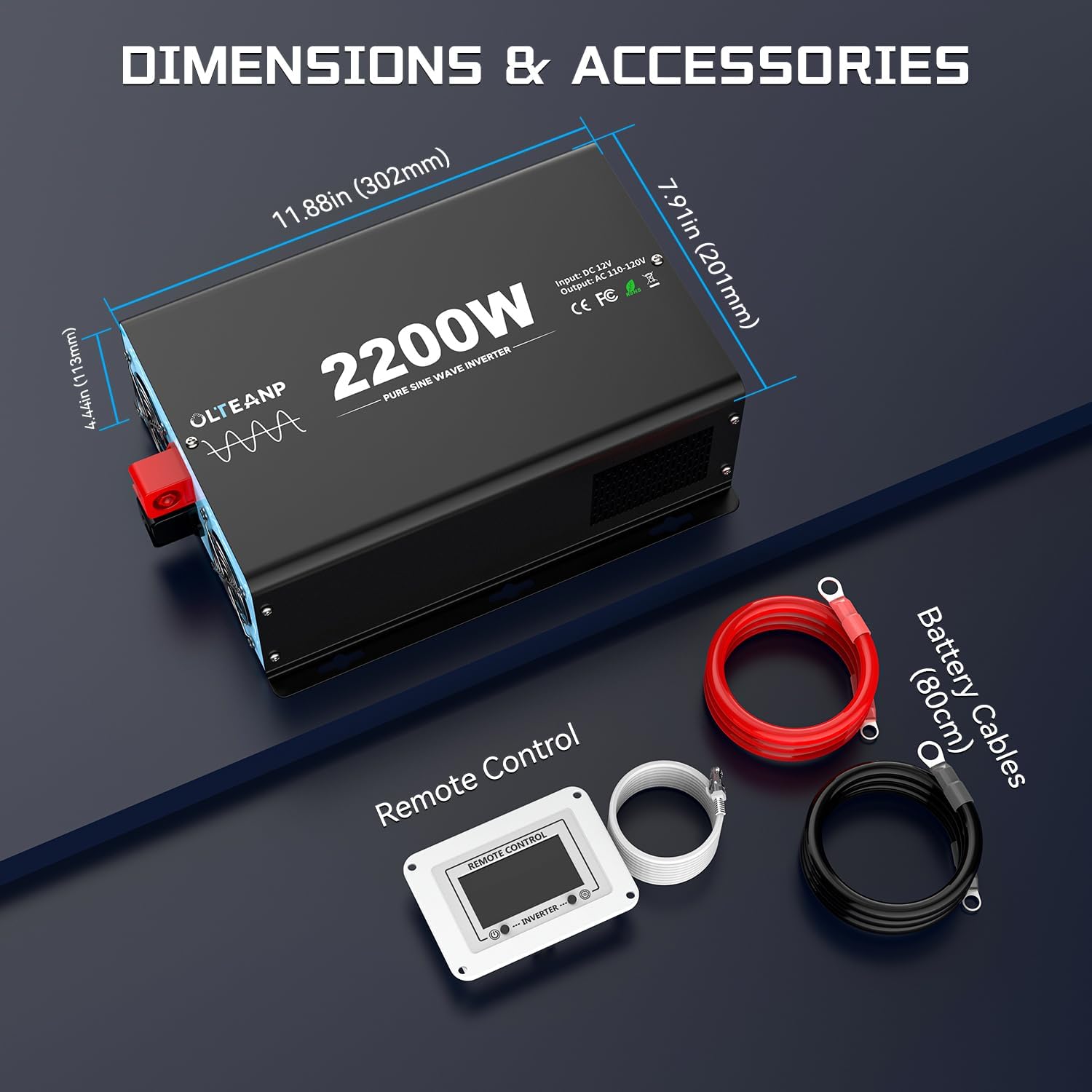
Figure 8.1: Product dimensions and a visual representation of included accessories: battery cables and remote control.
9. Warranty and Support
For warranty information and technical support, please contact OLTEANP directly through their official channels or the retailer from whom the product was purchased. Protection plans may be available for purchase separately to extend coverage beyond the manufacturer's standard warranty.
For further assistance, refer to the contact information provided with your product packaging or visit the OLTEANP brand store online.