
1. Introduction
Thank you for purchasing the Sanyo 20W Bluetooth Speaker. This portable speaker is designed to deliver high-quality audio with versatile connectivity options. Please read this manual carefully before using the product to ensure proper operation and to maximize its lifespan. Keep this manual for future reference.
Key features include:
- Bluetooth 5.3 for stable wireless connection.
- 20W audio output for clear and powerful sound.
- Multiple connectivity options: Bluetooth, AUX, USB.
- MP3 playback capability.
- Karaoke function.
2. Safety Information
To ensure safe operation and prevent damage, please observe the following safety precautions:
- Do not expose the speaker to water, moisture, or extreme temperatures.
- Do not attempt to disassemble or modify the speaker. This will void the warranty.
- Keep the speaker away from heat sources, direct sunlight, and flammable materials.
- Use only the specified charging cable and power adapter (if included) to charge the device.
- Clean the speaker with a soft, dry cloth. Do not use abrasive cleaners or solvents.
- Keep out of reach of children.
3. Package Contents
Please check the package for the following items:
- Sanyo 20W Bluetooth Speaker Unit
- USB Charging Cable
- AUX Audio Cable
- User Manual
4. Product Overview
Familiarize yourself with the speaker's components:
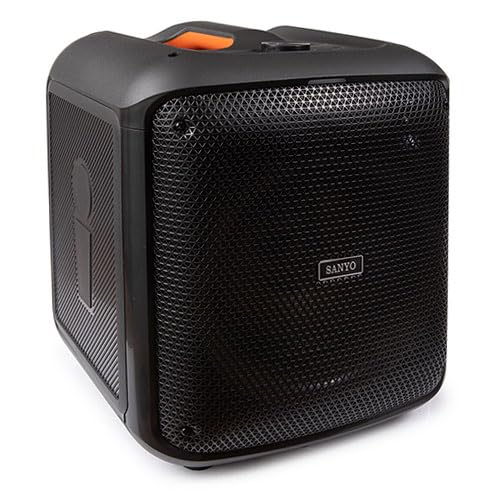
An image showing the front view of the Sanyo 20W Bluetooth Speaker, highlighting its compact design and speaker grille. The speaker appears to have a handle on top for portability.
Note: Specific button layouts and port locations may vary slightly. Refer to the image for general reference.
- Power Button: Press and hold to turn on/off.
- Mode Button: Switch between Bluetooth, AUX, and USB modes.
- Volume Controls: Adjust volume up/down.
- Play/Pause Button: Control audio playback.
- Previous/Next Track Buttons: Navigate through tracks.
- USB Port: For MP3 playback from a USB drive.
- AUX Input: For connecting external audio devices via a 3.5mm audio cable.
- Charging Port: For connecting the USB charging cable.
- Microphone Input: For karaoke function (if applicable).
5. Setup
5.1 Charging the Speaker
- Connect the small end of the USB charging cable to the charging port on the speaker.
- Connect the large end of the USB charging cable to a USB power adapter (not included) or a computer's USB port.
- The charging indicator light will illuminate (color may vary) to show that the speaker is charging.
- Once fully charged, the indicator light may change color or turn off. Disconnect the charging cable.
5.2 Powering On/Off
- To Power On: Press and hold the Power button for approximately 3 seconds. You will hear an audible prompt.
- To Power Off: Press and hold the Power button for approximately 3 seconds. You will hear an audible prompt.
5.3 Bluetooth Pairing
- Ensure the speaker is powered on and in Bluetooth mode. If not, press the Mode button until you hear the Bluetooth pairing prompt. The Bluetooth indicator light will flash.
- Enable Bluetooth on your mobile device (smartphone, tablet, etc.).
- Search for available Bluetooth devices. The speaker will appear as "Sanyo Speaker" or a similar name.
- Select the speaker from the list to pair. Once paired, you will hear a confirmation sound, and the Bluetooth indicator light will stop flashing and remain solid.
- You can now play audio from your device through the speaker.
Note: The speaker will automatically attempt to reconnect to the last paired device when powered on, if that device's Bluetooth is active and within range.
5.4 AUX Connection
- Connect one end of the 3.5mm AUX audio cable to the AUX input port on the speaker.
- Connect the other end of the AUX audio cable to the headphone jack or audio output port of your external audio device (e.g., MP3 player, computer).
- Press the Mode button on the speaker to switch to AUX mode.
- Play audio from your external device.
5.5 USB Playback
- Insert a USB flash drive containing MP3 audio files into the USB port on the speaker.
- Press the Mode button on the speaker to switch to USB mode.
- The speaker will automatically begin playing the MP3 files from the USB drive.
6. Operating Instructions
6.1 Volume Control
- Volume Up: Press the Volume Up button.
- Volume Down: Press the Volume Down button.
6.2 Music Playback (Bluetooth/USB)
- Play/Pause: Press the Play/Pause button to toggle playback.
- Next Track: Press the Next Track button.
- Previous Track: Press the Previous Track button.
6.3 Karaoke Function
If your speaker model includes a microphone input:
- Connect a compatible microphone (not included) to the microphone input port.
- Ensure music is playing via Bluetooth, AUX, or USB.
- Adjust the microphone volume and echo effects (if available on your speaker) using the dedicated controls.
7. Maintenance
7.1 Cleaning
- Wipe the speaker's exterior with a soft, dry, lint-free cloth.
- Do not use liquid cleaners, aerosols, or solvents.
- Avoid getting moisture into any openings.
7.2 Storage
- Store the speaker in a cool, dry place away from direct sunlight and extreme temperatures.
- If storing for an extended period, charge the battery periodically to maintain its health.
7.3 Battery Care
- Avoid fully discharging the battery frequently.
- Do not leave the speaker connected to power for excessively long periods after it is fully charged.
8. Troubleshooting
| Problem | Possible Cause | Solution |
|---|---|---|
| Speaker does not power on. | Low battery. | Charge the speaker fully. |
| No sound. | Volume too low; incorrect mode; device not connected properly. | Increase volume; ensure correct mode (Bluetooth, AUX, USB); re-pair Bluetooth or re-connect cables. |
| Bluetooth pairing fails. | Speaker not in pairing mode; device Bluetooth off; too far from speaker. | Ensure speaker is in pairing mode; enable Bluetooth on device; move device closer to speaker (within 10 meters). |
| Distorted sound. | Volume too high; weak signal; audio source issue. | Reduce volume on speaker and device; move device closer; try a different audio source. |
9. Specifications
| Feature | Detail |
|---|---|
| Brand | Sanyo |
| Model Number | 8432068023011 |
| Power Output | 20 Watts |
| Connectivity Technology | AUX, Bluetooth, USB |
| Bluetooth Version | 5.3 |
| Dimensions (L x W x H) | 30.5 x 33 x 38 cm (12 x 13 x 15 inches approx.) |
| Item Weight | 5.46 Kilograms (12.04 lbs approx.) |
| Color | Multicolor |
| Number of Channels | 2 |
| Special Features | Karaoke, MP3 Playback |
10. Warranty and Support
Sanyo products are manufactured to the highest quality standards. This product is covered by a limited warranty from the date of purchase. Please refer to the warranty card included in your package for specific terms and conditions.
For technical support, warranty claims, or further assistance, please contact Sanyo customer service through their official website or the contact information provided with your purchase documentation.
Please retain your proof of purchase for warranty purposes.