
Discala OG-75
Ozone Generator 35,000mg/h User Manual
Brand: Discala | Model: OG-75
Important Safety Information
ATTENTION: Use in UNOCCUPIED SPACE ONLY!
There might be an ozone smell remaining in the room after treatment. Open doors and windows to ventilate for at least 30 minutes after the treatment and before people return to the space.
Dangers
- Do not place or store the charger where it can fall or be pulled into a bathtub or sink, or where it will sit or drop into water or other liquids.
- Do not reach for a charger that has fallen into water. Unplug immediately.
- Never use a charger with a damaged cord or plug.
- Keep the cord away from heated surfaces.
- Children should be supervised to ensure that they do not play with the product.
- Never force the plug into an outlet; if the plug does not easily fit into the outlet, do not use that outlet.
Warnings
- Never use the product around humans or pets.
- Exposure to a high concentration of ozone is harmful. Make sure that all ozone is reverted back to oxygen before you enter the space; this process takes approximately 30 minutes.
- Do not use attachments other than those recommended by the manufacturer.
- Do not insert objects into the air filter or block it by placing it against a soft surface or in a position where it will be blocked by objects (examples of objects: magazine, tissue paper, hair, and similar).
- Use this product only for its intended use as described in this document.
- This product is for indoor use only.

This image illustrates critical safety warnings and dangers associated with the ozone generator, emphasizing the importance of using it in unoccupied spaces and avoiding contact with water or obstructions.
Product Overview
The Discala OG-75 Ozone Generator is an ultra-powerful odor eliminator designed for comprehensive odor elimination in various indoor environments. With an impressive output of 35,000mg/hour, it effectively tackles smoke, pet odors, cooking smells, and other lingering odors, providing a fresher living space.

Front view of the Discala OG-75 Ozone Generator, highlighting its compact design and control panel.
Key Features:
- Effective Odor Elimination: Produces 35,000mg/hour of ozone to quickly eliminate various odors.
- Adjustable Power Output: Select between Low, Medium, and High ozone output based on room size and air quality.
- Fan Delay Button: After automatic shutdown, the fan remains on for 1 minute to clean the ozone tray, extending machine life.
- Versatile Application: Suitable for cars, boats, dumpsters, kitchens, bathrooms, basements, homes, offices, and hotels.
- Portable Design: Compact size with a carry handle for easy relocation.

This graphic summarizes the core capabilities of the Discala Ozone Generator, including its high ozone output and recommended room size coverage.
Specifications
| Feature | Detail |
|---|---|
| Power Supply | AC 110V 50Hz |
| Power Consumption | 70W |
| Ozone Production | 35,000mg/hour |
| Timer | 0-120 minutes |
| Unit Weight | 2 kg (approx. 4 lbs) |
| Product Dimensions (L x W x H) | 13"D x 8"W x 8"H (approx. 33 x 20 x 20 cm) |
| Noise Level | 55 dB (max) |

A visual representation of the Discala OG-75's technical specifications and physical dimensions.
Setup
- Unpack the Unit: Carefully remove the ozone generator and its power cord from the packaging. Ensure all packing materials are removed.
- Placement: Place the unit in the center of the unoccupied space you wish to treat. Ensure it is on a stable, flat surface and not obstructed.
- Connect Power: Plug the power cord into the back of the ozone generator, then plug the other end into a standard AC 110V 50Hz electrical outlet.

This image provides a quick visual guide for setting up and using the ozone generator, emphasizing preparation and safety.
Operating Instructions
Before operating, ensure the area is unoccupied by humans and pets. Close all windows and doors in the treatment area.
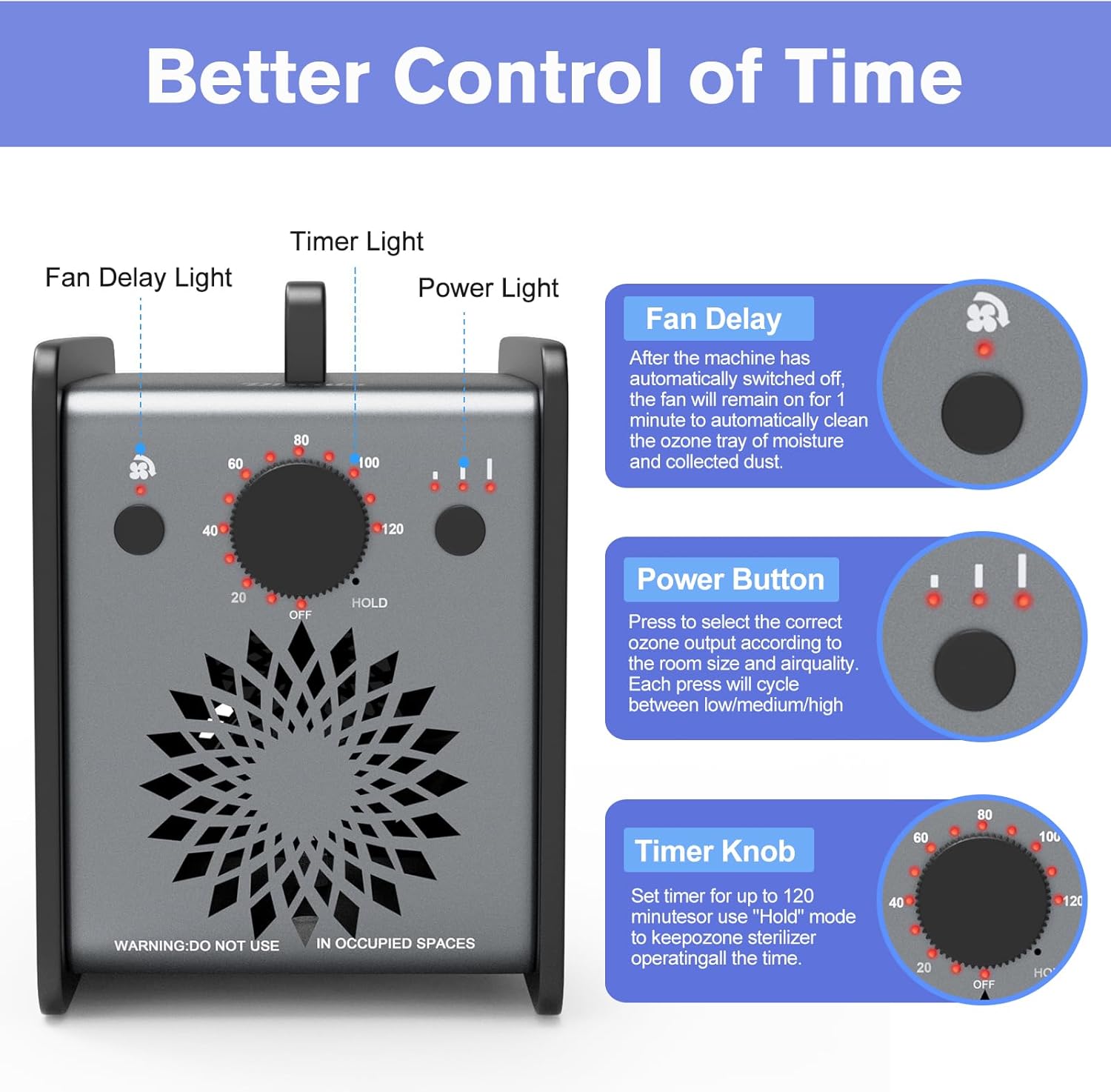
Detailed view of the control panel, showing the Fan Delay button, Power Button, and Timer Knob.
- Power On: Locate the main power switch on the back of the unit and flip it to the "ON" position. The power indicator light on the front panel will illuminate.
- Select Ozone Output (Power Button): Press the Power Button (rightmost button on the front panel) to cycle through the ozone output levels:
- Low: Suitable for rooms 500-1000 sq ft.
- Medium: Suitable for rooms 600-1500 sq ft.
- High: Suitable for rooms 1500-2000 sq ft.
- Set Treatment Time (Timer Knob): Rotate the Timer Knob (center knob) clockwise to set the desired treatment time in minutes (0-120 minutes). For continuous operation, turn the knob to "HOLD". Refer to the table below for recommended treatment times based on room size:
Room Size Recommended Time 100 sq ft 7 min 200 sq ft 15 min 300 sq ft 30 min 500 sq ft 60 min 1000 sq ft 90 min 2000 sq ft 150 min 3000 sq ft 180 min 4000 sq ft HOLD - Start Treatment: Once the timer is set, the unit will begin generating ozone.
- Vacate the Area: Immediately leave the treated space. Ensure no humans or pets remain in the area during operation.
- Ventilation After Treatment: After the set time, the machine will automatically shut off. The fan will remain on for 1 minute to clean the ozone tray. After this, open all doors and windows to ventilate the area for at least 30 minutes before re-entry.
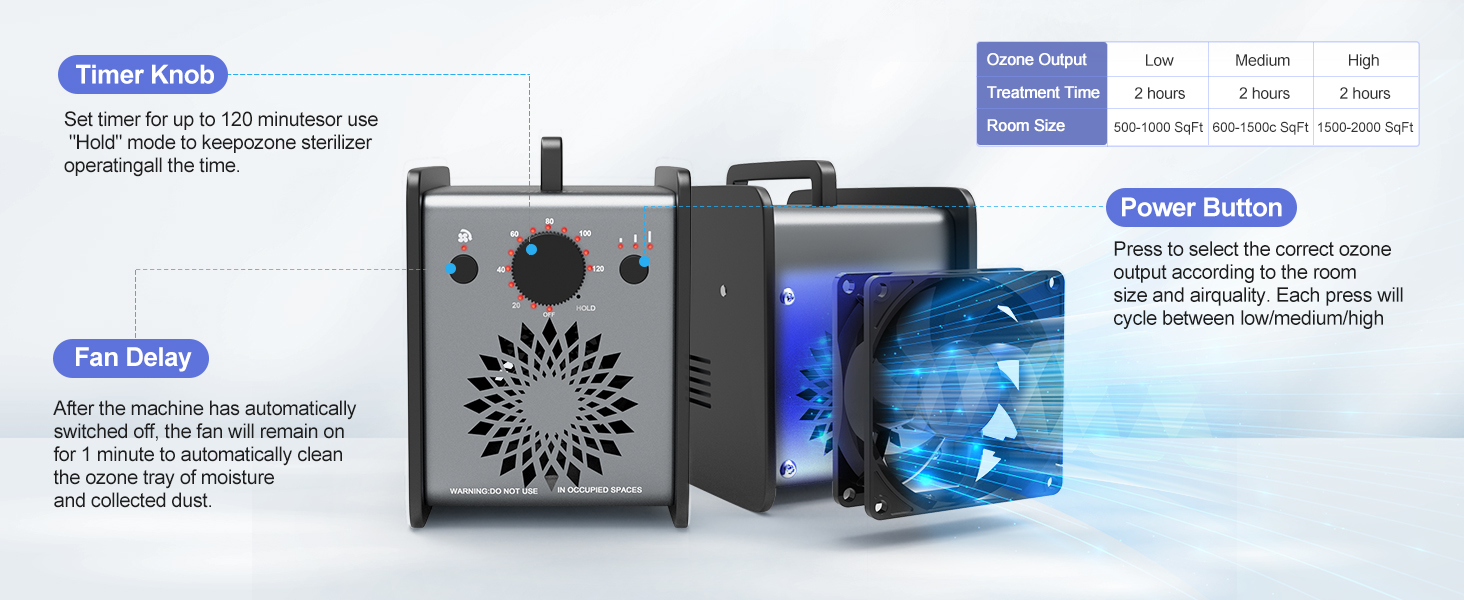
This image provides a comprehensive guide to the control functions of the Discala Ozone Generator, including timer and power settings.
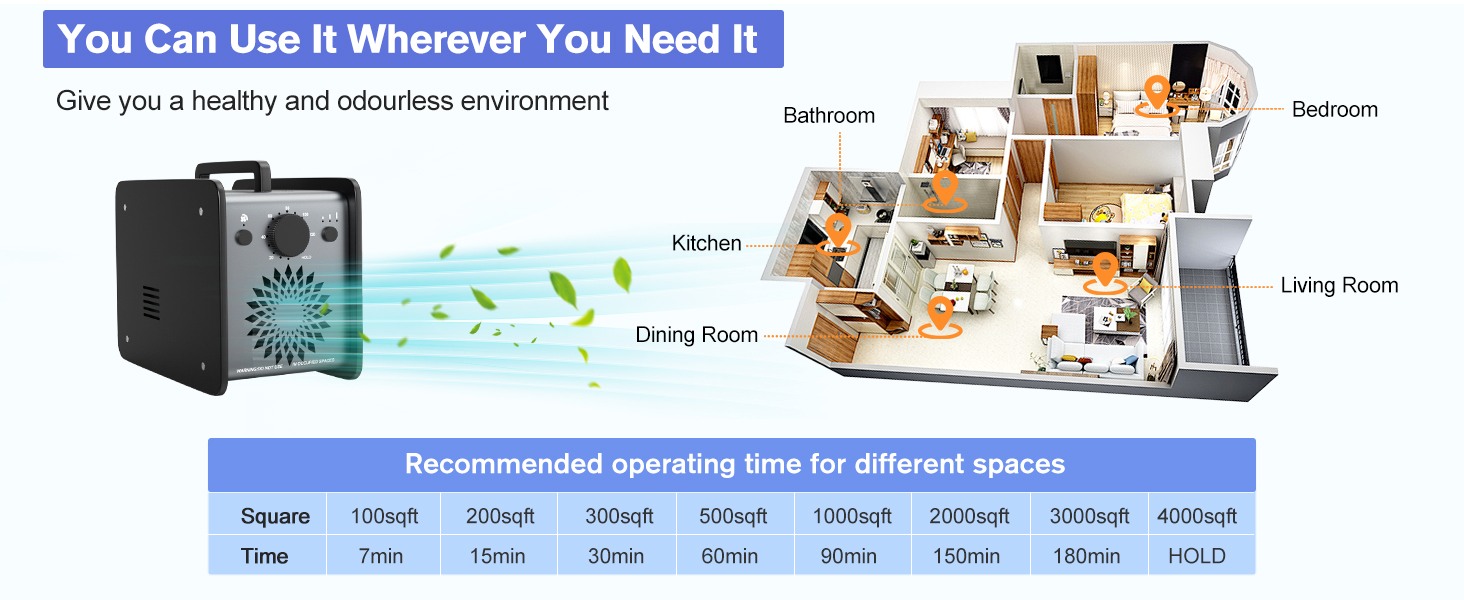
This diagram helps users determine the appropriate treatment duration based on the square footage of the area to be treated.
Maintenance
Regular maintenance ensures optimal performance and extends the lifespan of your Discala Ozone Generator.
- Ozone Tray Cleaning: The fan delay function automatically cleans the ozone tray of moisture and collected dust for 1 minute after the machine turns off. Frequently enabling this function will extend the life of the machine by at least 20%.
- Air Filter: Periodically check and clean the air filter located on the unit. Ensure it is free from dust and debris to maintain proper airflow.
- Exterior Cleaning: Wipe the exterior of the unit with a dry, soft cloth. Do not use liquid cleaners or immerse the unit in water.
Troubleshooting
Unit Does Not Turn On:
- Check Power Connection: Ensure the power cord is securely plugged into both the unit and a working electrical outlet.
- Verify Main Switch: Confirm the main power switch on the back of the unit is in the "ON" position.
- Check Outlet: Test the outlet with another device to ensure it is supplying power.
Weak Ozone Output:
- Clean Air Filter: A clogged air filter can restrict airflow. Clean or replace the air filter as needed.
- Check Ozone Tray: Ensure the ozone tray is clean and free of moisture or dust buildup.
- Adjust Power Setting: Make sure the ozone output is set to an appropriate level (Low, Medium, or High) for the room size.
Unusual Noises:
- Check for Obstructions: Ensure nothing is blocking the fan or air vents.
- Unit Placement: Make sure the unit is on a stable, flat surface to prevent vibrations.
Frequently Asked Questions
- Q: What are the benefits of using this machine?
- A: A Powerful Odor Elimination. Eliminates virtually ANY mal-odors from cigarette/cigar smoke, pets, cooking, musty, and other airborne odors.
- Q: What is the difference between an ozone air purifier and air filters?
- A: Air filters are usually the result of physical processes with air. However, ozone air purifiers produce reactive oxygen species, removing peculiar smells and freshening the air.
- Q: How do ozone air purifiers work?
- A: Ozone generators use mechanisms such as ultraviolet light or corona discharge (a type of electrical discharge) to produce ozone. The machine is also equipped with a fan to disperse ozone into the air. In theory, these ozone particles will come into contact with indoor air pollution and mix it up – for example, by killing live pollutants such as bacteria.

This image addresses frequently asked questions regarding the benefits and operational principles of ozone generators.
Warranty and Support
For warranty information, technical support, or any inquiries regarding your Discala Ozone Generator, please refer to the contact information provided in your product packaging or visit the official Discala website. Keep your purchase receipt for warranty claims.
We are committed to providing high-quality products and excellent customer service. If you have any dissatisfaction, please leave us a message, and we will provide a solution within 24 hours.
Ask a question about this manual
Ask about setup, troubleshooting, compatibility, parts, safety, or missing instructions. Manuals+ will review the question and use this page’s manual context to help answer it.