
Introduction
This user manual provides detailed instructions for the HEKEE Practical Series II Infrared Remote Control. Please read this manual carefully before using your remote control to ensure proper operation and to maximize its lifespan. Keep this manual for future reference.
Product Overview
The HEKEE Practical Series II is a pre-programmed infrared remote control designed for ease of use with various compatible devices, including televisions and audio/video receivers. It features a backlit design for visibility in low-light conditions and a range of up to 10 meters.
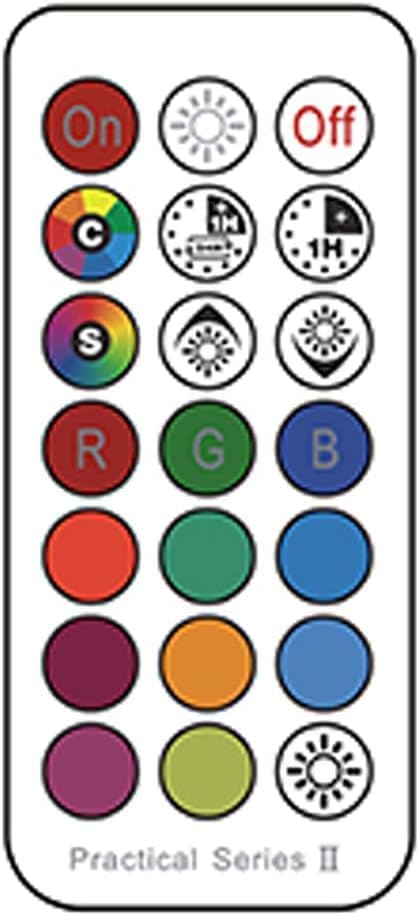
Figure 1: HEKEE Practical Series II Remote Control Layout
This image displays the front face of the HEKEE Practical Series II remote control, highlighting its array of buttons. The top row includes 'On' and 'Off' buttons, along with a brightness control. Subsequent rows feature color selection buttons (Red, Green, Blue, and various shades), mode controls, and timer functions. The remote is labeled "Practical Series II" at the bottom.
Key Features:
- Infrared (IR) Connectivity
- Pre-programmed for immediate use
- Backlit buttons for enhanced visibility
- Compatible with Televisions and Audio/Video Receivers
- Total of 15 control buttons
- Maximum operating range: 10 meters
Setup
1. Battery Installation
- Locate the battery compartment cover on the back of the remote control.
- Slide or lift the cover to open the compartment.
- Insert two AA or AAA batteries (not included), ensuring the positive (+) and negative (-) terminals align correctly with the markings inside the compartment.
- Replace the battery compartment cover until it clicks securely into place.
Note: This remote control is pre-programmed and typically does not require additional setup or pairing with compatible devices. Ensure a clear line of sight between the remote's IR emitter and the device's IR receiver for optimal performance.
Operating Instructions
The HEKEE Practical Series II remote control features a variety of buttons for controlling your compatible devices. Refer to Figure 1 for button locations.
| Button | Function |
|---|---|
| On | Powers on the connected device. |
| Off | Powers off the connected device. |
| Brightness Up (Sun with rays) | Increases the brightness level. |
| Brightness Down (Sun with rays pointing down) | Decreases the brightness level. |
| Color Cycle (C) | Cycles through available color modes or presets. |
| Timer 1X (Clock with 1X) | Activates a short-duration timer function. |
| Timer 1H (Clock with 1H) | Activates a 1-hour timer function. |
| Speed (S) | Adjusts the speed of dynamic lighting effects or transitions. |
| Mode Up (Sun with up arrow) | Advances to the next operating mode or effect. |
| Mode Down (Sun with down arrow) | Reverts to the previous operating mode or effect. |
| R (Red) | Selects the primary Red color. |
| G (Green) | Selects the primary Green color. |
| B (Blue) | Selects the primary Blue color. |
| Color Circles (Various) | Directly selects specific color presets (e.g., red, green, blue, purple, orange, light blue, dark purple, light green). |
Maintenance
Cleaning:
To clean the remote control, gently wipe its surface with a soft, dry cloth. For stubborn dirt, slightly dampen the cloth with water. Avoid using harsh chemicals, abrasive cleaners, or excessive moisture, as these can damage the remote.
Battery Replacement:
Replace batteries when the remote's response becomes sluggish or stops working. Always replace both batteries at the same time with new ones of the same type (AA or AAA). Do not mix old and new batteries or different battery types.
Storage:
If the remote control will not be used for an extended period, remove the batteries to prevent leakage and potential damage to the device.
Troubleshooting
- Remote not responding:
- Check if the batteries are correctly inserted with the correct polarity.
- Replace old batteries with new ones.
- Ensure there is a clear line of sight between the remote and the device's IR receiver. Obstructions can block the signal.
- Verify that the remote is pointed directly at the device.
- Short operating range:
- Replace batteries, as low battery power can reduce range.
- Ensure no strong light sources (like direct sunlight or bright fluorescent lights) are interfering with the IR signal.
- Buttons not functioning correctly:
- Clean the remote's surface, especially around the buttons, to remove any dirt or debris that might be obstructing them.
- If specific buttons are unresponsive, the remote may be damaged and might require replacement.
Specifications
| Feature | Detail |
|---|---|
| Brand | HEKEE |
| Model Name | Series II |
| Model Number | HEKEE_SERIES_II |
| Connectivity Technology | Infrared (IR) |
| Special Features | Pre-programmed, Backlit |
| Compatible Devices | Television, Audio/Video Receiver |
| Number of Buttons | 15 |
| Maximum Range | 10 Meters |
| Battery Description | AA or AAA Batteries (2 required) |
Warranty and Support
Information regarding specific warranty terms for the HEKEE Practical Series II Remote Control is not provided in the product data. For warranty claims, technical support, or inquiries about spare parts, please contact the seller or manufacturer directly through your purchase platform.
Please note that information on spare parts availability and guaranteed software updates is currently unavailable.