
Knifel 400GPH-AT
Knifel Submersible Pump 400GPH User Manual
Model: 400GPH-AT
Introduction
Thank you for choosing the Knifel Submersible Pump. This pump is designed for efficient water circulation in various applications, including fountains, hydroponic systems, ponds, and aquariums. It features an AUTO-Shut-Off mechanism for safety and longevity, an ultra-quiet operation, and adjustable water flow. Please read this manual thoroughly before installation and operation to ensure proper use and maintenance.
Safety Information
- Always disconnect the power supply before handling, installing, or performing any maintenance on the pump.
- Ensure the pump is fully submerged in water during operation to prevent overheating and damage.
- Do not operate the pump with a damaged cord or plug. If the cord is damaged, it must be replaced by the manufacturer or a qualified service agent.
- This pump is designed for water circulation only. Do not use it for flammable liquids or other hazardous materials.
- Keep children and pets away from the pump and water feature during operation.
- The AUTO-Shut-Off feature is designed to prevent pump burnout in low water conditions. However, regular monitoring of water levels is recommended.
Package Contents
- Knifel Submersible Pump 400GPH
- Assorted Nozzle Attachments (1/2", 2/3", 3/4")
- User Manual
Setup
- Choose Location: Place the pump in a stable position at the bottom of your fountain, pond, or aquarium. The pump features suction cups on its base for secure placement.
- Attach Nozzle: Select the appropriate nozzle attachment (1/2", 2/3", or 3/4") based on your desired water flow and height. Twist the chosen nozzle onto the pump's outlet.
- Submerge Pump: Ensure the pump is completely submerged in water. The water level should be sufficient to cover the pump entirely to allow for proper operation and cooling.
- Connect Power: Plug the pump's power cord into a grounded 110V electrical outlet. Ensure the power cord is routed safely to avoid tripping hazards and is not kinked or pinched.

Image: The Knifel Submersible Pump, showing its compact design, power cord, and suction cups on the base for stable placement in water.
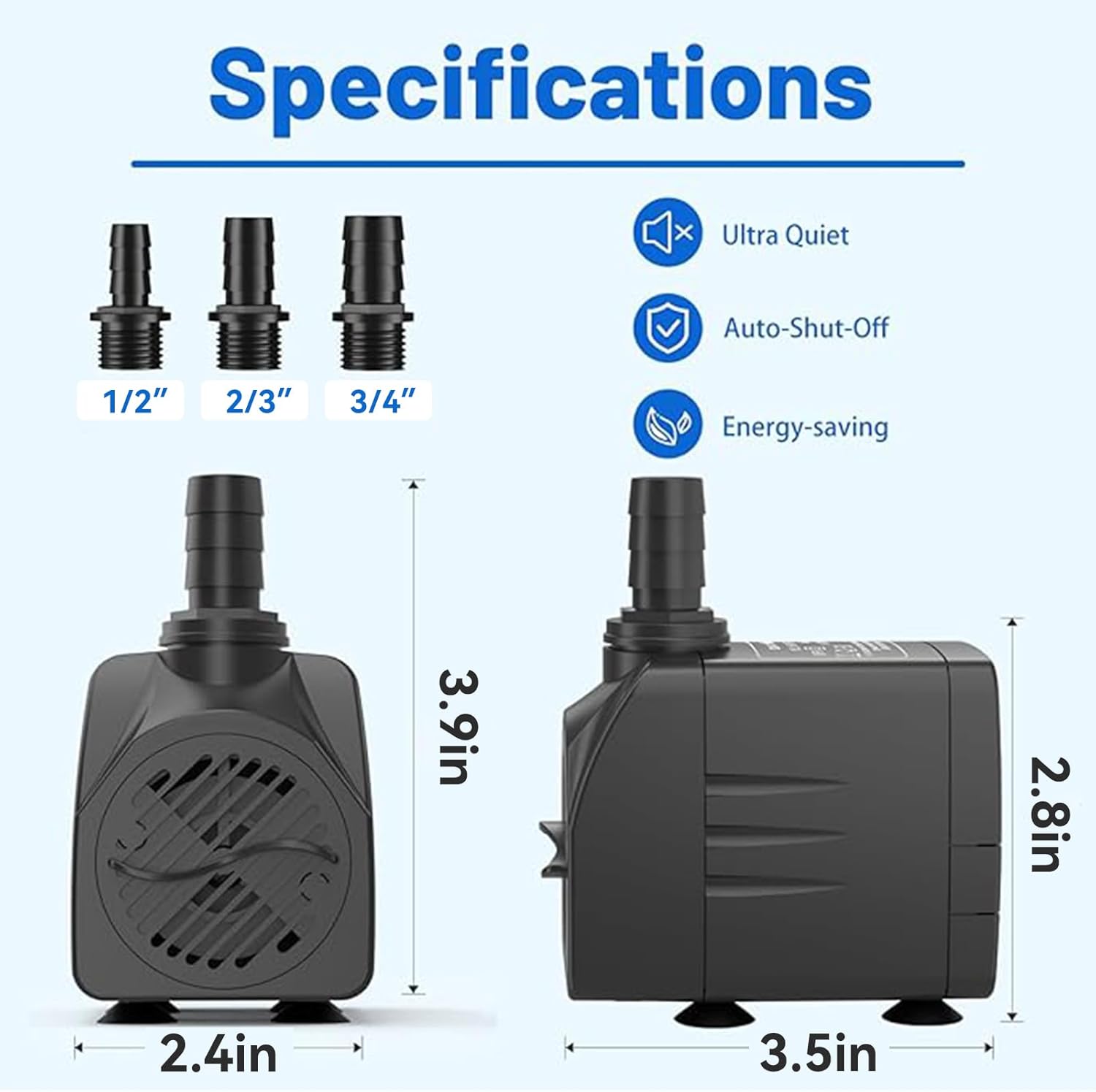
Image: Diagram illustrating the dimensions of the Knifel Submersible Pump (3.5"L x 2.4"W x 3.9"H) and the three included nozzle sizes (1/2", 2/3", 3/4").
Operating Instructions
- Power On: Once the pump is submerged and plugged in, it will begin to operate.
- Adjust Flow Rate: The pump features an adjustable knob to control the water flow rate. Turn the knob to increase or decrease the flow according to your preference. The maximum flow rate is 400 GPH (1500 L/H).
- Auto-Shut-Off Feature: This pump is equipped with an intelligent AUTO-Shut-Off system. If the water level drops too low due to evaporation or splashing, the pump will automatically turn off to prevent dry running and potential damage. It will resume operation once sufficient water is added back to the system.

Image: Visual representation of the pump's adjustable water flow rate, maximum flow rate of 400GPH, maximum lift of 6.5ft, and IPX8 waterproof rating.

Image: Illustration demonstrating the pump's automatic detection and intelligent power-off system, showing the pump operating normally in a full tank and automatically shutting off when the water level is low.

Image: Depiction of the pump's ultra-quiet operation, showing a person sleeping peacefully next to an aquarium with the pump running, emphasizing its low noise level.
Maintenance
Regular cleaning and maintenance will extend the life of your Knifel Submersible Pump.
- Disconnect Power: Always unplug the pump from the power source before cleaning.
- Disassemble: The pump is designed for easy disassembly without tools. Carefully remove the front cover and impeller assembly.
- Clean Components: Rinse all parts with clean water. Use a small brush or cotton swab to remove any accumulated debris, algae, or mineral deposits from the impeller, housing, and intake screen.
- Reassemble: Once all parts are clean, reassemble the pump, ensuring all components are securely in place.
- Frequency: The frequency of cleaning depends on the environment and water quality. For optimal performance, clean the pump every 2-4 weeks, or more frequently if you notice reduced flow or increased noise.

Image: Cross-section view highlighting the pure copper rotor of the Knifel pump, indicating a service life of up to 3 years, which is longer than ordinary rotors.
Troubleshooting
| Problem | Possible Cause | Solution |
|---|---|---|
| Pump does not operate | Not plugged in; Power outage; Low water level (Auto-Shut-Off activated); Impeller jammed. | Check power connection; Restore power; Add water until pump is fully submerged; Disconnect power, clean impeller. |
| Reduced water flow | Clogged intake screen or impeller; Kinked tubing; Water level too low. | Disconnect power, clean intake and impeller; Straighten tubing; Add water. |
| Pump is noisy | Debris in impeller; Pump not fully submerged; Pump not stable. | Disconnect power, clean impeller; Ensure pump is fully submerged; Secure pump with suction cups. |
Specifications
| Feature | Detail |
|---|---|
| Brand | Knifel |
| Model Number | AT-400 (400GPH-AT) |
| Color | Black |
| Material | Plastic |
| Style | Water Circulation |
| Product Dimensions (L x W x H) | 3.5" x 2.4" x 3.9" |
| Item Weight | 13.92 ounces |
| Power Source | Corded Electric |
| Maximum Flow Rate | 400 GPH (1500 Liters Per Hour) |
| Maximum Lifting Height | 6.5 Feet |
| Voltage | 110 Volts |
| Waterproof Rating | IPX8 |

Image: Collage showing various applications for the Knifel Submersible Pump, including hydroponic systems, ponds, aquariums, and decorative fountains.
Warranty and Support
For warranty information or technical support, please refer to the product packaging or contact Knifel customer service directly. Contact details are typically provided with your purchase documentation.
Ask a question about this manual
Ask about setup, troubleshooting, compatibility, parts, safety, or missing instructions. Manuals+ will review the question and use this page’s manual context to help answer it.