1. Product Overview
The HUANUO 63-inch Dual Motor L-Shaped Electric Standing Desk is designed to provide a versatile and ergonomic workspace. This desk allows users to easily switch between sitting and standing positions, promoting better posture and productivity. It features a robust dual-motor system for smooth height adjustments, integrated power outlets for convenience, and effective cable management solutions.

Image 1.1: The HUANUO 63-inch L-Shaped Electric Standing Desk configured for a multi-monitor setup, showcasing its spacious design and integrated features.
Key Features:
- Sit-to-Stand Functionality: Electric height adjustment from 28 inches to 46 inches.
- Memory Presets: Three programmable height memory presets for quick transitions.
- Ergonomic L-Shape: Provides ample workspace and can be configured with the long desktop on either the left or right side.
- Integrated Power Strip: Features two power outlets, one USB Type-A port, and one USB Type-C charging port directly on the desktop.
- Durable Construction: Equipped with dual motors and a solid carbon steel frame, supporting up to 220 lbs.
- Cable Management: Includes a cable management tray and clips to organize wires.
2. Setup and Assembly
Assembly of the HUANUO L-Shaped Standing Desk requires careful attention to detail. It is recommended that two individuals assemble the desk due to its weight and size. All necessary tools are included.
2.1 Unpacking and Preparation
- Unpack all components and verify against the parts list provided in your packaging.
- Ensure you have sufficient space for assembly.
- Keep all small parts, screws, and tools organized.
2.2 Assembly Steps (General Guidelines)
- Frame Assembly: Attach the desk legs to the crossbars, ensuring all connections are secure.
- Desktop Configuration: The L-shaped desktop can be assembled with the longer section on either the left or right side to suit your workspace. Refer to the specific diagrams in your included assembly guide for this step.
- Desktop Attachment: Securely attach the desktop sections to the assembled frame. Ensure all pre-drilled holes align correctly.
- Motor and Control Panel Installation: Install the dual motors and connect them to the control box. Mount the control panel in your desired location on the desktop.
- Power Strip and Cable Management: Install the built-in power strip into its designated slot on the desktop. Attach the cable management tray and use the provided clips to route all power and data cables neatly.
- Final Positioning: With assistance, carefully lift and place the assembled desk in its intended location.

Image 2.1: Illustration of the reversible L-shaped desktop sections, allowing customization for left or right-hand configurations.

Image 2.2: Detail of the integrated power outlets, including two AC outlets, one USB-A, and one USB-C port, providing convenient desktop charging.
3. Operating Instructions
3.1 Height Adjustment
The desk's height can be adjusted electrically using the control panel. The adjustable range is from 28 inches (minimum) to 46 inches (maximum).

Image 3.1: The control panel for height adjustment, featuring memory presets and up/down controls.
- Adjusting Height: Use the Up (▲) and Down (▼) arrow buttons on the control panel to raise or lower the desk to your desired height.
- Setting Memory Presets:
- Adjust the desk to your preferred height.
- Press the S button. The display will flash.
- Press one of the number buttons (1, 2, or 3) within 5 seconds to save the current height to that preset.
- Recalling Memory Presets: Press the corresponding number button (1, 2, or 3) to automatically move the desk to the saved height.
3.2 Using Built-in Power Outlets
The desk includes a flush-mounted power strip for convenient access to power.
- The power strip provides two standard AC power outlets.
- It also includes one USB Type-A port and one USB Type-C port for charging mobile devices, headsets, and other peripherals.
- Ensure devices are compatible with the provided USB charging specifications.
3.3 Cable Management
Utilize the integrated cable management tray and clips to maintain an organized workspace.
- Route power cords and data cables through the cable management tray located underneath the desktop.
- Use the provided cable clips to secure loose wires along the desk frame, preventing tangles and tripping hazards.
- A storage hook on each side of the desk provides a convenient place to hang headphones or bags.
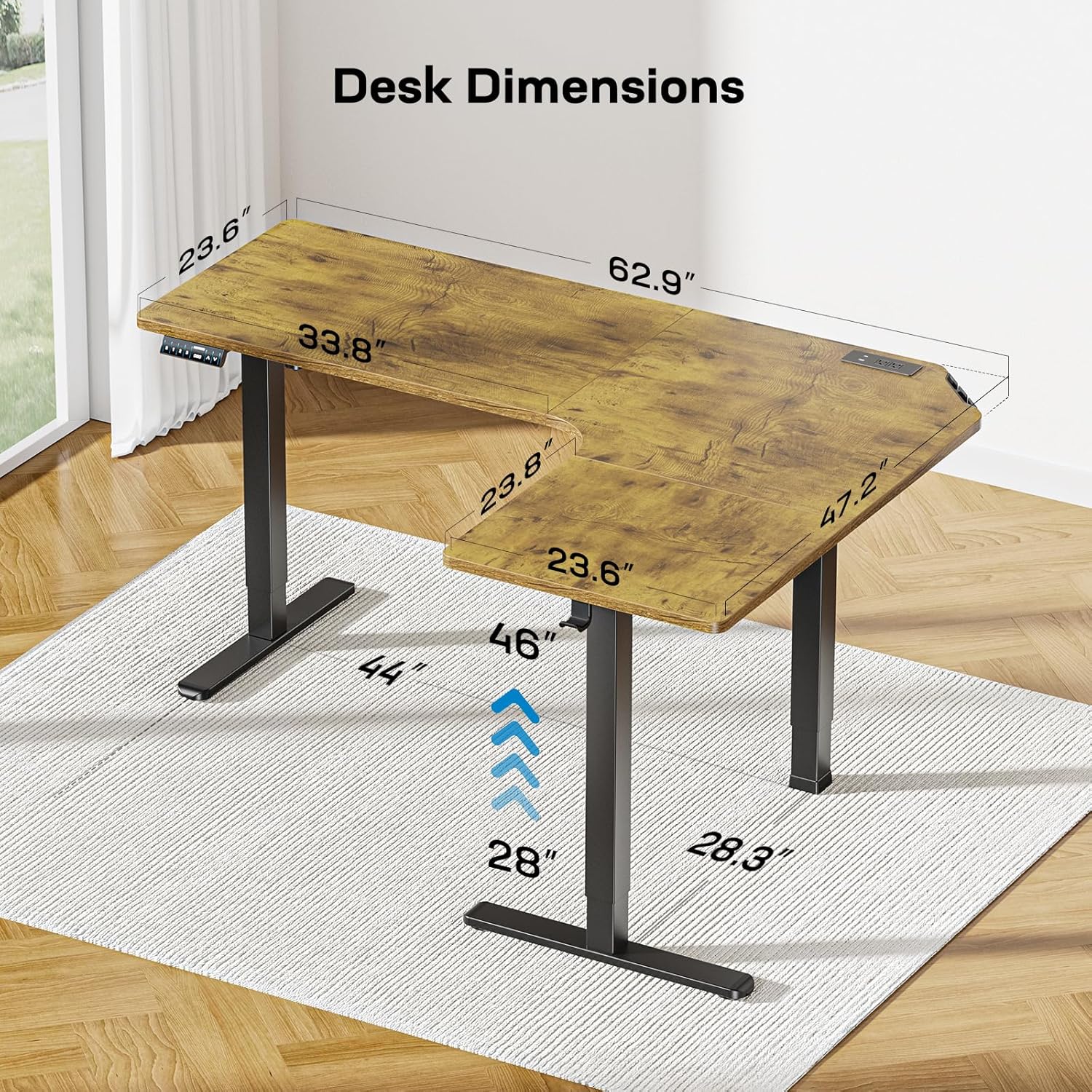
Image 3.2: The cable management tray and power strip holder, designed for organized wiring and safety.
4. Maintenance
Regular maintenance ensures the longevity and optimal performance of your HUANUO standing desk.
- Cleaning: Wipe the desktop surfaces with a soft, damp cloth. Avoid abrasive cleaners or harsh chemicals that could damage the finish.
- Frame Inspection: Periodically check all screws and bolts for tightness. Retighten if necessary to maintain stability.
- Motor Functionality: Listen for any unusual noises during height adjustment. If issues arise, refer to the troubleshooting section.
- Cable Management: Ensure cables remain neatly organized and are not pinched or stressed, which could affect their integrity or the desk's movement.
5. Troubleshooting
If you encounter any issues with your standing desk, refer to the following common troubleshooting tips.
- Desk Not Moving:
- Check if the power cord is securely plugged into both the desk and a working wall outlet.
- Ensure no obstructions are blocking the desk's movement path.
- If the control panel displays an error code, consult the full user manual for specific code meanings.
- Uneven Height:
- Perform a reset procedure (typically by holding the down arrow until the lowest point is reached, then releasing and holding again until a beep or full cycle completes). Refer to your specific control panel instructions.
- Verify that all frame connections are tight and evenly assembled.
- Power Outlets Not Working:
- Ensure the main power to the desk is active.
- Check if the devices plugged into the outlets are functioning correctly elsewhere.
- Excessive Noise During Adjustment:
- Minor motor noise is normal. If the noise is loud or unusual, check for any loose components or obstructions.
- Ensure the desk is not overloaded beyond its 220 lbs weight capacity.
For persistent issues, contact customer support.
6. Specifications
Detailed technical specifications for the HUANUO 63-inch Dual Motor L-Shaped Electric Standing Desk.

Image 6.1: Key dimensions of the HUANUO L-Shaped Standing Desk, including desktop measurements and height adjustment range.
| Feature | Specification |
|---|---|
| Model Number | HNESD47V-US |
| Brand | HUANUO |
| Desk Design | L-Shaped Computer Desk, Standing Desk |
| Product Dimensions (D x W x H) | 48"D x 63"W x 27"H (Overall) |
| Minimum Height | 28 Inches |
| Maximum Height | 46 Inches |
| Number of Height Positions | 3 (Preset) |
| Lifting Mechanism | Electric Dual Motor |
| Maximum Weight Recommendation | 220 Pounds |
| Base Material | Carbon Steel |
| Top Material Type | Engineered Wood (Laminated) |
| Color | Vintage Brown (Desktop), Black (Base) |
| Integrated Power Outlets | 2 AC Outlets, 1 USB Type-A, 1 USB Type-C |
| Cable Management | Tray & Clips included |
| Required Assembly | Yes (Recommended 2 people) |
| Certifications | ETL, FCC |
7. Warranty and Support
7.1 Warranty Information
The HUANUO 63-inch Dual Motor L-Shaped Electric Standing Desk comes with a 5-year limited warranty covering parts and labor. Please retain your proof of purchase for warranty claims.
7.2 Customer Support
For any questions, assistance with assembly, troubleshooting, or warranty claims, please contact HUANUO customer support. Refer to the contact information provided with your product packaging or visit the official HUANUO website for support details.
You can also visit the HUANUO Store on Amazon for additional product information and support resources.


