
1. Introduction
The Radiolink M435 is a high-performance heavy-lift drone designed for various applications requiring significant payload capacity and extended flight range. With a 3KG (6.6 lbs) payload capability and a top speed of 120km/h, it is suitable for tasks such as autonomous package delivery, surveying, and other specialized operations. Equipped with advanced flight control systems, including routes planning and autopilot features, the M435 offers reliable and efficient performance.

Figure 1: Radiolink M435 Drone, AT9S Pro Transmitter, and Aluminum Case.
2. Safety Guidelines
Always prioritize safety when operating the Radiolink M435 drone. Failure to follow these guidelines may result in injury, damage to property, or legal consequences.
- Local Regulations: Always check and comply with local aviation regulations and restrictions before flying.
- Weather Conditions: Do not fly in strong winds, rain, snow, or other adverse weather conditions.
- Clear Area: Operate the drone in open areas, away from people, buildings, and obstacles.
- Line of Sight: Maintain visual line of sight with the drone at all times during flight.
- Pre-Flight Check: Before each flight, inspect the drone, propellers, battery, and remote control for any damage or abnormalities.
- Battery Safety: Use only approved batteries and chargers. Do not overcharge or discharge batteries. Store them in a cool, dry place.
- Propeller Safety: Ensure propellers are securely attached and free from damage. Keep hands and face clear of rotating propellers.
3. Package Contents
Verify that all items listed below are included in your M435 RTF TC KIT package:
- 1x M435 Drone (without camera)
- 1x AT9S Pro Transmitter M2
- 1x R9DS Receiver (ESC, receivers, motors, GPS are pre-installed)
- 1x HOTA D6 Pro Charger
- 1x 6S Battery & Band
- 2x Load Material Straps
- 6x Propellers
- 1x Hook
- 2x Screwdrivers
- 1x Load Material Fixing-Plate & Holder Kit
- 1x User Instruction (this manual)
- 1x Aluminum Case
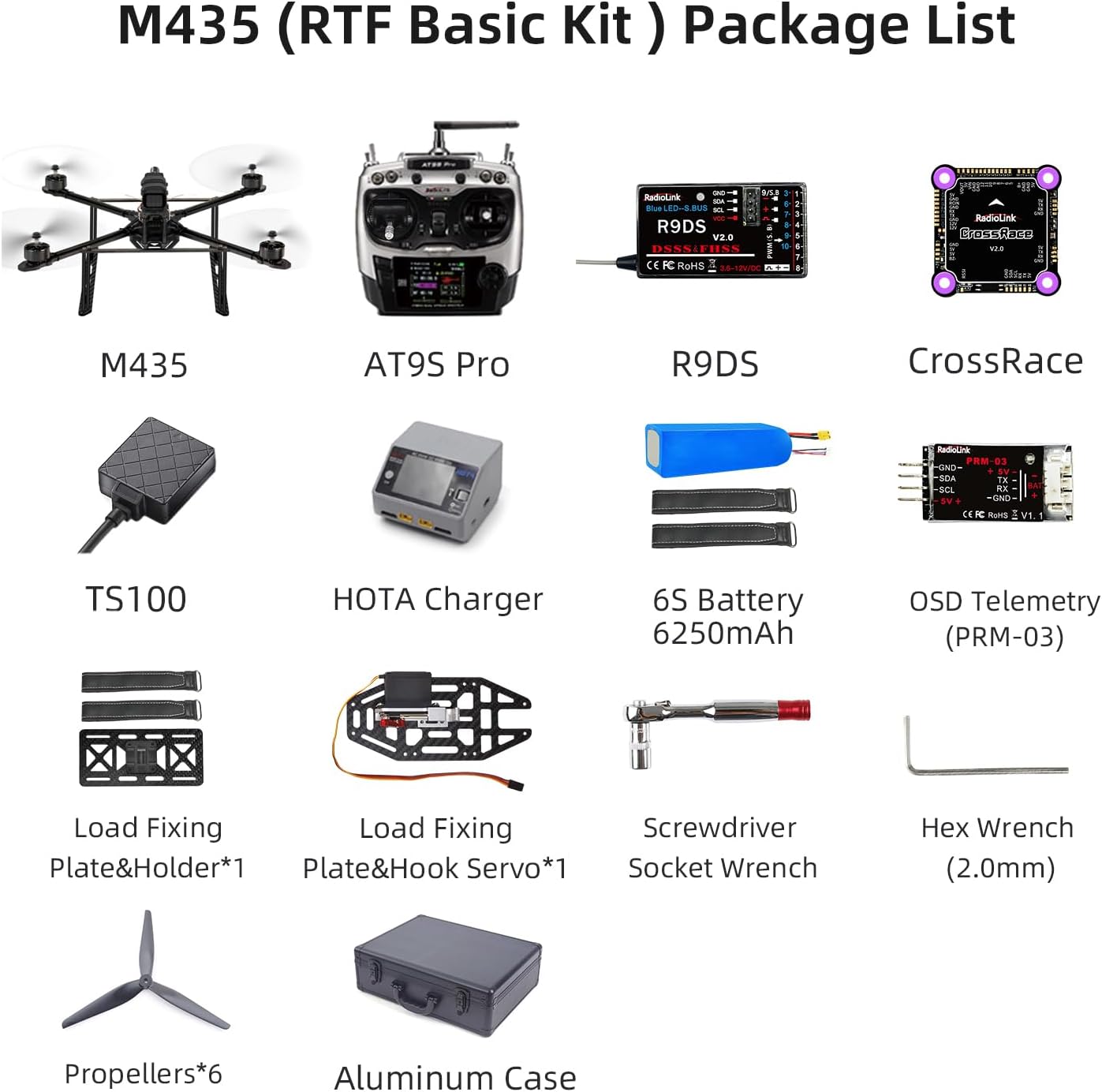
Figure 2: M435 RTF Basic Kit Package Contents.
4. Setup
4.1 Component Overview
The M435 drone features a durable carbon fiber frame and integrates the Radiolink CrossRace flight controller, FLYCOLOR 55A 4-in-1 ESC, and Radiolink GPS TS100 for stable and precise flight. The AT9S Pro transmitter provides comprehensive control.
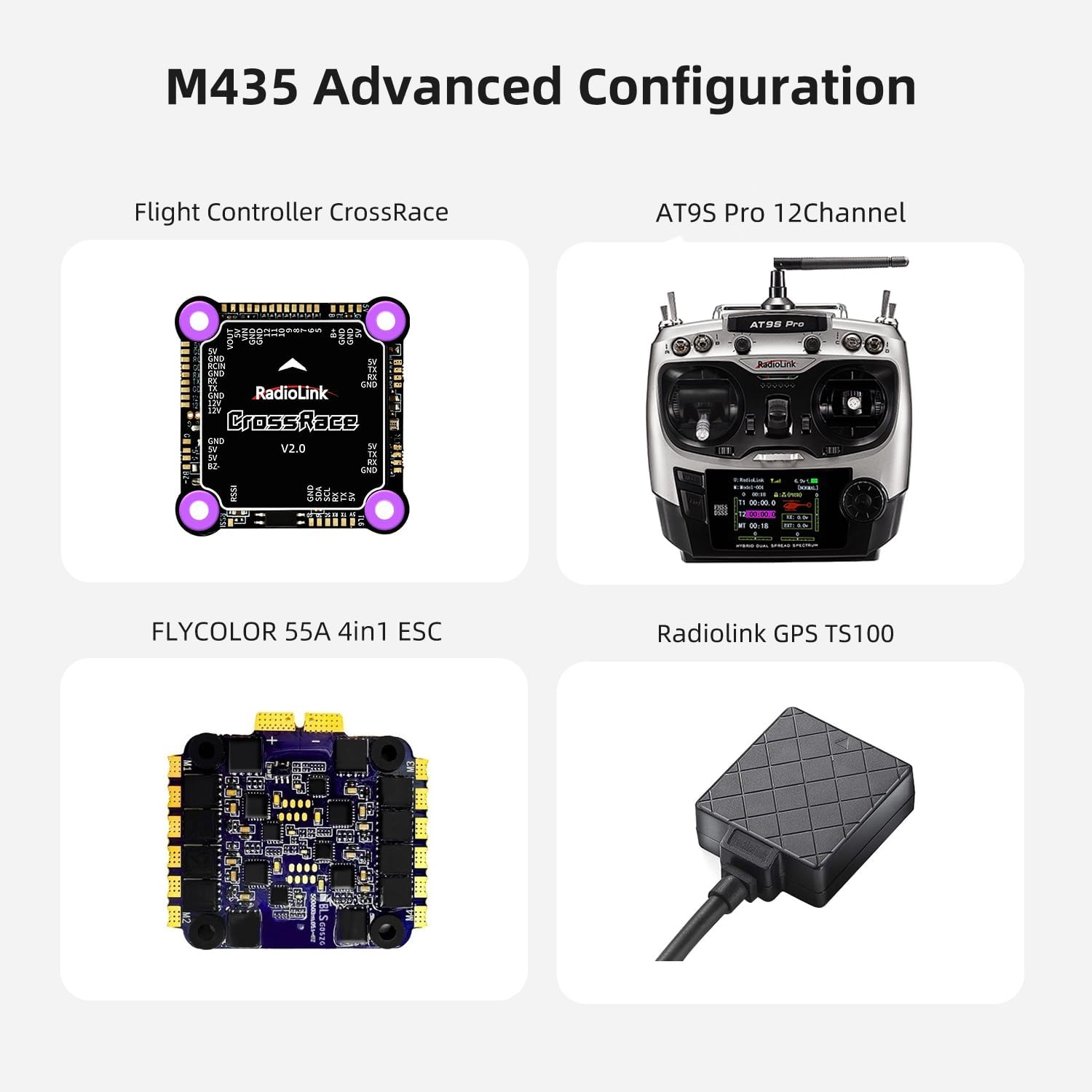
Figure 3: M435 Advanced Configuration Components.
4.2 Load Fixing-Plate Installation
To enable payload dropping functionality, install the Load Material Fixing-Plate and Hook Servo onto the drone's frame. Refer to the following steps and the accompanying video for detailed instructions:
- Connect the servo cable from the Load Fixing-Plate Hook Servo to the designated port on the drone's flight controller.
- Carefully wrap the servo cable under the plate to ensure it does not interfere with drone operation.
- Align the Load Fixing-Plate with the mounting points on the drone's underside.
- Secure the plate using the provided screws (7 screws for the hook) and the 2.0mm Hex Wrench. Ensure all screws are tightened securely.
Video 1: Radiolink M435 Loading Fixing-Plate Installation. This video demonstrates the process of connecting the servo cable, wrapping it, and securing the load fixing plate with screws.
4.3 Battery Charging
Use the included HOTA D6 Pro Charger to charge the 6S battery. This smart charger supports AC/DC dual-channel charging with a maximum power of 650W and 15A charging current, ensuring efficient and safe charging.

Figure 4: HOTA D6 Pro Charger Overview.
5. Operating Instructions
5.1 Pre-Flight Checklist
- Ensure the drone battery is fully charged and securely installed.
- Verify the AT9S Pro transmitter battery level is sufficient.
- Check all propellers for damage and ensure they are tightly secured.
- Confirm the flight area is clear of obstacles and people.
- Power on the transmitter first, then the drone.
5.2 Autonomous Flight and Waypoint Planning
The M435, with its integrated flight controller and GPS TS100, supports pre-set flight routes for autonomous operations. This allows for tasks such as autonomous takeoff, landing, and automatic package delivery by following defined waypoints.

Figure 5: Waypoint Planning for Autonomous Flight.
5.3 Payload Operation
The M435 supports multiple payload modes, including hook and cargo box options, to suit various transportation scenarios. The hook mechanism can be controlled via the AT9S Pro transmitter.
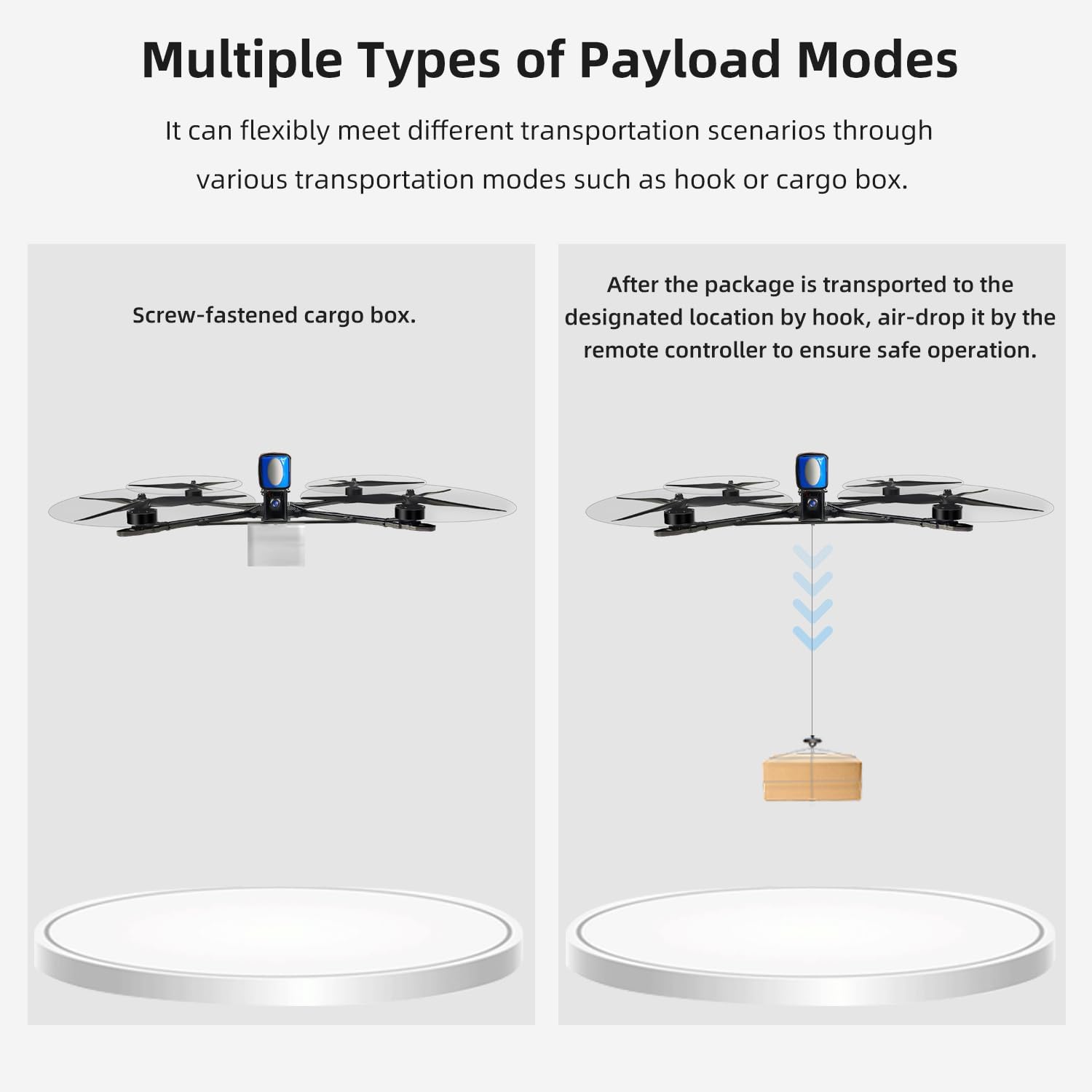
Figure 6: Multiple Types of Payload Modes.
To operate the hook servo for dropping payloads, trigger the SWB button (factory default CH6) on the AT9S Pro transmitter. This will open the hook. To close the hook, trigger the SWB button again.
5.4 Long Range Control
The AT9S Pro transmitter, paired with the R9DS receiver, provides long-range control up to 3400 meters (2.1 miles) in unobstructed, interference-free environments. This robust connection ensures reliable operation even in complex urban settings.
6. Maintenance
Regular maintenance ensures the longevity and optimal performance of your Radiolink M435 drone.
- Frame Inspection: The M435 features a durable carbon fiber frame. Regularly inspect it for any cracks or damage, especially after hard landings.
- Propeller Check: Before and after each flight, check propellers for chips, bends, or cracks. Replace damaged propellers immediately.
- Motor Cleanliness: Keep motors free from dust and debris.
- Battery Care: Store batteries at recommended storage voltage (around 3.8V per cell for LiPo) if not used for extended periods. Avoid extreme temperatures.
- General Cleaning: Wipe down the drone with a soft, dry cloth after use to remove dirt and dust.

Figure 7: Durable Carbon Fiber Frame of M435.
7. Troubleshooting
If you encounter issues with your Radiolink M435 drone, consider the following basic troubleshooting steps:
- No Power: Ensure batteries are fully charged and correctly connected to both the drone and transmitter.
- Loss of Control/Range Issues: Check for interference in your flying environment. Ensure transmitter and receiver antennas are properly oriented.
- Unstable Flight: Verify propellers are undamaged and correctly installed. Check for any loose components on the drone.
- Payload Drop Malfunction: Ensure the hook servo cable is securely connected and the SWB button on the transmitter is functioning correctly.
For more detailed troubleshooting and FAQs, please refer to the comprehensive user manual available on the Radiolink Direct store or the product's Amazon sales page.
8. Specifications
| Feature | Specification |
|---|---|
| Brand | Radiolink |
| Model Name | Radiolink M435 |
| Special Features | Auto-Landing, Integrated GPS, Long Distance Control, One Button Return, Speed Adjustment |
| Age Range (Description) | Adult |
| Color | black |
| Connectivity Technology | USB |
| Included Components | 1* AT9S Pro Transmitter M2+1*R9DS Receiver(ESC, receivers, motors GPS are installed), 1* HOTA D6 Pro Charger+1*6S Battery&Band+2*Load Material Straps, 1* M435 (Without camera), 1* User Instruction+1*Aluminum Case, 6* Propellers+1*Hook+2*Screwdriver+1*Load Material Fixing-Plate&Holder Kit |
| Skill Level | Professional |
| Item Weight | 2.1 Pounds |
| Battery Capacity | 6.25 Milliamp Hours |
| Video Capture Format | MP4 |
| Remote Control Technology | 2.4Ghz Radio Control |
| Control Type | Remote Control |
| Maximum Range | 3400 Meters (2.1 miles) |
| Material | Carbon Fiber |
| Wireless Communication Technology | 2.4 GHz Radio |
| Battery Cell Composition | Lithium |
| Are Batteries Included | Yes |
| Supported Image Format | JPEG, [possibly] RAW, [possibly] DNG |
| Remote Control Included? | No (Transmitter is included, but not a separate 'remote control' item) |
| Optical Sensor Technology | CMOS |
| Rechargeable Battery Included | Yes |
| Product Dimensions | 13.9"L x 13.9"W x 5.5"H |
| Manufacturer | Radiolink |
| Release Date | May 1, 2024 |
9. Warranty and Support
For warranty information, technical support, or to access additional resources such as full user manuals and FAQ troubleshooting files, please visit the official Radiolink Direct store or contact their customer service. Radiolink is committed to providing high-quality products and friendly after-sales service.


