
1. Introduction
This manual provides detailed instructions for the safe and efficient operation of your BOSYTRO 0-60V 0-10A Adjustable AC to DC Switching Power Supply. This device is designed to convert alternating current (AC) input into a stable, adjustable direct current (DC) output, suitable for a wide range of electronic applications requiring variable voltage and current.
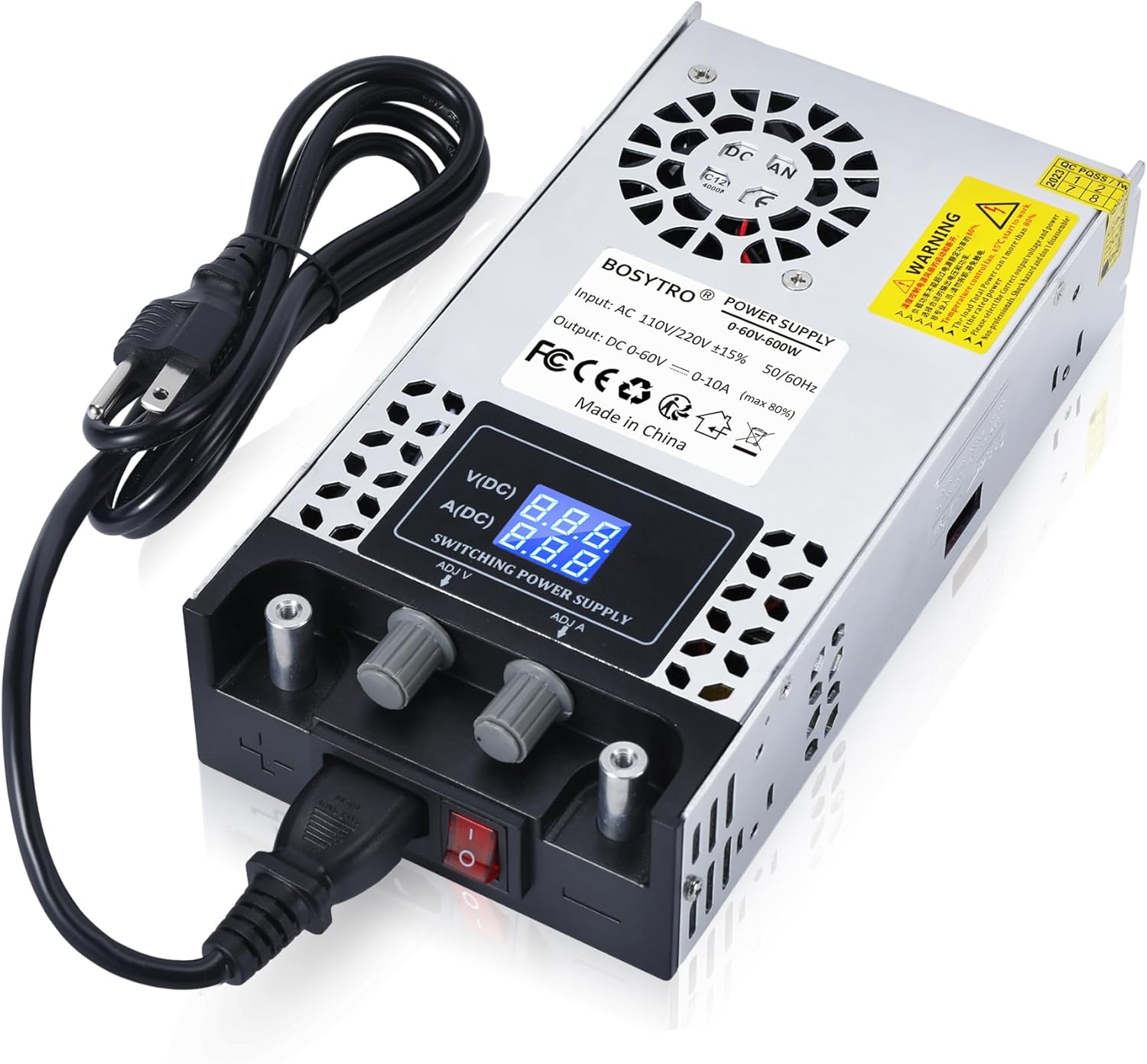
Figure 1: BOSYTRO 0-60V 0-10A Adjustable AC to DC Switching Power Supply.
2. Safety Information
Please read all safety warnings and instructions carefully before using this product. Failure to follow these instructions may result in electric shock, fire, or serious injury.
- Input Voltage Selection: Ensure the input voltage selector switch (115V/230V) is set correctly for your local power grid before connecting the AC power cord. Incorrect selection can cause severe damage to the unit.
- Ventilation: Do not block ventilation openings. Ensure adequate airflow around the unit to prevent overheating.
- Environment: Operate the power supply in a dry, well-ventilated area, away from moisture, flammable materials, and extreme temperatures.
- Grounding: Always connect the power supply to a properly grounded outlet.
- Output Connections: Ensure all DC output connections are secure and correctly polarized before applying power to your load. Avoid short circuits.
- Internal Access: Do not open the casing of the power supply. There are no user-serviceable parts inside, and opening it voids the warranty and poses a risk of electric shock.
- Children and Pets: Keep the device out of reach of children and pets.
3. Package Contents
Verify that all items are present in the package:
- BOSYTRO 0-60V 0-10A Adjustable AC to DC Switching Power Supply
- AC Power Cord
- Alligator Clip Cables (for DC output connection)
4. Product Overview
Familiarize yourself with the components and controls of your power supply.
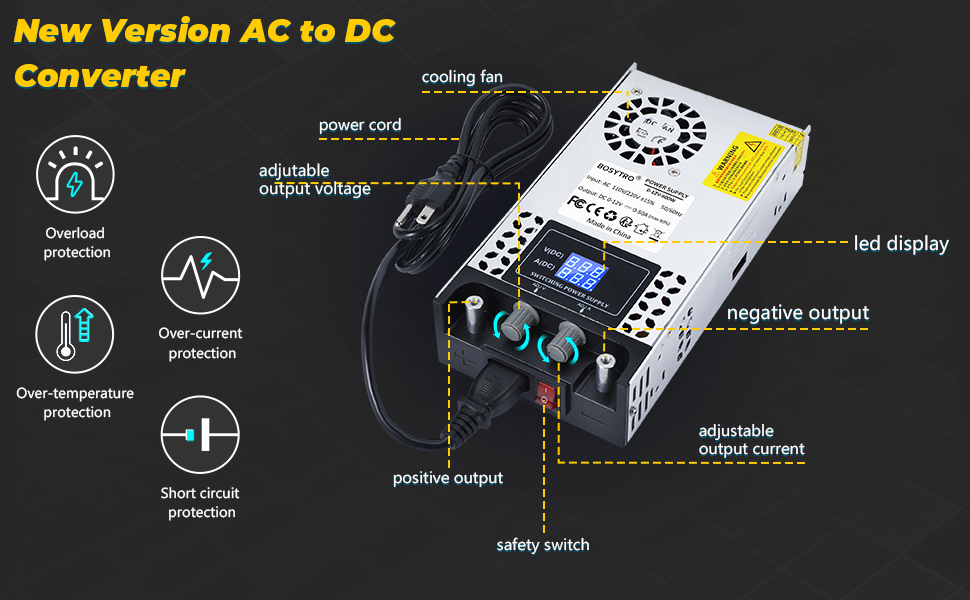
Figure 2: Labeled diagram of the power supply's features.
- Cooling Fan: Automatically activates to dissipate heat.
- Power Cord Input: Connects the AC power cord.
- Adjustable Output Voltage Knob (ADJ V): Used to set the desired DC output voltage.
- LED Display: Shows real-time output voltage (VDC) and current (ADC).
- Negative Output Terminal (-): Connects to the negative terminal of your DC load.
- Adjustable Output Current Knob (ADJ A): Used to set the maximum output current limit.
- Positive Output Terminal (+): Connects to the positive terminal of your DC load.
- Safety Switch: Main power switch for the unit.
- Input Voltage Selector Switch: Located on the side, used to select 115V or 230V AC input.
5. Setup
5.1. Input Voltage Selection
IMPORTANT: Before connecting the power cord, verify and set the input voltage selector switch to match your local AC power supply (115V for North America, 230V for Europe and other regions). This switch is typically located on the side of the unit.

Figure 3: Input voltage selector switch (115V/230V).
5.2. Connecting AC Power
- Ensure the power supply's safety switch is in the OFF position.
- Connect the provided AC power cord to the power input on the unit.
- Plug the other end of the AC power cord into a grounded wall outlet.
5.3. Connecting DC Load
The power supply features two nickel-plated copper terminals for output connections, allowing for direct wire connection or use with alligator clips.
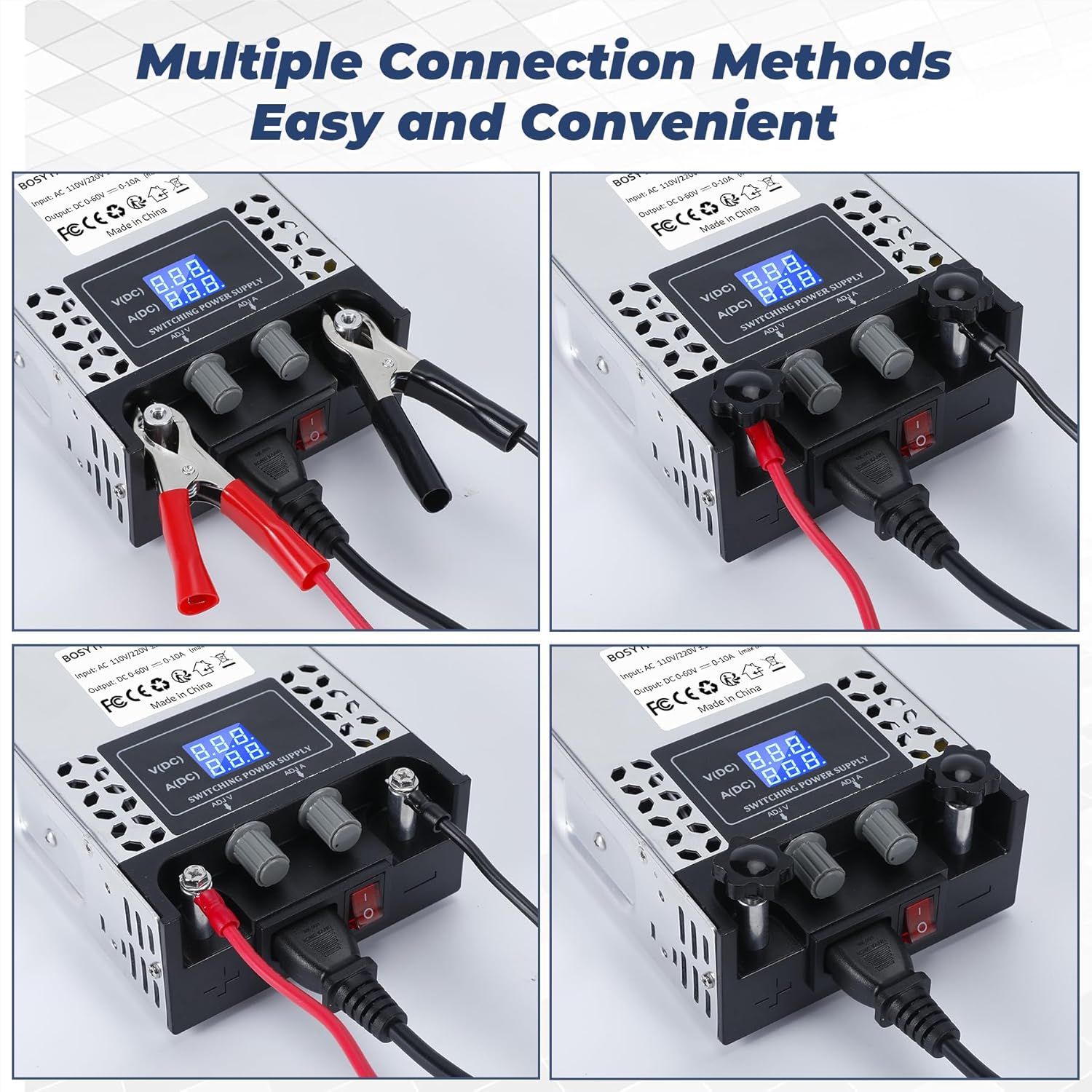
Figure 4: Multiple connection methods for DC output.
- Ensure the power supply is OFF and unplugged from AC power before making any DC connections.
- Connect the positive (+) terminal of your DC load to the positive output terminal (+) of the power supply.
- Connect the negative (-) terminal of your DC load to the negative output terminal (-) of the power supply.
- Ensure all connections are firm and secure to prevent arcing or accidental disconnections.
6. Operating Instructions
6.1. Powering On/Off
- After ensuring all connections are correct and secure, flip the safety switch to the ON position. The LED display will illuminate, showing the current voltage and current settings.
- To power off, flip the safety switch to the OFF position.
6.2. Adjusting Voltage and Current
The power supply features multi-turn potentiometers for precise adjustment of output voltage and current.

Figure 5: Voltage and Current Adjustment Knobs.
- Voltage Adjustment (ADJ V): Rotate the 'ADJ V' knob to increase or decrease the output voltage. The LED display will show the set voltage.
- Current Adjustment (ADJ A): Rotate the 'ADJ A' knob to set the maximum output current limit. When the load draws current exceeding this limit, the power supply will enter constant current (CC) mode, and the output voltage may drop to maintain the set current. The LED display will show the actual current being drawn by the load.
6.3. Understanding the Display
The integrated LED display provides real-time readings:
- V(DC): Displays the current DC output voltage in Volts.
- A(DC): Displays the current DC output current in Amperes.
7. Protection Features
The BOSYTRO power supply incorporates multiple protection mechanisms to safeguard both the unit and connected devices:

Figure 6: Internal components and protection features.
- Overload Protection: Prevents damage if the total power drawn by the load exceeds the unit's maximum wattage (600W).
- Over-Current Protection: Limits the output current to the set 'ADJ A' value, protecting the load from excessive current.
- Short Circuit Protection: Automatically cuts off output in case of a short circuit, preventing damage.
- Over-Temperature Protection: Shuts down the unit if internal temperatures become too high.
8. Cooling System
The power supply features an aluminum alloy shell with multiple ventilation holes and a built-in cooling fan to ensure efficient heat dissipation and stable operation.

Figure 7: Cooling system with built-in fan.
The fan operates automatically, adjusting its speed as needed to maintain optimal operating temperatures and prevent overheating of internal components.
9. Wide Application
This adjustable power supply is suitable for various applications, including:

Figure 8: Examples of common applications.
- LED strip lighting
- Motor pumps
- CCTV systems
- 3D printers
- Lab computers and experimental setups
- RV, radio/car stereos, Camper applications
- Security cameras
- LCD monitors
10. Maintenance
To ensure the longevity and proper functioning of your power supply, follow these maintenance guidelines:
- Cleaning: Disconnect the power supply from all power sources before cleaning. Use a soft, dry cloth to wipe the exterior. Do not use liquid cleaners or solvents.
- Ventilation: Regularly check that the ventilation openings are free from dust and debris. Use compressed air to gently clear any blockages.
- Storage: When not in use for extended periods, store the power supply in a cool, dry place, away from direct sunlight and extreme temperatures.
- Cable Inspection: Periodically inspect the AC power cord and output cables for any signs of damage (fraying, cuts, exposed wires). Replace damaged cables immediately.
11. Troubleshooting
If you encounter issues with your power supply, refer to the following common troubleshooting steps:
- No Power/Display Off:
- Check if the AC power cord is securely plugged into both the unit and the wall outlet.
- Ensure the safety switch is in the ON position.
- Verify the wall outlet is functional.
- Confirm the input voltage selector switch is set correctly (115V/230V).
- No Output Voltage/Current:
- Check all DC output connections for proper polarity and secure contact.
- Ensure the 'ADJ V' knob is not set to zero.
- If the load is drawing more current than the 'ADJ A' setting, the unit may be in constant current mode, and voltage may drop. Increase the 'ADJ A' setting if necessary.
- A short circuit in the load will trigger protection and result in no output. Disconnect the load and test the power supply without it.
- Unit Overheating/Shuts Down:
- Ensure adequate ventilation around the unit. Clear any obstructions from the fan or vents.
- Reduce the load if it is consistently operating near the maximum power (600W).
- Unstable Output Voltage/Current:
- Ensure connections are stable and not loose.
- Verify the load is within the specified operating range of the power supply.
If problems persist after following these steps, contact customer support.
12. Specifications
| Feature | Specification |
|---|---|
| Input Voltage | AC 110V-240V (selectable 115V/230V) |
| Output Voltage Range | DC 0-60V (Adjustable) |
| Output Current Range | 0-10A (Adjustable) |
| Maximum Output Power | 600W |
| Dimensions (L x W x H) | 8 x 4 x 1 inches (approximately) |
| Item Weight | 2 pounds |
| Material | Aluminum |
| Cooling | Built-in fan, aluminum alloy shell |
| Protection Features | Overload, Over-current, Short Circuit, Over-temperature |
13. Warranty and Support
Information regarding product warranty and customer support was not available in the provided data. Please refer to the product packaging or the seller's website for details on warranty coverage and how to contact support for assistance.