
BOSYTRO 0-48V/0-12.5A
BOSYTRO AC to DC Converter 48V DC Power Supply User Manual
Model: 0-48V/0-12.5A
1. Introduction and Overview
The BOSYTRO AC to DC Converter is a versatile and adjustable switching power supply designed for a wide range of applications. It converts standard AC input voltage (110V-240V) to an adjustable DC output voltage from 0-48V and an adjustable current from 0-12.5A, with a maximum output power of 600W. This power supply is suitable for various devices including LED strips, motor pumps, CCTV systems, 3D printers, lab computers, and more.
This manual provides essential information for the safe and efficient operation, setup, and maintenance of your BOSYTRO power supply.
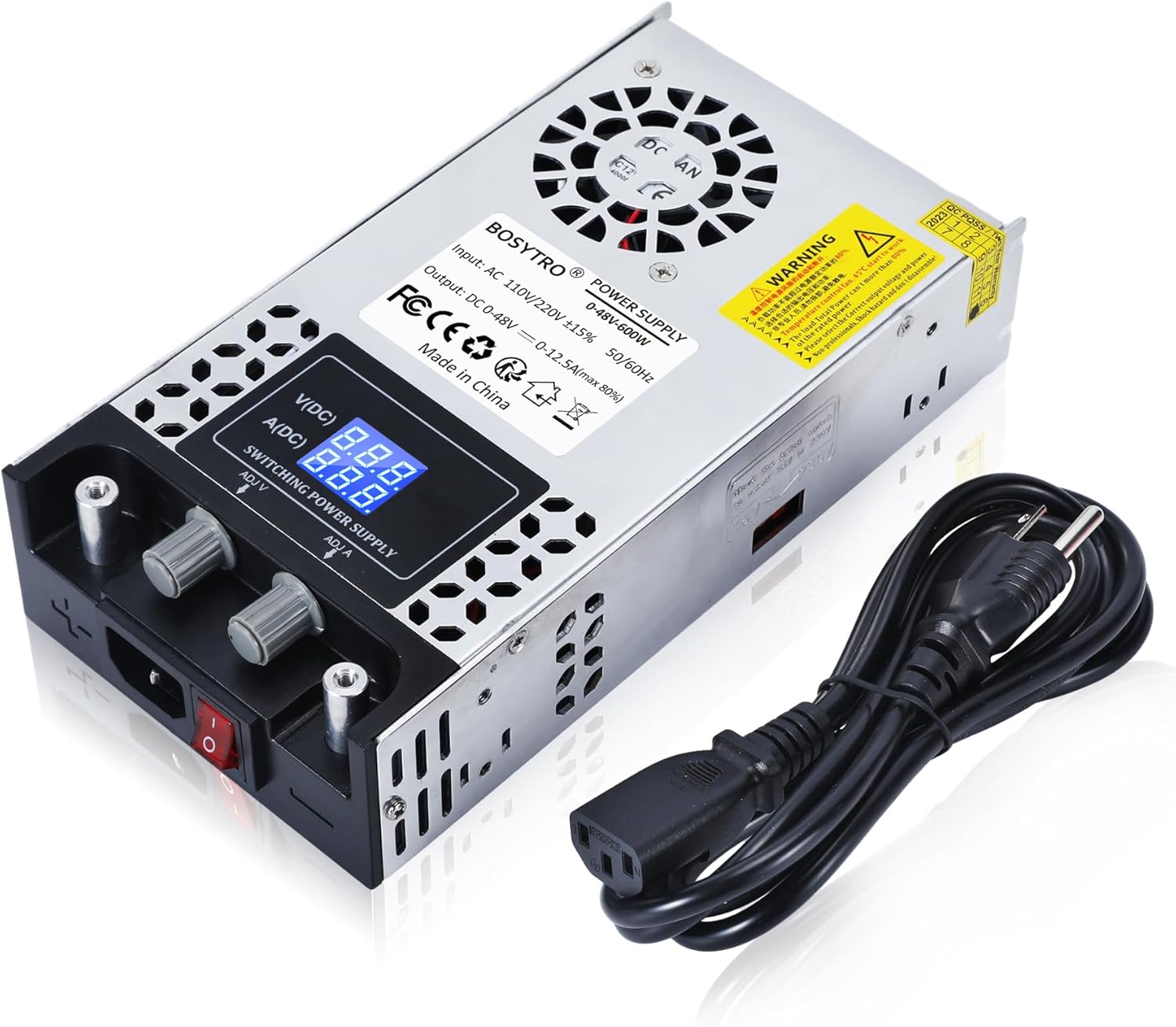
Figure 1.1: BOSYTRO AC to DC Converter 48V DC Power Supply with included power cord.
2. Safety Information
Please read and understand all safety warnings and instructions before operating this device. Failure to do so may result in electric shock, fire, or serious injury.
- Input Voltage Selection: Ensure the input voltage switch (115V/230V) on the side of the unit is set correctly according to your local power supply before connecting to AC power. Incorrect setting can damage the unit.
- Proper Ventilation: Do not block the ventilation holes or the cooling fan. Ensure adequate airflow around the unit to prevent overheating.
- Protection Features: This power supply includes built-in overload protection, over-current protection, and short circuit protection to safeguard your devices. However, always operate within the specified voltage and current limits.
- Dry Environment: Use the device in a dry environment. Avoid exposure to water, moisture, or high humidity.
- Professional Use: This device is intended for professional and hobbyist use. If you are unsure about any connection or operation, consult a qualified electrician or technician.
Figure 2.1: Important input voltage selection switch (115V/230V).
3. Product Features
- Adjustable Voltage & Current: Supports input voltage 110V-240V AC. Adjustable output voltage range 0-48V; adjustable output current range 0-12.5A. Max output power 600W.
- Easy Operation: Features two nickel-plated copper terminals for direct connection by clamps, offering good electrical conductivity and high conversion efficiency. Built-in wire integrated patent design for convenience.
- Multiple Protection: Equipped with overload protection, over-current protection, and short circuit protection to prevent device damage.
- Intelligent Cooling System: Aluminum alloy shell with multiple holes for better heat dissipation. Built-in cooling fan to prevent overheating. Anti-skid pads at the bottom also aid heat dissipation and stability.
- High Precision LED Display: Digital display for accurate voltage and current readings.

Figure 3.1: Overview of the power supply's multiple protection features.
4. Package Contents
Upon opening the package, please verify that all the following items are included:
- BOSYTRO AC to DC Converter 48V DC Power Supply Unit
- AC Power Cord
- Alligator Clip Cables (Red and Black)
- Additional Connectors (e.g., spade terminals)

Figure 4.1: Contents of the package, emphasizing easy operation.
5. Setup
- Unpacking: Carefully remove the power supply unit and all accessories from the packaging. Inspect for any visible damage.
- Voltage Selection: Locate the red slide switch on the side of the unit. This switch allows you to select between 115V and 230V input voltage. Ensure this switch is set to the correct voltage for your region before plugging in the unit. For example, 115V for US, 230V for EU.
- Placement: Place the power supply on a stable, flat surface with adequate ventilation. Do not place it on soft surfaces that may block the fan or vents.
- Connect AC Power: Insert the provided AC power cord into the power input port on the front of the unit. Plug the other end into a suitable wall outlet.
- Connect Load: Connect your device to the output terminals. The unit has clearly marked positive (+) and negative (-) terminals. Use the provided alligator clip cables or other suitable connectors to ensure a secure connection.
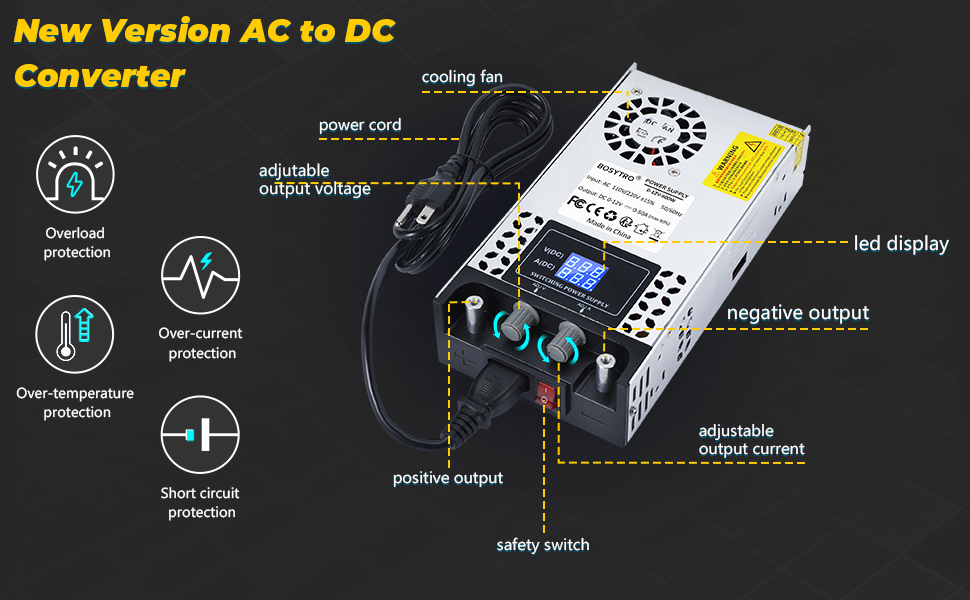
Figure 5.1: Key components and connections of the power supply.
6. Operating Instructions
- Power On: After connecting the AC power and your load, flip the red ON/OFF switch on the front panel to the 'ON' position. The LED display will illuminate, showing the current voltage and amperage.
- Adjusting Voltage (V(DC)): Use the 'ADJ.V' knob (typically on the left) to adjust the output voltage. Turn clockwise to increase voltage and counter-clockwise to decrease it. Observe the voltage reading on the LED display.
- Adjusting Current (A(DC)): Use the 'ADJ.A' knob (typically on the right) to adjust the output current. Turn clockwise to increase current and counter-clockwise to decrease it. The current displayed will reflect the actual current drawn by your connected device, up to the set limit.
- Monitoring: Continuously monitor the voltage and current readings on the LED display to ensure they are within the safe operating limits of your connected device.
- Power Off: When finished, first disconnect your load from the output terminals, then flip the red ON/OFF switch to the 'OFF' position, and finally unplug the AC power cord from the wall outlet.

Figure 6.1: Adjustable voltage (ADJ.V) and current (ADJ.A) knobs.
Video 6.1: Demonstration of the adjustable voltage and current features of the power supply, including unboxing and overview of components.
7. Maintenance
To ensure the longevity and optimal performance of your BOSYTRO power supply, follow these maintenance guidelines:
- Cleaning: Regularly wipe the exterior of the unit with a soft, dry cloth. Do not use abrasive cleaners or solvents. Ensure the unit is powered off and unplugged before cleaning.
- Ventilation: Periodically check that the cooling fan and ventilation holes are free from dust and debris. A clogged fan can lead to overheating.
- Storage: When not in use for extended periods, store the power supply in a cool, dry place, away from direct sunlight and extreme temperatures.
- Cable Inspection: Regularly inspect the power cord and output cables for any signs of wear, cuts, or damage. Replace damaged cables immediately.

Figure 7.1: The intelligent cooling fan helps maintain optimal operating temperature.
8. Troubleshooting
If you encounter issues with your BOSYTRO power supply, refer to the following common troubleshooting steps:
| Problem | Possible Cause | Solution |
|---|---|---|
| No power/display off | Power switch off, AC cord loose, no power from outlet, incorrect voltage selection. | Ensure power switch is ON. Check AC cord connection. Test outlet with another device. Verify 115V/230V switch setting. |
| No output voltage/current | Output terminals loose, load disconnected, voltage/current knobs set to zero, protection activated. | Check output connections. Ensure load is properly connected. Adjust voltage/current knobs. Disconnect load and power cycle the unit to reset protection. |
| Unit overheating/fan not running | Blocked ventilation, excessive load, fan malfunction. | Ensure vents are clear. Reduce load. If fan consistently fails to run under load, contact support. |
| Inaccurate display readings | Loose internal connection (rare), calibration issue. | Power cycle the unit. If problem persists, contact manufacturer support. |
If the issue persists after attempting these steps, please contact BOSYTRO customer support for further assistance.
9. Specifications
| Specification | Value |
|---|---|
| Brand | BOSYTRO |
| Model Number | 0-48V/0-12.5A |
| Input Voltage | AC 110V/220V (switchable) |
| Output Voltage Range | DC 0-48V (Adjustable) |
| Output Current Range | 0-12.5A (Adjustable) |
| Max Output Power | 600W |
| Material | Aluminum |
| Item Weight | 2 Pounds |
| Package Dimensions | 10.63 x 9.02 x 2.8 inches |
| Connector Type | Alligator Clips, Cable Lugs |
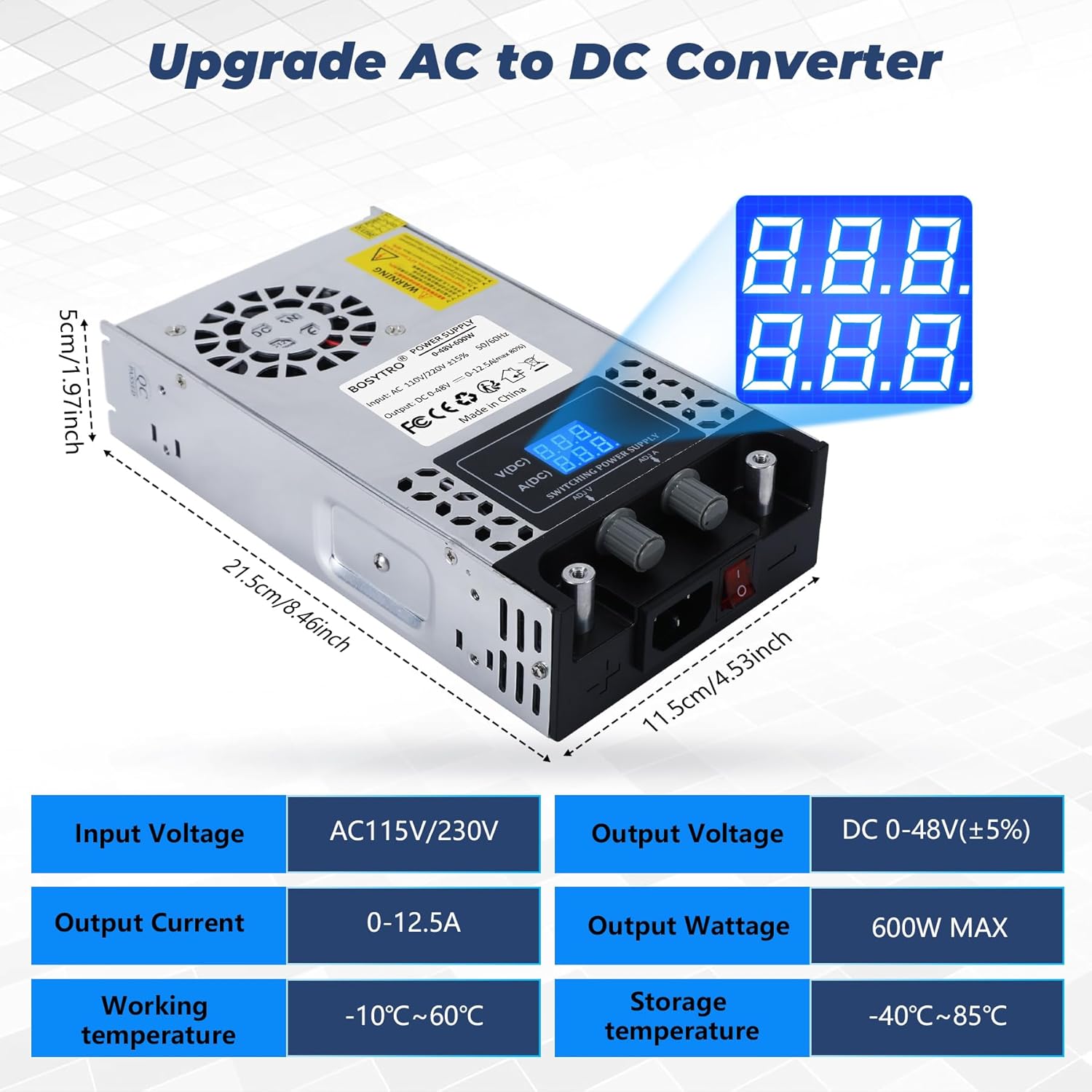
Figure 9.1: Product dimensions and key technical specifications.
10. Wide Application
The BOSYTRO AC to DC Converter is designed for broad compatibility and can be used in numerous scenarios:
- Industrial equipment
- RV and Camper power
- Radio/Car stereos
- LED strip lighting
- CCTV security systems
- Computer projects
- 3D printers
- Motor pumps
- LCD monitors
- Lab computers
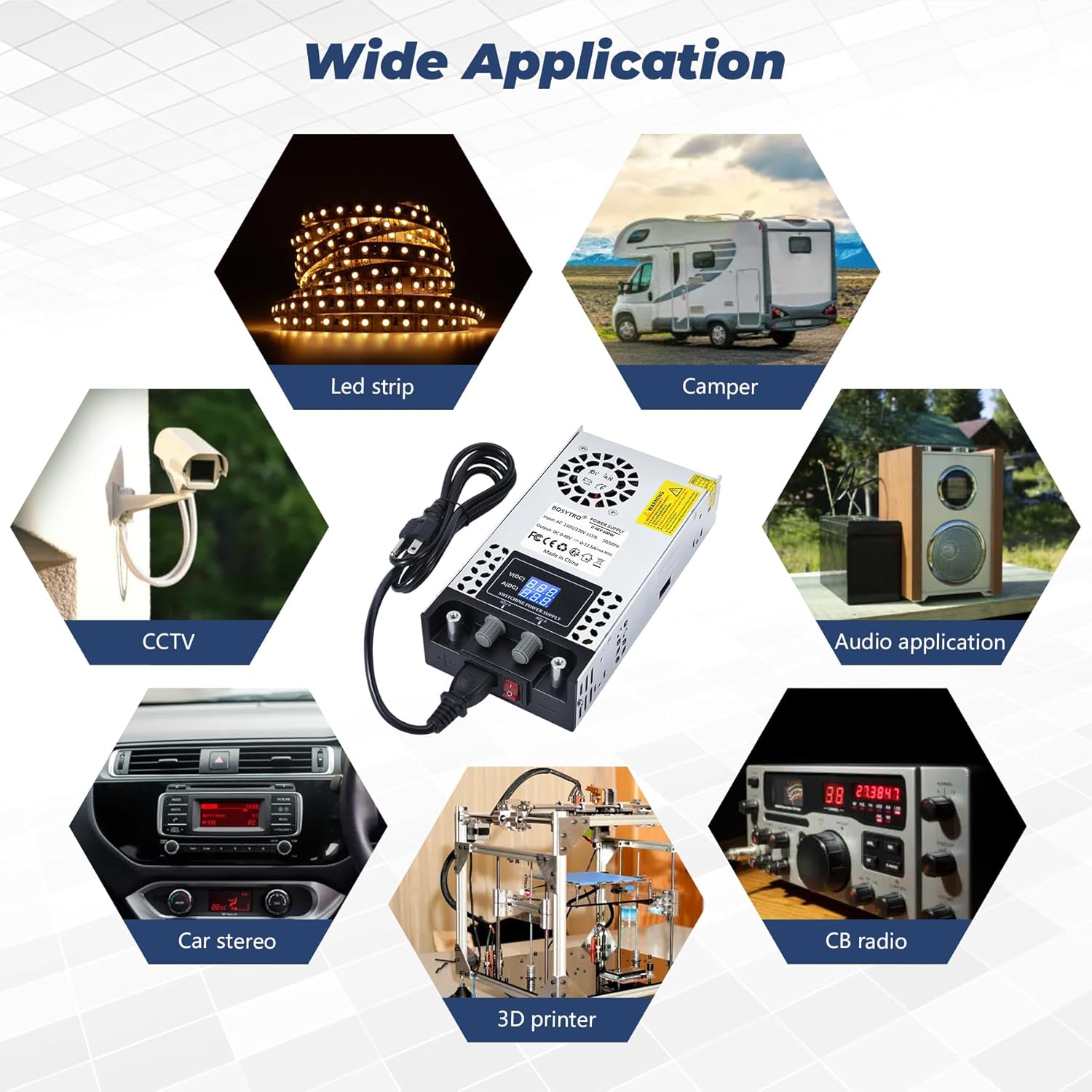
Figure 10.1: Examples of wide applications for the power supply.
11. Warranty and Support
BOSYTRO is committed to providing high-quality, stable, and cost-effective products. While specific warranty details are not provided in this manual, please retain your proof of purchase for any warranty claims.
For technical support, troubleshooting assistance beyond this manual, or warranty inquiries, please contact BOSYTRO customer service through the retailer where you purchased the product or visit the official BOSYTRO website for contact information.
Scan the QR code on the product label for quick access to online directions and support resources.
Related Documents - 0-48V/0-12.5A
 |
PECRON FP5000-48V User Manual: Power Station Expansion Comprehensive user manual for the PECRON FP5000-48V power station expansion battery. Learn about specifications, operating instructions, installation, maintenance, safety warnings, and disposal. |
 |
Kingbull Jumper Go E-bike Assembly and User Manual Comprehensive guide to assembling, operating, and maintaining your Kingbull Jumper Go electric bike. Includes safety tips, specifications, and troubleshooting. |
 |
POE-48V05A 48V 0.5A PoE Injector Technical Specifications Technical specifications and features for the POE-48V05A Power over Ethernet injector, supporting IEEE802.3af devices including IP cameras, routers, and access points. |
 |
Kingbull Hunter 2.0 Electric Bike User Manual and Safety Guide Comprehensive user manual and safety guide for the Kingbull Hunter 2.0 electric bike, covering assembly, operation, maintenance, and safety precautions. Learn about specifications, features, and best practices for your e-bike. |
 |
PFVFNY 48V Lithium Battery User Manual: Specifications & Operation Comprehensive user manual for the PFVFNY 48V Lithium Battery (20Ah-60Ah). Details product specifications, charging instructions, operation guidelines, BMS protection, storage, maintenance, and safety warnings for electric vehicles, scooters, and power tools. |
 |
AOSTIRMOT S18-1500W Electric Mountain Bike: Product Description, Installation, and Maintenance Guide Comprehensive guide for the AOSTIRMOT S18-1500W electric mountain bike, covering product features, step-by-step installation instructions, battery and controller maintenance, and essential safety notices. |
Ask a question about this manual
Ask about setup, troubleshooting, compatibility, parts, safety, or missing instructions. Manuals+ will review the question and use this page’s manual context to help answer it.